Page 106 of 384
106 Controls in detailMemory functionStoring positions into memory�
Adjust the seats, steering wheel and
mirrors to the desired position
(�page 34).
�
Press memory buttonM.
�
Release memory buttonM and push
position button1, 2 or3 within three
seconds.
All the settings are stored at the select-
ed position.
Recalling positions from memory�
Press and hold position button1, 2
or3 until the seat, steering wheel and
mirrors have fully moved to the stored
positions.iReleasing the button immediately
stops movement to the stored posi-
tions.
Warning!
G
Do not operate the power seats using the
memory button if the seat backrest is in an
extremely reclined position. Doing so could
cause damage to front or rear seats.
First move seat backrest to an upright posi-
tion.
Page 107 of 384
107 Controls in detail
Memory function
Storing exterior rear view mirror park-ing position
For easier parking you can adjust the pas-
senger exterior rear view mirror so that you
can see the right rear wheel as soon as you
engage reverse gearR.
For information on activating the parking
position, see “Setting parking position for
exterior rear view mirror” (
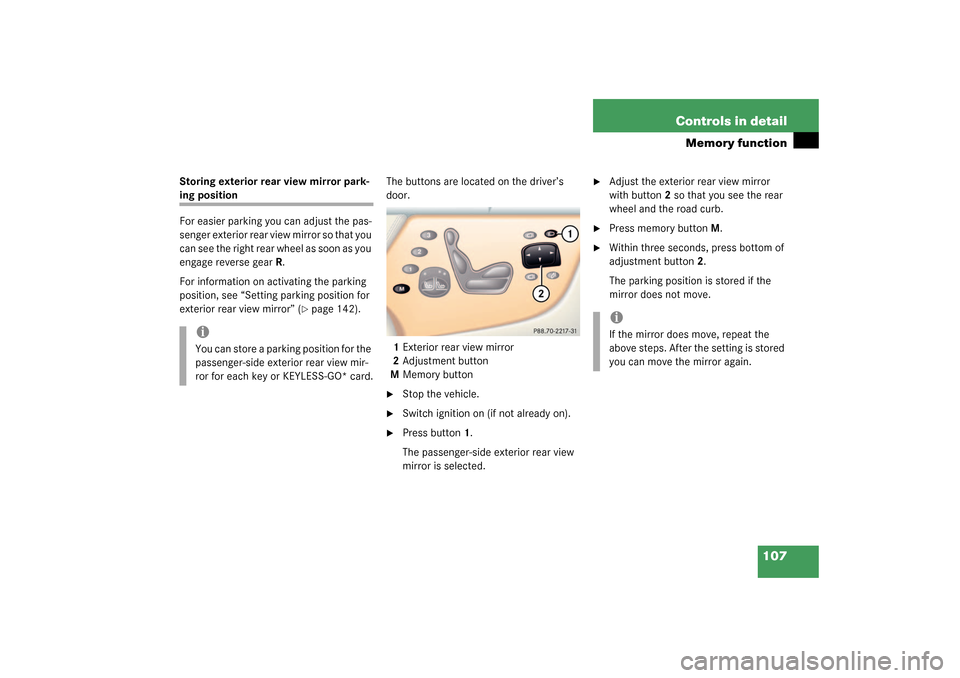
�page 142).The buttons are located on the driver’s
door.
1Exterior rear view mirror
2Adjustment button
MMemory button
�
Stop the vehicle.
�
Switch ignition on (if not already on).
�
Press button1.
The passenger-side exterior rear view
mirror is selected.
�
Adjust the exterior rear view mirror
with button2 so that you see the rear
wheel and the road curb.
�
Press memory button M.
�
Within three seconds, press bottom of
adjustment button2.
The parking position is stored if the
mirror does not move.
iYou can store a parking position for the
passenger-side exterior rear view mir-
ror for each key or KEYLESS-GO* card.
iIf the mirror does move, repeat the
above steps. After the setting is stored
you can move the mirror again.
Page 114 of 384

114 Controls in detailInstrument cluster
Instrument clusterA full view illustration of the instrument
cluster can be found in the “At a glance”
section of this manual (
�page 22).
The instrument cluster is activated when
you
�
open a door
�
turn on the ignition
�
press the reset button
J
(�page 22)
�
switch on the exterior lamps
You can change the instrument cluster set-
tings in the Instrument cluster submenu of
the control system (
�Seite 134).
Instrument cluster illumination
1Knob for adjusting instrument cluster
illumination
Use knob1 to adjust the illumination
brightness for the instrument cluster.
�
Press the knob1.
The knob will pop out.
To brighten illumination
�
Turn the knob1 clockwise.
The instrument cluster illumination will
brighten.
To dim illumination
�
Turn the knob1 in the instrument clus-
ter counterclockwise.
The instrument cluster illumination will
dim.
iThe instrument cluster illumination is
dimmed or brightened automatically to
suit ambient light conditions.
The instrument cluster illumination will
also be adjusted automatically when
you switch on the vehicle’s exterior
lamps.
Page 115 of 384
115 Controls in detail
Instrument cluster
Coolant temperature gauge
During severe operating conditions and
stop-and-go city traffic, the coolant tem-
perature may rise close to 248° F (120°C),
i.e. close to the red zone of the coolant
temperature gauge.The engine should not be operated with
the coolant temperature above 248° F
(120°C), i.e. in the red zone of the coolant
temperature gauge. Doing so may cause
serious engine damage which is not cov-
ered by the Mercedes-Benz Limited War-
ranty.
Trip odometer�
Make sure you are viewing the trip
odometer display.
�
Press button
è
or
ÿ
on the mul-
tifunction steering wheel repeatedly
until the trip odometer appears if it is
not displayed (
�page 117).
�
Press and hold the reset button
J
(
�page 22) in the instrument cluster
until the trip odometer is reset.
Tachometer
The red marking on the tachometer de-
notes excessive engine speed.
To help protect the engine, the fuel supply
is interrupted if the engine is operated
within the red marking.
CL 55 AMG
The tachometer of the CL 55 AMG does
not have a red marking denoting excessive
engine speed.
To help protect the engine, the fuel supply
is interrupted if the engine is operated at
an excessive engine speed.
Warning!
G
�
Driving when your engine is badly over-
heated can cause some fluids which
may have leaked into the engine com-
partment to catch fire. You could be se-
riously burned.
�
Steam from an overheated engine can
cause serious burns and can occur just
by opening the engine hood. Stay away
f r o m t h e e n g i n e i f y o u s e e o r h e a r s t e a m
coming from it.
Turn off the engine, get out of the vehicle
and do not stand near the vehicle until it
cools down.
iExcessive coolant temperatures trigger
a warning in the multifunction display
(�page 278).
!Avoid driving at excessive engine
speeds, as it may result in serious en-
gine damage that is not covered by the
Mercedes-Benz Limited Warranty.
Page 118 of 384
118 Controls in detailControl systemMultifunction steering wheel
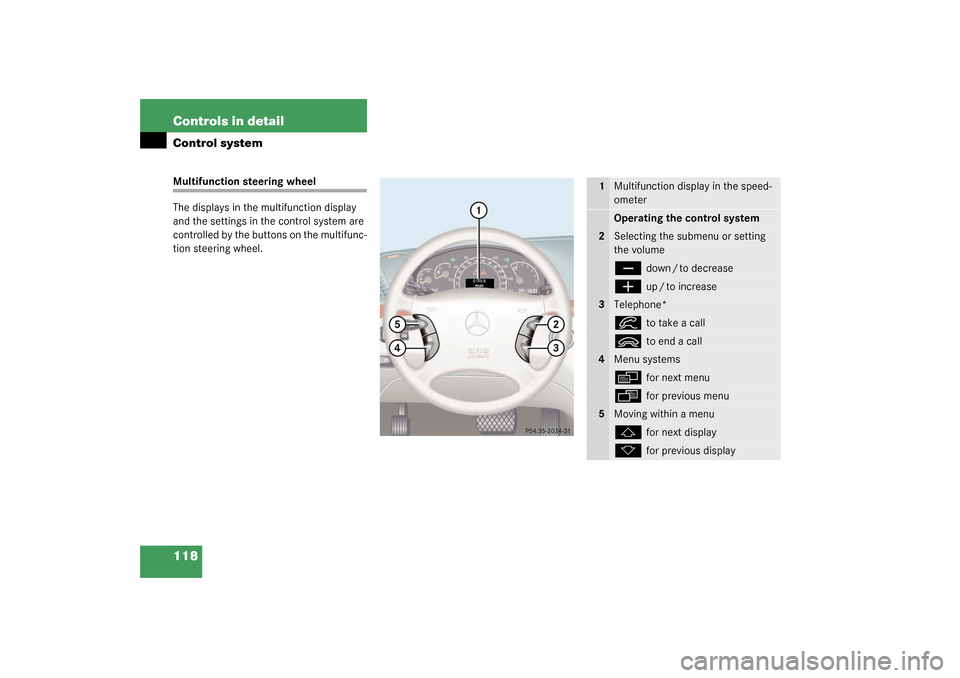
The displays in the multifunction display
and the settings in the control system are
controlled by the buttons on the multifunc-
tion steering wheel.
1
Multifunction display in the speed-
ometerOperating the control system
2
Selecting the submenu or setting
the volumeç
down / to decrease
æ
up / to increase
3
Telephone*í
to take a call
ì
to end a call
4
Menu systemsè
for next menu
ÿ
for previous menu
5
Moving within a menuj
for next display
k
for previous display
Page 119 of 384

119 Controls in detail
Control system
Pressing any of the buttons on the multi-
function steering wheel will alter what is
shown in the multifunction display.
The information available in the multifunc-
tion display is arranged in menus, each
containing a number of functions or sub-
menus.
The individual functions are then found
within the relevant menu (radio or CD op-
erations under
AUDIO
, for example). These
functions serve to call up relevant informa-
tion or to customize the settings for your
vehicle.It is helpful to think of the menus, and the
functions within each menu, as being ar-
ranged in a circular pattern.
�
If you press button
è
or
ÿ
repeatedly, you will pass through each
menu one after the other.
�
If you press button
k
or
j
repeatedly, you will pass through each
function display, one after the other, in
the current menu.In the
SETTINGS
menu, instead of functions
you will find a number of submenus for
calling up and changing settings. For in-
structions on using these submenus, see
the “Settings menu” section (
�page 131).
The number of menus available in the sys-
tem depends on which optional equipment
is installed in your vehicle.
The menus are described on the following
pages.
Page 122 of 384

122 Controls in detailControl systemStandard display menu
You can select the functions in the stan-
dard display menu with button
k
or
j
.
The following functions are available:
Display digital speedometer
�
Press the
j
or
k
button repeat-
edly until you see the digital speedom-
eter appear in the display.
The current vehicle speed is shown in
the multifunction display.
AUDIO menu
The functions in the
AUDIO
menu operate
the audio equipment which you currently
have turned on.
If no audio equipment is currently turned
on, the message
AUDIO OFF
is shown in the
display.
The following functions are available:
Select radio station
�
Turn on the radio. Refer to the separate
COMAND operating instructions.
�
Press button
è
or
ÿ
repeatedly
until you see the currently tuned sta-
tion in the display.1Waveband
2Setting for station selection using
memory
3Station frequency
�
Press button
k
or
j
repeatedly
until the desired station is found.
The type of search depends on the set-
ting for the station tuning
(
�page 139):
�
Frequency
�
Memory
Function
Page
Call up FSS
255
Check tire pressure*
248
Check engine oil level
238
Call up digital speedometer
see below
Function
Page
Select radio station
122
Operate CD player
123
Page 123 of 384

123 Controls in detail
Control system
Operate the CD player�
Turn on the radio and select the CD
player. Refer to separate COMAND op-
erating instructions.
�
Press button
è
or
ÿ
repeatedly
until the settings for the CD currently
being played are shown in the display.1Current CD,
for CD changer (
�page 123)
2Current track
�
Press button
k
or
j
repeatedly
until the desired track is selected.
CD changer operating mode
General notes
Should excessively high temperatures oc-
cur while in CD mode,
CD TEMP HIGH
will
appear on the display and muting will take
pl ace . The uni t wil l then s witch ba ck to the
last operating mode used until the temper-
ature has decreased to a safe operating
level.
Should excessively low temperatures oc-
cur while in CD mode,
CD TEMP LOW
will ap-
pear on the display, but the CD will
continue to play.
Handle CDs carefully to prevent interfer-
ence during playback. Avoid fingerprints
and dust on CDs. Do not write on CDs or
apply any label or other material to them.
Use only original CDs. Using copied CDs
may create problems during playback.
iYou can only store new stations using
the designated feature on the radio.
Refer to separate COMAND operating
instructions.
You can also operate the radio in the
usual manner.
iCD changer: To select a CD from the
magazine, press a number on the CO-
MAND system key pad located in the
center dashboard.