Page 132 of 288
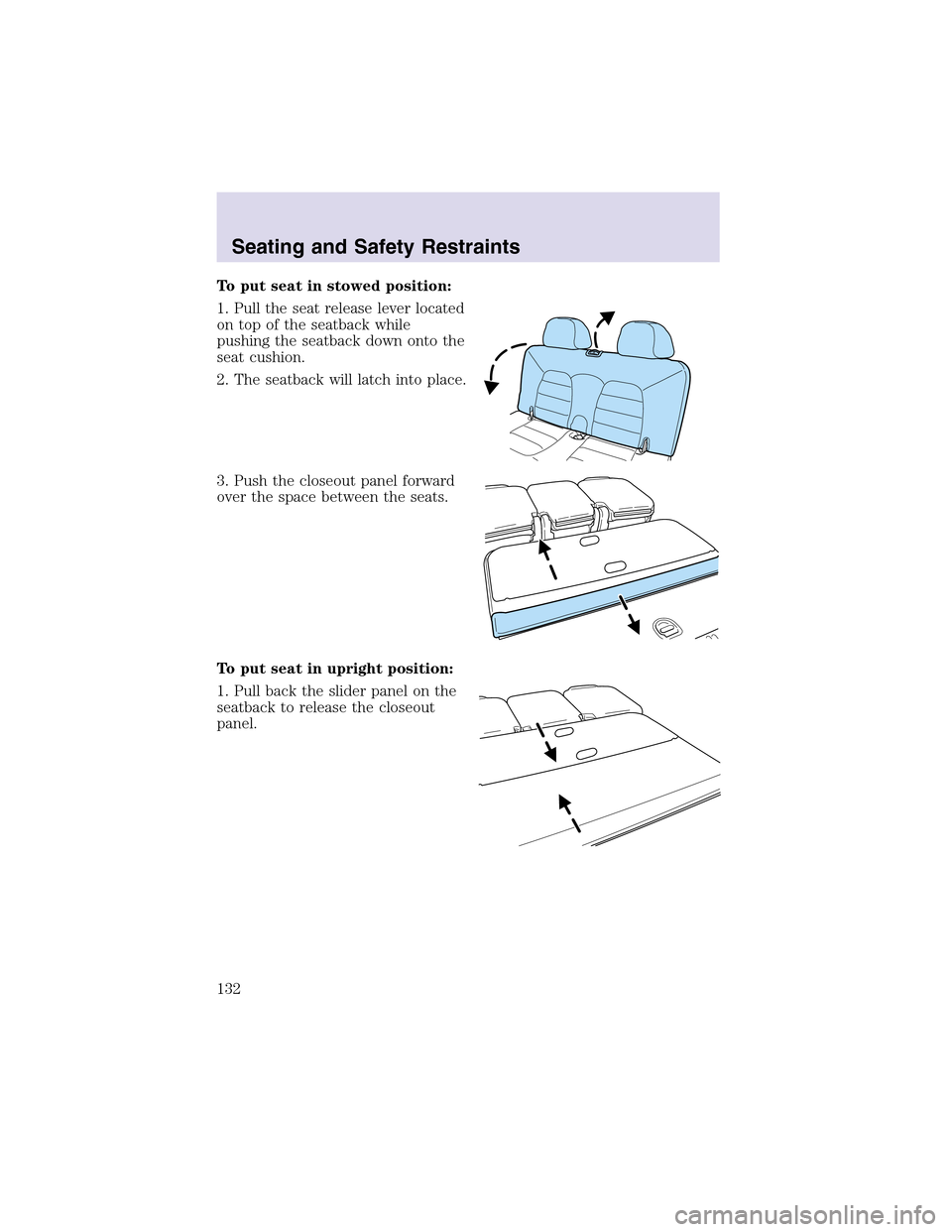
To put seat in stowed position:
1. Pull the seat release lever located
on topof the seatback while
pushing the seatback down onto the
seat cushion.
2. The seatback will latch into place.
3. Push the closeout panel forward
over the space between the seats.
To put seat in upright position:
1. Pull back the slider panel on the
seatback to release the closeout
panel.
Seating and Safety Restraints
132
Page 145 of 288

Do not attempt to service, repair, or modify the air bag
supplemental restraint systems or its fuses. See your Ford or
Lincoln Mercury dealer.
Modifying or adding equipment to the front end of the vehicle
(including frame, bumper, front end body structure and tow
hooks) may affect the performance of the air bag system, increasing
the risk of injury. Do not modify the front end of the vehicle.
Additional equipment may affect the performance of the air bag
sensors increasing the risk of injury. Please refer to the Body
Builders Layout Book for instructions about the appropriate installation
of additional equipment.
Children and air bags
Children must always be properly
restrained. Accident statistics
suggest that children are safer when
properly restrained in the rear
seating positions than in the front
seating position. Failure to follow
these instructions may increase the
risk of injury in a collision.
Air bags can kill or injure a
child in a child seat.
NEVERplace a rear-facing child
seat in front of an active air bag. If
you must use a forward-facing
child seat in the front seat, move
the seat all the way back.
Seating and Safety Restraints
145
Page 154 of 288
Follow all instructions provided by the manufacturer of the
booster seat.
Never put the shoulder belt under a child’s arm or behind the
back because it eliminates the protection for the upper part of
the body and may increase the risk of injury or death in a collision.
Never use pillows, books, or towels to boost a child. They can
slide around and increase the likelihood of injury or death in a
collision.
SAFETY SEATS FOR CHILDREN
Child and infant or child safety seats
Use a safety seat that is recommended for the size and weight of the
child. Carefully follow all of the manufacturer’s instructions with the
safety seat you put in your vehicle. If you do not install and use the
safety seat properly, the child may be injured in a sudden stop or
collision.
Seating and Safety Restraints
154
Page 158 of 288
6. Allow the belt to retract. The belt will click as it retracts to indicate it
is in the automatic locking mode.
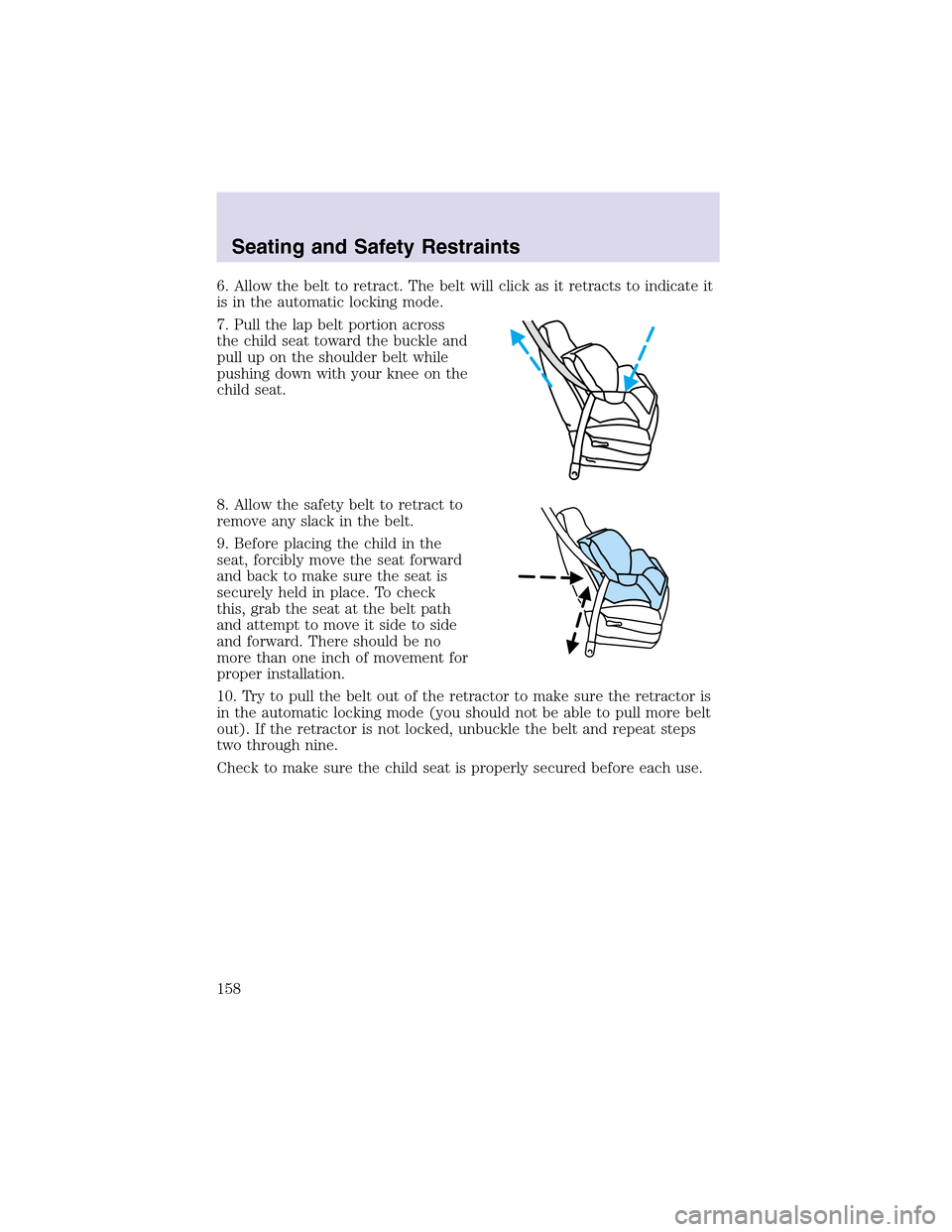
7. Pull the lapbelt portion across
the child seat toward the buckle and
pull up on the shoulder belt while
pushing down with your knee on the
child seat.
8. Allow the safety belt to retract to
remove any slack in the belt.
9. Before placing the child in the
seat, forcibly move the seat forward
and back to make sure the seat is
securely held in place. To check
this, grab the seat at the belt path
and attempt to move it side to side
and forward. There should be no
more than one inch of movement for
proper installation.
10. Try to pull the belt out of the retractor to make sure the retractor is
in the automatic locking mode (you should not be able to pull more belt
out). If the retractor is not locked, unbuckle the belt and repeat steps
two through nine.
Check to make sure the child seat is properly secured before each use.
Seating and Safety Restraints
158
Page 171 of 288
AdvanceTrac�enhances your vehicle’s stability during maneuvers that
require all available tire traction, like in wet/snowy/icy road conditions
and/or when performing emergency maneuvers. In an emergency
lane-change, the driver will experience better overall vehicle traction,
and have better control of the vehicle.
The AdvanceTrac�system helps the driver maintain steering control if
the vehicle begins to slide excessively left or right or spin out.
AdvanceTrac�will attempt to correct the sliding motion by applying
brake force at individual tires and, if necessary, by reducing engine
power.
Driving conditions which may activate AdvanceTrac�include:
•Taking a turn too fast
•Maneuvering quickly to avoid an accident, pedestrian or obstacle
•Hitting a patch of ice
•Changing lanes on a snow-rutted road
•Entering a snow-free road from a snow-covered side street, or vice
versa
•Entering a paved road from a gravel road, or vice versa
•Hitting a curb while turning
•Driving on slick surfaces
•Cornering while towing a heavily loaded trailer (refer toTrailer
Towingin this chapter)
The AdvanceTrac�system automatically turns on when the engine is
started. However, the system does not function when the vehicle is
traveling in R (Reverse). In R (Reverse), ABS and the traction
enhancement feature will continue to function.
The AdvanceTrac�button allows
the driver to control the availability
of the AdvanceTrac�system.
AdvanceTrac�system status is
indicated by a warning indicator
light with a “sliding car” icon in the instrument cluster that will flash
when the system is active and an indicator light in the control button
that will illuminate when the system is turned off. In vehicles with a
message center, the message “ADVANCETRAC OFF” will be displayed.
If a failure is detected in the AdvanceTrac�system, the warning
indicator light in the instrument cluster will stay on. If the warning
Driving
171
Page 175 of 288
3. Using the screwdriver (or
equivalent), push the white plastic
override mechanism (located behind
the bracket) toward the roof of the
vehicle as shown in the illustration.
4. Move the gearshift lever back to N (Neutral) (two places from P
[Park]).
5. Start the vehicle and release the parking brake.
If it is necessary to use the above procedure to move the gearshift lever,
it is possible that a fuse has blown or the vehicle’s brakelamps are not
operating properly. Refer toFuses and relaysin theRoadside
emergencieschapter.
Do not drive your vehicle until you verify that the brakelamps
are working.
Always set the parking brake fully and make sure the gearshift is
latched in P (Park). Turn the ignition to the LOCK position and
remove the key whenever you leave your vehicle.
If the parking brake is fully released, but the brake warning lamp
remains illuminated, the brakes may not be working properly.
See your dealer or a qualified service technician.
Driving
175
Page 178 of 288
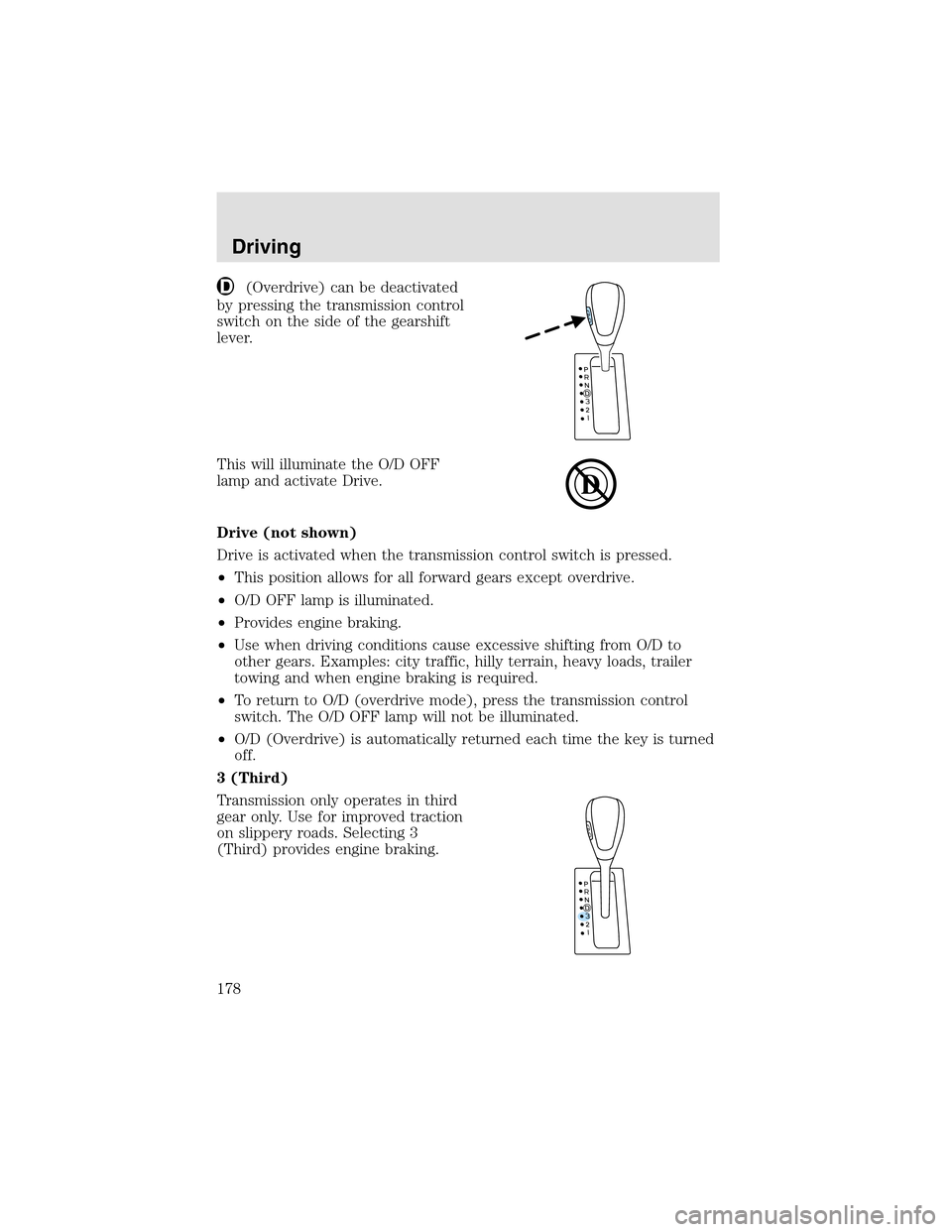
(Overdrive) can be deactivated
by pressing the transmission control
switch on the side of the gearshift
lever.
This will illuminate the O/D OFF
lampand activate Drive.
Drive (not shown)
Drive is activated when the transmission control switch is pressed.
•This position allows for all forward gears except overdrive.
•O/D OFF lampis illuminated.
•Provides engine braking.
•Use when driving conditions cause excessive shifting from O/D to
other gears. Examples: city traffic, hilly terrain, heavy loads, trailer
towing and when engine braking is required.
•To return to O/D (overdrive mode), press the transmission control
switch. The O/D OFF lampwill not be illuminated.
•O/D (Overdrive) is automatically returned each time the key is turned
off.
3 (Third)
Transmission only operates in third
gear only. Use for improved traction
on slippery roads. Selecting 3
(Third) provides engine braking.
Driving
178
Page 191 of 288

system gets wet, your engine may stall. Water may also enter your
engine’s air intake and severely damage your engine.
If driving through deepor standing water is unavoidable, proceed very
slowly. Never drive through water that is higher than the bottom of the
hubs (for trucks) or the bottom of the wheel rims (for cars).
Once through the water, always try the brakes. Wet brakes do not stop
the vehicle as effectively as dry brakes. Drying can be improved by
moving your vehicle slowly while applying light pressure on the brake
pedal.
Driving through deep water where the transmission vent tube is
submerged may allow water into the transmission and cause
internal transmission damage. Have the fluid checked and, if
water is found, replace the fluid.
VEHICLE LOADING
Before loading a vehicle, familiarize yourself with the following terms:
•Base Curb Weight:Weight of the vehicle including any standard
equipment, fluids, lubricants, etc. It does not include occupants or
aftermarket equipment.
•Payload:Combined maximum allowable weight of cargo, occupants
and optional equipment. The payload equals the gross vehicle weight
rating minus the weight of your vehicle.
•GVW (Gross Vehicle Weight):Base curb weight plus payload
weight. The GVW is not a limit or a specification.
•GVWR (Gross Vehicle Weight Rating):Maximum permissible total
weight of the base vehicle, occupants, optional equipment and cargo.
The GVWR is specific to each vehicle and is listed on the Safety
Certification Label on the driver’s door pillar.
•GAWR (Gross Axle Weight Rating):Carrying capacity for each axle
system. The GAWR is specific to each vehicle and is listed on the
Safety Certification Label on the driver’s door pillar.
•GCW (Gross Combined Weight):The combined weight of the
towing vehicle (including occupants and cargo) and the loaded trailer.
•GCWR (Gross Combined Weight Rating):Maximum permissible
combined weight of towing vehicle (including occupants and cargo)
and the loaded trailer.
•Maximum Trailer Weight Rating:Maximum weight of a trailer the
vehicle is permitted to tow. The maximum trailer weight rating is
Driving
191