2003 INFINITI G35 turn signal
[x] Cancel search: turn signalPage 93 of 256
programmed HomeLink button - releasing
when the device begins to activate.
5. If the indicator light on the HomeLink
blinks rapidly for two seconds and then
turns solid, HomeLink has picked up a
ªrolling codeº garage door opener signal.
You will need to proceed with the next steps
to train the HomeLink to complete the
programming which may require a ladder
and another person for convenience.
6. Press and release the ªsmartº or ªlearnº
program button located on the garage door
opener's motor to activate the ªtraining
modeº. This button is usually located near
the antenna wire that hangs down from the
motor. If the wire originates from under a
light lens, you will need to remove the lens
to access the program button.
NOTE:
Once you have pressed and released the
program button on the garage door open-
er's motor and the ªtraining lightº is lit, you
have 30 seconds in which to perform step
7. Use the help of a second person for
convenience to assist when performing
this step.
7. Quickly within 30 seconds of pressing and
releasing the garage door opener program button, firmly press and release the
HomeLink button you've just pro-
grammed. Press and release the
HomeLink button up to three times to
complete the training.
8. Your HomeLink button should now be
programmed. (To program the remaining
HomeLink buttons for additional door or
gate openers, follow steps 2-8 only.
NOTE:
Do not repeat step one unless you want to
ªclearº all previously programmed
HomeLink buttons).
If you have any questions or are having diffi-
culty programming your HomeLink buttons,
please refer to the HomeLink web site at:
www.homelink.com or call 1-800-662-6200.
PROGRAMMING HomeLink FOR
CANADIAN CUSTOMERS Prior to 1992, D.O.C. regulations required
hand-held transmitters to stop transmitting af-
ter 2 seconds. To program your hand-held
transmitter to HomeLink , continue to press
and hold the HomeLink button (note steps 2
through 4 under ªProgramming HomeLink º)
while you press and re-press (ªcycleº) your
hand-held transmitter every 2 seconds until the indicator light flashes rapidly (indicating
successful programming).
NOTE:
If programming a garage door opener, etc.,
it is advised to unplug the device during
the ªcyclingº process to prevent possible
damage to the garage door opener compo-
nents.
OPERATING THE HomeLink
UNIVERSAL TRANSCEIVER The HomeLink Universal Transceiver (once
programmed) may now be used to activate the
garage door, etc. To operate, simply press the
appropriate programmed HomeLink Univer-
sal Transceiver button. The red indicator light
will illuminate while the signal is being trans-
mitted.
PROGRAMMING TROUBLE
DIAGNOSIS If the HomeLink does not quickly learn the
hand-held transmitter information:
O replace the hand-held transmitter batteries
with new batteries.
O position the hand-held transmitter with its
battery area facing away from the
HomeLink surface. Instruments and controls
2-39
Z 02.7.29/V35-D/V5.0
X
Page 122 of 256
up easily when operating the heater or air
conditioning system. The air conditioning system in your INFINITI
vehicle is charged with a refrigerant designed
with the environment in mind. This refrigerant
will not harm the earth's ozone layer. How-
ever, special charging equipment and lubricant
are required when servicing your NISSAN air
conditioner. Using improper refrigerants or lu-
bricants will cause severe damage to your air
conditioning system. See ªCapacities and rec-
ommended fuel/lubricantsº in the ª10. Techni-
cal and consumer informationº section for air
conditioning system refrigerant and lubricant
recommendations.
Your INFINITI retailer will be able to service
your environmentally friendly air conditioning
system.
WARNING The air conditioner system contains re-
frigerant under high pressure. To avoid
personal injury, any air conditioner ser-
vice should be done only by an experi-
enced technician with proper equip-
ment. Turn the ignition key to ACC or ON and press
the POWER, FM or AM button to turn on the
radio. If you listen to the radio with the engine
not running, the key should be turned to the
ACC position.
Radio reception is affected by station signal
strength, distance from radio transmitter, build-
ings, bridges, mountains and other external
influences. Intermittent changes in reception
quality normally are caused by these external
influences.
Using a cellular phone in or near the ve-
hicle may influence radio reception quality.
Radio reception Your radio system is equipped with state-of-
the-art electronic circuits to enhance radio
reception. These circuits are designed to ex-
tend reception range, and to enhance the
quality of that reception.
However there are some general characteris-
tics of FM, AM and satellite radio signals that
can affect radio reception quality in a moving
vehicle, even when the finest equipment is
used. These characteristics are completely
normal in a given reception area, and do not
indicate any malfunction in your radio system.
Remember that a moving vehicle is not the
ideal place to listen to a radio. Because of theSERVICING AIR CONDITIONER AUDIO SYSTEM
4-6 Heater, air conditioner and audio systems
Z 02.7.29/V35-D/V5.0
X
Page 128 of 256
the radio will come on at the station last
played.
The last station played will also come on when
the POWER button is turned to ON.
If another audio source is playing when the
FM/AM band select button is turned to ON, the
other audio source will automatically be turned
off and the last radio station played will come
on.
The FM stereo indicator ST will glow during
FM stereo reception. When the stereo broad-
cast signal is weak, the radio will automatically
change from stereo to monaural reception.
Satellite radio operation
SAT Satellite channel select:
Pushing the SAT channel select button will
change the band as follows:
SAT1 ! SAT2 ! SAT1
If you have not signed up for satellite radio, or
if satellite radio receiver is not installed, ªNO
SATº will be shown on the display.
When SAT channel select button is pushed
while the ignition switch is in the ACC or ON
position, the radio will come on at the channel
last played. The last channel played will also come on
when the POWER button is turned to ON.
If another audio source is playing when the
SAT channel select button is turned to ON, the
other audio source will automatically be turned
off and the last channel played will come on.
TUNE (Tuning):
WARNING The radio should not be tuned while
driving so full attention may be given to
vehicle operation.
Use these buttons for manual tuning. To move
quickly through the channels, hold either of the
TUNE buttons down for more than 0.5 sec-
onds.
SEEK tuning:
For AM and FM radio:
Push the SEEK button or , to tune
from high to low or low to high frequencies and
stops at the next broadcasting station.
For satellite radio:
Push the SEEK button or to seek channels of the next or previous category.
SCAN tuning:
Push the SCAN tuning button to tune from low
to high frequencies and stops at each broad-
casting station for 5 seconds. Pushing the
button again during this 5 seconds period will
stop SCAN tuning and the radio will remain
tuned to that station.
If the SCAN tuning button is not pushed within
5 seconds, SCAN tuning moves to the next
station.
(DISP) Display mode of satellite
radio:
O Pushing the RPT button will display addi-
tional information about the satellite radio
broadcast (for example: Artist name, Title).
O Keep pushing the RPT button, and it will
change the information of the satellite radio
broadcast to be displayed as follows:
CH Number ! CH Name ! Artist Name !
Song Title ! CH Number
Station memory operations:
Twelve stations/channels can be set for the
FM band (six for FM1, six for FM2), twelve for
satellite radio (six for SAT1, six for SAT2) and
six stations can be set for the AM band.
4-12 Heater, air conditioner and audio systems
Z 02.7.29/V35-D/V5.0
X
Page 160 of 256
Every new INFINITI comes with a 4 year,
unlimited mileage Roadside Assistance plan.
In the event of a roadside emergency,
Roadside Assistance Service is available to
you. Please refer to your Warranty Booklet
(U.S.) or Warranty & Roadside assistance
information booklet (Canada) for details. Both
the Warranty Booklet and Roadside
Assistance Calling Card in your Owner's
Literature Portfolio provide the Toll-Free
Number to call for assistance. Roadside
Assistance is provided 24 hours a day, 365
days a year, for 4 years from the date sold to
give emergency roadside help, in the event of
mechanical or nonmechanical trouble(s) such
as flat tires, out-of-gas, dead battery, lost
keys, mechanical breakdown, accident, etc. CHANGING A FLAT TIRE If you have a flat tire, follow the instructions
below.
Stopping the vehicle 1. Safely move the vehicle off the road away
from traffic.
2. Turn on the hazard warning flashers.
3. Park on a level surface and apply the
parking brake. Shift the manual transmis-
sion into R (Reverse) position (automatic
transmission in P (Park) position).
4. Turn off the engine.
5. Raise the hood to warn other traffic, and to
signal professional road assistance person-
nel that you need assistance.
6. Have all passengers get out of the vehicle
and stand in a safe place, away from traffic
and clear of the vehicle.
WARNING O Make sure that the parking brake is
securely applied and the manual
transmission is shifted into R (Re- verse), or the automatic transmission
into P (Park).
O Never change tires when the vehicle
is on a slope, ice or slippery areas.
This is hazardous.
O Never change tires if oncoming traffic
is close to your vehicle. Wait for pro-
fessional road assistance.ROADSIDE ASSISTANCE
PROGRAM FLAT TIRE
6-2 In case of emergency
Z 02.7.29/V35-D/V5.0
X
Page 201 of 256
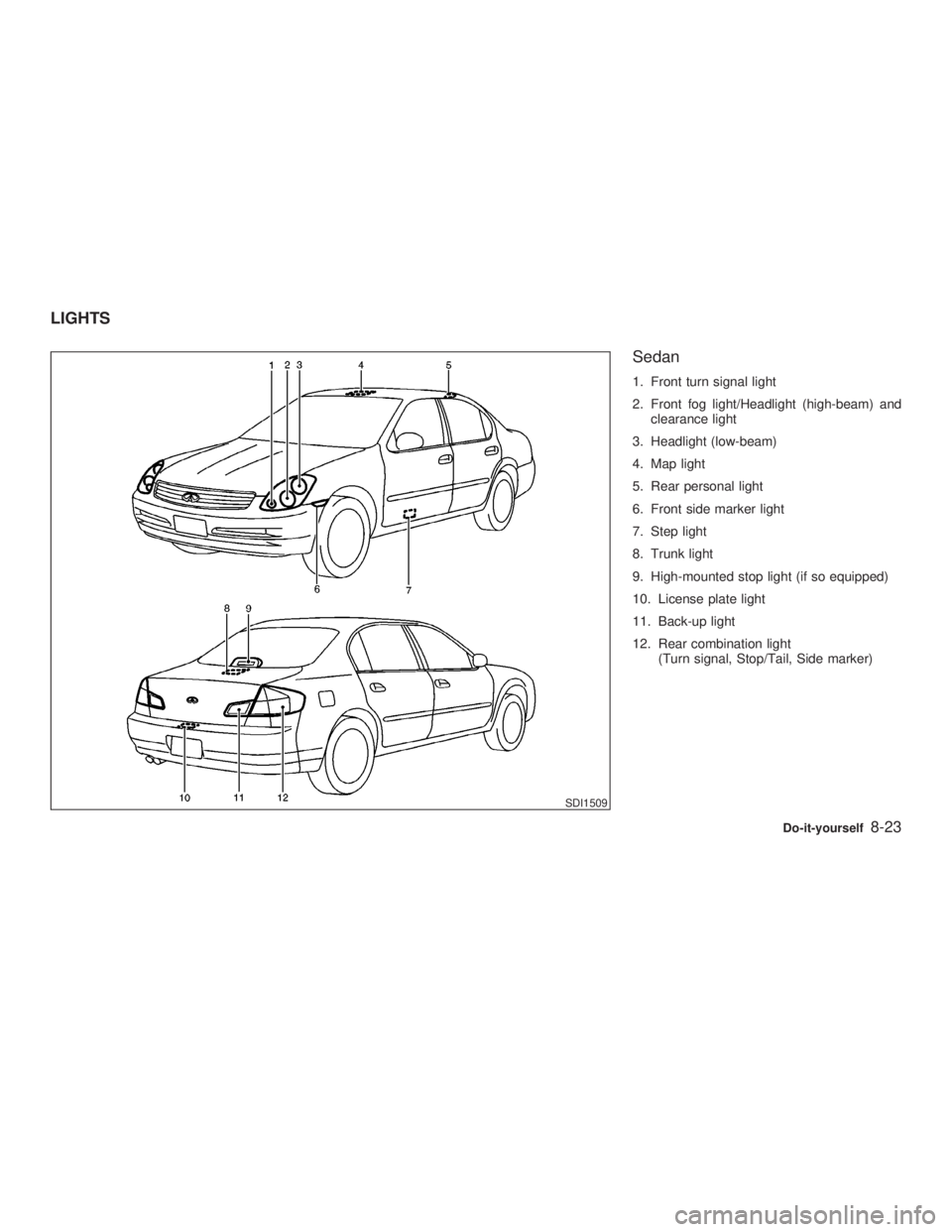
Sedan 1. Front turn signal light
2. Front fog light/Headlight (high-beam) and
clearance light
3. Headlight (low-beam)
4. Map light
5. Rear personal light
6. Front side marker light
7. Step light
8. Trunk light
9. High-mounted stop light (if so equipped)
10. License plate light
11. Back-up light
12. Rear combination light
(Turn signal, Stop/Tail, Side marker)
SDI1509LIGHTS
Do-it-yourself
8-23
Z 02.7.29/V35-D/V5.0
X
Page 202 of 256
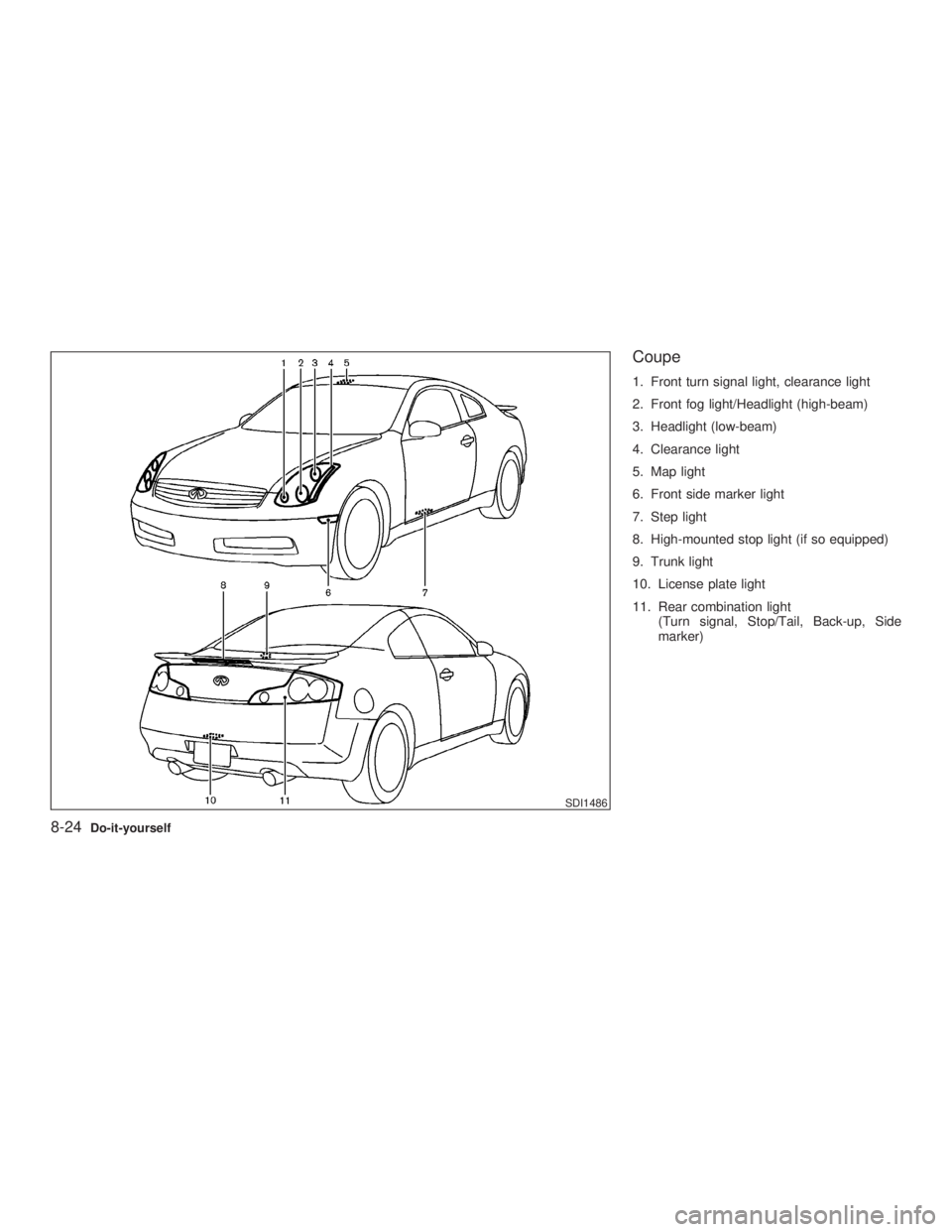
Coupe 1. Front turn signal light, clearance light
2. Front fog light/Headlight (high-beam)
3. Headlight (low-beam)
4. Clearance light
5. Map light
6. Front side marker light
7. Step light
8. High-mounted stop light (if so equipped)
9. Trunk light
10. License plate light
11. Rear combination light
(Turn signal, Stop/Tail, Back-up, Side
marker)
SDI1486
8-24 Do-it-yourself
Z 02.7.29/V35-D/V5.0
X
Page 203 of 256
HEADLIGHTS
Replacing If replacement is required, see an authorized
INFINITI retailer.
Xenon headlight bulb:
WARNING HIGH VOLTAGE
When xenon headlights are on, they
produce a high voltage. To prevent an
electric shock, never attempt to modify
or disassemble the headlight assembly.
Always have your xenon headlights re-
placed at an authorized INFINITI retailer.
For additional information, see ªHead-
light and turn signal switchº in the ª2.
Instruments and controlsº section.
Halogen headlight bulb:
A bulb can be replaced from under the engine
compartment without removing the headlight
assembly. CAUTION O High pressure halogen gas is sealed
inside the halogen bulb. The bulb
may break if the glass envelope is
scratched or the bulb is dropped.
O When handling the bulb, do not touch
the glass envelope.
O Do not touch the bulb.
O Use the same number and wattage as
originally installed:
Bulb no. H1 (55W) - Low-beam
HB2 (60/55W) - High-beam/
Fog light
O Do not leave the bulb out of the head-
light reflector for a long period of time
as dust, moisture, and smoke may
enter the headlight body and affect
the performance of the headlight.
Do-it-yourself
8-25
Z 02.7.29/V35-D/V5.0
X
Page 204 of 256
EXTERIOR AND INTERIOR LIGHTS Item Wattage (W) Bulb No.
Front turn signal* 21 T20
Clearance light* 5 T10
Front side marker light 3.8 T10
Rear combination light
Turn signal 21 T20
Stop/Tail* (LED) Ð
Side marker light* (LED) Ð
Back-up light 18 T16
License plate light 5 T10
High-mounted stop light* (LED) Ð
Map light 8 Ð
Rear personal light (Sedan) 8 Ð
Step light 5 Ð
Trunk light 3.4 158
Vanity mirror light (if so equipped) 1.32 Ð
*: See an authorized INFINITI retailer for replacement.
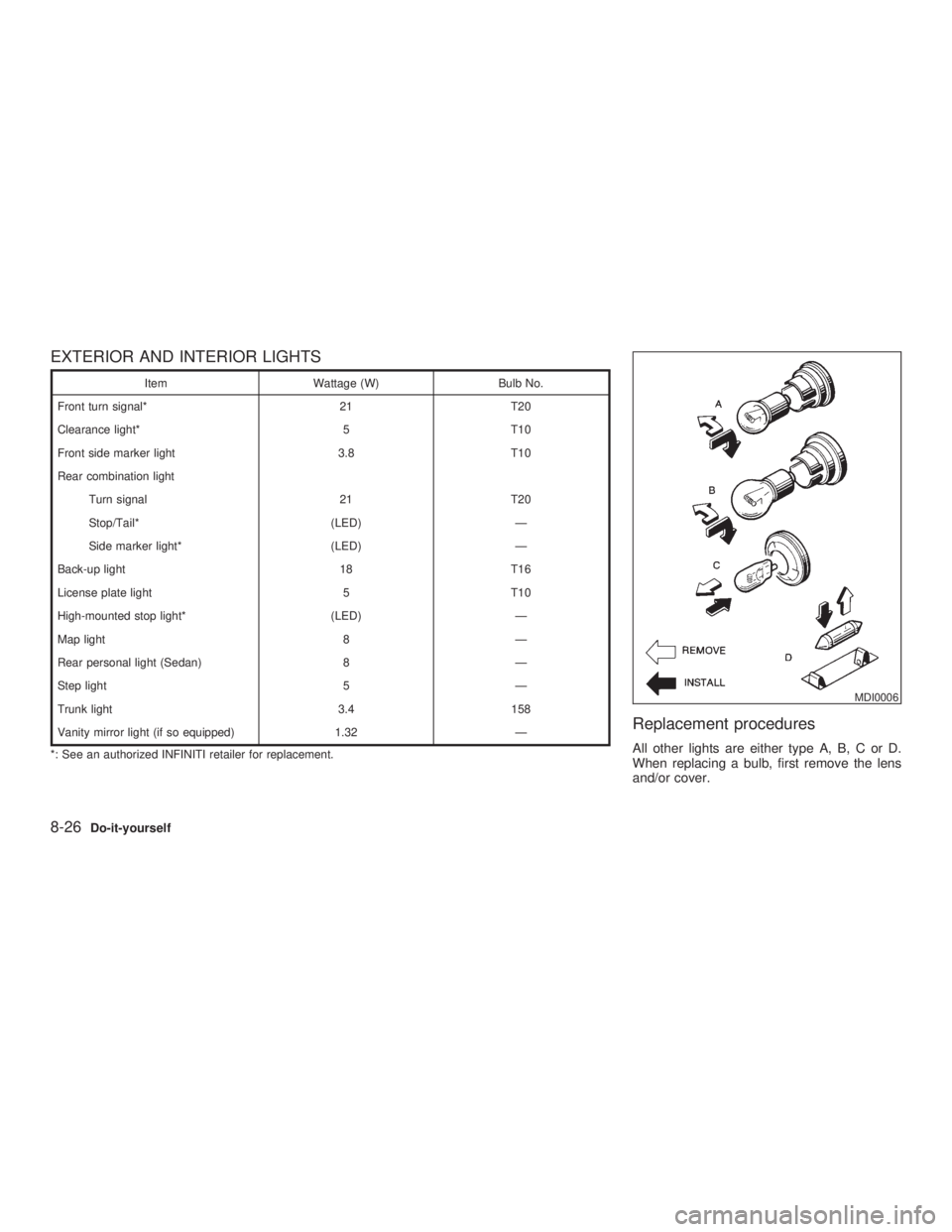
Replacement procedures All other lights are either type A, B, C or D.
When replacing a bulb, first remove the lens
and/or cover. MDI0006
8-26 Do-it-yourself
Z 02.7.29/V35-D/V5.0
X