Page 112 of 235
1- 98 FEATURES OF YOUR HYUNDAI
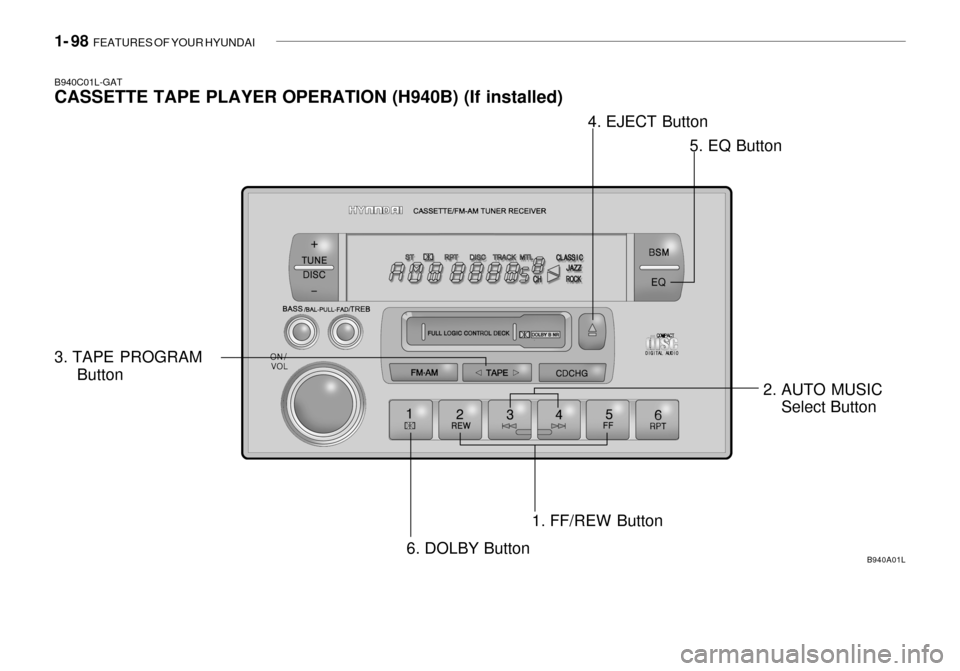
B940C01L-GAT CASSETTE TAPE PLAYER OPERATION (H940B) (If installed)
1. FF/REW Button
B940A01L
2. AUTO MUSICSelect Button
3. TAPE PROGRAM
Button 4. EJECT Button
5. EQ Button
6. DOLBY Button
Page 115 of 235

FEATURES OF YOUR HYUNDAI 1- 101
B940F02L-GAT The CD auto changer connected with audio system is located in the left side of the trunk.
o To use the CD auto changer
1. Open the sliding lid of the CD auto
changer.
2. To eject the compact disc maga- zine, press the EJECT button lo- cated in the CD auto changer.
3. Insert the discs into the magazine.
4. Push the magazine into the CD auto changer and close the sliding lid.
o The CD auto changer can be used when the ignition switch is in either"ON" or "ACC" position.
1. CDCHG Button When the CD changer have discs in- serted in the magazine, if you press the CDCHG button, the CD changer can be used even if the radio or cas-sette player is being used. The Hyundai CD changer can hold up to eight discs. The disc number will be lit, and thetrack number, and elapsed time will be displayed. 2. FF/REW While the disc is playing, if you hold down the FF button continuously, the selected track is advanced. Holdingdown the REW button continuously moves the selected track back. 3. TRACK UP/DOWN
o The desired track on the disc cur-
rently being played can be selected using the track number.
o Press once to skip forward to the
beginning of the next track.
o Press once to skip back to the beginning of the track.
4. DISC Select Button To select the CD you want, push "DISC +" or "DISC-" to change the disc num-ber.
5. SCAN (If installed)
o Press the SCAN button to playback the first 10 seconds of each track.
o Press the SCAN button again within
10 seconds for the desired track. 6. REPEAT
o To repeat the track you are listening
to, press the RPT button. To cancel , press again.
o If you do not release RPT operation after all the tracks are played back,the unit will play back again from thefirst track.
7. EQ Button Press the EQ button to select the CLASSIC, JAZZ, ROCK and DEFEAT MODE for the desired tone quality.Each press of the button changes the display as follows;
CLASSIC � JAZZ � ROCK � DEFEAT
Page 120 of 235
1- 106 FEATURES OF YOUR HYUNDAI
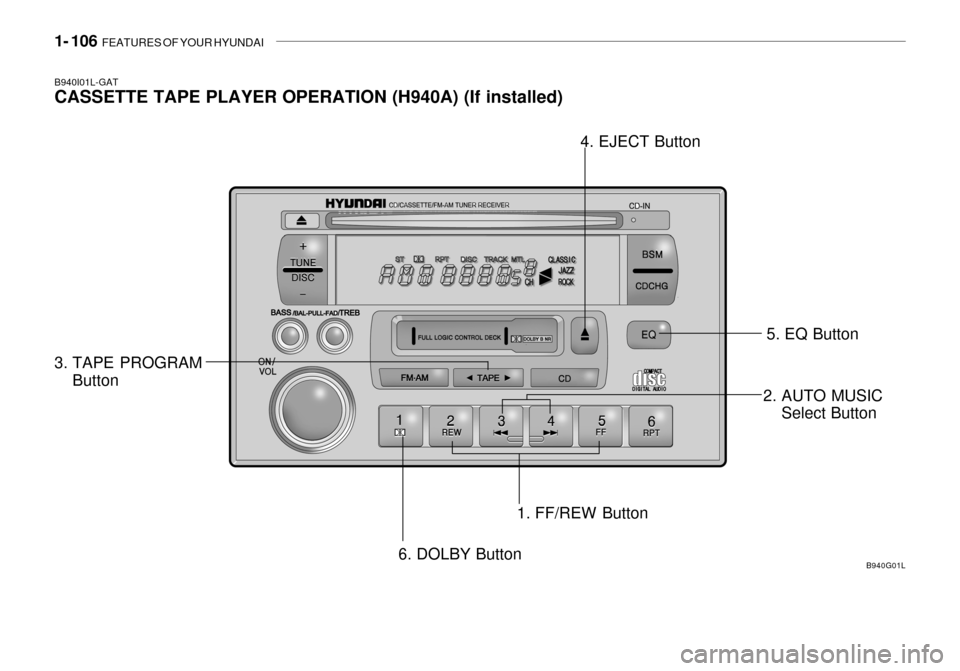
B940I01L-GAT CASSETTE TAPE PLAYER OPERATION (H940A) (If installed)
1. FF/REW Button
3. TAPE PROGRAM
Button 4. EJECT Button
5. EQ Button
6. DOLBY Button B940G01L
2. AUTO MUSIC
Select Button
Page 122 of 235
1- 108 FEATURES OF YOUR HYUNDAI
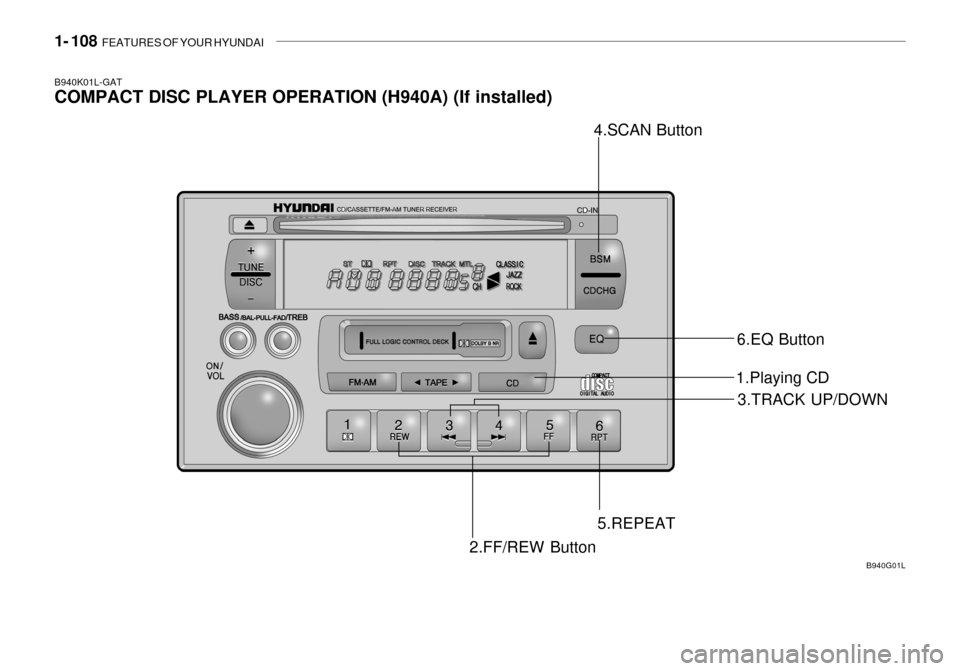
B940K01L-GAT COMPACT DISC PLAYER OPERATION (H940A) (If installed)
2.FF/REW Button3.TRACK UP/DOWN
5.REPEAT B940G01L
1.Playing CD
4.SCAN Button
6.EQ Button
Page 123 of 235

FEATURES OF YOUR HYUNDAI 1- 109
B940L02L-GAT
1. Playing CD
o Insert the CD with the label facing
upward.
o Insert the CD to start CD playback, during radio operation or cassette tape playing.
o When a disc is in the CD deck, if you press the play button the CD playerwill begin playing even if the radio orcassette player is being used.
o The CD player can be used when
the ignition switch is in either the"ON" or "ACC" position.
2. FF/REW While the disc is playing, if you hold down the FF button continuously, the selected track is advanced. Holding down the REW button continuouslymoves the selected track back.
3. TRACK UP/DOWN
o The desired track on the disc cur- rently being played can be selected using the track number.
o Press once to skip forward to the beginning of the next track.
o Press once to skip back to the
beginning of the track. 4. SCAN (If installed)
o Press the SCAN button to playback
the first 10 seconds of each track.
o Press the SCAN button again within
10 sec. when you have reached the desired track.
5. REPEAT
o To repeat the track you are currently listening to, press the RPT button. To cancel , press again.
o If you do not release RPT operation
after all the tracks are played back,the unit will play back again from the first track.
6. EQ Button Press the EQ button to select the CLASSIC, JAZZ, ROCK and DEFEAT MODE for the desired tone quality. Each press of the button changes thedisplay as follows; NOTE:
o To assure proper operation of the
unit, keep the vehicle interior tem- perature within a normal range by using the vehicle's air condition-ing or heating system.
o When replacing the fuse, replace
it with a fuse having the correctcapacity.
o The preset station frequencies
are all erased when the car bat-tery is disconnected. Therefore, all data will have to be set again if this should occur.
o Do not add any oil to the rotating
parts. Keep magnets, screwdriv-ers and other metallic objects away from the tape mechanism and head.
o This equipment is designed to be used only in a 12 volt DCbattery system with negativeground.
o This unit is made of precision
parts. Do not attempt to disas-semble or adjust any parts.
CLASSIC � JAZZ � ROCK � DEFEAT
Page 124 of 235
1- 110 FEATURES OF YOUR HYUNDAI
o When driving your vehicle, be sure
to keep the volume of the unit set low enough to allow you to hearsounds coming from the outside.
o Do not expose this equipment (in-
cluding the speakers and tape) towater or excessive moisture.
! CAUTION:
Do not insert warped or poor quality discs into the CD player as damage to the unit may occur.
Page 126 of 235

1- 112 FEATURES OF YOUR HYUNDAI
2. FF/REW While the disc is playing, if you hold down the FF button continuously, theselected track is advanced. Holding down the REW button continuously moves the selected track back.
3. TRACK UP/DOWN
o The desired track on the disc cur-
rently being played can be selected using the track number.
o Press once to skip forward to the
beginning of the next track.
o Press once to skip back to the beginning of the track.
4. DISC Select Button To select the CD you want, push "DISC +" or "DISC -" to change the discnumber
5. SCAN (If installed)
o Press the SCAN button to playback the first 10 seconds of each track.
o Press the SCAN button again within
10 sec. for the desired track. CLASSIC
� JAZZ � ROCK � DEFEAT
B940N02L-GAT The CD auto changer connected with audio system is located in the left side of trunk.
o To use the CD auto changer
1. Open the sliding lid of the CD auto
changer.
2. To eject the compact disc maga- zine, press the EJECT button lo- cated inside the CD auto changer.
3. Insert the discs into the magazine.
4. Push the magazine into the CD auto changer and close the sliding lid.
o The CD auto changer can be used when the ignition switch is in either"ON" or "ACC" position.
1. CDCHG Button When the CD changer have discs in- serted in the magazine, if you press the CDCHG button, the CD changer can be used even if the radio or cas-sette player is being used. The Hyundai CD changer can hold up to eight discs. The disc number will be lit, and thetrack number, and elapsed time will be displayed. 6. REPEAT
o To repeat the track you are listening
to, press the RPT button. To cancel , press again.
o If you do not release RPT operation
after all the tracks are played back,the unit will play back again from the first track.
7. EQ Button Press the EQ button to select the CLASSIC, JAZZ, ROCK and DEFEAT MODE for the desired tone quality.Each press of the button changes the display as follows;
Page 128 of 235

1- 114 FEATURES OF YOUR HYUNDAI
INDICATION
Er2 Er3Er6 Er8
HHH
no CD
B890A01Y-AAT AUDIO FAULT CODE If you see any error indication in the display while using the system in the CD or Tape mode, find the cause in the chart below .
If you cannot clear the error indication, take the car to your Hyundai dealer.
SOLUTION
After resetting the audio system, push the eject button. If disc is not ejected, consult your hyundai dealer. Make sure the disc is not scratched or damaged. Press the eject button and pull out the disc.Then insert a normal cd disc. Check if the disc is inserted correctly in the cd player. Make sure the disc is not scratched or damaged. After resetting the audio system, push the eject button. If tape does not eject, consult your Hyundai dealer.Fault code will reset automatically when the temperature returns to normal. Insert disc in magazine or insert cd magazine in the auto changer.
CAUSE
CD DECK MECHANICAL ERROR (EJECT ERROR, LOADING ERROR) FOCUS ERROR DATA READ ERROR DISC ERROR TAPE DECK ERROR TAPE EJECT ERROR TEMPERATURE IS TOO HIGH NO DISC IN MAGAZINE NO CD MAGAZINE IN THE AUTO CHANGER