2003 Hyundai Elantra IAT
[x] Cancel search: IATPage 55 of 172

FEATURES OF YOUR HYUNDAI FEATURES OF YOUR HYUNDAIFEATURES OF YOUR HYUNDAI FEATURES OF YOUR HYUNDAI
FEATURES OF YOUR HYUNDAI
1- 46
B510C01A-AATFOLDING THE OUTSIDE REARVIEW
MIRRORS
To fold the outside rearview mirrors, push them
towards the rear.
The outside rearview mirrors can be folded
rearward for parking in narrow areas.
WARNING: WARNING:WARNING: WARNING:
WARNING:Do not adjust or fold the outside rearview Do not adjust or fold the outside rearviewDo not adjust or fold the outside rearview Do not adjust or fold the outside rearview
Do not adjust or fold the outside rearview
mirrors while the vehicle is moving. This mirrors while the vehicle is moving. Thismirrors while the vehicle is moving. This mirrors while the vehicle is moving. This
mirrors while the vehicle is moving. This
could result in loss of control, and an acci- could result in loss of control, and an acci-could result in loss of control, and an acci- could result in loss of control, and an acci-
could result in loss of control, and an acci-
dent which could cause death, serious in- dent which could cause death, serious in-dent which could cause death, serious in- dent which could cause death, serious in-
dent which could cause death, serious in-
jury or property damage. jury or property damage.jury or property damage. jury or property damage.
jury or property damage.
B510D01Y-AATOUTSIDE REARVIEW MIRROR HEATER
(If Installed)
The outside rearview mirror heater is actuated
in connection with the rear window defroster.
To heat the outside rearview mirror glass, push
in the switch for the rear window defroster. The
rearview mirror glass will be heated for defrost-
ing or defogging and will give you improved rear
vision in inclement weather conditions. Push
the switch again to turn the heater off. The
outside rearview mirror heater automatically
turns itself off after 15 minutes.
B380A01EB510E01E
CAUTION:o Do not operate the switch continuously
for an unnecessary length of time.
o Scraping ice from the mirror face could
cause permanent damage. To remove
any ice, use a sponge, soft cloth or ap-
proved de-icer.
WARNING:Be careful when judging the size or distance
of any object seen in the passenger side
rear view mirror. It is a convex mirror with a
curved surface. Any objects seen in this
mirror are closer than they appear.
B510D01E
To adjust the position of either
mirror:
1. Move the selecting switch to the right or left
to activate the adjustable mechanism for
the corresponding door mirror.
2. Now, adjust mirror angle by depressing the
appropriate perimeter switch as illustrated.
Page 58 of 172

FEATURES OF YOUR HYUNDAI FEATURES OF YOUR HYUNDAIFEATURES OF YOUR HYUNDAI FEATURES OF YOUR HYUNDAI
FEATURES OF YOUR HYUNDAI
1- 49
WARNING: WARNING:WARNING: WARNING:
WARNING:o oo o
o
The fuel cap must be tightened at least 3 The fuel cap must be tightened at least 3The fuel cap must be tightened at least 3 The fuel cap must be tightened at least 3
The fuel cap must be tightened at least 3
clicks, otherwise light will illuminate. clicks, otherwise light will illuminate.clicks, otherwise light will illuminate. clicks, otherwise light will illuminate.
clicks, otherwise light will illuminate.
o oo o
o
Gasoline vapors are dangerous. Before Gasoline vapors are dangerous. BeforeGasoline vapors are dangerous. Before Gasoline vapors are dangerous. Before
Gasoline vapors are dangerous. Before
refueling, always stop the engine and refueling, always stop the engine andrefueling, always stop the engine and refueling, always stop the engine and
refueling, always stop the engine and
never allow sparks or open flames near never allow sparks or open flames nearnever allow sparks or open flames near never allow sparks or open flames near
never allow sparks or open flames near
the filler area. If you need to replace the the filler area. If you need to replace thethe filler area. If you need to replace the the filler area. If you need to replace the
the filler area. If you need to replace the
filler cap, use a genuine Hyundai re- filler cap, use a genuine Hyundai re-filler cap, use a genuine Hyundai re- filler cap, use a genuine Hyundai re-
filler cap, use a genuine Hyundai re-
placement part. placement part.placement part. placement part.
placement part.
o oo o
o
If you open the fuel filler cap during high If you open the fuel filler cap during highIf you open the fuel filler cap during high If you open the fuel filler cap during high
If you open the fuel filler cap during high
ambient temperatures, a slight "pres- ambient temperatures, a slight "pres-ambient temperatures, a slight "pres- ambient temperatures, a slight "pres-
ambient temperatures, a slight "pres-
sure sound" may be heard. This is nor- sure sound" may be heard. This is nor-sure sound" may be heard. This is nor- sure sound" may be heard. This is nor-
sure sound" may be heard. This is nor-
mal and not a cause for concern. mal and not a cause for concern.mal and not a cause for concern. mal and not a cause for concern.
mal and not a cause for concern.
Whenever you open the fuel filler cap, Whenever you open the fuel filler cap,Whenever you open the fuel filler cap, Whenever you open the fuel filler cap,
Whenever you open the fuel filler cap,
turn it slowly. turn it slowly.turn it slowly. turn it slowly.
turn it slowly.
o oo o
o
Make sure the fuel filler cap is replaced and Make sure the fuel filler cap is replaced andMake sure the fuel filler cap is replaced and Make sure the fuel filler cap is replaced and
Make sure the fuel filler cap is replaced and
securely seated after fueling. Failure to securely seated after fueling. Failure tosecurely seated after fueling. Failure to securely seated after fueling. Failure to
securely seated after fueling. Failure to
replace or fully seat the fuel filler cap will replace or fully seat the fuel filler cap willreplace or fully seat the fuel filler cap will replace or fully seat the fuel filler cap will
replace or fully seat the fuel filler cap will
result in fuel vapors escaping into the atmo- result in fuel vapors escaping into the atmo-result in fuel vapors escaping into the atmo- result in fuel vapors escaping into the atmo-
result in fuel vapors escaping into the atmo-
sphere and the MIL indicator sphere and the MIL indicator sphere and the MIL indicator sphere and the MIL indicator
sphere and the MIL indicator
illu illuillu illu
illu
- -- -
-
minating. minating.minating. minating.
minating.
B560B01E
B560A02S-AAT
REMOTE FUEL-FILLER LID RELEASE REMOTE FUEL-FILLER LID RELEASEREMOTE FUEL-FILLER LID RELEASE REMOTE FUEL-FILLER LID RELEASE
REMOTE FUEL-FILLER LID RELEASE
The fuel-filler lid may be opened from inside the
vehicle by pulling up on the fuel-filler lid opener
located on the front floor area on the left side of
the car.
NOTE: NOTE:NOTE: NOTE:
NOTE:If the fuel-filler lid will not open because ice If the fuel-filler lid will not open because iceIf the fuel-filler lid will not open because ice If the fuel-filler lid will not open because ice
If the fuel-filler lid will not open because ice
has formed around it, tap lightly or push on has formed around it, tap lightly or push onhas formed around it, tap lightly or push on has formed around it, tap lightly or push on
has formed around it, tap lightly or push on
the lid to break the ice and release the lid. Do the lid to break the ice and release the lid. Dothe lid to break the ice and release the lid. Do the lid to break the ice and release the lid. Do
the lid to break the ice and release the lid. Do
not pry on the lid. If necessary, spray around not pry on the lid. If necessary, spray aroundnot pry on the lid. If necessary, spray around not pry on the lid. If necessary, spray around
not pry on the lid. If necessary, spray around
the lid with an approved deicer fluid (do not the lid with an approved deicer fluid (do notthe lid with an approved deicer fluid (do not the lid with an approved deicer fluid (do not
the lid with an approved deicer fluid (do not
use radiator anti-freeze) or move the vehicle use radiator anti-freeze) or move the vehicleuse radiator anti-freeze) or move the vehicle use radiator anti-freeze) or move the vehicle
use radiator anti-freeze) or move the vehicle
to a warm place and allow the ice to melt. to a warm place and allow the ice to melt.to a warm place and allow the ice to melt. to a warm place and allow the ice to melt.
to a warm place and allow the ice to melt.
B560A02E-A
4 DOOR
5 DOOR
B571A01O B990A03Y-AAT
FLOOR MAT ANCHOR
To use a floor mat on the front floor carpet,
make sure it attaches to the floor mat anchor in
your vehicle. This keeps the floor mat from
sliding forward.
WARNING:o Make sure the floor mat is properly placed
on the floor carpet. If the floor mat slips
and interferes with the movement of the
pedals during driving, it may cause an
accident.
o Don't put an additional floor mat on the
top of the anchored mat, otherwise the
additional mat may slide forward and
interfere with the movement of the ped-
als.
Page 71 of 172

FEATURES OF YOUR HYUNDAI FEATURES OF YOUR HYUNDAIFEATURES OF YOUR HYUNDAI FEATURES OF YOUR HYUNDAI
FEATURES OF YOUR HYUNDAI
1- 62
B980B01Y-AATFan Speed Control Switch
HXD118C
The fan speed can be set to the desired speed
by pressing the appropriate fan speed control
button. The higher the fan speed is, the more air
is delivered. Pressing the "OFF" button turns
off the fan.
B670C01E-AAT
Air Intake Control Air Intake ControlAir Intake Control Air Intake Control
Air Intake Control Switch
(Without A.Q.S)
HXD118G
This is used to select fresh outside air or
recirculation inside air.
To change the air intake control mode, (Fresh
mode, Recirculation mode) push the control
button.
FRESH MODE ( ) : The indicator light on
the button goes off when the air intake control
is fresh mode.
RECIRCULATION MODE ( ) : The indica-
tor light on the button is illuminated when the air
intake control is recirculation mode.
With the "Fresh" mode selected, air enters the
vehicle from the outside and is heated or cooled
according to the function selected.
With the "Recirculation" mode selected, air
from within the passenger compartment will be
drawn through the heating system and heated
or cooled according to the function selected.
NOTE:o It should be noted that prolonged opera-
tion of the heating system in "recircula-
tion" mode will give rise to fogging of the
windshield and side windows and the air
within the passenger compartment will
become stale. In addition, prolonged use
of the air conditioning with the "Recircu-
lation" mode selected may result in the
air within the passenger compartment
becoming excessively dry.
o When the ignition switch is turned "ON",
the air intake control will change to " "
mode (regardless of switch position).
This is normal operation. The air intake
control operates in "AUTO" mode when
turning the ignition to the "ON" posi-
tion if the "AUTO" mode was used be-
fore shutting off the engine.
B980A01Y-AATMANUAL OPERATIONThe heating and cooling system can be con-
trolled manually as well by pushing buttons
other than the "AUTO" button. In this state, the
system sequentially works according to the
order of buttons selected.
The function of the buttons which are not se-
lected will be controlled automatically.
Press the "AUTO" button in order to convert to
automatic control of the system. Pressing the button displays the ambient
temperature on the VFD.
OUTSIDE
TEMP
Page 78 of 172

FEATURES OF YOUR HYUNDAI FEATURES OF YOUR HYUNDAIFEATURES OF YOUR HYUNDAI FEATURES OF YOUR HYUNDAI
FEATURES OF YOUR HYUNDAI
1- 69
FAD (Fader Control) KnobPull the treble control knob further out.
Turn the control knob counterclockwise to em-
phasize front speaker sound. (Rear speaker
sound will be attenuated)
When the control knob is turned clockwise, rear
speaker sound will be emphasized.
(Front speaker sound will be attenuated)
4. TUNE (Manual) Select ButtonPress the side or side to increase or to
decrease the frequency. Press either button
and hold down to continuously scroll. Release
button once the desired station is reached.
SEEK Operation (Automatic Channel
Selection)
Press the TUNE select button 0.5 sec or more.
Releasing it will automatically tune to the next
available station with a beep sound.
When the side is pressed longer than 0.5
second, releasing will automatically tune to the
next higher frequency and when the side is
pressed longer than 0.5 second, releasing will
automatically tune to the next lower frequency.
5. BAND SelectorPressing the button changes the AM, FM1
and FM2 bands. The mode selected is dis-
played on LCD.
6. PRESET STATION SELECT ButtonSix (6) stations for AM, FM and FM2 respective-
ly can be preset in the electronic memory circuit
on this unit.
HOW TO PRESET STATIONSSix AM and twelve FM stations may be pro-
grammed into the memory of the radio. Then,
by simply pressing the band select button and/
or one of the six station select buttons, you may
recall any of these stations instantly. To pro-
gram the stations, follow these steps:
o Press band selector to set the band for AM,
FM, or FM2.
o Select the desired station to be stored by
seek or manual tuning.
o Determine the preset station select button
you wish to use to access that station.
o Press the station select button for more than
two seconds. A select button indicator will
show in the display indicating which select
button you have depressed. The frequency
display will flash after it has been stored into
the memory with a beep sound. You should
then release the button, and proceed to
program the next desired station. A total of
18 stations can be programmed by select-
ing one AM and two FM stations per button.
o When completed, any preset station may be
recalled by selecting AM, FM or FM2 band
and the appropriate station button.
H240B03O-AAT1. POWER ON-OFF Control KnobThe radio unit may be operated when the
ignition key is in the "ACC" or "ON" position.
Press the knob to switch the power on. The
LCD shows the radio frequency in the radio
mode or the tape direction indicator in the tape
mode. To switch the power off, press the knob
again.
VOLUME ControlRotate the knob clockwise to increase the
volume and turn the knob counterclockwise to
reduce the volume.
2. BASS Control KnobPress to pop the knob out and turn to the left or
right for the desired bass tone.
BAL (Balance Control) KnobPull the bass control knob further out. Turn the
control knob clockwise to emphasize right
speaker sound. (Left speaker sound will be
attenuated)
When the control knob is turned counterclock-
wise, left speaker sound will be emphasized.
(Right speaker sound will be attenuated)
3. TREB (Treble Control) KnobPress to pop the knob out and turn to the left or
right for the desired treble tone.
FM/AM
Page 84 of 172

FEATURES OF YOUR HYUNDAI FEATURES OF YOUR HYUNDAIFEATURES OF YOUR HYUNDAI FEATURES OF YOUR HYUNDAI
FEATURES OF YOUR HYUNDAI
1- 75 You should then release the button, and
proceed to program the next desired sta-
tion. A total of 18 stations can be pro-
grammed by selecting one AM and two FM
stations per button.
o When completed, any preset station may be
recalled by selecting AM, FM or FM2 band
and the appropriate station button.
Page 90 of 172

FEATURES OF YOUR HYUNDAI FEATURES OF YOUR HYUNDAIFEATURES OF YOUR HYUNDAI FEATURES OF YOUR HYUNDAI
FEATURES OF YOUR HYUNDAI
1- 81
H290B03E-GAT1. POWER ON-OFF Control KnobThe radio unit may be operated when the
ignition key is in the "ACC" or "ON" position.
Press the button to switch the power on. The
display shows the radio frequency in the radio
mode, the tape direction indicator in the tape
mode or CD track in either the CD mode or CD
AUTO CHANGER mode. To switch the power
off, press the button again.
VOLUME ControlRotate the knob clockwise to increase the
volume and turn the knob counterclockwise to
reduce the volume.
2. BASS/BALANCE Control Knob
BASS Control Knob
Press to pop the knob out. To increase the
bass, rotate the knob clockwise, while to de-
crease the bass, rotate the knob counterclock-
wise.
BALANCE Control knobPull the Bass control knob out further. Rotate
the knob clockwise to emphasize right speaker
sound. (Left speaker sound will be attenuated)
When the control knob is turned counterclock-
wise, left speaker sound will be emphasized
(Right speaker sound will be attenuated).
3. TREBLE/FAD Knob
TREBLE Control Knob
Press to pop the knob out and turn to the left or
right for the desired treble tone.
FAD (Fader Control) KnobPull the Treble control knob out further. Turn
the control knob counterclockwise to empha-
size front speaker sound. (Rear speaker sound
will be attenuated) When the control knob is
turned clockwise, rear speaker sound will be
emphasized. (Front speaker sound will be at-
tenuated)
4. TUNE (Manual) Select ButtonPress the ( ) side or ( ) side to increase or to
decrease the frequency. Press either button
and hold down to continuously scroll. Release
button once the desired station is reached.
SEEK Operation (Automatic Channel
Selection)
Press the TUNE select button for 0.5 sec or
more. Releasing it will automatically tune to the
next available station with a beep sound.
When the ( ) side is pressed longer than 0.5
second, releasing will automatically tune to the
next higher frequency and when the ( ) side is
pressed longer than 0.5 second and releasing
will automatically tune to the next lower fre-
quency.
5. PRESET STATION Select ButtonsSix (6) stations for AM, FM and FM2 respec-
tively can be preset in the electronic memory
circuit.
HOW TO PRESET STATIONSSix AM and twelve FM stations may be pro-
grammed into the memory of the radio. Then,
by simply pressing the band select button and/
or one of the six station select buttons, you may
recall any of these stations instantly. To pro-
gram the stations, follow these steps:
o Press band selector to set the band for AM,
FM or FM2.
o Select the desired station to be stored by
seek or manual tuning.
o Determine the preset station select button
you wish to use to access that station.
o Press the station select button for more than
two seconds. A select button indicator will
show in the display indicating which select
button you have depressed. The frequency
display will flash after it has been stored into
the memory with a beep sound. You should
then release the button, and proceed to
program the next desired station. A total of
18 stations can be programmed by select-
ing one AM and two FM station per button.
o When completed, any preset station may be
recalled by selecting AM, FM or FM2 band
and the appropriate station button.
Page 102 of 172

DRIVING YOUR HYUNDAI DRIVING YOUR HYUNDAIDRIVING YOUR HYUNDAI DRIVING YOUR HYUNDAI
DRIVING YOUR HYUNDAI
2- 1
2. DRIVING YOUR HYUNDAI
C010A01A-AAT
WARNING: ENGINE EXHAUST CAN BE DANGEROUS! WARNING: ENGINE EXHAUST CAN BE DANGEROUS!WARNING: ENGINE EXHAUST CAN BE DANGEROUS! WARNING: ENGINE EXHAUST CAN BE DANGEROUS!
WARNING: ENGINE EXHAUST CAN BE DANGEROUS!
Engine exhaust fumes can be extremely dangerous. If, at any time, you smell exhaust fumes inside the vehicle, open the windows
immediately.
o Do not inhale exhaust fumes. o Do not inhale exhaust fumes.o Do not inhale exhaust fumes. o Do not inhale exhaust fumes.
o Do not inhale exhaust fumes.
Exhaust fumes contain carbon monoxide, a colorless, odorless gas that can cause unconsciousness and death by asphyxiation.
o Be sure the exhaust system does not leak. o Be sure the exhaust system does not leak.o Be sure the exhaust system does not leak. o Be sure the exhaust system does not leak.
o Be sure the exhaust system does not leak.
The exhaust system should be checked whenever the vehicle is raised to change the oil or for any other purpose. If you hear
a change in the sound of the exhaust or if you drive over something that strikes the underneath side of the car, have the exhaust
system checked as soon as possible by your Hyundai dealer.
o Do not run the engine in an enclosed area. o Do not run the engine in an enclosed area.o Do not run the engine in an enclosed area. o Do not run the engine in an enclosed area.
o Do not run the engine in an enclosed area.
Letting the engine idle in your garage, even with the garage door open, is a hazardous practice. Never run the engine in your
garage any longer than it takes to start the engine and back the car out.
o Avoid idling the engine for prolonged periods with people inside the car. o Avoid idling the engine for prolonged periods with people inside the car.o Avoid idling the engine for prolonged periods with people inside the car. o Avoid idling the engine for prolonged periods with people inside the car.
o Avoid idling the engine for prolonged periods with people inside the car.
If it is necessary to idle the engine for a prolonged period with people inside the car, be sure to do so only in an open area with
the air intake set at "Fresh" and fan operating at one of the higher speeds so fresh air is drawn into the interior.
If you must drive with the trunk /tail gate open because you are carrying objects that make this necessary:
1. Close all windows.
2. Open side vents.
3. Set the air intake control at "Fresh", the air flow control at "Floor" or "Face" and the fan at one of the higher speeds.
To assure proper operation of the ventilation system, be sure the ventilation air intakes located just in front of the windshield are
kept clear of snow, ice, leaves or other obstructions.
2 22 2
2
Page 103 of 172
DRIVING YOUR HYUNDAI DRIVING YOUR HYUNDAIDRIVING YOUR HYUNDAI DRIVING YOUR HYUNDAI
DRIVING YOUR HYUNDAI
2- 2
C020A01A-AAT
BEFORE STARTING THE ENGINE BEFORE STARTING THE ENGINEBEFORE STARTING THE ENGINE BEFORE STARTING THE ENGINE
BEFORE STARTING THE ENGINEBefore you start the engine, you should always:
1. Look around the vehicle to be sure there are
no flat tires, puddles of oil, water or other
indications of possible trouble.
2. After entering the car, check to be sure the
parking brake is engaged.
3. Check that all windows, and lights are clean.
4. Check that the interior and exterior mirrors
are clean and in position.
5. Check your seat, seatback and headrest to
be sure they are in their proper positions.
6. Lock all the doors.
7. Fasten your seat belt and be sure that all
other occupants have fastened theirs.
8. Turn off all lights and accessories that are not
needed.
9. When you turn the ignition switch to "ON",
check that all appropriate warning lights are
operating and that you have sufficient fuel.
10. Check the operation of warning lights and all
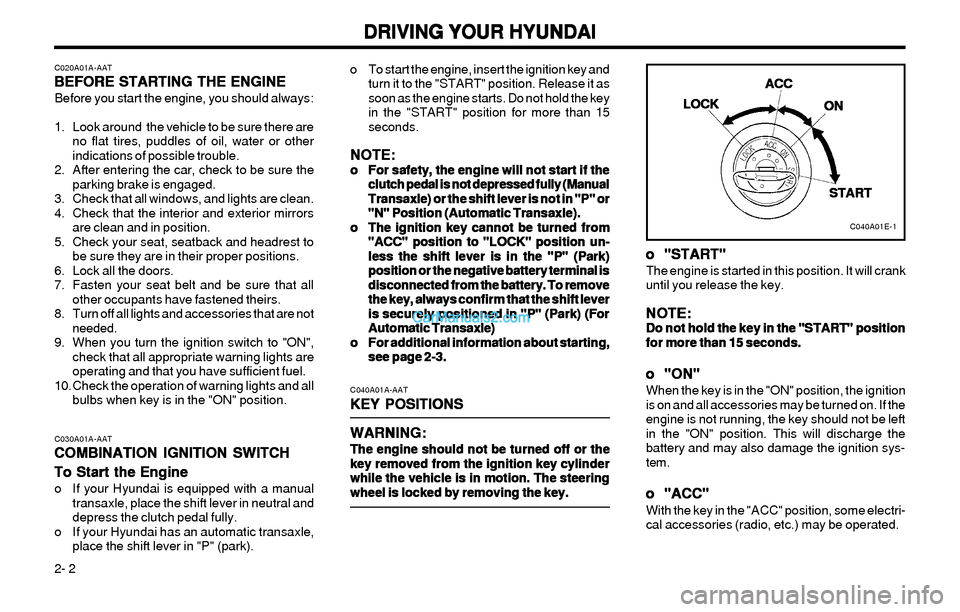
bulbs when key is in the "ON" position.o To start the engine, insert the ignition key and
turn it to the "START" position. Release it as
soon as the engine starts. Do not hold the key
in the "START" position for more than 15
seconds.
NOTE: NOTE:NOTE: NOTE:
NOTE:o oo o
o
For safety, the engine will not start if the For safety, the engine will not start if theFor safety, the engine will not start if the For safety, the engine will not start if the
For safety, the engine will not start if the
clutch pedal is not depressed fully (Manual clutch pedal is not depressed fully (Manualclutch pedal is not depressed fully (Manual clutch pedal is not depressed fully (Manual
clutch pedal is not depressed fully (Manual
Transaxle) or the shift lever is not in "P" or Transaxle) or the shift lever is not in "P" orTransaxle) or the shift lever is not in "P" or Transaxle) or the shift lever is not in "P" or
Transaxle) or the shift lever is not in "P" or
"N" Position (Automatic Transaxle). "N" Position (Automatic Transaxle)."N" Position (Automatic Transaxle). "N" Position (Automatic Transaxle).
"N" Position (Automatic Transaxle).
o oo o
o
The ignition key cannot be turned from The ignition key cannot be turned fromThe ignition key cannot be turned from The ignition key cannot be turned from
The ignition key cannot be turned from
"ACC" position to "LOCK" position un- "ACC" position to "LOCK" position un-"ACC" position to "LOCK" position un- "ACC" position to "LOCK" position un-
"ACC" position to "LOCK" position un-
less the shift lever is in the "P" (Park) less the shift lever is in the "P" (Park)less the shift lever is in the "P" (Park) less the shift lever is in the "P" (Park)
less the shift lever is in the "P" (Park)
position or the negative battery terminal is position or the negative battery terminal isposition or the negative battery terminal is position or the negative battery terminal is
position or the negative battery terminal is
disconnected from the battery. To remove disconnected from the battery. To removedisconnected from the battery. To remove disconnected from the battery. To remove
disconnected from the battery. To remove
the key, always confirm that the shift lever the key, always confirm that the shift leverthe key, always confirm that the shift lever the key, always confirm that the shift lever
the key, always confirm that the shift lever
is securely positioned in "P" (Park) (For is securely positioned in "P" (Park) (Foris securely positioned in "P" (Park) (For is securely positioned in "P" (Park) (For
is securely positioned in "P" (Park) (For
Automatic Transaxle) Automatic Transaxle)Automatic Transaxle) Automatic Transaxle)
Automatic Transaxle)
o oo o
o
For additional information about starting, For additional information about starting,For additional information about starting, For additional information about starting,
For additional information about starting,
see page 2-3. see page 2-3.see page 2-3. see page 2-3.
see page 2-3.
C040A01A-AAT
KEY POSITIONS KEY POSITIONSKEY POSITIONS KEY POSITIONS
KEY POSITIONS
WARNING: WARNING:WARNING: WARNING:
WARNING:
The engine should not be turned off or the The engine should not be turned off or theThe engine should not be turned off or the The engine should not be turned off or the
The engine should not be turned off or the
key removed from the ignition key cylinder key removed from the ignition key cylinderkey removed from the ignition key cylinder key removed from the ignition key cylinder
key removed from the ignition key cylinder
while the vehicle is in motion. The steering while the vehicle is in motion. The steeringwhile the vehicle is in motion. The steering while the vehicle is in motion. The steering
while the vehicle is in motion. The steering
wheel is locked by removing the key. wheel is locked by removing the key.wheel is locked by removing the key. wheel is locked by removing the key.
wheel is locked by removing the key.C030A01A-AAT
COMBINATION IGNITION SWITCH COMBINATION IGNITION SWITCHCOMBINATION IGNITION SWITCH COMBINATION IGNITION SWITCH
COMBINATION IGNITION SWITCH
To Start the Engine To Start the EngineTo Start the Engine To Start the Engine
To Start the Engine
o If your Hyundai is equipped with a manual
transaxle, place the shift lever in neutral and
depress the clutch pedal fully.
o If your Hyundai has an automatic transaxle,
place the shift lever in "P" (park).
C040A01E-1
LOCK LOCKLOCK LOCK
LOCKACC ACCACC ACC
ACC
ON ONON ON
ON
START STARTSTART START
START
o oo o
o
"START" "START""START" "START"
"START"The engine is started in this position. It will crank
until you release the key.
NOTE: NOTE:NOTE: NOTE:
NOTE:Do not hold the key in the "START" position Do not hold the key in the "START" positionDo not hold the key in the "START" position Do not hold the key in the "START" position
Do not hold the key in the "START" position
for more than 15 seconds. for more than 15 seconds.for more than 15 seconds. for more than 15 seconds.
for more than 15 seconds.
o oo o
o
"ON" "ON""ON" "ON"
"ON"When the key is in the "ON" position, the ignition
is on and all accessories may be turned on. If the
engine is not running, the key should not be left
in the "ON" position. This will discharge the
battery and may also damage the ignition sys-
tem.
o oo o
o
"ACC" "ACC""ACC" "ACC"
"ACC"With the key in the "ACC" position, some electri-
cal accessories (radio, etc.) may be operated.