Page 246 of 415
Bef ore you begin driving your Honda,
youshouldknowwhatgasolineto
use, and how to check the levels of
important f luids. You also need to
know how to properly store luggage
or packages. The inf ormation in this
section will help you. If you plan to
add any accessories to your vehicle,
please read the inf ormation in this
section f irst..............................
Break-in Period .244
.........................................
Gasoline .244
.........
Service Station Procedures . 245
................
Filling the Fuel Tank . 245
....................
Opening the Hood .246
...............................
Oil Check .248
.........
Engine Coolant Check . 249
...............................
Fuel Economy .250
.....................
Vehicle Condition .250
...........................
Driving Habits .250
...
Accessories and Modif ications . 251
.............................
Carrying Cargo .253
Bef ore Driving
Bef ore Driving243
Page 253 of 415

The condition of your vehicle and
your driving habits are the two most
important things that affect the fuel
mileage you get.
Always maintain your vehicle accord-
ing to the maintenance schedule.
This will keep it in top operating
condition.A cold engine uses more f uel than a
warm engine. It is not necessary to
‘‘warm-up’’ a cold engine by letting it
idle f or a long time. You can drive
away in about a minute, no matter
how cold it is outside. The engine
will warm up f aster, and you get
better f uel economy. To cut down on
the number of ‘‘cold starts,’’ try to
combine several short trips into one.
You can improve f uel economy by
driving moderately. Rapid acceler-
ation, abrupt cornering, and hard
braking use more f uel.
Always drive in the highest gear that
allows the engine to run and acceler-
ate smoothly.
Depending on traf f ic conditions, try
to maintain a constant speed. Every
time you slow down and speed up,
your vehicle uses extra f uel. Use the
cruise control, when appropriate, to
increase f uel economy.
The air conditioning puts an extra
load on the engine which makes it
usemorefuel.Turnoff theA/Cto
cut down on air conditioning use.
Use the f low-through ventilation
when the outside air temperature is
moderate.
In winter, the build-up of snow on
your vehicle’s underside adds weight
and rolling resistance. Frequent
cleaning helps your f uel mileage and
reduces the chance of corrosion. An important part of that mainte-
nance is the (see page ). For
example, an underinf lated tire
causes more ‘‘rolling resistance,’’
which uses f uel. It also wears out
f aster, so check the tire pressure at
least monthly. 295
Vehicle Condition
Driving Habits
Owner Maintenance
Checks
Bef ore Driving
Fuel Economy
250
Page 254 of 415
However, if electronic accessories
are improperly installed, or exceed
your vehicle’s electrical system
capacity, they can interf ere with theoperation of your vehicle, or even
cause the airbags to deploy.
Make sure the accessory does not
obscure any lights, or interf ere
with proper vehicle operation or
perf ormance.
Be sure electronic accessories do
not overload electrical circuits
(see page ).
Have the installer contact your
Honda dealer f or assistance bef ore
installing any electronic accessory.
If possible, have your dealer inspect
the f inal installation.
Modif ying your vehicle, or installing
some non-Honda accessories, can
make your vehicle unsaf e. Bef ore
you make any modif ications or add
anyaccessories,besuretoreadthe
f ollowing inf ormation.
Bef ore installing any accessory:
When properly installed, cellular
phones, alarms, two-way radios, and
low-powered audio systems should
not interf ere with your vehicle’s
computer-controlled systems, such
as the SRS and anti-lock brake
system.
Your dealer has Honda accessories
that allow you to personalize your
vehicle. These accessories have
been designed and approved f or your
vehicle, and are covered by warranty.
Non-Honda accessories are usually
designed f or universal applications.
Although aftermarket accessories
may f it on your vehicle, they may not
meet f actory specif ications, and
could adversely af f ect your vehicle’s
handling and stability. (See
‘‘Modif ications’’ on page f or
additional information.)
374
252
A ccessories
A ccessories and Modif ications
Bef ore Driving251
Improper accessories or
modifications can affect your
vehicle’s handling, stability, and
performance, and cause a
crash in which you can be hurt
or killed.
Follow all instructions in this
owner’s manual regarding
accessories and modifications.
Page 255 of 415

Covering the outside edge of a
f ront seat-back, with a non-Honda
seat cover for example, could
prevent the airbag from inflating
properly.If a side airbag
inflates,acupholderorotherhard
object attached on or near the
door could be propelled inside the
vehicle and hurt someone.
This could make the driver’s seat
position sensor and the f ront
passenger’s weight sensors
inef f ective.
Some examples are:
Lowering the vehicle with an
aftermarket suspension kit that
signif icantly reduces ground
clearance can allow the
undercarriage to impact speed
bumps or other raised objects,
which could cause the airbags to
deploy.
Raising the vehicle with an
af termarket suspension kit can
af f ect the handling and stability.
Af termarket wheels, because they
are a universal design, can cause
excessive stress on suspension
components. Larger or smaller wheels and tires
can interf ere with the operation of
your vehicle’s anti-lock brakes and
other systems.
Do not modif y your steering wheel
or any other part of your
Supplemental Restraint System.
Modif ications could make the
system inef f ective.
Any object
attached to or placed on the covers
marked ‘‘SRS AIRBAG,’’ in the
center of the steering wheel and
on top of the dashboard, could
interf ere with the proper operation
of the airbags. Or, if the airbags
inf late, the objects could be
propelled inside the vehicle and
hurt someone.
If you plan to modif y your vehicle,
consult with your Honda dealer.
Removing parts f rom your vehicle,
or replacing components with non-
Honda (af termarket) components
could seriously af f ect your vehicle’s
handling, stability, and reliability. Modif ications
Additional Saf ety Precautions
A ccessories and Modif ications
Bef ore Driving
Do not place any object s over t heoutsideedgeof afront seat-back.
Do not at t ach hard object s on or
near a f ront door.
Do not modif y t he f ront seat s.
Do not at t ach or place object s on
the f ront airbag covers.
252
Page 256 of 415
�Î
�Î �Î
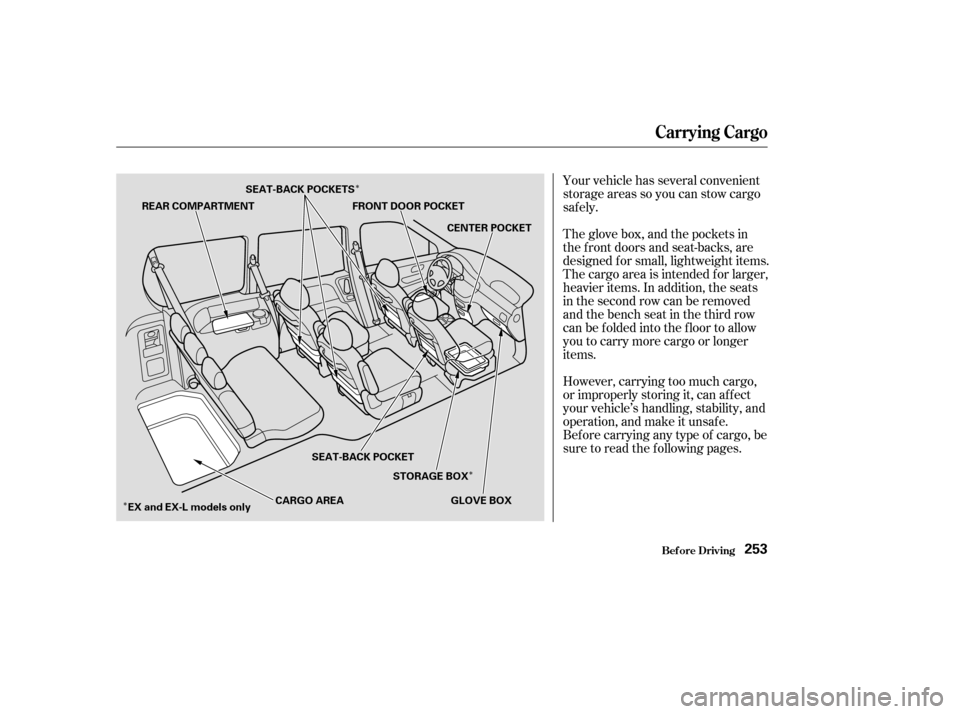
Your vehicle has several convenient
storage areas so you can stow cargo
saf ely.
The glove box, and the pockets in
the f ront doors and seat-backs, are
designed f or small, lightweight items.
The cargo area is intended f or larger,
heavier items. In addition, the seats
in the second row can be removed
andthebenchseatinthethirdrow
can be f olded into the f loor to allow
you to carry more cargo or longer
items.
However, carrying too much cargo,
or improperly storing it, can af f ect
your vehicle’s handling, stability, and
operation, and make it unsaf e.
Bef ore carrying any type of cargo, be
sure to read the f ollowing pages.
Carrying Cargo
Bef ore Driving253
REAR COMPARTMENT
FRONT DOOR POCKET
CENTER POCKET
GLOVE BOX
STORAGE BOX
SEAT-BACK POCKET
EX and EX-L models only CARGO AREA
SEAT-BACK POCKETS
Page 257 of 415

Store or secure all items that could
be thrown around and hurt
someone during a crash.
Be sure items placed on the f loor
behind the f ront seats cannot roll
under the seats and interf ere with
the driver’s ability to operate the
pedals, or with the proper
operation of the seats.
Keep the glove box closed while
driving. If the lid is open, a
passenger could injure their knees
during a crash or sudden stop.
This f igure includes the total weight
of all occupants, cargo, accessories,
and the tongue weight if you are
towing a trailer.
The f inal number is the total weight
of cargo you can carry.
If you are towing a trailer, add the
tongue weight to the number
above. Add up the weight of all occupants.
To f igure out how much cargo you
can carry: When you load luggage, the total
weight of the vehicle, all passengers,
cargo, and trailer tongue load must
not exceed the Gross Vehicle
Weight Rating (GVWR). The load
for the front and rear axles also must
not exceed the Gross Axle Weight
Rating (GAWR). The GVWR and
GAWRareprintedonthetire
information label attached to the
driver’s doorjamb (see page ).
The maximum load f or your vehicle
is 1,158 lbs (525 kg).
Subtract the total f rom 1,158 lbs
(525 kg). 386Carrying Items in the Passenger
Compartment
Load Limit
Carrying Cargo
Bef ore Driving254
Overloading or improper
loading can affect handling and
stability and cause a crash in
which you can be hurt or killed.
Follow all load limits and other
loading guidelines in this
manual.
Page 259 of 415
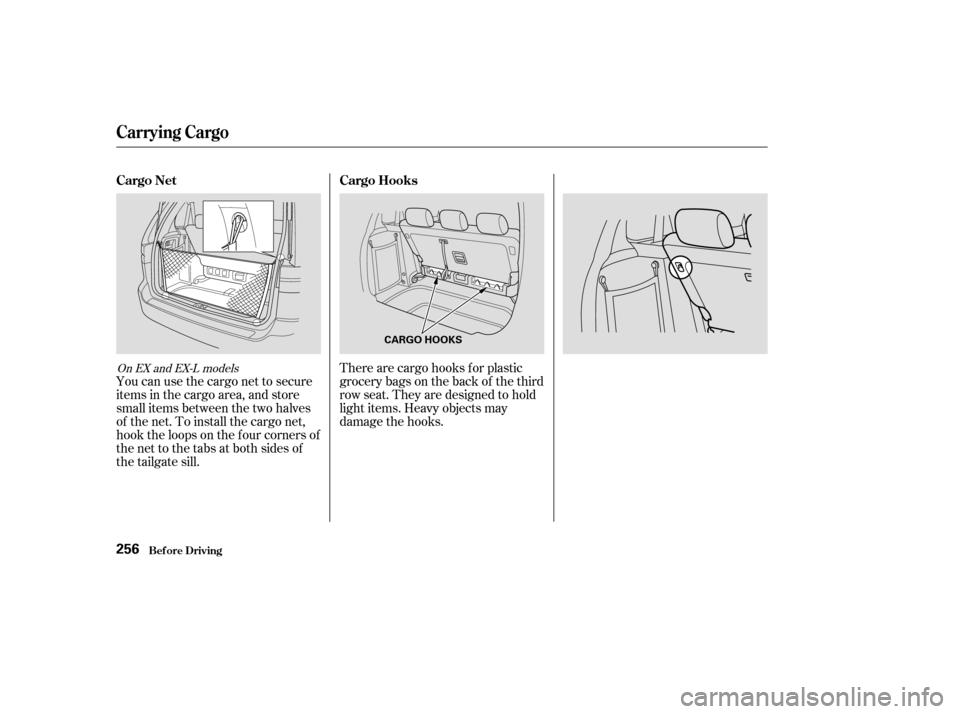
You can use the cargo net to secure
items in the cargo area, and store
small items between the two halves
of the net. To install the cargo net,
hook the loops on the f our corners of
the net to the tabs at both sides of
the tailgate sill.There are cargo hooks f or plastic
grocery bags on the back of the third
row seat. They are designed to hold
light items. Heavy objects may
damage the hooks.
On EX and EX-L models
Carrying Cargo
Cargo Net
Cargo Hooks
Bef ore Driving256
CARGO HOOKS
Page 260 of 415

This section gives you tips on
starting the engine under various
conditions, and how to operate the
automatic transmission. It also
includes important inf ormation on
parking your vehicle, the braking
system, the Traction Control System,
and f acts you need if you are
planning to tow a trailer.........................
Preparing to Drive .258
.......................
Starting the Engine .259
Starting in Cold Weather ....................
at High Altitude .259
..............
Automatic Transmission . 260
.
Shif t Lever Position Indicator . 260
................
Shif t Lever Positions . 261
..............
Engine Speed Limiter . 263
....................
Shif t Lock Release . 263
...........................................
Parking .265
.....................
The Braking System .266
.............
Brake Wear Indicators . 266
...............
Brake System Design . 267
.......................
Anti-lock Brakes .267
Important Saf ety .........................
Reminders .268
........................
ABS Indicator .268
..............
Traction Control System . 269
...............
TCS ON/OFF Switch . 270
............................
TCS Indicator .271
...............
Driving in Bad Weather . 272
...........................
Towing a Trailer .274
Driving
Driving257