Page 179 of 415
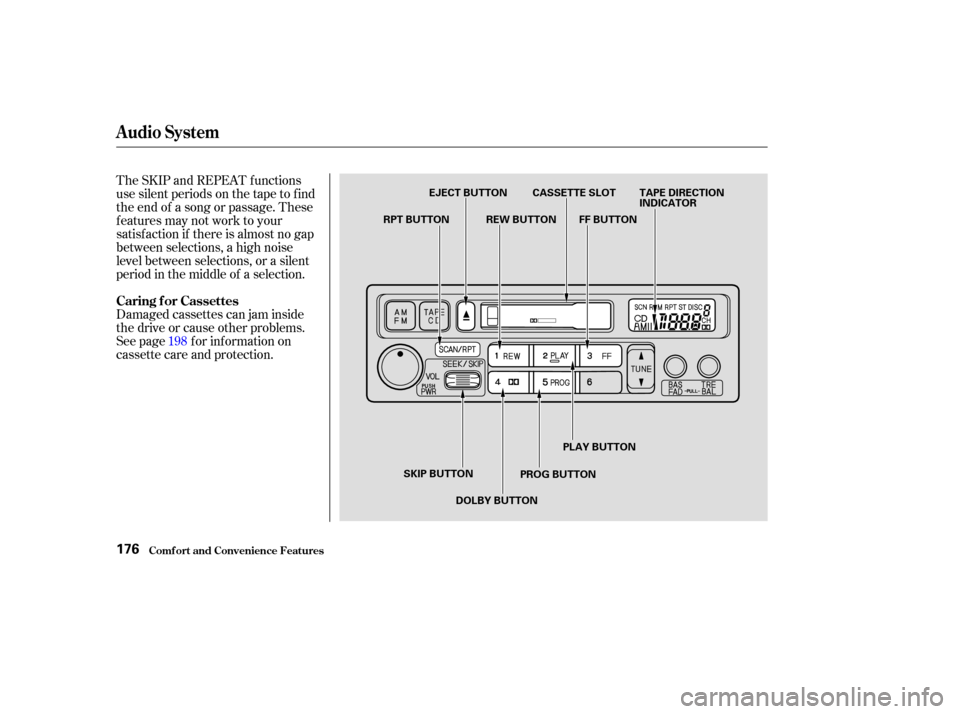
The SKIP and REPEAT f unctions
use silent periods on the tape to f ind
the end of a song or passage. These
f eatures may not work to your
satisfaction if there is almost no gap
between selections, a high noise
level between selections, or a silent
period in the middle of a selection.
Damaged cassettes can jam inside
the drive or cause other problems.
See page for information on
cassette care and protection.198
Caring f or Cassettes
Audio System
Comf ort and Convenience Feat ures176
EJECT BUTTON CASSETTE SLOT TAPE DIRECTION
INDICATOR
FF BUTTON
REW BUTTON
RPT BUTTON
SKIP BUTTON DOLBY BUTTON PROG BUTTONPLAY BUTTON
Page 180 of 415
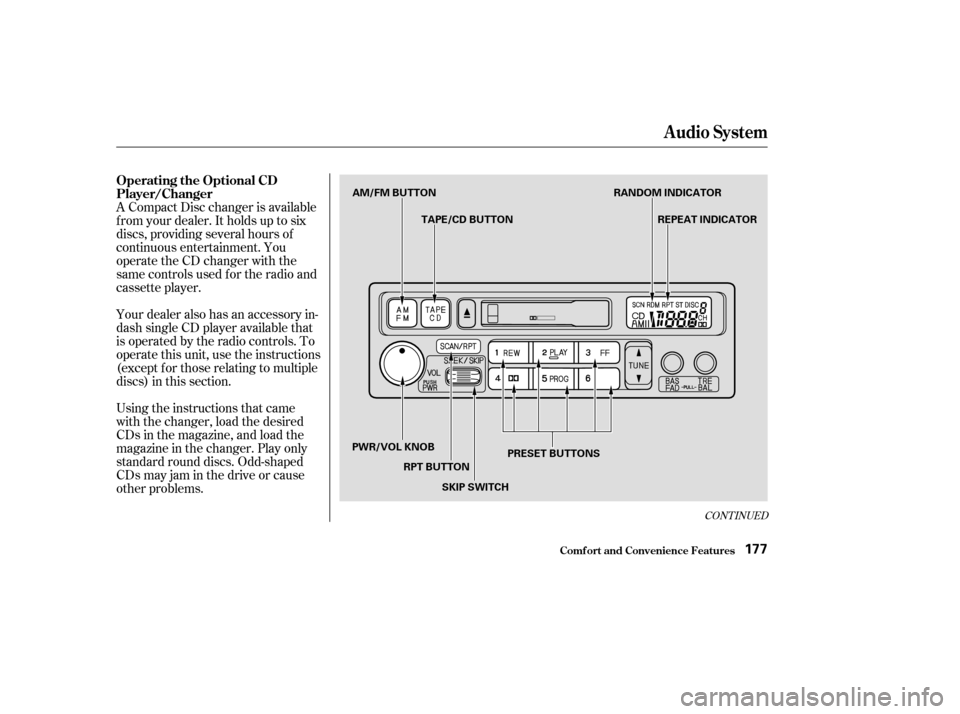
A Compact Disc changer is available
f rom your dealer. It holds up to six
discs, providing several hours of
continuous entertainment. You
operate the CD changer with the
same controls used f or the radio and
cassette player.
Using the instructions that came
with the changer, load the desired
CDs in the magazine, and load the
magazine in the changer. Play only
standard round discs. Odd-shaped
CDs may jam in the drive or cause
other problems. Your dealer also has an accessory in-
dash single CD player available that
is operated by the radio controls. To
operate this unit, use the instructions
(except f or those relating to multiple
discs) in this section.
CONT INUED
Operating the Optional CD
Player/Changer
Audio System
Comf ort and Convenience Feat ures177
AM/FM BUTTONTAPE/CD BUTTON RANDOM INDICATOR
REPEAT INDICATOR
PRESET BUTTONS
SKIP SWITCH
RPT BUTTON
PWR/VOL KNOB
Page 181 of 415

�µ�µ
�µ
When you activate the
Repeat feature by pressing the RPT
button, the system continuously
replays the current track. You will
see RPT in the display as a reminder.
Press the RPT button again to turn it
of f .
This feature,
when activated, plays the tracks on a
CD in random order, rather than in
the order they are recorded on the
CD. To activate Random Play, press
andholdtheRPTbuttonuntilyou
seeRDMinthedisplay.Thesystem
will then select and play tracks
randomly on the current disc. When
all tracks on that disc have been
played, the next disc is loaded and
played randomly. This continues
until you deactivate Random Play by
pressing RPT again.
If you push and hold the SKIP switch,
you will hear a beep and the system
will continue to move across tracks.
Release the switch when you think it
has reached the desired place on the
disc. You can use the SKIP switch to
select tracks within a disc. If you
push and release the SKIP switch,
the system will move to the
beginning of a track. Push the switch
up to move to the beginning of the
next track, and push the switch
down to move to the beginning of
the current track. To select a dif f erent disc, press the
appropriate preset button (1 6). If
you select an empty slot in the
magazine, the changer will, af ter
f inding that slot empty, try to load
the CD in the next slot. This
continues until it f inds a CD to load
and play.
For best results when using CD-R
discs, use only high quality discs
labeled f or audio use. When
recording a CD-R, the recording
must be closed in order f or the disc
to be used by CD players. CD-RW
discs will not work in this unit.
To operate the CD changer or player,
the ignition must be in ACCESSORY
(I) or ON (II) and the audio system
must be on.
Press the CD button until ‘‘CD’’
appears in the display. The system
will start to play the f irst track of the
f irst disc in the magazine. Play only
standard round discs.
When that disc ends, the next disc in
the magazine is loaded and played.
Af ter the last disc f inishes, the
system returns to disc 1.
Audio System
Comf ort and Convenience Feat ures
REPEAT
RANDOM PLAY
178
Page 182 of 415
If the system is in Repeat mode, you
must turn it of f by pressing RPT
bef ore you can select Random Play.
Then press the button again until
you see RDM displayed.
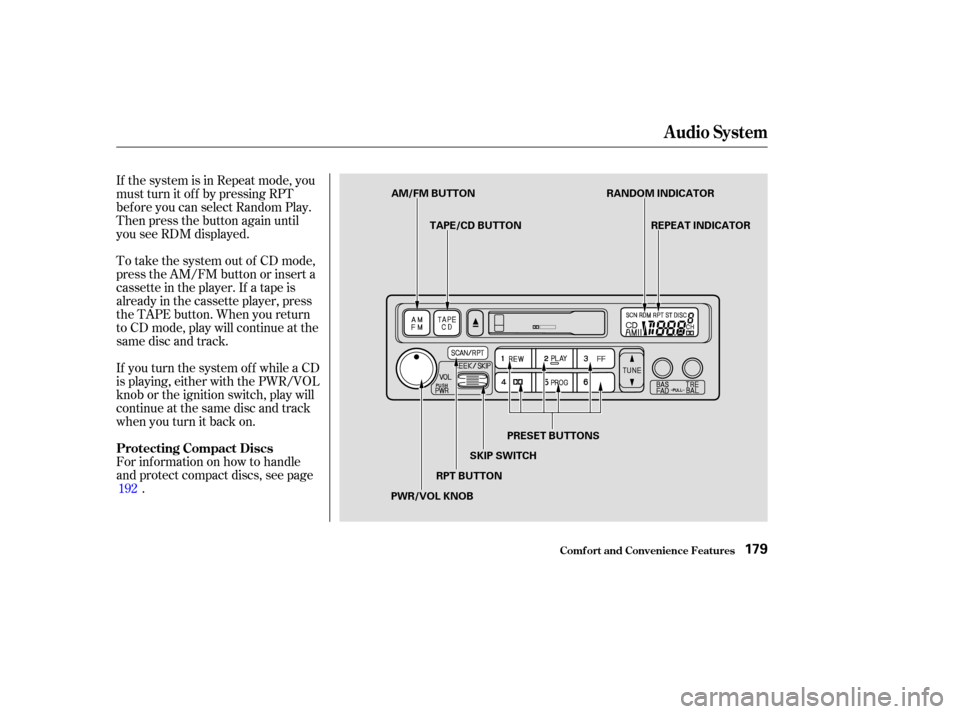
To take the system out of CD mode,
press the AM/FM button or insert a
cassette in the player. If a tape is
already in the cassette player, press
the TAPE button. When you return
to CD mode, play will continue at the
same disc and track.
For inf ormation on how to handle
and protect compact discs, see page.
If you turn the system of f while a CD
is playing, either with the PWR/VOL
knob or the ignition switch, play will
continue at the same disc and track
when you turn it back on.
192
Audio System
Comf ort and Convenience Feat ures
Protecting Compact Discs
179
AM/FM BUTTON TAPE/CD BUTTON RANDOM INDICATOR
REPEAT INDICATOR
PRESET BUTTONS
SKIP SWITCH
RPT BUTTON
PWR/VOL KNOB
Page 183 of 415

If you see an error indication in the
display while operating the CD
changer, f ind the cause in the chart
to the right. If you cannot clear the
error indication, take the vehicle to
your Honda dealer.Indication
Solution
Cause
If the code disappears within a few seconds,
unit is OK.
Press the magazine eject button and pull out
the magazine, check for error indication. Insert
the magazine again. If the code does not
disappear or the magazine cannot be pulled out,
consult your Honda dealer.
Press the magazine eject button. If the maga-
zine does not eject, consult your Honda dealer.
Press the magazine eject button, and insert an
empty magazine.
Will disappear when the temperature returns to
normal.
See your Honda dealer.
Insert CD magazine.
Insert a CD in the magazine.
Disc-changer
malf unction.
CD magazine ejection
impossible.
Disc is in changer
mechanism.
High Temperature
Misconnection or
disconnection of CD
changer.
No CD magazine in the
CD changer.
No CD in magazine.
CD Changer Error Indications
Audio System
Comf ort and Convenience Feat ures180
Page 184 of 415
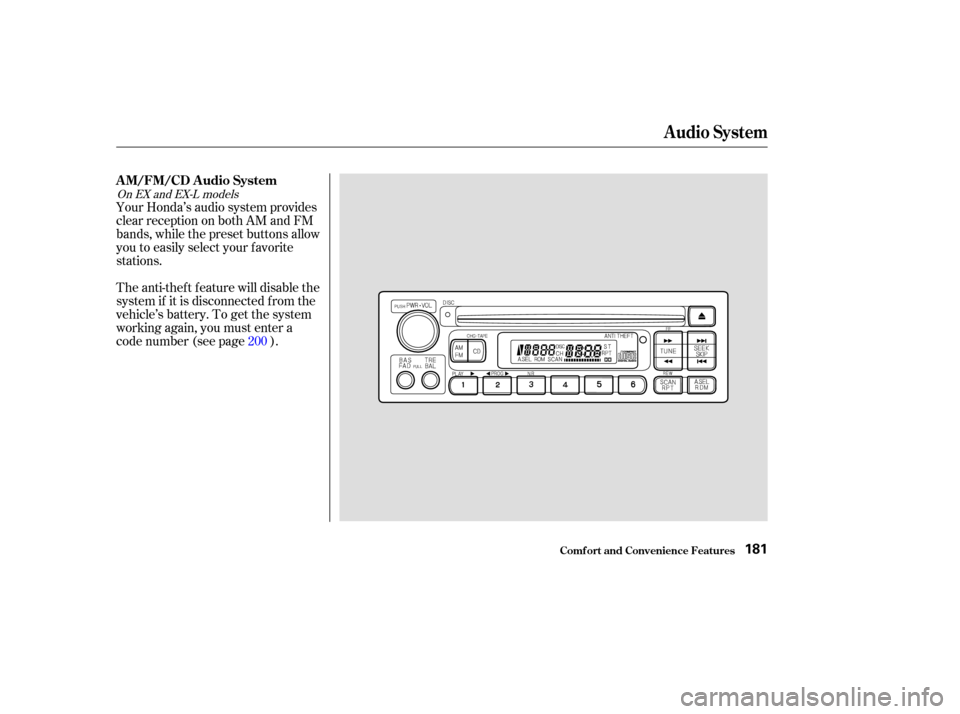
Your Honda’s audio system provides
clear reception on both AM and FM
bands, while the preset buttons allow
you to easily select your f avorite
stations.
The anti-thef t f eature will disable the
system if it is disconnected f rom the
vehicle’s battery. To get the system
working again, you must enter a
code number (see page ).200
On EX and EX-L models
Audio System
Comf ort and Convenience Feat ures
AM/FM/CD Audio System
181
Page 185 of 415

�µ�µ
The ignition switch must be in
ACCESSORY (I) or ON (II) to
operate the audio system. Turn the
system on by pushing the PWR/
VOL knob. Adjust the volume by
turning the same knob.
The band and f requency that the
radio was last tuned to is displayed.
To change bands, press the AM/FM
button. On the FM band, ST will be
displayed if the station is broadcast-
ing in stereo. Stereo reproduction on
AM is not available. Use the TUNE bar to tune
the radio to a desired f requency.
Press the side of the bar to tune
to a higher f requency, and the side to tune to a lower
f requency. The f requency numbers
will start to change rapidly. Release
the bar when the display reaches the
desired f requency. To change the
f requency in small increments, press
and release the TUNE bar quickly.
You can use any of f ive methods to
f ind radio stations on the selected
band: TUNE, SEEK, SCAN, AUTO
SELECT, and the preset buttons. The SEEK f unction
searches the band for a station with
a strong signal. To activate it, press
theSEEKbaroneitherthe or side, then release it.
Depending on which side you press,
the system scans upward or down-
ward f rom the current f requency. It
stops when it finds a station with a
strong signal.
Operating the Radio
T UNESEEK
Audio System
Comf ort and Convenience Feat ures182
Page 186 of 415
�µ�µ
CONT INUED
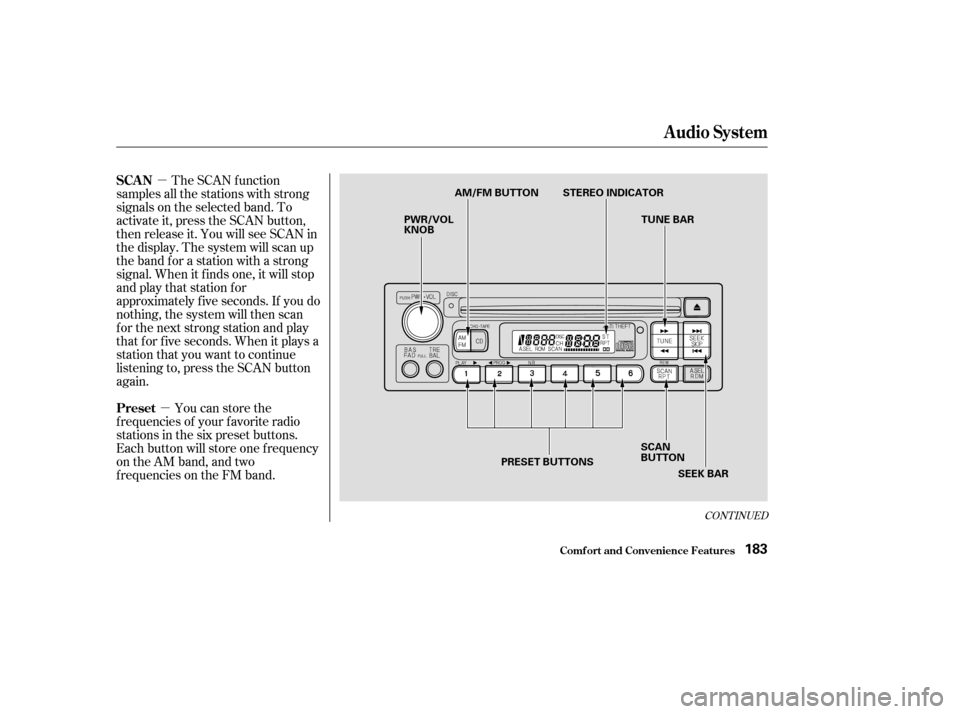
The SCAN f unction
samples all the stations with strong
signals on the selected band. To
activate it, press the SCAN button,
then release it. You will see SCAN in
the display. The system will scan up
the band for a station with a strong
signal. When it f inds one, it will stop
and play that station for
approximately f ive seconds. If you do
nothing, the system will then scan
f or the next strong station and play
that f or f ive seconds. When it plays a
station that you want to continue
listening to, press the SCAN button
again.
You can store the
f requencies of your f avorite radio
stations in the six preset buttons.
Each button will store one f requency
on the AM band, and two
f requencies on the FM band.
Audio System
Comf ort and Convenience Feat ures
SCAN
Preset
183
PWR/VOL
KNOB AM/FM BUTTON STEREO INDICATOR
TUNE BAR
PRESET BUTTONS SCAN
BUTTON
SEEK BAR