Page 135 of 411

�µ
�µ
The ignition switch has f our
positions: LOCK (0), ACCESSORY
(I), ON (II), and START (III). You can
operate the audio system and the
accessory power sockets in this
position.
If you leave the key in the ignition
switch in the ACCESSORY (I)
position and open the driver’s door,
you will see a ‘‘RETURN IGNITION
SWITCH TO LOCK (0) POSITION’’
message on the multi-inf ormation
display and hear a reminder beeper.
If you turn the ignition key to the
ACCESSORY (I) position with the
driver’s door closed, you will see an
‘‘ACCESSORY (I) POSITION’’
message on the multi-inf ormation
display to inf orm you of the key
position.
You can insert or
remove the key only in this position.
To turn the key, the shift lever must
be in Park, and you must push the
key in slightly.
If the f ront wheels are turned, the
anti-thef t lock may make it dif f icult
to turn the key. Firmly turn the
steering wheel to the lef t or right as
you turn the key.
CONT INUED
A CCESSORY (I)
LOCK (0)
Ignition Switch
Inst rument s and Cont rols
131
Page 136 of 411
�µ
�µ Use this position
only to start the engine. The switch
returns to the ON (II) position when
you let go of the key.
You will hear a reminder beeper if
you leave the key in the ignition
switch in the LOCK (0) or the
ACCESSORY (I) position and open
thedriver’sdoor.Removethekeyto
turn of f the beeper.
You will also see a ‘‘REMOVE KEY’’
message on the multi-inf ormation
display.
TheshiftlevermustbeinPark
bef ore you can remove the key f rom
the ignition switch.
This is the normal key
position when driving. Several of the
indicators on the instrument panel
come on as a test when you turn the
ignition switch f rom the
ACCESSORY (I) to the ON (II)
position. ST A RT (III)
ON (II)
Ignition Switch
132
Page 155 of 411
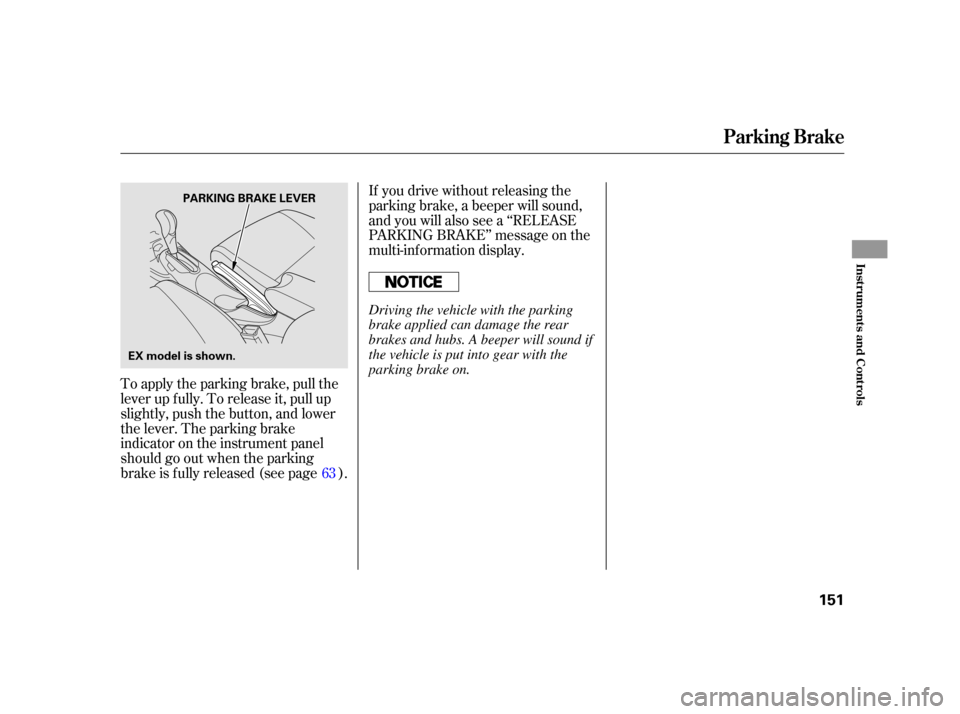
To apply the parking brake, pull the
lever up f ully. To release it, pull up
slightly, push the button, and lower
the lever. The parking brake
indicator on the instrument panel
should go out when the parking
brake is f ully released (see page ).If you drive without releasing the
parking brake, a beeper will sound,
and you will also see a ‘‘RELEASE
PARKING BRAKE’’ message on the
multi-inf ormation display.
63
Parking Brake
Inst rument s and Cont rols
151
PARKING BRAKE LEVER
EX model is shown.
Driving the vehicle with the parking
brake applied can damage the rear
brakes and hubs. A beeper will sound if
the vehicle is put into gear with the
parking brake on.
Page 167 of 411
CONT INUED
On models with navigation systemThe automatic climate control
system in your vehicle maintains the
interior temperature you select. The
system also adjusts the f an speed
and airf low levels.
The climate control system f or your
vehicle can also be operated using
the voice control system. See the
navigation system manual f or
complete details.
Press the AUTO button. You will
see AUTO in the display.
Set the desired temperature by
turning the temperature control
dial.
The system automatically selects
the proper mix of conditioned
and/or heated air that will, as
quickly as possible, raise or lower
the interior temperature to your
pref erence.During the auto idle stop, the air
conditioning system will be turned
off.If theECONmodeisselected,
thefanmayalsobeturnedoff.
Turning this dial clockwise increases
the temperature of the airflow.
2. 1.
Voice Control System
Using A utomatic Climate Control
Climat e Cont rol Syst em
T emperat ure Cont rol
Features
163
Page 168 of 411

�Û
�Ý
When you set the temperature to its
lower limit ( ) or its upper limit
( ), the system runs at f ull
cooling or heating only. It does not
regulate the interior temperature.
When you adjust a f an control, the
f an is taken out of AUTO mode.
Press the side of the bar to
increase the f an speed and airf low.
Press the side of the bar to
decrease them. You can manually select various
f unctions of the climate control
system when it is in f ully automatic
mode. All other f eatures remain
automatically controlled. Making any
manual selection causes the word
AUTO in the display to go out.
To keep stale air and mustiness
f rom collecting, you should have
the f an running at all times. Keep the system completely of f
f or short periods only.
To turn the system completely of f ,
press the ON/OFF button. Each time you press this button, the
climate control system switches
betweenonandoff.Turningonthe
system with this button selects your
last climate control selection.
Climat e Cont rol Syst em
Semi-automatic Operation
Fan Control
To Turn Everything Of fON/OFF Button
164
Page 169 of 411

CONT INUED
This button turns the air
conditioningonandoff.Youwillsee
A/C ON or A/C OFF in the display.
When you turn the A/C of f , the
system cannot regulate the inside
temperature if you set the
temperature control below the
outside temperature.Pushing this button also turns the
power mirror heaters on and of f .
When the recirculation indicator is
on, air f rom the vehicle’s interior is
sent throughout the system again.
Select recirculation mode when
driving through dusty or smoky
conditions, then return to fresh air
mode.
The outside air intakes f or the
climate control system are at the
base of the windshield. Keep this
area clear of leaves and other debris.
When the f resh air indicator is on,
air is brought in f rom the outside of
the vehicle.
Thesystemshouldbeleftinfresh
air mode under almost all conditions.
Keeping the system in recirculation
mode, particularly with the A/C of f ,
can cause the windows to fog up. This button turns the rear window
def ogger on and of f (see page ).
126
On U.S. EX models and all Canadian
models
Climat e Cont rol Syst em
A ir Condit ioning (A /C) But t on Recirculat ion But t on Rear Window Def ogger But t on
Fresh Air Button
Features
165
Page 174 of 411

�µ�µ
�µ
You can use any of f ive methods to
f ind radio stations on the selected
band: tune, seek, scan, the preset
buttons, and auto select.
Use the TUNE knob to
tune the radio to a desired f requency.
Turn the knob to the right to tune to
a higher f requency, and turn it to the
lef t to tune to a lower f requency.
The ignition switch must be in the
ACCESSORY (I) or ON (II) position.
Turn the system on by pushing the
power/volume knob or the AM or
FM button. Adjust the volume by
turning the power/volume knob.
The scan f unction samples
all stations with strong signals on the
selected band. To activate it, press
the right side of the A. SEL/SCAN
bar, then release it. You will see
SCAN in the display. The system will
scan f or a station with a strong signal.
When it f inds one, it will stop and
play that station for about 10 seconds.
If you do nothing, the system will
then scan f or the next strong station
andplayitfor10seconds.Whenit
plays a station you want to listen to,
press the SCAN side of the bar again.
The band and f requency that the
radio was last tuned to is displayed.
To change bands, press the AM or
FM button. On the FM band, ST will
be displayed if the station is broad-
castinginstereo.Stereo
reproduction on AM is not available.
The seek f unction
searches up and down f rom the
current f requency to f ind a station
with a strong signal. To activate it,
press the or side of the
SEEK bar, then release it. To Select a Station
TUNE
To Play the AM/FM Radio
SCAN
SEEK /SK IP
Playing the A M/FM Radio (Insight model)
170
Page 175 of 411

�µ�µ�µ If you do not like the stations auto
select has stored, you can store
other f requencies on the preset
buttons as previously described.
For inf ormation on AM/FM radio
f requencies and reception, see page
.
Each preset button can
store one f requency on AM and two
f requencies on FM.
Select the desired band, AM or
FM. You can store one f requency
on FM1, and one f requency on
FM2witheachpresetbutton.
Usethetune,seek,orscan
function to tune the radio to a
desired station. ,pressthe
A. SEL side of the bar. This restores
the presets you originally set.
Press the lef t side of the
A. SEL/SCAN bar. You will see
A. SEL f lashing in the display, and
the system goes into scan mode f or
several seconds. It stores the
f requencies of six AM, and twelve
FM stations in the preset buttons.
You will see a ‘‘0’’ displayed af ter
pressing a preset button if auto
select cannot f ind a strong station f or
every preset button. If you are
traveling and can no longer receive
your preset stations, you can use the
auto select feature to find stations in
the local area.
Pick a preset button (1 6), then
press and hold it until you hear a
beep.
Repeat steps 1 through 3 to store a
total of six stations on AM and
twelve stations on FM.
1.
2.
3.
4.
212
To turn of f auto select
Preset
A UT O SEL ECT
Playing the A M/FM Radio (Insight model)
Features
171