Page 238 of 411

HFLusesaClass2Bluetooth,which
means, the maximum range between
yourphoneandvehicleis30feet(10
meters).
During a call, HFL allows you to talk
up to 30 minutes af ter you remove
the key from the ignition switch.
However, this may weaken the
vehicle’s battery. You can make calls using a name in
the HFL phonebook or any phone
number. You can also redial the last
number called.Once connected, you will hear the
person you called through the audio
speakers.
Say ‘‘ ’’ or ‘‘ .’’
Follow the HFL prompts and say
thenamestoredintheHFL
phonebook that you want to call.
Follow the HFL prompts to
conf irm the name and make the
call.
Say ‘‘ ’’ or ‘‘ .’’
Follow the HFL prompts and say
the phone number you want to dial.
Follow the HFL prompts to
conf irm the number and say
‘‘ ’’ or ‘‘ .’’
Press and release the HFL Talk
button bef ore a command.
Press and release the HFL Talk
button bef ore a command.
1.
2.
3.
1.
2.
3.
Making a Call
Call DialCall Dial
Call Dial
Tomakeacallusinganameinthe HFL phonebook: T o make a call using a phone
number:
BluetoothHandsFreeL ink(Models wit hout navigat ion syst em)
234
Page 239 of 411
Press and release the HFL Talk
button and say ‘‘ .’’When you receive a call, an incoming
call notif ication (if activated) will
play and interrupt the audio system
if it is on.If your phone has Call Waiting, press
and release the HFL Talk button to
put the original call on hold and
answer the incoming call.
To return to the original call, press
the HFL Talk button again. If you
don’t want to answer the incoming
call, disregard it and continue with
your original call. If you want to hang
up the original call and answer the
new call, press the HFL Back button.
Press the HFL Talk button to answer
the call, or the HFL Back button to
hang up.
To redial the last number called by
HFL : Call Wait ing
RedialReceiving a Call
BluetoothHandsFreeL ink(Models wit hout navigat ion syst em)
Features
235
Page 258 of 411

Your dealer has Honda accessories
that allow you to personalize your
vehicle. These accessories have
been designed and approved f or your
vehicle, and are covered by warranty.Bef ore installing any accessory:
When properly installed, cellular
phones, alarms, two-way radios, and
low-powered audio systems should
not interf ere with your vehicle’s
computer controlled systems, such
as your airbags, anti-lock brakes, and
tire pressure monitoring system (if
equipped). Do not install accessories on the
side pillars or across the rear
windows. Accessories installed in
theseareasmayinterferewith
proper operation of the side
curtain airbags. Bef ore installing any electronic
accessory, have the installer
contact your dealer for assistance.
If possible, have your dealer
inspect the f inal installation. Be sure electronic accessories do
not overload electrical circuits
(see page ) or interf ere with
the proper operation of your
vehicle. Make sure the accessory does not
obscure any lights, or interf ere
with proper vehicle operation or
perf ormance.
Although non-Honda accessories
may f it on your vehicle, they may not
meet f actory specif ications, and
could adversely af f ect your vehicle’s
handling, stability, and reliability. Modif ying your vehicle, or installing
non-Honda accessories, may make
your vehicle unsaf e. Bef ore you
make any modif ications or add any
accessories,besuretoreadthe
f ollowing inf ormation. 367
A ccessories
A ccessories and Modif ications
254
Improper accessories or
modifications can affect your
vehicle’s handling, stability, and
performance, and cause a
crash in which you can be hurt
or killed.
Follow all instructions in this
owner’s manual regarding
accessories and modifications.
Page 301 of 411

This section explains why it is
important to keep your vehicle well
maintained and how to f ollow basic
maintenance saf ety precautions.
If you have the skills and tools to
perf orm more complex maintenance
tasks on your vehicle, you may want
to purchase the service manual. See
page f or inf ormation on how to
obtain a copy, or see your dealer.U.S. Vehicles:
This section also includes
instructions on how to read the
Maintenance Minder messages on
the multi-information display, and
instructions f or simple maintenance
tasks you may want to take care of
yourself . ......................
Maintenance Saf ety .298
.................
Maintenance Minder . 299
..............................
Fluid Locations .309
........................
Adding Engine Oil .310
.........
Changing the Oil and Filter . 312
..............................
Engine Coolant .315
....................
Windshield Washers .317
....
Automatic Transmission Fluid . 318
Continuously Variable ............
Transmission (CVT) . 318
....................................
Brake Fluid .319
.............................................
Lights .321
..............................
Audio Antenna .331
................
Cleaning the Seat Belts . 331
.....................................
Floor Mats .331
..................
DustandPollenFilter . 332
.................................
Wiper Blades .332
...............................................
Tires .338
......
Checking the 12Volt Battery . 344
.............................
Vehicle Storage .346
397
Maintenance
Maintenance, replacement, or
repair of emissions control
devices and systems may be done
by any automotive repair
establishment or individual using
parts that are ‘‘certif ied’’ to EPA
standards.
Maint enance
297
TM
Page 335 of 411
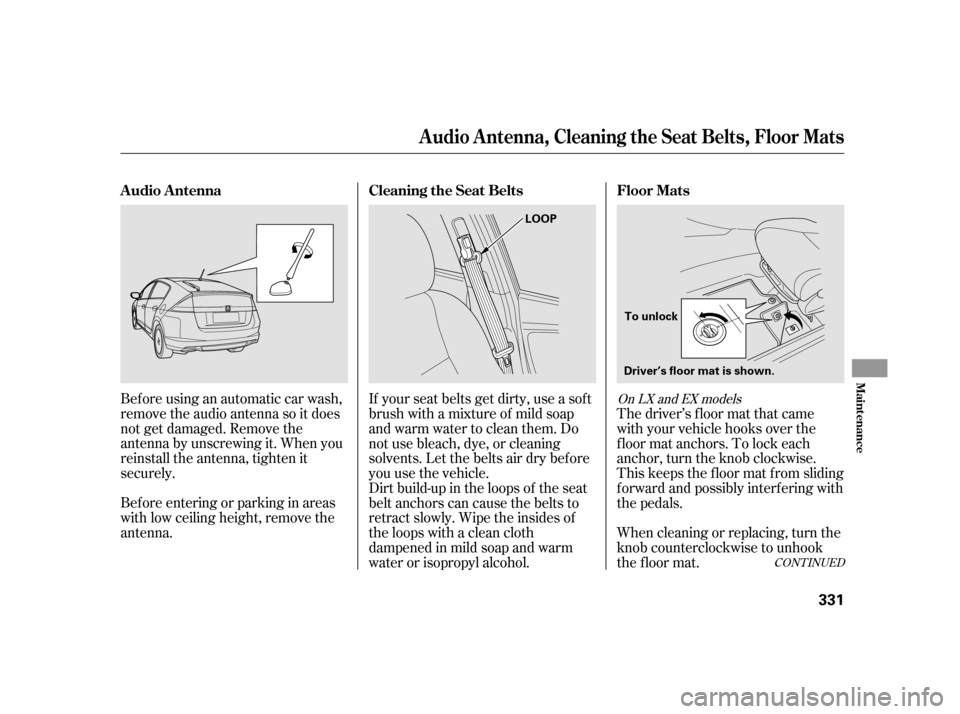
Beforeusinganautomaticcarwash,
remove the audio antenna so it does
not get damaged. Remove the
antenna by unscrewing it. When you
reinstall the antenna, tighten it
securely.
Bef ore entering or parking in areas
with low ceiling height, remove the
antenna.The driver’s f loor mat that came
with your vehicle hooks over the
f loor mat anchors. To lock each
anchor, turn the knob clockwise.
This keeps the f loor mat f rom sliding
f orward and possibly interf ering with
the pedals.
If your seat belts get dirty, use a sof t
brush with a mixture of mild soap
and warm water to clean them. Do
not use bleach, dye, or cleaning
solvents. Let the belts air dry bef ore
you use the vehicle.
Dirt build-up in the loops of the seat
belt anchors can cause the belts to
retract slowly. Wipe the insides of
the loops with a clean cloth
dampened in mild soap and warm
water or isopropyl alcohol.
When cleaning or replacing, turn the
knob counterclockwise to unhook
the floor mat.
CONT INUED
On LX and EX models
Floor Mats
Cleaning the Seat Belts
A udio A ntenna
A udio A ntenna, Cleaning the Seat Belts, Floor Mats
Maint enance
331
LOOP
To unlock
Driver’s floor mat is shown.
Page 349 of 411
If your vehicle’s battery is
disconnected, or goes dead, the time
setting may be lost. To reset the time,
see page .
If your vehicle’s battery is
disconnected or goes dead, the audio
system may disable itself . The next
timeyouturnontheradio,youwill
see ‘‘ENTER CODE’’ in the
f requency display. Use the preset
buttons to enter the code (see page). The navigation system will also
disableitself.Thenexttimeyouturn
on the ignition switch, the system
will require you to enter a PIN
bef ore it can be used. Ref er to the
navigation system manual.
220
219On vehicles with navigation system
Checking the 12Volt Battery
Maint enance
345
Page 362 of 411
Although this seems like a simple
procedure, you should take several
precautions.To jump start your vehicle:
The numbers in the illustration show
you the order to connect the jumper
cables.
You cannot start your vehicle by
pushing or pulling it. Open the hood, and check the
physical condition of the 12 volt
battery.
Turn of f all the electrical
accessories: climate control, audio
system, lights, etc. Put the
transmission in Park, and set the
parking brake.
1.
2.
Jump Starting
358
BOOSTER
BATTERY
A battery can explode if you do
not follow the correct procedure,
seriously injuring anyone
nearby.
Keep all sparks, open flames,
and smoking materials away
from the battery.
If a battery sits in extreme cold, the
electrolyte inside can f reeze.
Attempting to jump start with a f rozen
battery can cause it to rupture.
Page 375 of 411
If the replacement fuse of the
same rating blows in a short time,
there is probably a serious
electrical problem with your
vehicle. Leave the blown fuse in
that circuit, and have your vehicle
checked by a qualif ied technician.
When the audio system is disabled,
the clock setting in the audio system
is canceled. You need to reset the
clock according to the instructions in
the audio system section in this
owner’s manual. 6.
Fuses
T aking Care of t he Unexpect ed
371
Replacing a f use with one that has a
higher rating greatly increases the
chances of damaging the electrical
system. If you do not have a
replacement f use with the proper rating
f or the circuit, install one with a lower
rating.


