Page 74 of 411
This indicator is in the f uel gauge. It
comesonasareminderthatyou
must ref uel soon. You will also see a
‘‘FUEL LOW’’ message on the multi-
inf ormation display.
When the needle reaches E, there is
a very small amount of f uel in the
tank.This indicator comes on when there
is a system message on the multi-
inf ormation display. Press the INFO
button on the steering wheel (see
page ) to see the message (see
page ).
Most of the time, this indicator
comes on along with other indicators
in the instrument panel such as the
seat belt reminder indicator, SRS
indicator, VSA system indicator, etc.
When the indicator comes on, there
are about 1.8 U.S. gal (6.9
)of fuel
remaining in the tank. This indicator comes on when the
security system is set. For more
inf ormation, see page .
76
89
221
On LX and EX models
L ow Fuel IndicatorSystem Message
Indicator Security System Indicator
Instrument Panel Indicators
70
LOW FUEL INDICATOR
SECURITY SYSTEM INDICATOR
Page 79 of 411

The multi-inf ormation display in the
instrument panel displays various
inf ormation and messages when the
ignition switch is in the ON (II)
position. Some of the messages help
you operate your vehicle more
comf ortably. Others help to keep
you aware of the periodic
maintenance your vehicle needs f or
continued trouble-f ree driving.If you do not f asten your seat belt,
you will see a ‘‘FASTEN SEAT
BELT’’ message on the multi-
inf ormation display when you turn
the ignition switch to the ON (II)
position.
These messages go of f several
seconds af ter the key is inserted into
the ignition switch.
There are three types of messages:
normal display messages, engine oil
lif e and maintenance messages, and
system messages.
You can select the displayed
language and also customize some
vehicle control settings to your liking
with the multi-information display
and the three buttons on the steering
wheel (see page ).
You will see an ‘‘ECON ON’’ or
‘‘ECON OFF’’ message on the multi-
inf ormation display according to the
previous ECON setting when you
turn the ignition switch to the ON
(II) position (see page ).
76 127
CONT INUED
Normal Display Messages
Multi-Inf ormation Display
Inst rument s and Cont rols
75
ECON is On.
ECON is Off.
Page 92 of 411

�Û�Ý�Û�Ý
�Û�Ý
If there is a problem with your
vehicle, f or example the engine oil
level is low or a door is not f ully
closed, the multi-inf ormation display
will show you the problem. It does
this by interrupting the current
display with one or more messages. The system message(s) triggers the
appropriate indicator(s) on the
instrument panel, including the
system message indicator, to come
on. The system message indicator
does not go of f until the problem(s)
is corrected.
You will also hear a beep when the
system message comes on f or the
first time.
Most of the messages are displayed
f or about 5 seconds, and then the
normal display returns. If there are
several system messages to be
shown, the display switches these
messages every 5 seconds.
To switch the message(s) bef ore 5
seconds have elapsed, press the
INFO( / )buttononthesteering
wheel.
Even if you press the INFO ( / )
button, some messages stay on or
come on again at regular intervals
until the problem is corrected.
If the system message indicator
remains lit on the instrument panel,
you can see the corresponding
message(s) again by pressing the
INFO ( / ) button repeatedly.
Here is a list of all messages:
System Messages
Multi-Inf ormation Display
88
SYSTEM MESSAGE INDICATOR
Page 122 of 411
�Î
�Î
�Î
�Î�Î
�Î �Î
�Î
�Î �Î
�Î
�Î
To use the horn, press the center pad of the steering wheel.
Only on vehicles equipped with navigation system. Ref er to the navigation system manual. If equipped
1:
2:
3:
Controls Near the Steering Wheel
118
HORN
EX model with navigation system is shown. HEADLIGHTS/TURN SIGNALS
REAR WINDOW DEFOGGER/
HEATED MIRROR
ACCESSORY POWER SOCKET
MULTI-INFORMATION
BUTTONS (P.76)
MULTI-INFORMATION BUTTONS (P.76)
REMOTE AUDIO
CONTROL BUTTONS
NAVIGATION SYSTEM VOICE
CONTROL BUTTONS (P.119)
(P.124) CRUISE CONTROL BUTTONS
INSTRUMENT PANEL BRIGHTNESS CONTROL KNOB WINDSHIELD
WIPERS/WASHERS
MIRROR CONTROLS
(P.147)
VEHICLE STABILITY
ASSIST (VSA) OFF
SWITCH
STEERING WHEEL
ADJUSTMENTS (P.128)(P.126/
148)
NAVIGATION SYSTEM /
AUDIO SYSTEM
(P.120)
AUXILIARY INPUT JACK
(P.217)
(P.294)
BLUETOOTH
HANDS-FREE LINKSYSTEM VOICE CONTROL
BUTTONS (P.225) (P.218) (P.155)(P.168)
(P.222)1 2
2 2
2
3 2
3
2
Page 132 of 411
Move the steering wheel so it
points toward your chest, not
toward your f ace. Make sure you
can see the instrument panel
gauges and indicators.
Make any steering wheel
adjustments before you start driving.
Pull the lever under the steering
column toward you until it stops.Push the lever f orward f ully to
lock the steering wheel in position.
Make sure you have securely
locked the steering wheel in place
by trying to move it up, down, in,
and out. Make sure the lever is positioned
securely at the bottom of the
steeringcolumnasshown.
1. 3.
4.
2.
Steering Wheel A djustments
128
To adjust To lock LEVERAdjusting the steering wheel
position while driving may
cause you to lose control of the
vehicle and be seriously injured
inacrash.
Adjust the steering wheel only
when the vehicle is stopped.
Page 135 of 411

�µ
�µ
The ignition switch has f our
positions: LOCK (0), ACCESSORY
(I), ON (II), and START (III). You can
operate the audio system and the
accessory power sockets in this
position.
If you leave the key in the ignition
switch in the ACCESSORY (I)
position and open the driver’s door,
you will see a ‘‘RETURN IGNITION
SWITCH TO LOCK (0) POSITION’’
message on the multi-inf ormation
display and hear a reminder beeper.
If you turn the ignition key to the
ACCESSORY (I) position with the
driver’s door closed, you will see an
‘‘ACCESSORY (I) POSITION’’
message on the multi-inf ormation
display to inf orm you of the key
position.
You can insert or
remove the key only in this position.
To turn the key, the shift lever must
be in Park, and you must push the
key in slightly.
If the f ront wheels are turned, the
anti-thef t lock may make it dif f icult
to turn the key. Firmly turn the
steering wheel to the lef t or right as
you turn the key.
CONT INUED
A CCESSORY (I)
LOCK (0)
Ignition Switch
Inst rument s and Cont rols
131
Page 221 of 411
�Û�Ý�´
�µ �´�µ �´
�µ
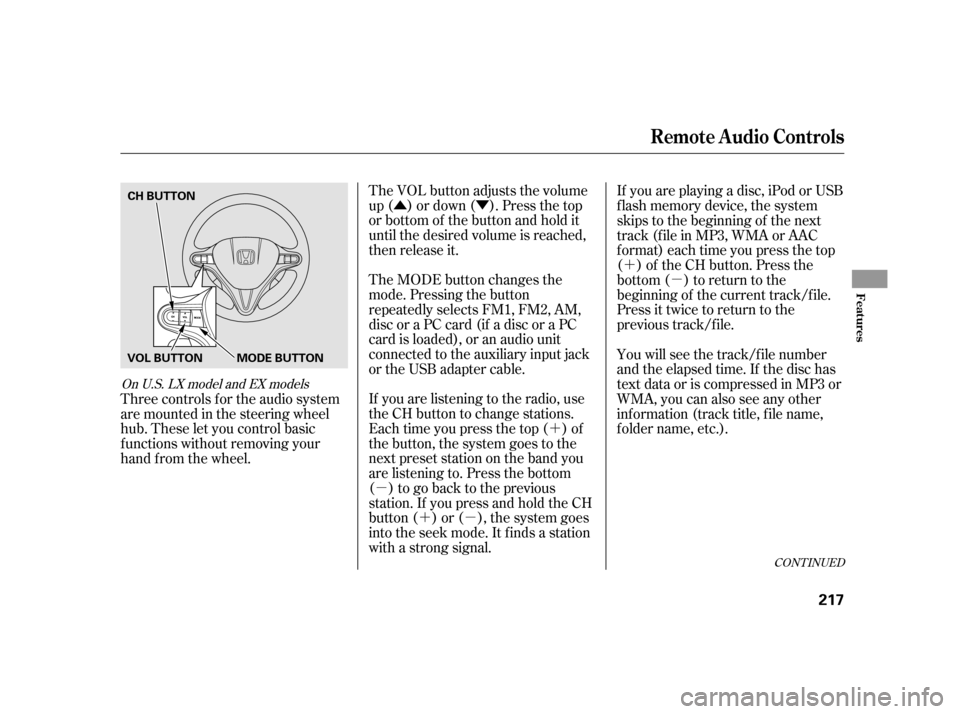
The VOL button adjusts the volume
up ( ) or down ( ). Press the top
or bottom of the button and hold it
until the desired volume is reached,
then release it.
The MODE button changes the
mode. Pressing the button
repeatedly selects FM1, FM2, AM,
discoraPCcard(ifadiscoraPC
card is loaded), or an audio unit
connected to the auxiliary input jack
or the USB adapter cable.
If you are listening to the radio, use
the CH button to change stations.
Each time you press the top ( ) of
the button, the system goes to the
next preset station on the band you
are listening to. Press the bottom
( ) to go back to the previous
station.If youpressandholdtheCH
button ( ) or ( ), the system goes
into the seek mode. It finds a station
with a strong signal. If youareplayingadisc,iPodorUSB
f lash memory device, the system
skips to the beginning of the next
track (file in MP3, WMA or AAC
format) each time you press the top
( ) of the CH button. Press the
bottom ( ) to return to the
beginning of the current track/f ile.
Press it twice to return to the
previous track/f ile.
You will see the track/f ile number
and the elapsed time. If the disc has
text data or is compressed in MP3 or
WMA, you can also see any other
inf ormation (track title, f ile name,
f older name, etc.).
Three controls f or the audio system
are mounted in the steering wheel
hub. These let you control basic
f unctions without removing your
hand f rom the wheel.
CONT INUED
On U.S. LX model and EX models
Remote Audio Controls
Features
217
CH BUTTON
MODE BUTTON
VOL BUTTON
Page 226 of 411

Push the CRUISE button on the
steering wheel. The CRUISE
MAIN indicator on the instrument
panel comes on.
Accelerate to the desired cruising
speedabove25mph(40km/h).Press and release the SET/
DECELbuttononthesteering
wheel. The CRUISE CONTROL
indicator on the instrument panel
comes on to show the system is
now activated.
Cruise control allows you to maintain
asetspeedabove25mph(40km/h)
without keeping your f oot on the
accelerator pedal. It should be used
f or cruising on straight, open
highways. It is not recommended f or
city driving, winding roads, slippery
roads, heavy rain, or bad weather.
Cruise control may not hold the set
speed when you are going up and
down hills. If your vehicle speed
increases going down a hill, use the
brakes to slow down. This will cancel
thecruisecontrol.Toresumetheset
speed, press the RES/ACCEL button.
The CRUISE CONTROL indicator
on the instrument panel will come
back on.
1.
2. 3.
On LX and EX modelsUsing the Cruise Control
Cruise Control
222
CANCEL
BUTTON
CRUISE BUTTON
RES/ACCEL
BUTTON
SET/DECEL
BUTTON
Improper use of the cruise
control can lead to a crash.
Use the cruise control only
when traveling on open
highways in good weather.


