Page 266 of 411
Make sure all windows, mirrors,
and outside lights are clean and
unobstructed. Remove f rost, snow,
or ice.Check that any items you may be
carrying are stored properly or
f astened down securely.
Check the seat adjustment (see
page ).
Check the adjustment of the
inside and outside mirrors (see
page ).
Check the steering wheel
adjustment (see page ).
Make sure the doors are securely
closed and locked.Fasten your seat belt. Check that
your passengers have f astened
their seat belts (see page ).
Youshoulddothefollowingchecks
and adjustments bef ore you drive
your vehicle.
Visually check the tires. If a tire
looks low, use a gauge to check its
pressure (see page ). Check that the hood and hatch are
f ully closed. When you start the engine, check
the gauges and indicators in the
instrument panel, and the
messages on the multi-inf ormation
display (see pages , and
).
1.
2.
3.
8. 7. 6.9.
4.
5.
61 7217
10.
141
147
128 89
338
Preparing to Drive
262
Page 268 of 411
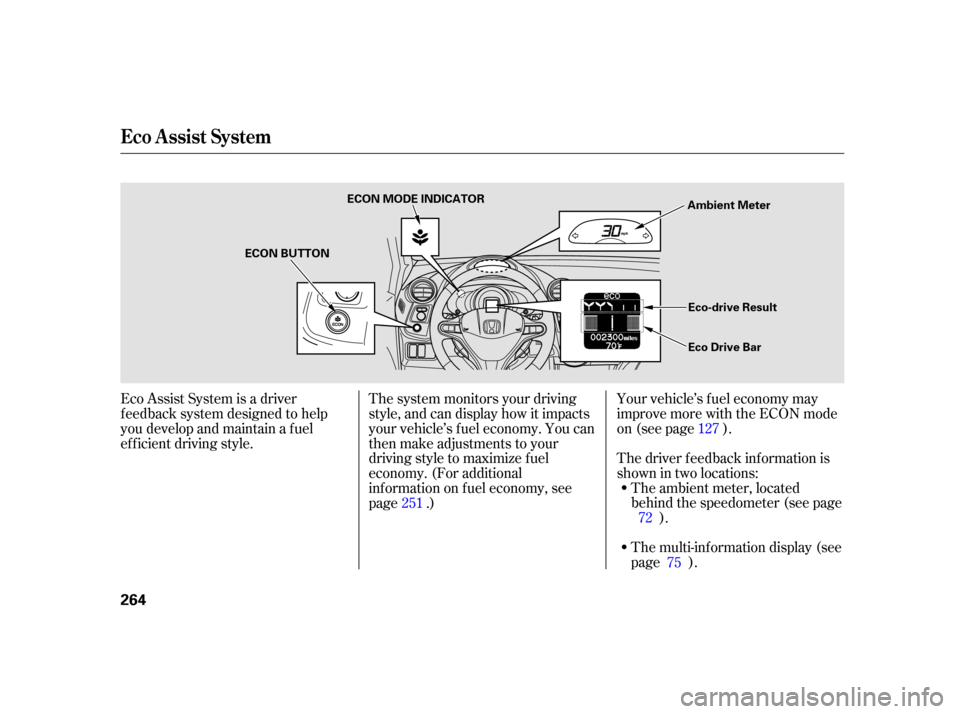
The multi-inf ormation display (see
page ).
Your vehicle’s f uel economy may
improve more with the ECON mode
on (see page ).
The driver f eedback inf ormation is
shownintwolocations:
The ambient meter, located
behind the speedometer (see page ).
The system monitors your driving
style, and can display how it impacts
your vehicle’s f uel economy. You can
then make adjustments to your
driving style to maximize f uel
economy. (For additional
inf ormation on f uel economy, see
page .)
Eco Assist System is a driver
f eedback system designed to help
you develop and maintain a f uel
ef f icient driving style.
7275 127
251
Eco A ssist Syst em
264
ECON BUTTON ECON MODE INDICATOR
Ambient Meter
Eco-drive Result
Eco Drive Bar
Page 269 of 411
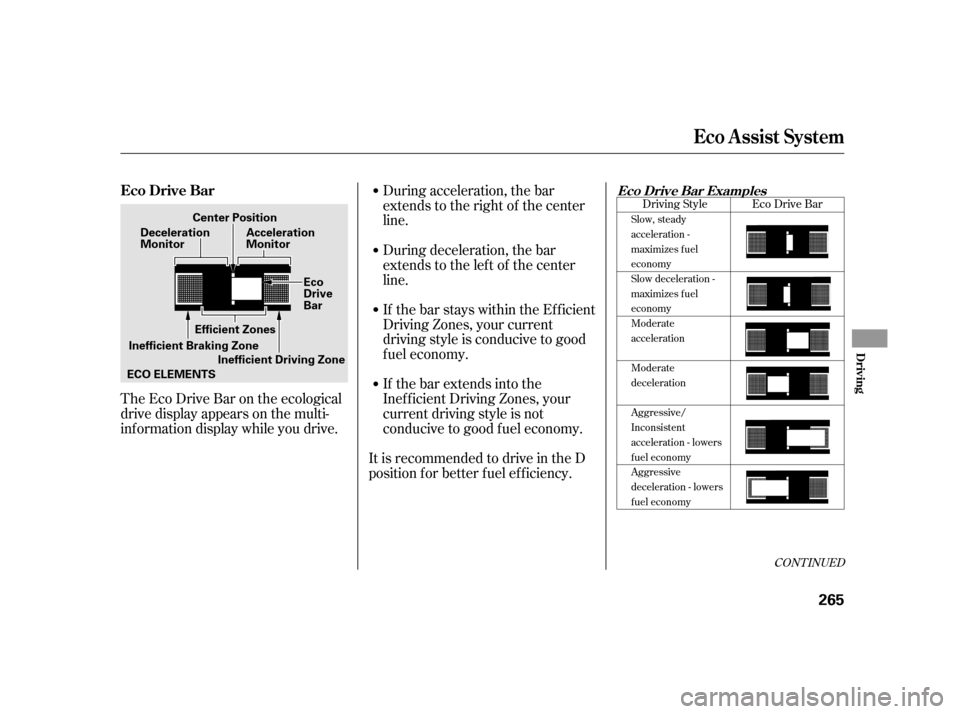
TheEcoDriveBarontheecological
drive display appears on the multi-
inf ormation display while you drive.During acceleration, the bar
extends to the right of the center
line.
If the bar extends into the
Inef f icient Driving Zones, your
current driving style is not
conducive to good f uel economy. If the bar stays within the Efficient
Driving Zones, your current
driving style is conducive to good
f uel economy. During deceleration, the bar
extends to the left of the center
line.
It is recommended to drive in the D
position f or better f uel ef f iciency.
CONT INUED
Eco Drive Bar
Driving Style
Slow, steady
acceleration -
maximizes f uel
economy
Slow deceleration -
maximizes f uel
economy
Moderate
acceleration
Moderate
deceleration
Aggressive/
Inconsistent
acceleration - lowers
fuel economy
Aggressive
deceleration - lowers
fuel economy
Eco Drive BarEco Drive Bar Examples
Eco A ssist Syst em
Driving
265
Acceleration
Monitor
Inefficient Driving Zone
Center Position
Deceleration
Monitor
Inefficient Braking Zone Efficient Zones
ECO ELEMENTS Eco
Drive
Bar
Page 271 of 411
�µ
CONT INUED
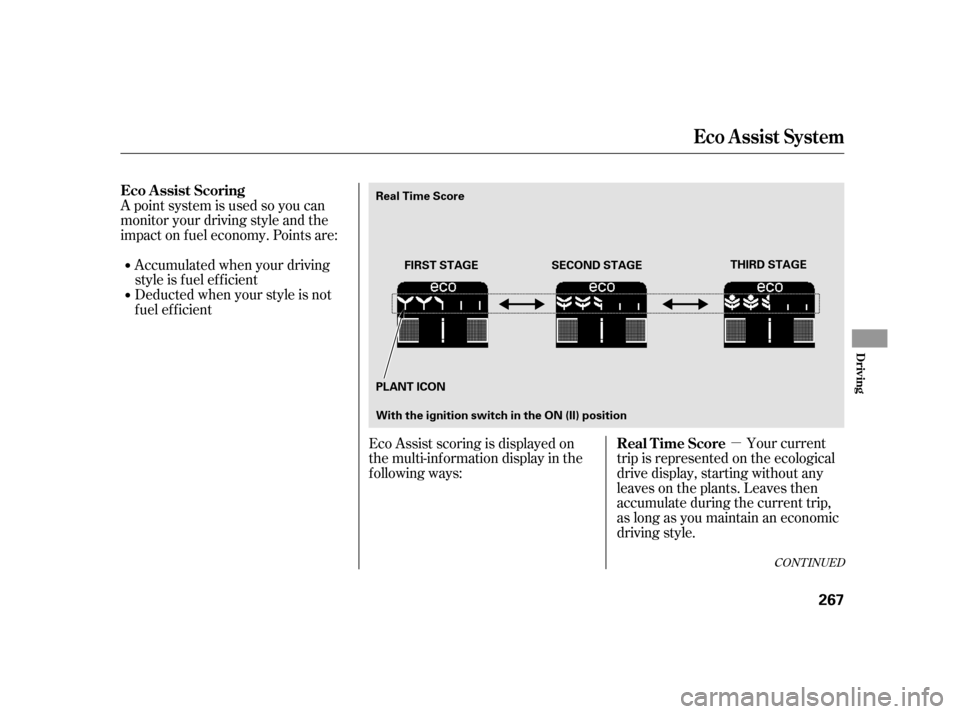
A point system is used so you can
monitor your driving style and the
impact on f uel economy. Points are:Accumulatedwhenyourdriving
style is f uel ef f icient
Deducted when your style is not
f uel ef f icient
Your current
trip is represented on the ecological
drive display, starting without any
leaves on the plants. Leaves then
accumulate during the current trip,
as long as you maintain an economic
driving style.
Eco Assist scoring is displayed on
the multi-information display in the
following ways:
Eco A ssist Scoring
Real Time Score
Eco A ssist Syst em
Driving
267
FIRST STAGETHIRD STAGE
PLANT ICON SECOND STAGE
Real Time Score
With the ignition switch in the ON (II) position
Page 272 of 411
�µ
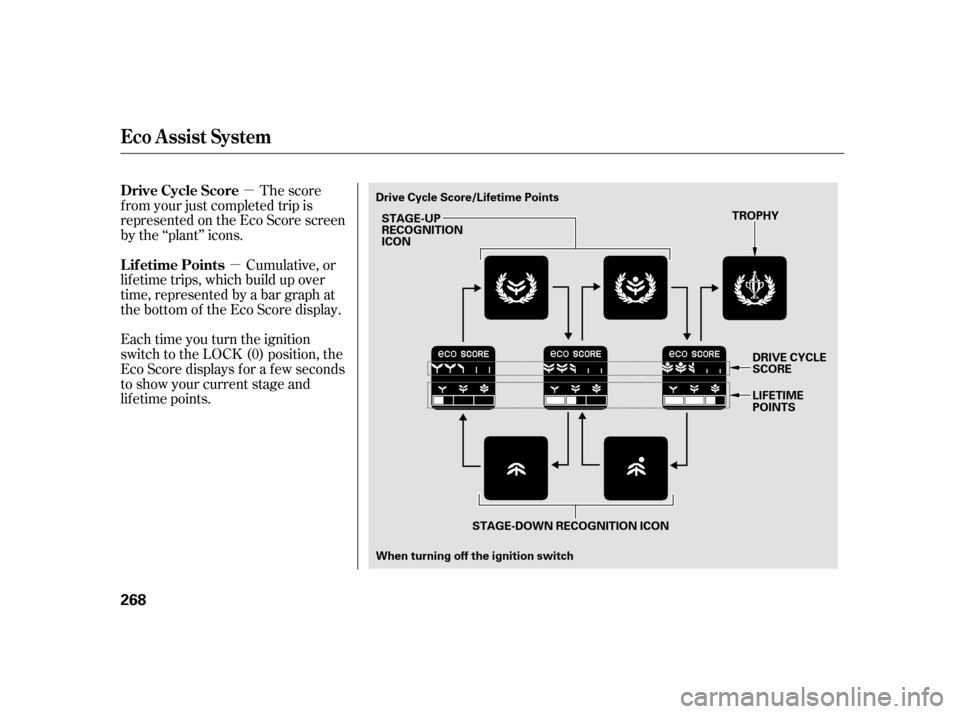
�µ The score
f rom your just completed trip is
represented on the Eco Score screen
by the ‘‘plant’’ icons.
Cumulative, or
lif etime trips, which build up over
time, represented by a bar graph at
the bottom of the Eco Score display.
Each time you turn the ignition
switch to the LOCK (0) position, the
Eco Score displays f or a f ew seconds
to show your current stage and
lif etime points. Drive Cycle Score
Lif etime Points
Eco A ssist Syst em
268
STAGE-UP
RECOGNITION
ICON
When turning off the ignition switch TROPHY
STAGE-DOWN RECOGNITION ICON
Drive Cycle Score/Lifetime Points
DRIVE CYCLE
SCORE
LIFETIME
POINTS
Page 273 of 411
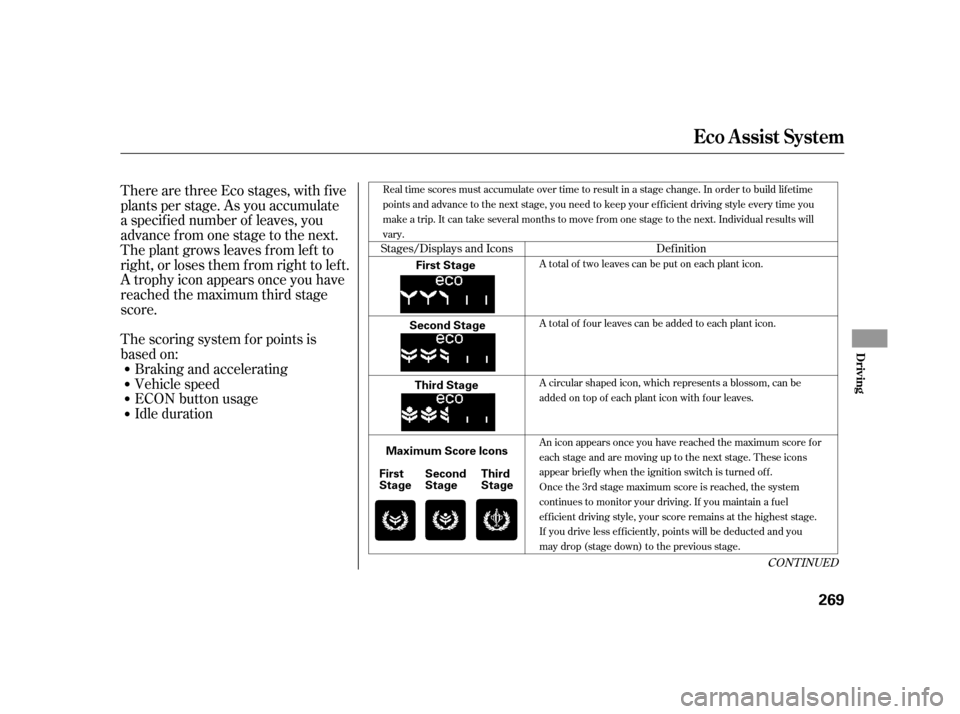
There are three Eco stages, with f ive
plants per stage. As you accumulate
a specif ied number of leaves, you
advance from one stage to the next.
The plant grows leaves f rom lef t to
right, or loses them f rom right to lef t.
A trophy icon appears once you have
reached the maximum third stage
score.Idle duration ECON button usage
Vehicle speed
Braking and accelerating
The scoring system f or points is
based on:
Stages/Displays and Icons
Def inition
CONT INUED
A total of two leaves can be put on each plant icon.
A total of four leaves can be added to each plant icon.
A circular shaped icon, which represents a blossom, can be
added on top of each plant icon with four leaves.
An icon appears once you have reached the maximum score f or
each stage and are moving up to the next stage. These icons
appear briefly when the ignition switch is turned off.
Oncethe3rdstagemaximumscoreisreached,thesystem
continues to monitor your driving. If you maintain a f uel
efficient driving style, your score remains at the highest stage.
If you drive less ef f iciently, points will be deducted and you
maydrop(stagedown)tothepreviousstage.
Real time scores must accumulate over time to result in a stage change. In order to build lif etime
points and advance to the next stage, you need to keep your efficient driving style every time you
make a trip. It can take several months to move f rom one stage to the next. Individual results will
vary.
Eco A ssist Syst em
Driving
269
First Stage
Second Stage Third Stage
Maximum Score Icons Second
Stage
First
Stage Third
Stage
Page 274 of 411

�Î
�Î
The f ollowing procedure clears all
leaves and your lif etime points. This
procedure must be f ollowed exactly.
As you progress to a higher level, the
system monitors your driving style
more strictly. As a result, you must
f urther ref ine your driving style to
continue to move up to the next level.
Turn the ignition switch to the ON
(II) position. Conf irm that the ECON
mode is OFF. If it is OFF, proceed to
step 1. Do run the engine.
Thefollowingaresomeof the
conditions that may af f ect your
score:
Extremely high or low ambient
temperature
Inconsistent acceleration use, such
as pumping the pedal repeatedly
within a short period of time
Frequent use of the climate
control system
Short distance trips If theECONmodeison,pressand
releasetheECONbuttontoturnit
off. You also need to turn the ignition
switch off.
Turn the ignition switch to the ON
(II) position again. Do run the
engine. Press and release the brake pedal
at least two times. The ambient
meter color changes f rom blue to
green .
Complete the following steps within
30 seconds:
The ambient meter color
changes only if the multi-
inf ormation display’s meter
color change setting is on. (See
page .)
Press and release the ECON
button two times (ECON mode
comes on, then goes of f ). The
ambient meter color goes of f , and
the accumulated data is cleared.
Turn the ignition switch to the
LOCK (0) position. :
1.
2.
3. 103
Reset the System
not not
Eco A ssist Syst em
270
Page 275 of 411

Honda’s Continuously Variable
Transmission’s unique design
provides a smooth, constant f low of
power. It is electronically controlled
f or more precise operation and
better f uel economy.These indicators on the instrument
panel show which position the shif t
lever is in.
The ‘‘D’’ indicator comes on f or a
f ew seconds when you turn the
ignition switch to the ON (II)
position. If it f lashes while driving (in
any shif t position), it indicates a
possible problem in the transmission.If the malf unction indicator lamp
comes on along with the ‘‘D’’
indicator, there is a problem with the
automatic transmission control
system. Avoid rapid acceleration, and
have the transmission checked by
your dealer as soon as possible.
When the ‘‘D’’ indicator warns of a
possible problem with the
transmission, you will see a ‘‘CHECK
TRANSMISSION’’ message on the
multi-inf ormation display.
Continuously Variable
T ransmission (CVT )
Shif t L ever Position Indicators
Automatic Transmission (CVT)
Driving
271
EX models
Insight and LX models