Page 215 of 411

If you see an error message on the
audio display while playing a USB
f lash memory device, f ind the
solution in the chart to the right. If
you cannot clear the error message,
take your vehicle to your dealer.Cause
Error Message Solution
USB ROM Error
Appears when an
incompatible device is
connected
Use of unsupported
files
No files in USB flash
memory device
Use of unsupported
USB f lash memory
deviceThere is a problem with the USB adapter unit.
Disconnect the device. Then, turn the audio
systemoff,andturnitonagain.Donot
reconnect the device that caused the error.
Appears when the files in the USB flash
memory device are DRM or an unsupported
format. This error message appears for about 3
seconds, then plays the next song.
Appears when the USB f lash memory device is
emptyortherearenoMP3,WMA,orAACfiles
in the USB flash memory device. Save some
MP3, WMA, or AAC files in the USB flash
memory device.
Appears when an unsupported device is
connected. See page
203for the specification
information for the USB flash memory device.
If it appears when the supported device is
connected, reconnect the device.
USB Flash Memory Device Error Messages (U.S. L X model and EX model without navigation system)
Features
211
USB ERROR BAD USBDEVICE
PLEASE CHECK OWNERS
MANUAL
UNPLAYABLE FILE
USB NO SONG
UNSUPPORTED
Page 216 of 411

The radio can receive the complete
AM and FM bands.
Those bands cover these f requen-
cies:
AM band: 530 to 1,710 kHz
FM band: 87.7 to 107.9 MHzHow well the radio receives stations
is dependent on many f actors, such
as the distance from the station’s
transmitter, nearby large objects,
and atmospheric conditions.
Driving very near the transmitter of
a station that is broadcasting on a
f requency close to the f requency of
the station you are listening to can
also af f ect your radio’s reception.
You may temporarily hear both
stations,orhearonlythestationyou
are close to.
A radio station’s signal gets weaker
as you get f arther away f rom its
transmitter. If you are listening to an
AM station, you will notice the sound
volume becoming weaker, and the
stationdriftinginandout.If youare
listening to an FM station, you will
see the stereo indicator f lickering of f
and on as the signal weakens.
Eventually, the stereo indicator will
go of f and the sound will f ade
completely as you get out of range of
the station’s signal.
Radio stations on the AM band are
assigned f requencies at least 10 kHz
apart (530, 540, 550). Stations on the
FM band are assigned f requencies at
least 0.2 MHz apart (87.9, 88.1, 88.3).
Stations must use these exact
f requencies. It is f airly common f or
stations to round-of f the f requency in
their advertising, so your radio could
display a f requency of 100.9 even
though the announcer may identif y
the station as ‘‘FM101.’’ Radio Frequencies
Radio Reception
FM/A M Radio Recept ion
212
Page 223 of 411

If your vehicle’s battery is
disconnected or goes dead, the audio
system disables itself . If this happens,
you will see ‘‘ENTER CODE’’ in the
f requency display next time you turn
on the system. Use the preset bars
(icons on models with navigation
system) to enter the f ive-digit code.
ThecodeisontheAnti-theft
Identification Card included in your
owner’s manual kit. When it is
entered correctly, the radio will start
playing.
The Anti-thef t Identif ication Card
also lists your audio serial number. It
is best to store the card in a saf e
place at home. In addition, you
should write the audio system’s
serial number in this owner’s manual.
If you make a mistake entering the
code, do not start over; complete the
f ive-digit sequence, then enter the
correct code. You have ten tries to
enter the correct code. If you areunsuccessful in ten attempts, you
must then leave the system on for
one hour bef ore trying again.
The system will retain your AM and
FM presets even if power is
disconnected.
We recommend that you register the
security code at Owner Link (owners.
honda.com). If you lose the Anti-
thef t Identif ication Card bef ore
registering the code at Owner Link,
you must obtain the code f rom your
dealer or
. To do this, you will need the
audio system’s serial number. If you
do not have the serial number with
you,askyourdealerorgoto for
inf ormation on how to retrieve it. If you lose the Anti-thef t
Identif ication Card, you must obtain
thecodefromyourdealer.Todothis,
you will need the audio system’s
serial number. If you do not have the
serial number with you, ask your
dealer how to retrieve it.
You need to enter a separate code
f or the navigation system to
reactivate. The Anti-theft Card also
lists the navigation system’s security
code and serial number. Follow the
same procedure to retrieve the serial
number and obtain the code, and
read the navigation system manual
f or details.
https://radio-navicode.honda.
com/
https://
radio-navicode.honda.com/ On models with navigation system
U.S. owners Canadian owners
Radio T hef t Prot ect ion
Features
219
Page 224 of 411

For example: 1:06 will reset to 1:001:52 will reset to 2:00
When you set the time, the ignition
switch must be ACCESSORY (I) or
ON (II) position.
To set the time, press the CLOCK
button until you hear a beep. The
displayed time begins to blink.
Change the hours by pressing the H
(hour) button until the numbers
advance to the desired time. Change
the minutes by pressing the M
(minute) button until the numbers
advance to the desired time.
Press the CLOCK button again to
enter the set time.
You can quickly set the time to the
nearest hour. If the displayed time is
bef ore the half hour, press and hold
the CLOCK button, then press the R
(reset) button to set the time back to
the previous hour. If the displayed
time is af ter the half hour, the same
procedure sets the time f orward to
the beginning of the next hour.
Setting the Clock (Models without navigation system)
220
CLOCK BUTTON
(A.SEL side of the A.SEL/SCAN bar)
HOUR BUTTON
(PRESET 4) HOUR BUTTON
(PRESET 1)
RESET BUTTON
(PRESET 6) EX model without navigation system
and LX model
MINUTE BUTTON
(PRESET 5) CLOCK BUTTON
(FM/AM button)
MINUTE BUTTON
(PRESET 2)RESET BUTTON
(PRESET 3)
Insight model
Page 225 of 411
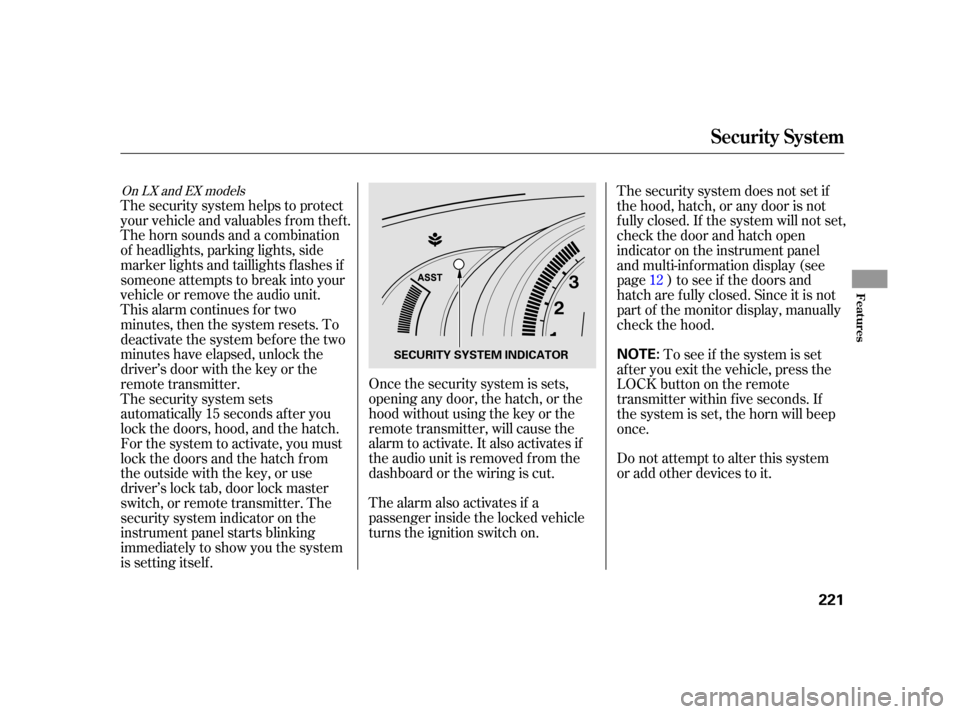
The alarm also activates if a
passenger inside the locked vehicle
turns the ignition switch on.Do not attempt to alter this system
or add other devices to it.
Once the security system is sets,
opening any door, the hatch, or the
hood without using the key or the
remote transmitter, will cause the
alarm to activate. It also activates if
the audio unit is removed f rom the
dashboard or the wiring is cut.
The security system helps to protect
your vehicle and valuables f rom thef t.
The horn sounds and a combination
of headlights, parking lights, side
marker lights and taillights f lashes if
someone attempts to break into your
vehicle or remove the audio unit.
This alarm continues for two
minutes, then the system resets. To
deactivate the system before the two
minutes have elapsed, unlock the
driver’s door with the key or the
remote transmitter.
The security system sets
automatically 15 seconds after you
lock the doors, hood, and the hatch.
For the system to activate, you must
lock the doors and the hatch f rom
the outside with the key, or use
driver’s lock tab, door lock master
switch, or remote transmitter. The
security system indicator on the
instrument panel starts blinking
immediately to show you the system
is setting itself .
To see if the system is set
af ter you exit the vehicle, press the
LOCK button on the remote
transmitter within five seconds. If
the system is set, the horn will beep
once. The security system does not set if
the hood, hatch, or any door is not
f ully closed. If the system will not set,
check the door and hatch open
indicator on the instrument panel
and multi-inf ormation display (see
page ) to see if the doors and
hatch are f ully closed. Since it is not
part of the monitor display, manually
check the hood. 12
On LX and EX models
Security System
Features
221
NOTE:SECURITY SYSTEM INDICATOR
Page 231 of 411
CONT INUED
To hear general HFL inf ormation,
including help on pairing a phone
or setting up the system, say
‘‘Tutorial.’’
For help at any time, including a
list of available commands, say
‘‘Hands f ree help.’’As an incoming call notif ication, you
will see the f ollowing display:
The Bluetooth icon will also
appear on the display when a phone
is linked. Some phones may send battery,
signal strength, and roaming status
inf ormation to HFL.
Help Feat ures
Inf ormat ion Display
BluetoothHandsFreeL ink(Models wit hout navigat ion syst em)
Features
227
ROAM STATUSHFL
MODE
PHONE DIALING
SIGNAL STRENGTH BA
TTERY
LEVEL STATUS
Page 251 of 411

Your vehicle’s on board diagnostic
system will detect a loose or missing
f uel f ill cap as an evaporative system
leak. The f irst time a leak is detected
a ‘‘TIGHTEN FUEL CAP’’ message
appears on the multi-inf ormation
display.Turn the engine of f , and conf irm the
f uel f ill cap is installed. If it is, loosen
it, then retighten it until it clicks at
least once. The message should go
off after several days of normal
driving once you tighten or replace
thefuelfillcap.Toscrolltoanother
message, press the INFO button.
The ‘‘TIGHTEN FUEL CAP’’
message will appear each time you
restart the engine until the system
turns the message off.
Screw the fuel fill cap back on
until it clicks at least once. If you
do not properly tighten the cap,
you will see a ‘‘TIGHTEN FUEL
CAP’’ message on the multi-
inf ormation display. If the system
still detects an evaporative system
leak af ter retightening the cap, the
malf unction indicator lamp may
come on (see page ).
Push the f uel f ill door closed until
it latches.
6. 5.
365
CONT INUED
Tighten Fuel Cap Message
Service Station Procedures
Bef ore Driving
247
Page 256 of 411

�µ�µ
�µ
�µ�µ�µ
Aggressive driving (hard
acceleration and braking)
Excessive idling, accelerating and
braking in stop-and-go traf f ic
Cold engine operation (engines
aremoreefficientwhenwarmed
up)
Driving with a heavy load or the
air conditioner running
Improperly inf lated tires
The f ollowing f actors can lower your
vehicle’s f uel economy:
A properly maintained vehicle
maximizes f uel economy. Poor
maintenance can signif icantly reduce
f uel economy. Always maintain your
vehicle according to the maintenance
messages displayed on the multi-
inf ormation display (see
on page ).
For example: Rapid
acceleration, abrupt cornering,
and hard braking increase fuel
consumption.
Aerodynamic drag has a big ef f ect
on f uel economy at speeds above
45 mph (75 km/h). Reduce your
speed and you reduce the drag.
Trailers, car top carriers, roof
racks and bike racks are also big
contributors to increased drag.
An underinf lated tire increases
‘‘rolling resistance,’’ which reduces
f uel economy.
It puts a heavier
load on the engine, increasing f uel
consumption.
In
particular, a build-up of snow or
mud on your vehicle’s underside
adds weight and rolling resistance.
Frequent cleaning helps your f uel
economy. Idling
results in 0 miles per gallon (0 kms
per liter).
Use the ECON mode as much as
possible.
307
Fuel Economy Factors
Use the recommended viscosity
motor oil, displaying the A PI
Certif ication Seal (see page ).
Improving Fuel Economy Owner’s
Maintenance Checks Drive moderately
Observe the speed limit
Maintain proper tire inf lation
A void carrying excess weight in
your vehicle
K eep your vehicle clean
A void excessive idling
311
Vehicle Maint enance Drive Ef f icient ly
Fuel Economy
252
