Page 74 of 374
�µBetween 8,000 miles (12,800 km)
and 10,000 miles (16,000 km) this
indicator will light f or two seconds
when you f irst turn the ignition
switch to ON (II), and then flash for
ten seconds.
If you exceed 10,000 miles (16,000
km) without having the scheduled
maintenance perf ormed, this
indicator will remain on as a constant
reminder.
This light comes on if the tailgate or
the hatch glass is not closed tightly.
This light comes on if any door is not
closed tightly.
For the f irst 8,000 miles (12,800 km)
af ter the Maintenance Required
Indicator is reset, it will come on f or
two seconds when you turn the
ignition switch to ON (II). Ref er to the Maintenance Schedules
f or Normal and Severe Driving
Conditions on pages.
This indicator reminds you that it is
time to take your vehicle in for
scheduled maintenance.
238 242
Indicator L ights
Maintenance Required
Indicator
Tailgate and Hatch Glass
Open Indicator
Door-open Indicator
Inst rument s and Cont rols70
Page 78 of 374

This shows the temperature of the
engine’s coolant. During normal
operation, the pointer should rise
from the bottom white mark to about
the middle of the gauge. In severe
driving conditions, such as very hot
weather or a long period of uphill
driving, the pointer may rise to the
upper white zone. If it reaches the
red (Hot) mark, pull saf ely to the
side of the road. Turn to page f or
instructions and precautions on
checking the engine’s cooling
system.
The temperature sensor is located in
the f ront bumper. Theref ore, the
temperature reading can be af f ected
by heat ref lection f rom the road sur-
f ace, engine heat, and the exhaust
f rom the surrounding traf f ic. This
can cause the temperature reading
not to be correct when your speed is
under 19 mph (30 km/h).
This shows how much f uel you have.
It is most accurate when the vehicle
is on level ground. It may show
slightly more or less than the actual
amount when you are driving on
curvy or hilly roads.
The needle returns to the bottom
after you turn off the ignition. The
gauge shows the f uel level reading
immediately af ter you turn the
ignition switch back ON (II).
When the outside temperature goes
down below 37°F (3°C) the f irst
time, the temperature reading blinks
about ten times to show you the
outside temperature is low. In certain
weather conditions, temperature
readings near f reezing 32°F (0°C)
couldmeanthaticeisformingonthe
road surf ace. 323
Temperature Gauge
Fuel Gauge
Gauges
Inst rument s and Cont rols74
Avoid driving with an extremely low
f uel level. Running out of f uel could
cause the engine to misf ire, damaging
the catalytic converter.
Page 79 of 374
�Î
�Î
Thetwoleversonthesteering
column contain controls f or driving
f eatures you use most of ten. The lef t
lever controls the turn signals,
headlights, and high beams. The
right lever controls the windshield
washers and wipers.
The hazard warning lights switch is
on the dashboard between the
center air vents.
The tilt adjustment lever on the
underside of the steering column
allows you to tilt the steering wheel. The controls under the lef t air vent
are f or the moonroof and the cruise
control.To use the horn, press the center pad of the steering wheel.
:
Controls Near the Steering Wheel
Inst rument s and Cont rols75
HEADLIGHTS/TURN SIGNALS SHIFT LEVER (A/T)
(P.204)
(P.76, 77)
CRUISE CONTROL
(P.179) MOONROOF
(P.113)
TILT ADJUSTMENT
(P.83) (P.82) PARKING BRAKE
HORN
REAR WINDOW
DEFOGGER
(P.81)
HAZARD WARNING
LIGHTS
(P.81)
(P.78, 79)
WINDSHIELD WIPERS/
WASHERS
A/T model is shown.
Page 80 of 374
To change f rom low beams to high
beams, push the turn signal lever
f orward until you hear a click. The
blue high beam indicator will light
(see page ). To return to low
beams, pull the turn signal lever
back. If you leave the lights on with the
ignition switch in ACCESSORY (I)
or LOCK (0), you will hear a
reminder tone when you open the
driver’s door.To f lash the high beams, pull the
turn signal lever back lightly, then
release it. The high beams will come
on and go of f . The high beams will
stay on f or as long as you hold the
lever back, no matter what position
the headlight switch is in.
The rotating switch on the lef t lever
controls the lights. Turning this
switch to the ‘‘ ’’ position turns
on the parking lights, taillights,
instrument panel lights, side-marker
lights, and rear license plate light.
Turning the switch to the ‘‘ ’’
position turns on the headlights.
69
Headlights
Controls Near the Steering Wheel
Inst rument s and Cont rols76
Page 81 of 374
Canadian models only
With the headlight switch off, the
high beam headlights come on with
reduced brightness when you turn
the ignition switch to ON (II) and
release the parking brake. They
remain on until you turn the ignition
of f , even if you set the parking brake.
The headlights revert to normal
operation when you turn them on
with the switch.Turntheknobontheleftsideof the
instrument panel to adjust the
brightness of the instrument panel
lights.Signal a turn or lane change with this
lever. Push down on the lever to
signal a lef t turn, and up to signal a
right turn. If you push it up or down
all the way, the turn signal continues
to blink even when you release the
lever. It shuts off automatically as
you complete the turn.
CONT INUED
Instrument Panel Brightness
Daytime Running L ights T urn Signals
Controls Near the Steering Wheel
Inst rument s and Cont rols77
TURN SIGNAL LEVER
Page 82 of 374
To signal a lane change, push lightly
on the turn signal lever in the proper
direction and hold it. The lever will
return to the center position as soon
as you release it.This lever controls the windshield
wipers and washers. It has five
positions:MIST: mist
OFF: off
INT: intermittent
LO: low speed
HI: high speed
To select a position, push the lever
up or down. In intermittent, the wipers operate
every f ew seconds. In low speed and
high speed, the wipers run continu-
ously.
Controls Near the Steering Wheel
Inst rument s and Cont rols
Windshield Wipers
78
Page 85 of 374
Push the button between the center
air vents to turn on the hazard
warning lights (f our-way f lashers).
This causes all f our outside turn
signals and both indicators in the
instrument panel to f lash. Use the
hazard warning lights if you need to
park in a dangerous area near heavy
traf f ic, or if your vehicle is disabled.The rear window def ogger will clear
fog, frost, and thin ice from the
window. Push the def ogger button to
turn it on and of f . The light in the
button lights to show the def ogger is
on.Make sure the rear window is clear
and you have good visibility bef ore
starting to drive.
Thedefoggerwiresontheinsideof
the rear window can be accidentally
damaged. When cleaning the glass,
always wipe side to side.
Controls Near the Steering Wheel
Inst rument s and Cont rols
Hazard Warning
Rear Window Def ogger
81
Page 86 of 374
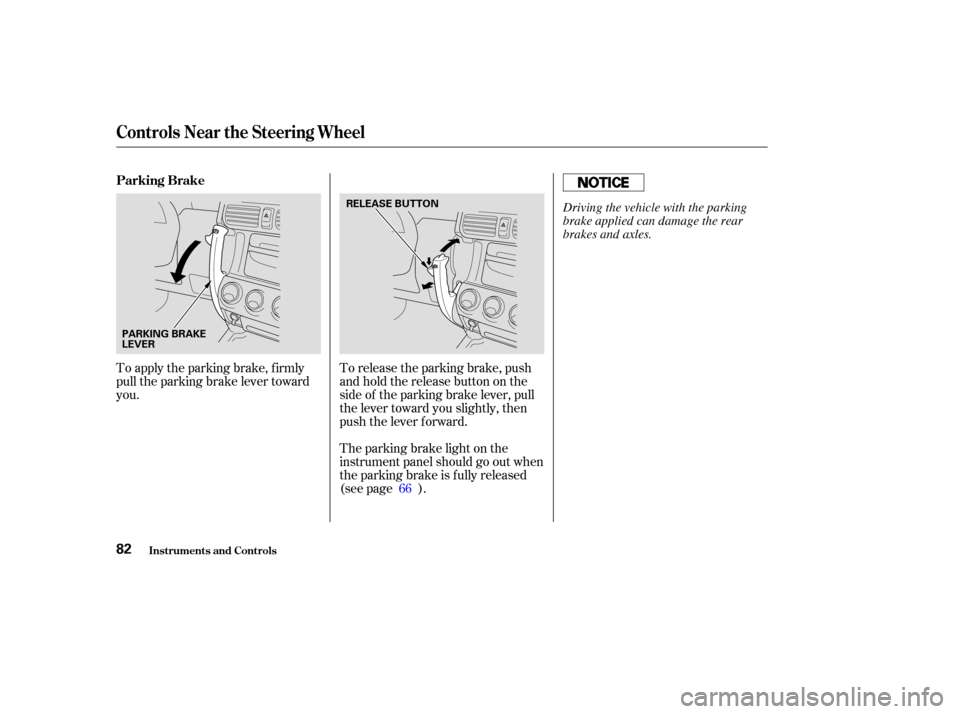
To release the parking brake, push
andholdthereleasebuttononthe
side of the parking brake lever, pull
the lever toward you slightly, then
push the lever f orward.
The parking brake light on the
instrument panel should go out when
the parking brake is fully released
(see page ).
To apply the parking brake, f irmly
pull the parking brake lever toward
you.
66
Controls Near the Steering Wheel
Inst rument s and Cont rols
Parking Brake
82
PARKING BRAKE
LEVERRELEASE BUTTON
Driving the vehicle with the parking
brake applied can damage the rear
brakes and axles.