Page 229 of 374

Start the engine.
Press on the brake pedal. Shif t the
lever through all the positions (P,
R, N, D, 2, 1)
ShifttoD,thentoN.Letthe
engine run f or three minutes, then
turn of f the engine.
Release the parking brake.
Leave the ignition switch in
ACCESSORY (I) so the steering
wheel does not lock. Make sure
the radio and any items plugged
into the accessory power sockets
are turned of f so you do not run
down the battery.If you tow more than 8 hours in one
day, you should repeat the above
procedure at least every 8 hours.
(when you stop f or f uel, etc.)
If youtowaCR-Vwithanautomatic
transmission, the transmission f luid
must be changed every two years or
30,000 miles (48,000 km), whichever
comes f irst.Ext ended T owing
Towing Your Vehicle Behind a Motorhome
Driving225
Failure to f ollow the above instructions
exactly will result in severe automatic
transmission damage. If you cannot
shif t the transmission or start the
engine, your vehicle must be
transported on a f lat-bed truck or
trailer. The steering system can be damaged if
the steering wheel is locked. Leave the
ignition switch in Accessory (I), and
make sure the steering wheel turns
f reely bef ore you begin towing.Severe automatic transmission damage
will occur if the vehicle is shif ted f rom
reverse to neutral and then towed with
the drive wheels on the ground.
Page 237 of 374

This section explains why it is
important to keep your vehicle well
maintained and to f ollow basic
maintenance saf ety precautions.
This section also includes
Maintenance Schedules f or normal
driving and severe driving conditions,
a Maintenance Record, and instruc-
tions f or simple maintenance tasks
you may want to take care of
yourself .
If you have the skills and tools to per-
f orm more complex maintenance
tasks on your Honda, you may want
to purchase the Service Manual. See
page f or inf ormation on how to
obtain a copy, or see your Honda
dealer.......................
Maintenance Saf ety .234
.
Important Safety Precautions . 235
.................
Maintenance Schedule . 236 ...
Required Maintenance Record . 243
.......
Owner Maintenance Checks . 245
..............................
Fluid Locations .246
......................................
Engine Oil .247
..................................
Adding Oil .247
....................
Recommended Oil .247
..............................
Synthetic Oil .248
....................................
Additives .248
.....
Changing the Oil and Filter . 249
.............................
Cooling System .251
............
Adding Engine Coolant . 251
.......
Replacing Engine Coolant . 253
....................
Windshield Washers .258
.......................
Transmission Fluid .260
..........
Automatic Transmission . 260
5-speed Manual .........................
Transmission .261
.................
Rear Dif f erential Fluid . 262
................
Brake and Clutch Fluid . 263
............................
Brake System .263
...........................
Clutch System .264
..............................
Power Steering .264
.....................
Air Cleaner Element .265
....................................
Hood Latch .266
....................................
Spark Plugs .267
..............................
Replacement .267 ............................
Specif ications .268
...........................................
Battery .269
.................................
Wiper Blades .271
..............
Air Conditioning System . 274
..................
Dust and Pollen Filter . 275
.......................................
Drive Belt .277
...............................................
Tires .278
......................................
Inf lation .278
Recommended Tire Pressures f or Normal ...........................
Driving .279
Tire Pressure Adjustment f or ..........
High Speed Driving . 279
..................................
Inspection .280
..............................
Maintenance .280
.............................
Tire Rotation .281
...
Replacing Tires and Wheels . 282
......................
Wheels and Tires .283
..........................
Winter Driving .283
.............................
Snow Tires .283
............................
Tire Chains .284
.............................................
Lights .285
.....................
Headlight Aiming .287
........................
Replacing Bulbs .287
....................
Storing Your Vehicle .295
357
Maintenance
Maint enance233
Page 239 of 374

Bef ore you begin any maintenance,
make sure your vehicle is parked on
level ground and that the parking
brake is set. Also, be sure the engine
is of f . This will help to eliminate
several potential hazards:Be sure
there is adequate ventilation
whenever you operate the engine.
Let the
engine and exhaust system cool
bef ore touching any parts.
Do
not run the engine unless in-
structed to do so. Read the instructions before you
begin, and make sure you have the
tools and skills required.
To reduce the possibility of f ire or
explosion, be caref ul when working
around gasoline or batteries. Use a
commercially available degreaser or
parts cleaner, not gasoline, to clean
parts. Keep cigarettes, sparks, and
flames away from the battery and all
f uel-related parts.
You should wear eye protection and
protective clothing when working
near the battery or when using
compressed air.
Maintenance Saf ety
Maint enance
Important Saf ety Precautions
Carbon monoxide poisoning
f rom engine exhaust.
Burns f rom hot parts.
Injury f rom moving parts.
235
Page 259 of 374
To drain the coolant from the
reserve tank:Remove the reserve tank
mounting bolt with a wrench, pull
out the coolant tube f rom the two
clips on the upper and lower side
of the fan shroud, then move the
reserve tank away f rom the f an
shroud while pulling the bottom
tab of the reserve tank out of the
hole.Remove the coolant tube from the
f our clips.
Use a wrench to remove the bolt
from the battery hold-down.
Remove the seven holding clips
f rom the cover by using a f lat-
tipped screwdriver. Then pull the
bulkhead cover away.
6.
7.8.
CONT INUED
Cooling Syst em
Maint enance255
BOLT
TABBOLT
Page 260 of 374

Remove the coolant tube f rom the
radiator.
Put the end of the coolant tube
lower than the coolant reserve
tank and drain the coolant into an
appropriate container.Put the reserve tank back in place,
making sure its bottom tab is in
the holder. Reinstall and tighten
the mounting bolt securely.
Reinstall the cover. Lock the
holding clips by pushing on the
center of the clip. Reinstall the bolt
in the battery hold-down.
When the coolant stops draining,
tightenthedrainplugatthe
bottom of the radiator.
Put the cover back in place and
tighten the bolts securely.
Reinstall the 16 holding clips. Lock
each clip in place by pushing on its
center.
Pour Honda All Season
Antif reeze/Coolant Type 2 into
the radiator up to the base of the
f iller neck. This coolant is a
mixture of 50 percent antif reeze
and 50 percent water. Pre-mixing
is not required.
Put the coolant tube back in the
clips and reinstall the coolant tube
to the radiator securely.
12.
13.
9.
10. 11.
14.
15. 16.
Cooling Syst em
Maint enance256
FILLER NECK
Fill up to here
Page 273 of 374
Check the battery terminals for
corrosion (a white or yellowish
powder). To remove it, cover the
terminals with a solution of baking
soda and water. It will bubble up and
turn brown. When this stops, wash it
of f with plain water. Dry of f the
battery with a cloth or paper towel.
Coat the terminals with grease to
help prevent f uture corrosion.
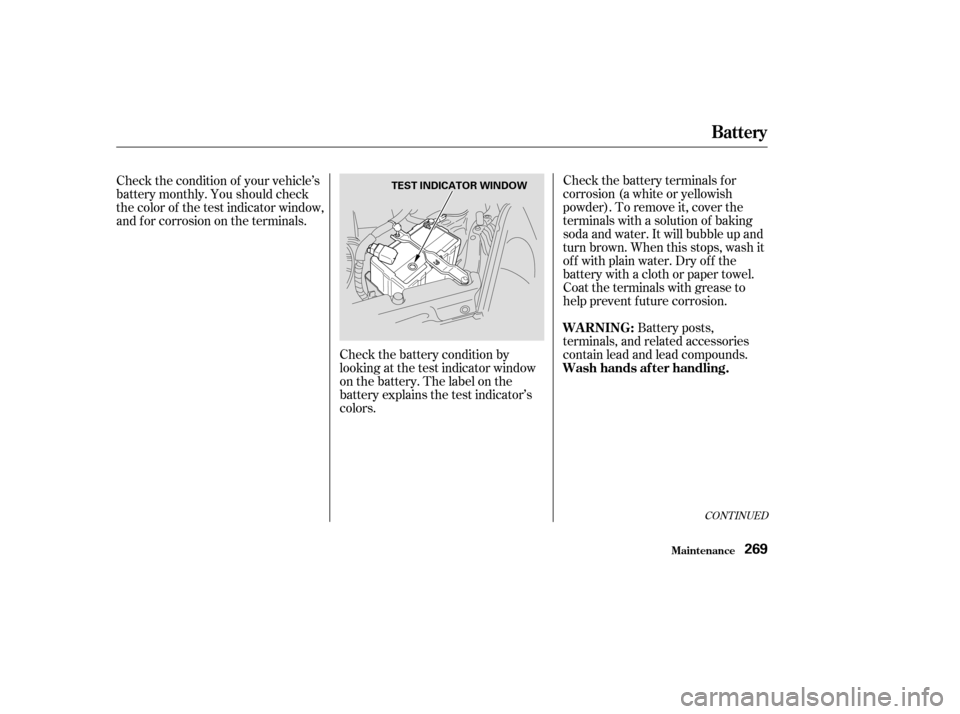
Check the battery condition by
looking at the test indicator window
on the battery. The label on the
battery explains the test indicator’s
colors.
Check the condition of your vehicle’s
battery monthly. You should check
the color of the test indicator window,
and f or corrosion on the terminals.
Battery posts,
terminals, and related accessories
contain lead and lead compounds.
CONT INUED
Battery
Maint enance
WARNING:
Wash hands af ter handling.
269
TEST INDICATOR WINDOW
Page 274 of 374

�µIf you need to connect the battery to
a charger, disconnect both cables to
prevent damage to the vehicle’s
electrical system.
If the terminals are severely cor-
roded, clean them with baking soda
and water. Then use a wrench to
loosen and remove the cables f rom
the terminals. Always disconnect the
negative ( ) cable f irst and recon-
nect it last. Clean the battery termi-
nals with a terminal cleaning tool or
wire brush. Reconnect and tighten
the cables, then coat the terminals
with grease. If your vehicle’s battery is
disconnected or goes dead, the audio
system will disable itself . The next
timeyouturnontheradioyouwill
see ‘‘ ’’ in the f requency
display. Use the Preset buttons to
enter the f ive-digit code (see page
). You will then have to set the
clock and enter your station presets. 178
Battery
Maint enance270
The battery gives off explosive
hydrogen gas during normal
operation.
A spark or flame can cause the
battery to explode with enough
force to kill or seriously hurt you.
Wear protective clothing and a
face shield, or have a skilled
mechanic do the battery
maintenance. Charging the battery with the cables
connected can seriously damage your
vehicle’s electronic controls. Detach
the battery cables bef ore connecting
the battery to a charger.
Page 293 of 374
Use a wrench to loosen the bolt on
the battery hold-down. Remove
the seven holding clips f rom the
cover by using a flat-tipped
screwdriver. Then pull the
radiator support cover away. To access the parking light bulb: Open the hood. The f ront parking
light is next to the headlight bulb.Insert the socket back into the
headlight assembly. Turn it
clockwise to lock it in place.
Turn on the parking lights and
check that the new bulb is
working.
Reinstall the radiator support
cover. Lock the holding clips by
pushing on the center of each clip.
Tighten the bolt on the battery
hold-down.
Remove the socket from the
headlight assembly by turning it
one-quarter turn counterclockwise.
Pull the burned out bulb straight
out of its socket. Push the new
bulb straight into the socket until
it bottoms.
1.
2.
3.
4.5.
6.
7.
Lights
Maint enance
Replacing a Front Parking L ight
Bulb
289
BOLT
BULB
HOLDING
CLIP
COVER