Page 160 of 374

�µ�µThe SCAN f unction
samples all the stations with strong
signals on the selected band. To
activate it, press the SCAN button,
then release it. You will see SCAN in
the display. The system will scan up
the band for a station with a strong
signal. When it f inds one, it will stop
and play that station for
approximately f ive seconds. If you do
nothing, the system will then scan
f or the next strong station and play
that f or f ive seconds. When it plays a
station that you want to continue
listening to, press the SCAN button
again. You can store the
f requencies of your f avorite radio
stations in the six preset buttons.
Each button will store one f requency
on the AM band, and two
f requencies on the FM band.
To store a f requency: Once a station’s frequency is stored,
simply press and release the proper
preset button to tune to it.
The preset f requencies will be lost if
your vehicle’s battery goes dead, is
disconnected, or the radio f use is
removed.
Repeat steps 1 to 3 to store a total
of six stations on AM and twelve
on FM. Pick the Preset button you want
for that station. Press the button
and hold it until you hear a beep. UsetheTUNE,SEEK,orSCAN
function to tune the radio to a
desired station. Select the desired band, AM or
FM. FM1 and FM2 let you store
two f requencies with each preset
button.
1.
2.
3.
4.
SCA N
Preset
Audio System
Comf ort and Convenience Feat ures156
Page 167 of 374
Press and hold the H (Preset 4)
button until the hour advances to the
desired time.
Press and hold the M (Preset 5)
button until the minutes advance to
the desired time.
Press the CLOCK (FM) button again
to enter the set time.For example:1:06 would RESET to 1:00
1:52 would RESET to 2:00 If your vehicle’s battery is
disconnected or goes dead, the time
setting will be lost. To set the time
again, follow the setting procedure.
To set the time, press the CLOCK
(FM) button until you hear a beep.
The displayed time begins to blink.
You can quickly set the time to the
nearest hour. If the displayed time is
bef ore the half hour, the clock is set
back to the previous hour by
pressing the CLOCK (FM) button
until you hear a beep, then pressing
the R (Preset 6) button. If the
displayed time is af ter the half hour,
the clock is set forward to the
beginning of the next hour.
Audio System
Comf ort and Convenience Feat ures163
CLOCK BUTTON H BUTTON M BUTTON R BUTTON
Page 182 of 374

You will have to store your favorite
stations in the Preset buttons after
the system begins working. Your
original settings were lost when
power was disconnected.
If your vehicle’s battery is discon-
nected or goes dead, or the radio
f use is removed, the audio system
will disable itself . If this happens,
youwillsee‘‘ ’’inthe
frequencydisplaythenexttimeyou
turn on the system. Use the Preset
buttons to enter the five-digit code. If
it is entered correctly, the radio will
start playing.
If you make a mistake entering the
code, do not start over or try to
correct your mistake. Complete the
f ive-digit sequence, then enter the
correct code. You have ten tries to
enter the correct code. If you are
unsuccessful in ten attempts, you
must then leave the system on for
one hour bef ore trying again.
Your vehicle’s audio system will
disable itself if it is disconnected
f rom electrical power f or any reason.
To make it work again, the user
must enter a specif ic f ive-digit code
in the Preset buttons. Because there
are hundreds of number
combinations possible f rom f ive
digits, making the system work
without knowing the exact code is
nearly impossible.
Youshouldhavereceivedacardthat
lists your audio system’s code
number and serial number. It is best
tostorethiscardinasafeplaceat
home. In addition, you should write
the audio system’s serial number in
this Owner’s Manual. If you should
happen to lose the card, you must
obtain the code number f rom your
Honda dealer. To do this, you will
need the system’s serial number. Thef t Protection
Audio System
Comf ort and Convenience Feat ures178
Page 204 of 374

If the engine still does not start,
press the accelerator pedal all the
way down and hold it there while
starting in order to clear f looding.
As bef ore, keep the ignition key in
the START (III) position f or no
more than 15 seconds. Return to
step 5 if the engine does not start.
If it starts, lif t your f oot of f the
accelerator pedal so the engine
does not race.
If the engine does not start within
15 seconds, or starts but stalls
right away, repeat step 4 with the
accelerator pedal pressed half-way
down. If the engine starts, release
pressure on the accelerator pedal
so the engine does not race. Without touching the accelerator
pedal, turn the ignition key to the
START (III) position. If the engine
does not start right away, do not
hold the key in START (III) f or
more than 15 seconds at a time.
Pause f or at least 10 seconds
bef ore trying again.
Apply the parking brake.
In cold weather, turn of f all
electrical accessories to reduce
the drain on the battery.
Push the clutch pedal down all the
way. START (III) does not
f unction unless the clutch pedal is
depressed.
Make sure the shif t lever is in
Park. Press on the brake pedal.
1.
2.
3.
4.
5.6.
Manual Transmission:
Automatic Transmission:
Driving
Starting the Engine
200
Page 205 of 374
An engine is harder to start in cold
weather. The thinner air f ound at
high altitude above 8,000 f eet
(2,400 meters) adds to the problem.
Use the f ollowing procedure:Turn of f all electrical accessories
to reduce the drain on the battery.
Push the accelerator pedal half-
way to the f loor and hold it there
while starting the engine. Do not
hold the ignition key in START
(III) f or more than 15 seconds.
When the engine starts, release
the accelerator pedal gradually as
the engine speeds up and smooths
out. If the engine fails to start in step 2,
push the accelerator pedal to the
f loor and hold it there while you
try to start the engine for no more
than 15 seconds. If the engine
does not start, return to step 2.
3.
2. 1. Starting in Cold Weather at High
A ltitude (A bove 8,000 f eet/
2,400 meters)
Starting the Engine
Driving201
Page 210 of 374

�µ
�µ Use Neutral if you
need to restart a stalled engine, or if
it is necessary to stop brief ly with
the engine idling. Shif t to Park posi-
tion if you need to leave the vehicle
f or any reason. Press on the brake pe-
dal when you are moving the shif t
lever from Neutral to another gear.
If you have done all of the above and
still cannot move the lever out of
Park, see Shif t Lock Release on page
.
To avoid transmission damage, come
to a complete stop bef ore shif ting
into Park. The shif t lever must be in
Park bef ore you can remove the key
from the ignition switch. To shif t to Reverse
f rom Park, see the explanation under
Park. To shif t to Reverse f rom
Neutral, come to a complete stop and
then shift. Your vehicle has a reverse lockout so
you cannot accidentally shif t to
Reverse when the vehicle speed
exceeds 5 mph (8 km/h).
If you cannot shif t to Reverse when
the vehicle is stopped, press the
brake pedal and slowly shift to
Neutral, and then to Reverse.
If there is a problem in the reverse
lockout system, or your vehicle’s
battery is disconnected or goes dead,
you cannot shif t to Reverse. (Ref er
to Shif t Lock Release on page ).
209
209Neutral (N)
Reverse (R)
Automatic Transmission
Driving206
Page 224 of 374
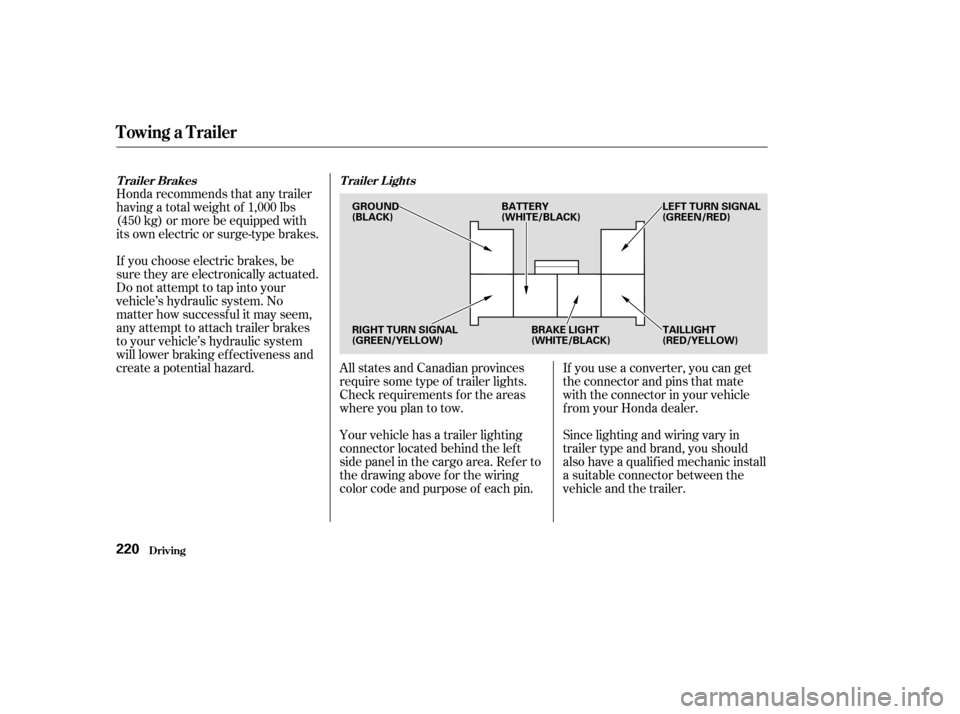
Honda recommends that any trailer
having a total weight of 1,000 lbs
(450 kg) or more be equipped with
its own electric or surge-type brakes.
If you choose electric brakes, be
sure they are electronically actuated.
Do not attempt to tap into your
vehicle’s hydraulic system. No
matter how successf ul it may seem,
any attempt to attach trailer brakes
to your vehicle’s hydraulic system
will lower braking ef f ectiveness and
create a potential hazard.Your vehicle has a trailer lighting
connector located behind the lef t
side panel in the cargo area. Ref er to
thedrawingaboveforthewiring
color code and purpose of each pin. All states and Canadian provinces
require some type of trailer lights.
Check requirements f or the areas
where you plan to tow.If you use a converter, you can get
the connector and pins that mate
with the connector in your vehicle
f rom your Honda dealer.
Since lighting and wiring vary in
trailer type and brand, you should
also have a qualif ied mechanic install
a suitable connector between the
vehicle and the trailer.
Trailer Brakes
Trailer Lights
Towing a Trailer
Driving220
GROUND
(BLACK) LEFT TURN SIGNAL
(GREEN/RED)
RIGHT TURN SIGNAL
(GREEN/YELLOW) BRAKE LIGHT
(WHITE/BLACK)TAILLIGHT
(RED/YELLOW)
BATTERY
(WHITE/BLACK)
Page 228 of 374

When preparing to tow your CR-V,
make sure the transmission is
f illed to the correct level (see page). Do not overf ill.
Leave the key in the ignition
switch and the ignition switch in
ACCESSORY (I) so the steering
wheel does not lock. Make sure
the radio and any items plugged
into the accessory power sockets
are turned of f so you do not run
down the battery. Shif t the transmission to Neutral. Release the parking brake.
After attaching the tow bar to your
motorhome, do the following to
prepare your CR-V f or ‘‘f lat towing’’: When purchasing a tow bar, make
sure you select a reputable
manuf acturer and installer. Follow
the manufacturer’s attachment
instructions caref ully. Your CR-V can be towed behind a
motorhome at legal highway speeds
up to 65 mph(100 km/h). Do not
exceed 65 mph(100km/h).
Otherwise, severe transmission
damage will occur. To avoid damage
to the 4WD system, it must be towed
with all f our wheels on the ground
(f lat towing). When preparing to tow your CR-V,
make sure the transmission is f ull of
fluid (see page ). Maintaining
the correct level is very important.
Do not overf ill. Do the f ollowing
Follow the procedure exactly.
Otherwise, severe automatic
transmission damage will occur.
261
260
every day immediately bef ore you begin
towing.
5-speed Manual T ransmission A ut omat ic T ransmission
Towing Your Vehicle Behind a Motorhome
Driving224