Page 10 of 317
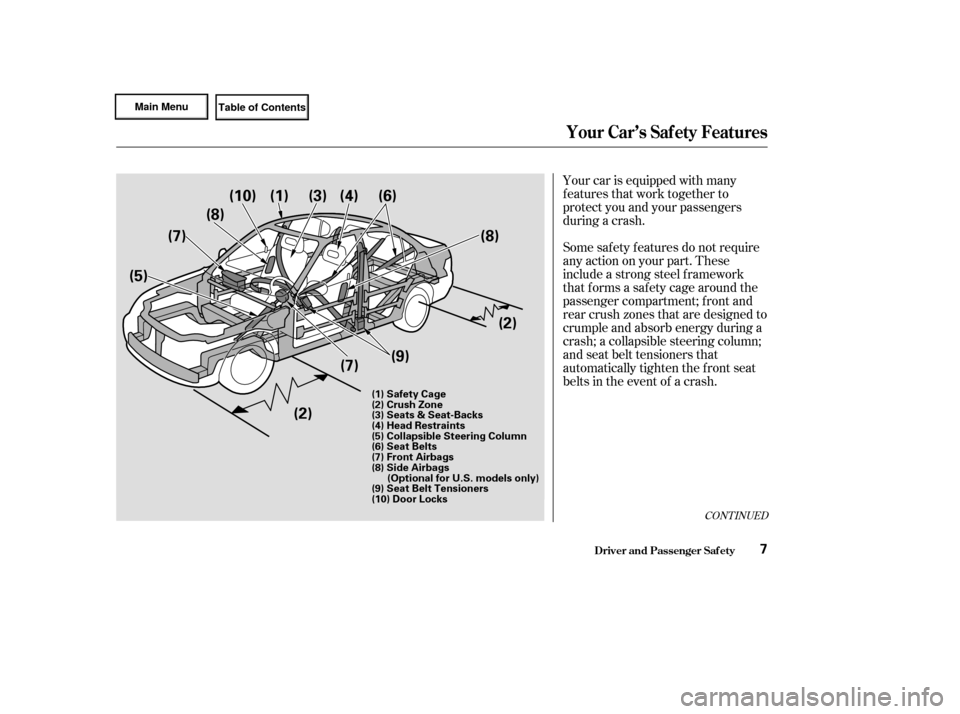
Your car is equipped with many
features that work together to
protect you and your passengers
during a crash.
Some saf ety f eatures do not require
anyactiononyourpart.These
include a strong steel f ramework
that forms a safety cage around the
passenger compartment; f ront and
rear crush zones that are designed to
crumple and absorb energy during a
crash; a collapsible steering column;
and seat belt tensioners that
automatically tighten the front seat
belts in the event of a crash.
CONT INUED
Driver and Passenger Saf ety
Your Car’s Saf ety Features
7
(1) Safety Cage
(2) Crush Zone
(3) Seats & Seat-Backs
(4) Head Restraints
(5) Collapsible Steering Column
(6) Seat Belts
(7) Front Airbags
(8) Side Airbags(Optional for U.S. models only)
(9) Seat Belt Tensioners
(10) Door Locks
(1)
(10)
(8)
(7)
(5)
(2)(7)
(9) (2)
(8)
(6)(4)(3)
Page 14 of 317

How you adjust your seats and seat-
backs can also affect your safety. For
example, sitting too close to the
steering wheel or dashboard
increases the risk of you or your
passenger being injured by striking
theinsideof thecar,orbyan
inf lating airbag.
Reclining a seat-back too f ar reduces
the seat belt’s ef f ectiveness and
increases the chance that the seat’s
occupant will slide under the seat
belt in a crash and be seriously
injured.Head restraints can help protect you
f rom whiplash and other injuries. For
maximum protection, the back of
your head should rest against the
center of the head restraint.
Your car’s seats are designed to keep
you in a comf ortable, upright
position so you can take f ull
advantage of the protection offered
by seat belts and the energy
absorbing materials in the seats.
Move the f ront
seats as far back as possible, and
keep adjustable seat-backs in an
upright position whenever the car is
moving. Keeping your doors locked reduces
thechanceof beingthrownoutof
the car during a crash. It also helps
prevent occupants f rom accidentally
opening a door and f alling out, and
outsiders f rom unexpectedly opening
your doors.
Seats & Seat-Backs
Head RestraintsDoor L ocks
What you should do:
Driver and Passenger Saf ety
Your Car’s Saf ety Features
11
Page 65 of 317

This light has two f unctions:This light normally comes on f or a
f ew seconds when you turn the
ignition switch ON (II), and when
the ignition switch is turned to
START (III). If this light comes on at
any other time, there is a problem in
theABS.If thishappens,takethe
cartoyourdealertohaveitchecked.
With the light on, your car still has
normal braking ability but no anti-
lock. For complete inf ormation, see
page .
If this light comes on when the
engine is running, the battery is not
being charged. For complete
inf ormation, see page .
The engine can be severely damaged
if this light f lashes or stays on when
the engine is running. For complete
inf ormation, see page .
This indicator comes on when you
turn the ignition switch ON (II). It
is a reminder to check the parking
brake. Driving with the parking
brake not f ully released can
damage the brakes and tires.
If the indicator remains lit after
you have f ully released the
parking brake while the engine is
running, or if it comes on while
driving, it can indicate a problem
in the brake system. For complete
inf ormation, see page .
See page . 1.
2.
272
271 275177
273
Only on models equipped with ABS (see
page ) 175
Parking Brake
and Brake
System
Indicator Anti-lock Brake
System (A BS)
Indicator
Charging System
Indicator
L ow Oil Pressure
Indicator
Malf unction Indicator
Lamp
Indicator L ights
Inst rument s and Cont rols62
U.S. Canada
U.S. Canada
Page 111 of 317
The heating and cooling system in
your Honda has f ull heating,
ventilation, and air conditioning
capabilities. In combination with the
air conditioning, the system regu-
lates the interior temperature you
select. The system also adjusts the
fanspeedandairflowdirection
automatically depending on the set
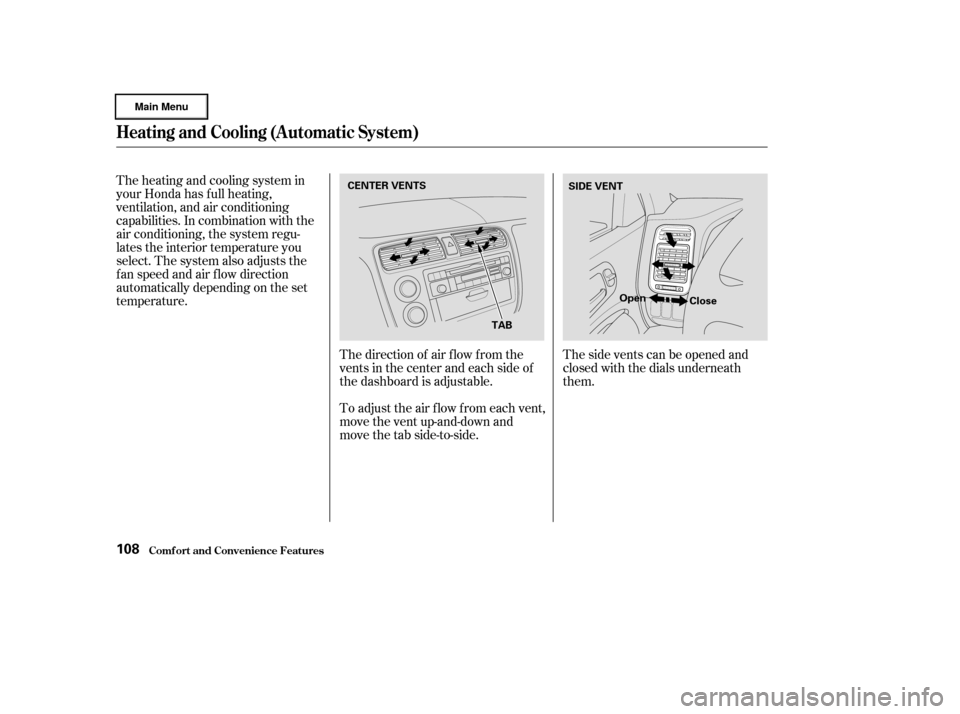
temperature.The direction of air f low f rom the
vents in the center and each side of
the dashboard is adjustable.
To adjust the air f low f rom each vent,
move the vent up-and-down and
move the tab side-to-side.Thesideventscanbeopenedand
closed with the dials underneath
them.
Heating and Cooling (Automatic System)
Comf ort and Convenience Feat ures108
CENTER VENTS
TABSIDE VENT
Open Close
Page 162 of 317

This section gives you tips on
starting the engine under various
conditions, and how to operate the
5-speed manual and automatic
transmissions. It also includes impor-
tant inf ormation on parking your car,
and the braking system.........................
Preparing to Drive .160
.......................
Starting the Engine .161
Starting in Cold Weather ....................
at High Altitude .161 ....
5-speed Manual Transmission . 162
............................
Auto Idle Stop .163
...........
Auto Idle Stop Indicator . 164
Shif t Up/Shif t Down ...................................
Indicators .165
..............
Engine Speed Limiter . 165
..
Automatic Transmission(CVT) . 166
Continuously Variable .................
Transmission(CVT) . 166
.
Shif t Lever Position Indicator . 166
................
Shif t Lever Positions . 167
..............
Engine Speed Limiter . 169
....................
Shif t Lock Release . 170
............................
Auto Idle Stop .171
...........
Auto Idle Stop Indicator . 172
...........................................
Parking .173
..............................
Parking Tips .173
.....................
The Braking System .174
.............
Brake Wear Indicators . 174
...............
Brake System Design . 175
.......................
Anti-lock Brakes .175
Important Saf ety .........................
Reminders .176
........................
ABS Indicator .177
...............
Driving in Bad Weather . 178
...........................
Towing a Trailer .179
Driving
Driving159
Page 177 of 317

Check your brakes af ter driving
through deep water. Apply the
brakes moderately to see if they f eel
normal. If not, apply them gently and
f requently until they do. Since a
longer distance is needed to stop
with wet brakes, be extra cautious
and alert in your driving. Constant application of the brakes
when going down a long hill builds
up heat and reduces their ef f ective-
ness. Use the engine to assist the
brakes by downshif ting to a lower
gear and taking your f oot of f the
accelerator pedal.When the brake pads need replacing,
you will hear a distinctive metallic
‘‘screeching’’ sound when you apply
the brakes. If you do not have the
brake pads replaced, they will begin
screeching all the time.
Your brakes may sometimes squeal
or squeak when you apply them
lightly. Do not conf use this with the
brakewearindicators.Theymakea
very audible ‘‘screeching.’’ The f ront disc brakes on all models
have audible brake wear indicators.
Put your f oot on the brake pedal only
when you intend to brake. Resting
your f oot on the pedal keeps the
brakes applied lightly, causing them
to build up heat. Heat build-up can
reduce how well your brakes work. It
also keeps your brake lights on all
the time, conf using drivers behind
you. The Civic Hybrid is equipped with
f ront disc brakes. The brakes on the
rear wheels are drum. A power assist
helps reduce the ef f ort needed on
thebrakepedal.TheABS(oncars
equipped with ABS) helps you retain
steering control when braking very
hard. Brake Wear Indicators
The Braking System
Driving174
Page 178 of 317
CONT INUED
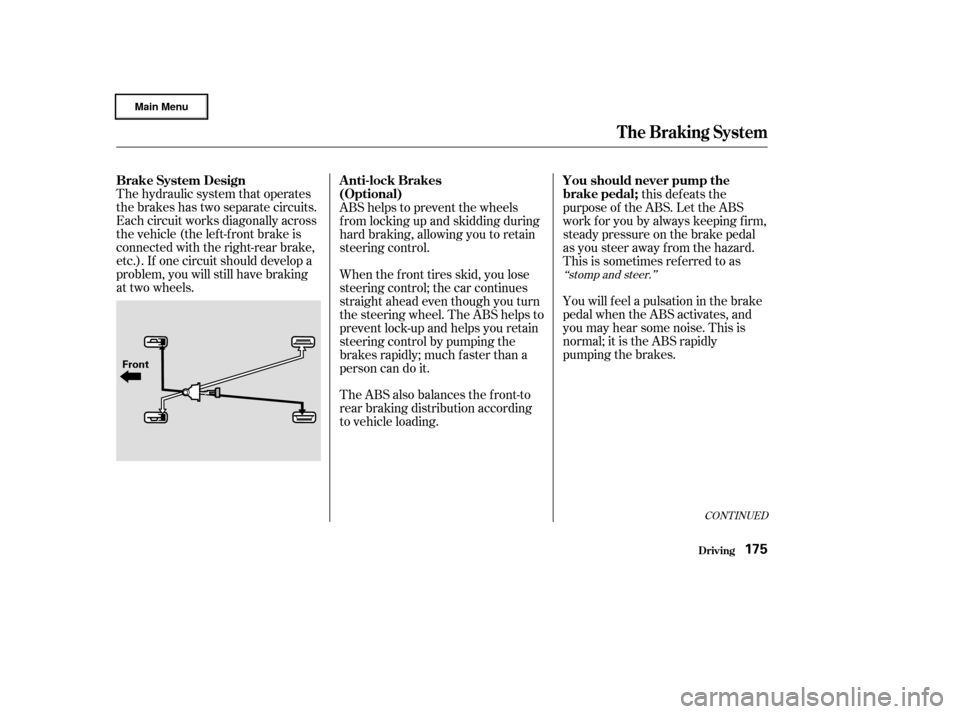
The hydraulic system that operates
the brakes has two separate circuits.
Each circuit works diagonally across
the vehicle (the lef t-f ront brake is
connected with the right-rear brake,
etc.). If one circuit should develop a
problem, you will still have braking
at two wheels.this defeats the
purpose of the ABS. Let the ABS
work f or you by always keeping f irm,
steady pressure on the brake pedal
as you steer away from the hazard.
This is sometimes ref erred to as
You will f eel a pulsation in the brake
pedal when the ABS activates, and
you may hear some noise. This is
normal; it is the ABS rapidly
pumping the brakes.
ABS helps to prevent the wheels
f rom locking up and skidding during
hard braking, allowing you to retain
steering control.
When the f ront tires skid, you lose
steering control; the car continues
straightaheadeventhoughyouturn
the steering wheel. The ABS helps to
prevent lock-up and helps you retain
steering control by pumping the
brakes rapidly; much f aster than a
person can do it.
The ABS also balances the f ront-to
rear braking distribution according
to vehicle loading.
‘‘stomp and steer.’’
Brake System Design
A nti-lock BrakesYou should never pump the
brake pedal;
(Optional)
Driving
The Braking System
175
Front
Page 179 of 317

on loose or
uneven surf aces, such as gravel or
snow, than a vehicle without anti-
lock. Slow down and allow a greater
distance between vehicles under
those conditions.
it
only helps with steering control
during braking. You should always
maintain a saf e f ollowing distance
f rom other vehicles.
such as trying to take a
corner too f ast or making a sudden
lane change. Always drive at a safe,
prudent speed f or the road and
weather conditions.
Always steer moderately
when you are braking hard. Severe
or sharp steering wheel movement
can still cause your car to veer into
oncoming traffic or off the road.
Activation varies with the amount of
traction your tires have. On dry
pavement, you will need to press on
thebrakepedalveryhardbeforeyou
activate the ABS. However, you may
feel the ABS activate immediately if
you are trying to stop on snow or ice.
The Braking System
Driving
A vehicle with A BS may require a
longer distance to stop
A BS does not reduce the time or
distance it takes to stop the car;
A BS will not prevent a skid that
results f rom changing direction
abruptly,
A BS cannot prevent a loss of
stability.Import ant Saf et y Reminders
176