Page 106 of 380
After all doors are closed tightly, the
light dims slightly, then f ades out in
about 30 seconds. In the ON position,
the ceiling light stays on
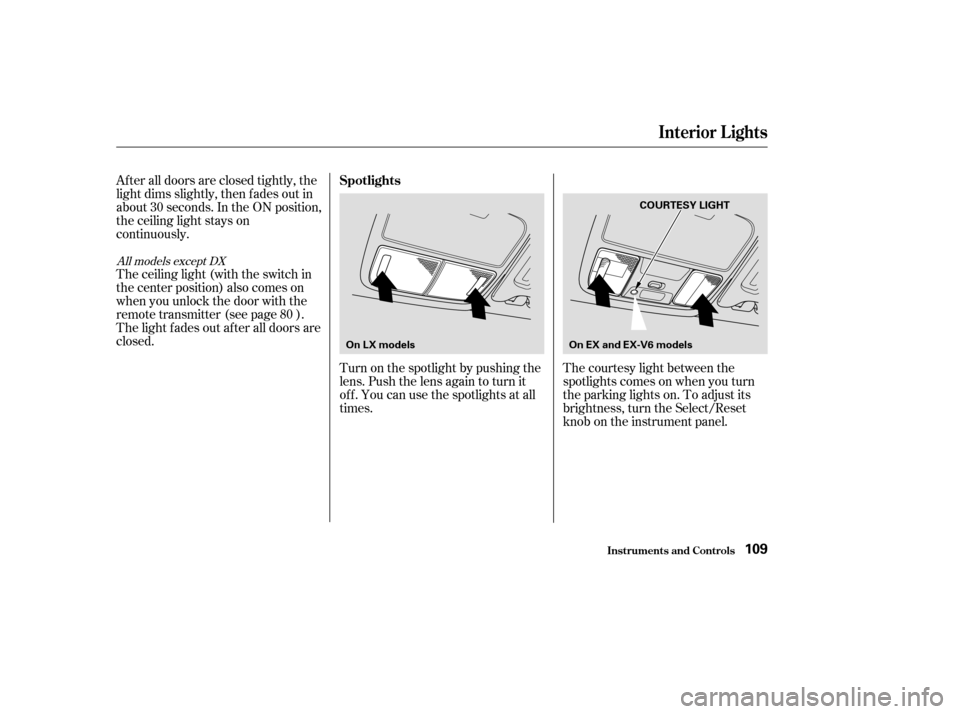
continuously.Turn on the spotlight by pushing the
lens. Push the lens again to turn it
of f . You can use the spotlights at all
times.
The ceiling light (with the switch in
the center position) also comes on
when you unlock the door with the
remote transmitter (see page ).
The light f ades out af ter all doors are
closed.
The courtesy light between the
spotlights comes on when you turn
the parking lights on. To adjust its
brightness, turn the Select/Reset
knob on the instrument panel.
80
All models except DX
Interior Lights
Inst rument s and Cont rols
Spotlights
109
On LX models On EX and EX-V6 models COURTESY LIGHT
�����—�����—�����y���������������y���
�(�����������y���
�
���y
Page 107 of 380
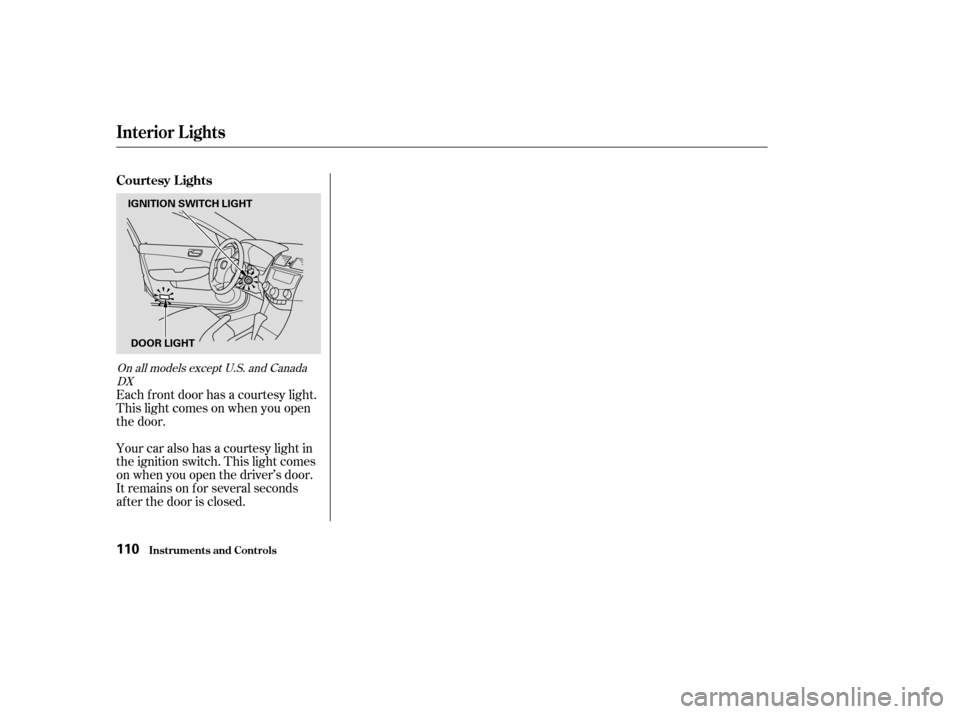
Your car also has a courtesy light in
the ignition switch. This light comes
on when you open the driver’s door.
It remains on f or several seconds
af ter the door is closed.
Each f ront door has a courtesy light.
This light comes on when you open
the door.
On all models except U.S. and Canada
DX
Interior Lights
Inst rument s and Cont rols
Courtesy Lights
110
IGNITION SWITCH LIGHT
DOOR LIGHT
�����—�����—�����y�����������
���y���
�(�����������y���
�
���y
Page 108 of 380
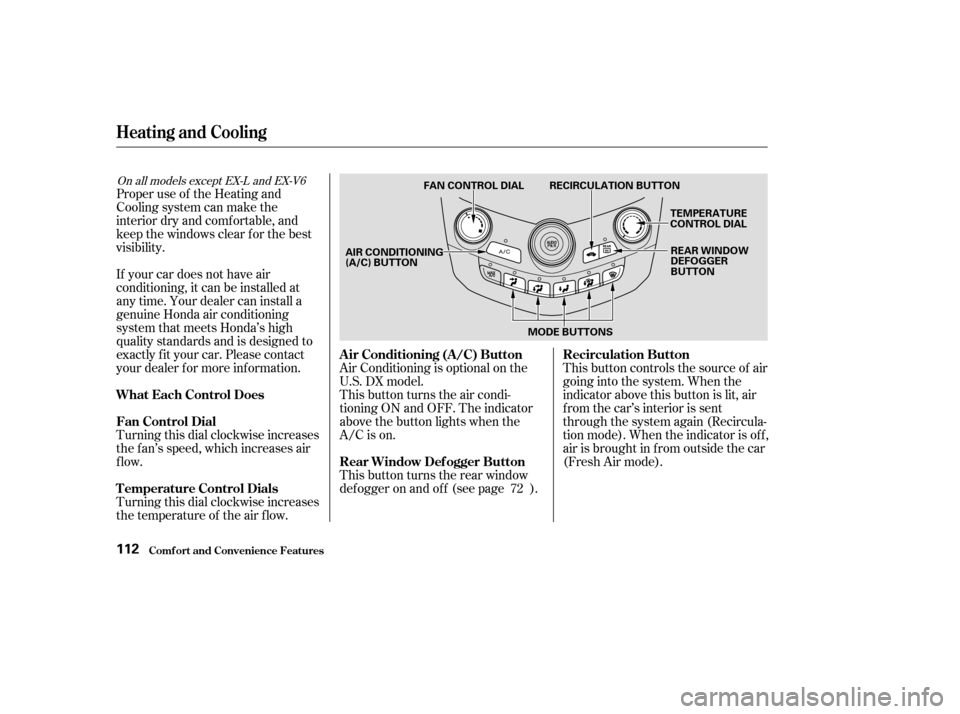
This button controls the source of air
going into the system. When the
indicator above this button is lit, air
from the car’s interior is sent
through the system again (Recircula-
tion mode). When the indicator is off,
air is brought in f rom outside the car
(Fresh Air mode).
This button turns the air condi-
tioning ON and OFF. The indicator
above the button lights when the
A/C is on.
Air Conditioning is optional on the
U.S. DX model.
Turning this dial clockwise increases
the temperature of the air flow.
Turning this dial clockwise increases
the f an’s speed, which increases air
flow.
If your car does not have air
conditioning, it can be installed at
any time. Your dealer can install a
genuine Honda air conditioning
system that meets Honda’s high
quality standards and is designed to
exactly f it your car. Please contact
your dealer f or more inf ormation.
This button turns the rear window
def ogger on and of f (see page ).
Proper use of the Heating and
Cooling system can make the
interior dry and comf ortable, and
keep the windows clear f or the best
visibility.
72
On all models except EX-L and EX-V6
Comf ort and Convenience Feat ures
Heating and Cooling
Air Conditioning (A/C) Button Recirculation Button
Rear Window Def ogger Button
T emperature Control Dials
Fan Control Dial
What Each Control Does
112
TEMPERATURE
CONTROL DIAL
FAN CONTROL DIAL RECIRCULATION BUTTON
REAR WINDOW
DEFOGGER
BUTTON
MODE BUTTONS
AIR CONDITIONING
(A/C) BUTTON
�����—�����—�����y���������������y���
�(�����������y���
�
���y
Page 112 of 380

Air conditioning places an extra load
on the engine. Watch the engine
coolant temperature gauge (see page) when driving in stop-and-go
traf f ic or climbing a long, steep hill.
If it moves near the red zone, turn
of f the A/C until the gauge reads
normally.
When the interior has cooled down
to a more comf ortable temperature,
close the windows and set the
controls as described f or normal
cooling.
If the interior is very warm f rom
beingparkedinthesun,youcancool
it down more rapidly by setting up
the controls this way: Turn on the A/C by pressing the
A/C button. The light above the
buttonshouldcomeonwhenafan
speed is selected.
Make sure the temperature
controldialissettomaximumcool.
Select .
If the outside air is humid, select
Recirculation mode. If the outside
air is dry, select Fresh Air mode.
Set the f an to the desired speed.
Start the engine.
Turn on the A/C by pressing the
A/C button. Make sure the tem-
perature control dial is set to
maximum cool.
Set the f an to maximum speed.
Open the windows partially. Select
and Fresh Air mode.
1. 2. 3. 4. 5. 1. 2. 3. 4.
64
On cars with manual air conditioningsystem
Comf ort and Convenience Feat ures
Heating and Cooling
T o Cool wit h A /C
116
RECIRCULATION BUTTON
TEMPERATURE
CONTROL DIAL
AIR CONDITIONING
(A/C) BUTTON
FAN CONTROL
DIAL
MODE BUTTONS
�����—�����—�����y���������������y���
�(�����������y���
�
���y
Page 123 of 380

�Û
�Ý
To put the Automatic Climate
Control in f ully-automatic mode,
press the AUTO button. The
indicator in the button will light.
Then set the desired temperature by
pressing the temperature buttons:
to raise the temperature above the
displayed value, or to lower the
temperature.
The system automatically selects the
proper mix of conditioned and/or
heated air that will, as quickly as
possible, raise or lower the interior
temperature f rom its current level to
the set temperature.
When you set the temperature to its
lower limit (60°F/18°C ‘‘ ’’)
or its upper limit (90°F/32°C
‘‘ ’’), the system runs at f ull
cooling or heating only. It does not
regulate the interior temperature.
When the temperature is set between the lower and upper limits,
the system regulates the interior
temperature to the set value.
In cold weather, the f an will not
come on automatically until the car
has been driven f or a short time and
the heater starts to develop warm air.
Pressing the OFF button shuts the
climate control system completely
of f . Keep the system completely of f
only f or short periods. To keep stale
air and mustiness f rom collecting,
you should have the f an running at
all times.
Climat e Cont rol Syst em
Comf ort and Convenience Feat ures
With Navigation System
Fully-automatic Operation
127
AUTO BUTTON
OFF BUTTON
RECIRCULATION
BUTTON
TEMPERATURE DISPLAY
DRIVER’S SIDE
TEMPERATURE
CONTROL BUTTONS PASSENGER’S SIDE
TEMPERATURE
CONTROL BUTTONS
�����—�����—�����y�����������
�
�y���
�(�����������y���
�����y
Page 129 of 380
Theclimatecontrolsystemhastwo
sensors. A sunlight sensor is located
in the top of the dashboard and a
temperature sensor is next to the
steering column. Do not cover the
sensors or spill any liquid on them.
Climat e Cont rol Syst em
Comf ort and Convenience Feat ures
Sunlight Sensor/T emperature
Sensor
133
SUNLIGHT SENSORTEMPERATURE SENSOR
�����—�����—�����y������
����
�
�y���
�(�����������y���
�����y
Page 143 of 380

�Û
The tape direction indicator will light
to show you which side of the
cassette is playing. The indicates
thesideyouinsertedfacingupward
is now playing. If you want to play
the other side, press the Preset 3
(PLAY/PROG) side of the preset
bar. Dolby noise reduction turns on when
you insert a cassette. The indi-
cator will light in the display. If the
tape was not recorded with Dolby
noise reduction, turn it of f by
pressing the Preset 4 (NR) side of
the preset bar.
Noise reduction remains of f until you
turn it on by pressing the button
again.If you turn the system of f while a
tape is playing, either with the PWR/
VOL knob or by turning of f the
ignition, the cassette will remain in
the drive. When you turn the system
back on, the cassette player will be in
pause mode. To begin playing, press
thePreset3(PLAY/PROG)sideof
the preset bar.
To switch to the radio or CD player
while a tape is playing, press the
AM/FM, or CD/AUX button. To
change back to the cassette player,
push the CD/AUX button.
When the system reaches the end of
the tape, it will automatically reverse
direction and play the other side. If
you want to remove the cassette
from the drive, press the eject button
on the cassette player.
Audio System
Comf ort and Convenience Feat ures147
�����—�����—�����y������
��������y���
�(�����������y���
�����y
Page 162 of 380

�Û
The tape direction indicator will light
to show you which side of the
cassette is playing. The indicates
thesideyouinsertedfacingupward
is now playing. If you want to play
the other side, press the Preset 3
(PLAY/PROG) side of the preset
bar. Dolby noise reduction turns on when
you insert a cassette. The indi-
cator will light in the display. If the
tape was not recorded with Dolby
noise reduction, turn it of f by
pressing the Preset 4 (NR) side of
the preset bar.
Noise reduction remains of f until you
turn it on by pressing the button
again.If you turn the system of f while a
tape is playing, either with the PWR/
VOL knob or by turning of f the
ignition, the cassette will remain in
the drive. When you turn the system
back on, the cassette player will be in
pause mode. To begin playing, press
thePreset3(PLAY/PROG)sideof
the preset bar.
When the system reaches the end of
the tape, it will automatically reverse
direction and play the other side. If
you want to remove the cassette
from the drive, press the eject button
on the cassette player. To switch to the radio or CD player
while a tape is playing, press the
AM/FM, or CD/AUX button. To
change back to the cassette player,
push the CD/AUX button.
Audio System
Comf ort and Convenience Feat ures166
�����—�����—�����y������
����
���y���
�(�����������y���
�����y