Page 111 of 380

CONT INUED
The f low-through ventilation system
draws in outside air, circulates it
through the interior, then exhausts it
through vents near the rear window.Turn the temperature control dial
all the way to the lef t.
Make sure the A/C is of f .
Select and Fresh Air mode.
Set the f an to the desired speed.
The outside air intakes f or the
heating and cooling system are at
the base of the windshield. Keep
these clear of leaves and other
debris.
This section covers how to set up the
system controls f or ventilation,
heating, cooling, dehumidif ying, and
def rosting.
The engine must be running f or the
heater and air conditioning to
generate hot and cold air. The heater
uses engine coolant to warm the air.
If the engine is cold, it will be several
minutes bef ore you f eel warm air
coming from the system.
It is best to leave the system in Fresh
Air mode under almost all conditions.
Keeping the system in Recirculation
mode, particularly with the A/C of f ,
can cause the windows to fog up.
Switch to Recirculation mode when
you are driving through smoky or
dusty conditions, then switch back to
Fresh Air mode when the condition
clears.
The air conditioning does not rely on
engine temperature.
1. 2. 3.
Heating and Cooling
Comf ort and Convenience Feat ures
Vent ilat ion
How to Use the System
115
RECIRCULATION BUTTONTEMPERATURE
CONTROL DIAL
FAN CONTROL
DIAL
MODE BUTTONS
AIR CONDITIONING
(A/C) BUTTON
�����—�����—�����y���������������y���
�(�����������y���
�
���y
Page 112 of 380

Air conditioning places an extra load
on the engine. Watch the engine
coolant temperature gauge (see page) when driving in stop-and-go
traf f ic or climbing a long, steep hill.
If it moves near the red zone, turn
of f the A/C until the gauge reads
normally.
When the interior has cooled down
to a more comf ortable temperature,
close the windows and set the
controls as described f or normal
cooling.
If the interior is very warm f rom
beingparkedinthesun,youcancool
it down more rapidly by setting up
the controls this way: Turn on the A/C by pressing the
A/C button. The light above the
buttonshouldcomeonwhenafan
speed is selected.
Make sure the temperature
controldialissettomaximumcool.
Select .
If the outside air is humid, select
Recirculation mode. If the outside
air is dry, select Fresh Air mode.
Set the f an to the desired speed.
Start the engine.
Turn on the A/C by pressing the
A/C button. Make sure the tem-
perature control dial is set to
maximum cool.
Set the f an to maximum speed.
Open the windows partially. Select
and Fresh Air mode.
1. 2. 3. 4. 5. 1. 2. 3. 4.
64
On cars with manual air conditioningsystem
Comf ort and Convenience Feat ures
Heating and Cooling
T o Cool wit h A /C
116
RECIRCULATION BUTTON
TEMPERATURE
CONTROL DIAL
AIR CONDITIONING
(A/C) BUTTON
FAN CONTROL
DIAL
MODE BUTTONS
�����—�����—�����y���������������y���
�(�����������y���
�
���y
Page 113 of 380

To warm the interior:Air conditioning, as it cools, removes
moisture from the air. When used in
combination with the heater, it
makes the interior warm and dry.To remove f og f rom the inside of the
windows:
Set the f an to the desired speed.
Turn on the air conditioning.
Select and Fresh Air mode.
Adjust the temperature control
dial so the mixture of heated and
cooled air f eels comf ortable.
Start the engine.
Select and Fresh Air mode.
Set the f an to the desired speed.
Adjust the warmth of the air with
the temperature control dial.
Once the engine is warmed up, this
setting is suitable f or all driving
conditions. Set the f an to the desired speed.
Select .
When you select , the
system automatically switches to
Fresh Air mode and turns on the
A/C. (The indicator above the
A/C button stays off.)
Adjust the temperature control
dial so the air flow from the
def roster vents f eels warm.
Turn on the rear window def ogger
to help clear the rear window.
When you switch to another mode
f rom , the A/C turns of f .
Butifitwasontostartwith,it
stays on.
1.2.3.4.
1.2.3.4.1.2. 3. 4.
CONT INUED
Heating and Cooling
Comf ort and Convenience Feat ures
T o Heat T o Heat and Dehumidif y wit h A ir
Condit ioningT o Def og and Def rost
117
�����—�����—�����y���������������y���
�(�����������y���
�����y
Page 114 of 380

For saf ety, make sure you have a
clear view through all the windows
bef ore driving away.To shut of f the system temporarily,
turn the fan speed and temperature
control dials all the way to the lef t.
You should shut the system
completely of f only f or the f irst f ew
minutes of driving in cold weather,
until the engine coolant warms up
enough to operate the heater. Keep
the fan on at all other times so stale
air does not build up in the interior.
These settings direct all the air f low
to the defroster vents at the base of
the windshield and the side window
def roster vents. The air f low will get
warmer and clear the windows faster
as the engine warms up. You can
close the side vents with the dial
underneath each vent. This will send
more warm air to the windshield
defroster vents.
To remove exterior f rost or ice f rom
the windshield and side windows
after the car has been sitting out in
cold weather:
Start the engine.
Select .
When you select , the
system automatically switches to
Fresh Air mode and turns on the
A/C. (The indicator above the
A/C button stays off.)
Set the f an and temperature
controls to maximum.
To rapidly remove exterior f rost or
ice f rom the windshield (on very cold
days), f irst select the Recirculation
mode. Once the windshield is clear,
select the Fresh Air mode to avoid
f ogging the windows.
1.2. 3.
Heating and Cooling
Comf ort and Convenience Feat ures
To Turn Everything Of f
118
�����—�����—�����y���������������y���
�(�����������y���
���
�y
Page 115 of 380
CONT INUED
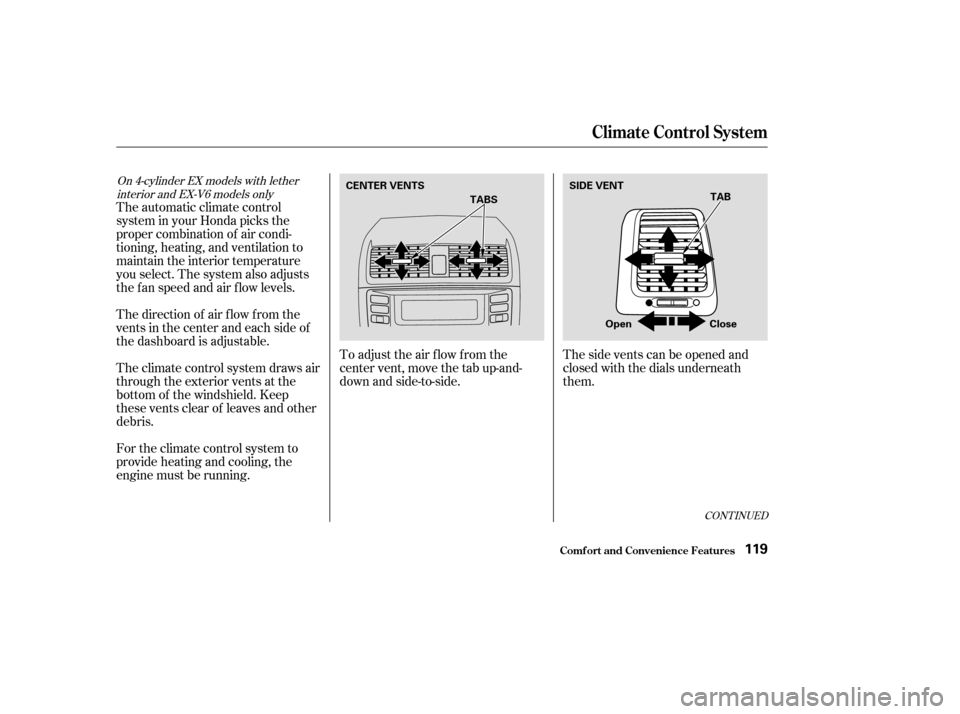
To adjust the air f low f rom the
center vent, move the tab up-and-
down and side-to-side.Thesideventscanbeopenedand
closed with the dials underneath
them.
For the climate control system to
provide heating and cooling, the
engine must be running.
The climate control system draws air
through the exterior vents at the
bottom of the windshield. Keep
these vents clear of leaves and other
debris.
The direction of air f low f rom the
vents in the center and each side of
the dashboard is adjustable.
The automatic climate control
system in your Honda picks the
proper combination of air condi-
tioning, heating, and ventilation to
maintain the interior temperature
you select. The system also adjusts
the fan speed and air flow levels.
On 4-cylinder EX models with lether
interior and EX-V6 models only
Climat e Cont rol Syst em
Comf ort and Convenience Feat ures119
CENTER VENTS TAB
TABS
Close
Open
SIDE VENT
�����—�����—�����y���������������y���
�(�����������y���
�����y
Page 117 of 380

Pressing the OFF button shuts the
climate control system completely
of f . Keep the system completely of f
only f or short periods. To keep stale
air and mustiness f rom collecting,
you should have the f an running at
all times.
To put the Automatic Climate
Control in f ully-automatic mode,
press the AUTO button, then set the
desired temperature by turning the
driver’s temperature control dial.
You will see AUTO in the system’s
display.
The system automatically selects the
proper mix of conditioned and/or
heated air that will, as quickly as
possible, raise or lower the interior
temperature f rom its current level to
the set temperature.
When you set the temperature to its
lower limit (60°F/18°C ‘‘ ’’)
or its upper limit (90°F/32°C
‘‘ ’’), the system runs at f ull
cooling or heating only. It does not
regulate the interior temperature.
When the temperature is set
between the lower and upper limits,
the system regulates the interior
temperature to the set value.
In cold weather, the f an will not
come on automatically until the car
has been driven f or a short time and
the heater starts to develop warm air.
Climat e Cont rol Syst em
Comf ort and Convenience Feat ures
Fully-automatic Operation
Without Navigation System
121
RECIRCULATION BUTTON
OFF BUTTON TEMPERATURE DISPLAY
FAN CONTROL
BUTTONS
AUTO BUTTON
DRIVER’S SIDE
TEMPERATURE
CONTROL DIAL
PASSENGER’S SIDE
TEMPERATURE
CONTROL DIAL
�����—�����—�����y�����������
�
�y���
�(�����������y���
�����y
Page 118 of 380
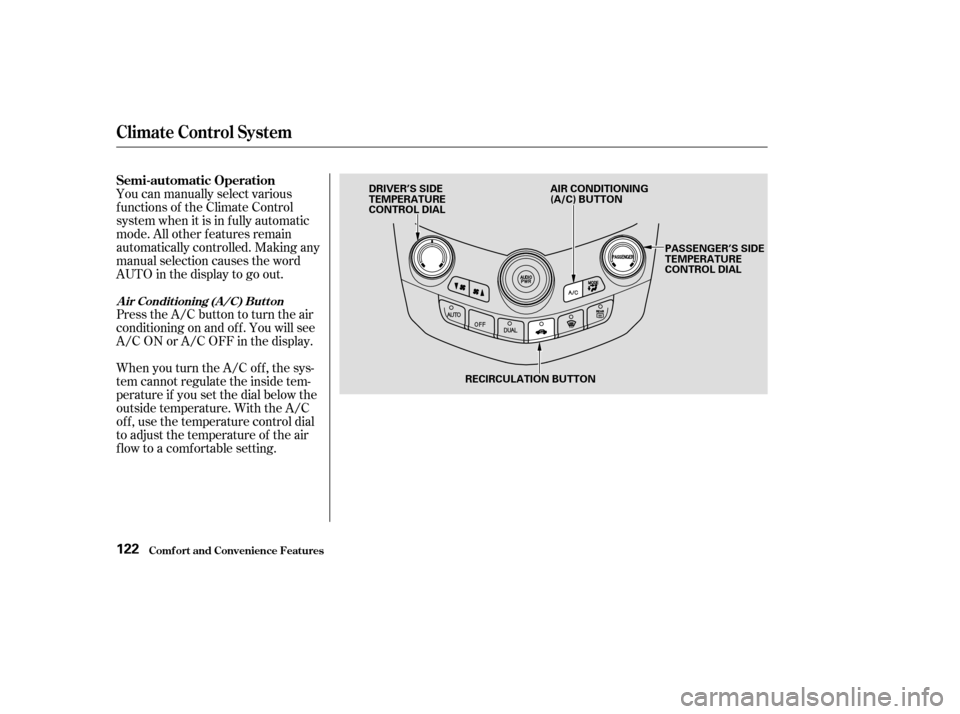
Press the A/C button to turn the air
conditioningonandoff.Youwillsee
A/C ON or A/C OFF in the display.
You can manually select various
f unctions of the Climate Control
system when it is in f ully automatic
mode. All other f eatures remain
automatically controlled. Making any
manual selection causes the word
AUTO in the display to go out.
When you turn the A/C of f , the sys-
tem cannot regulate the inside tem-
perature if you set the dial below the
outside temperature. With the A/C
of f , use the temperature control dial
to adjust the temperature of the air
flow to a comfortable setting.
Semi-automatic Operation
A ir Condit ioning (A /C) But t on
Climat e Cont rol Syst em
Comf ort and Convenience Feat ures122
RECIRCULATION BUTTON
DRIVER’S SIDE
TEMPERATURE
CONTROL DIAL
PASSENGER’S SIDE
TEMPERATURE
CONTROL DIAL
AIR CONDITIONING
(A/C) BUTTON
�����—�����—�����y�����������
���y���
�(�����������y���
�����y
Page 121 of 380
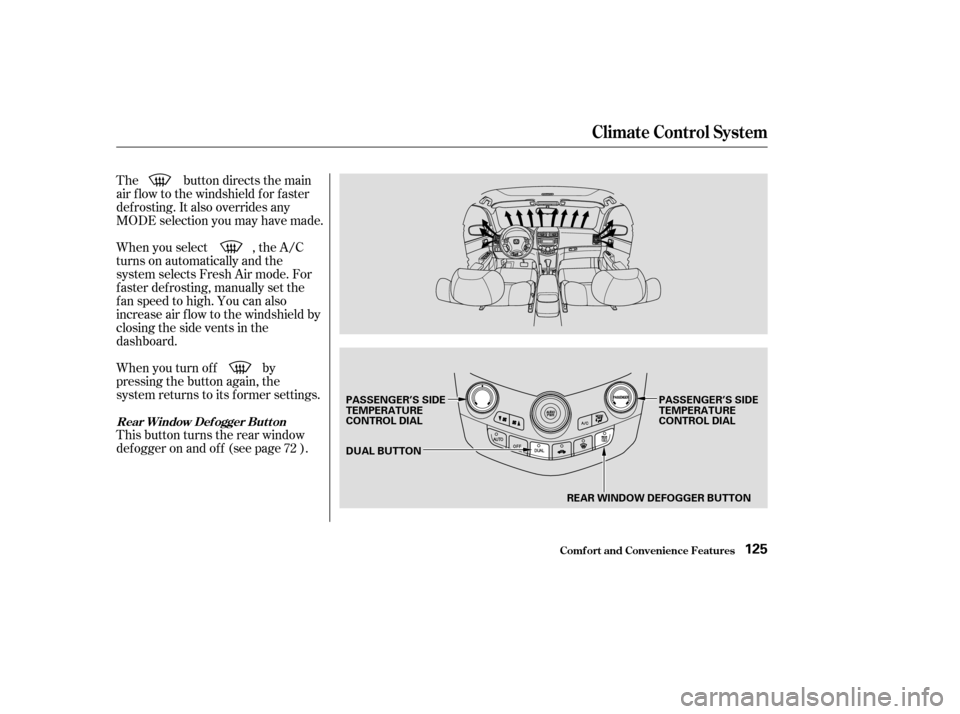
The button directs the main
air f low to the windshield f or f aster
def rosting. It also overrides any
MODE selection you may have made.
When you turn of f by
pressing the button again, the
system returns to its former settings.
When you select , the A/C
turns on automatically and the
system selects Fresh Air mode. For
f aster def rosting, manually set the
fanspeedtohigh.Youcanalso
increase air f low to the windshield by
closing the side vents in the
dashboard.
This button turns the rear window
def ogger on and of f (see page ).
72
Climat e Cont rol Syst em
Comf ort and Convenience Feat ures
Rear Window Def ogger But t on
125
REAR WINDOW DEFOGGER BUTTON
DUAL BUTTON
PASSENGER’S SIDE
TEMPERATURE
CONTROL DIAL
PASSENGER’S SIDE
TEMPERATURE
CONTROL DIAL
�����—�����—�����y���������������y���
�(�����������y���
�����y