Page 104 of 429
When storing cargo, you can move
therearcentershoulderbeltoutof
the way by removing the belt f rom
the guide.To release the seat-back from inside
the trunk, pull the release under the
trunk panel. Push the seat-back
down, then let go of the release.
To lock the seat-back upright, push it
f irmly against the trunk panel. Make
sure it is latched in place by pulling
on the top of the seat.
Do not put any heavy items on the
seat-back when it is folded.Make sure all rear shoulder belts are
positioned in f ront of the rear seat-
back whenever the seat-back is in its
upright position.
Make sure all items in the trunk, or
items extending through the opening
into the back seat, are secured.
Looseitemscanflyforwardand
cause injury if you have to brake
hard. See
on page
.
Never drive with the seat-back
f olded down and the trunk lid open.
See on
page . 56
234
Carrying Cargo
Carbon Monoxide Hazard
Seat A djustments
Inst rument s and Cont rols101
GUIDE Pull
CENTER
SHOULDER BELT
Page 109 of 429

You can open both windows f rom the
outside with the remote transmitter.
You cannot close the windows with
the remote transmitter.Turnthekeyclockwiseagain,and
hold it. Both windows start to open.
To stop the windows, release the
key.
You can open and close the windows
with the key in the driver’s door lock.
To open: Insert the key in the driver’s door
lock.
Turn the key clockwise, then
release it. To open the windows f urther, turn
andholdthekeyagain(within
10 seconds).
NOTE: If the window stops bef ore
the desired position, repeat steps 2
and 3.
Press the UNLOCK button once
to unlock the driver’s door.
Press the UNLOCK button a
second time, and hold it. The
passenger’s door unlocks, and
both windows start to open. To
stop the windows, release the
button.
To open the windows f urther,
press the button again.
1.
2.
3.
1.
2.3.
4.
Opening the Windows with the
Remote Transmitter
Opening/Closing the Windows
with the Key
Power Windows
Inst rument s and Cont rols106
UNLOCK BUTTONCloseOpen
Page 110 of 429

To tilt up the back of the moonroof ,
press and hold the center button
( ). To close the moonroof ,
press and hold the upper part of the
switch ( ). To open the
moonroof , press and hold the lower
part of the switch ( ). Release
the switch when the moonroof gets
to the desired position. Make sure
everyone’s hands are away f rom the
moonroof bef ore opening or closing
it.
The moonroof has two positions: it
can be tilted up in the back f or
ventilation, or it can be slid back into
the roof . Use the switch under the
lef t dashboard vent to operate the
moonroof . The ignition switch must
be ON (II).
To close:
Insert the key in the driver’s door
lock.
Turn the key counterclockwise,
then release it.
Turn the key counterclockwise
again, and hold it. Both windows
starttoclose.Tostopthewindows,
release the key.
To close the windows f urther, turn
andholdthekeyagain(within
10 seconds).
NOTE: If the window stops bef ore
the desired position, repeat steps 2
and 3. 1.
2.
3.
4.
CONT INUED
On all EX and EX-V6 models
Power Windows, Moonroof
Inst rument s and Cont rols
Moonroof
107
MOONROOF SWITCH
Opening or closing the
moonroof on someone’s hands
or fingers can cause serious
injury.
Make sure all hands and fingers
are clear of the moonroof
before opening or closing it.
Page 120 of 429
These sockets are intended to supply
power f or 12 volt DC accessories
that are rated 120 watts or less (10
amps).
They will not power an automotive
type cigarette lighter element. When both sockets are being used,
the combined power rating of both
accessories should be 120 watts or
less (10 amps).Af ter both doors are closed tightly,
the light dims slightly, then f ades out
in about 30 seconds. In the ON
position, the ceiling light stays on
continuously.
The ceiling light (with the switch in
the center position) also comes on
when you unlock the door with the
remote transmitter (see page ).
The light f ades out af ter both doors
are closed.
The ceiling light has a three-position
switch. In the OFF position, the light
does not come on. In the center
position, the ceiling light comes on
when you open either door. 88
CONT INUED
AccessoryPowerSockets,InteriorLights
Inst rument s and Cont rols
Ceiling L ight
117
O OF
FFF O
ON
N
DOOR ACTIVATED
ACCESSORY POWER SOCKET
Page 122 of 429
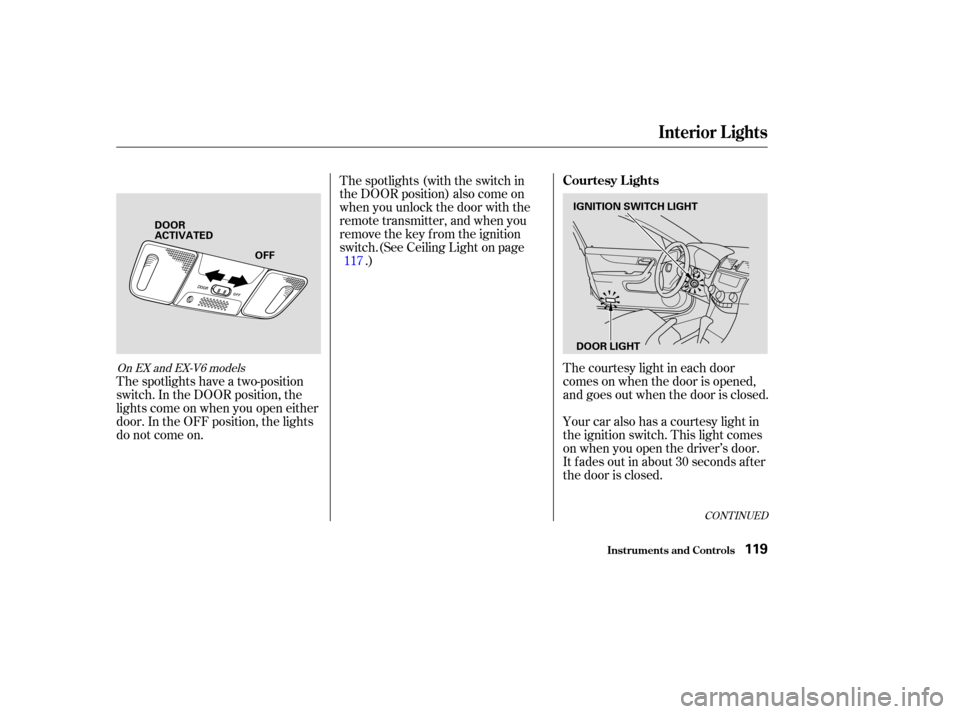
The courtesy light in each door
comes on when the door is opened,
and goes out when the door is closed.
Your car also has a courtesy light in
the ignition switch. This light comes
on when you open the driver’s door.
It f ades out in about 30 seconds af ter
the door is closed.
The spotlights (with the switch in
the DOOR position) also come on
when you unlock the door with the
remote transmitter, and when you
remove the key from the ignition
switch.(See Ceiling Light on page
.)
The spotlights have a two-position
switch. In the DOOR position, the
lights come on when you open either
door. In the OFF position, the lights
do not come on. 117
CONT INUED
On EX and EX-V6 models
Interior Lights
Inst rument s and Cont rols
Courtesy Lights
119
IGNITION SWITCH LIGHT
DOOR LIGHT
OFF
DOOR
ACTIVATED
Page 124 of 429

.....................
Heating and Cooling .122
.........
What Each Control Does . 122
............
How to Use the System . 125
..........
To Turn Everything Of f . 128
...............
Climate Control System . 129
.......
Fully-automatic Operation . 131
.......
Semi-automatic Operation . 132
......
Dual Temperature Control . 137
.......
Fully-automatic Operation . 138
.......
Semi-automatic Operation . 139
......
Dual Temperature Control . 145
Sunlight Sensor/ ............
Temperature Sensor . 147
.......................
Audio System (LX) .148
....
AM/FM/CD Audio System . 148
.................
Operating the Radio . 148
.................
Adjusting the Sound . 152
..............................
Digital Clock .153
.........
Operating the CD Player . 154
.....
Operating the CD Changer . 156
....
CD Player Error Indications . 158
CD Changer Error .............................
Indications .159 Operating the Cassette
....................................
Player .160
...........
Tape Search Functions . 161
Audio System ..............
(EX, EX-V6, LX-V6) . 163
AM/FM/CD Changer Audio ....................................
System .163
.................
Operating the Radio . 164
.................
Adjusting the Sound . 169
..............................
Digital Clock .171
.....
Operating the CD Changer . 173
CD Changer Error .............................
Indications .182
Operating the Cassette ....................................
Player .183
...........
Tape Search Functions . 185
Audio System (U.S. 4-cylinder EX withleather interior, U.S. ............................
EX-V6) .187
AM/FM/CD Changer Audio ....................................
System .187
.................
Operating the Radio . 188
................
Adjusting the Sound . 191.............................
Digital Clock .193
...................
Radio Frequencies . 194
.......................
Radio Reception .194
.....
Operating the CD Changer . 196
CD Changer Error .............................
Indications .204
......
Protecting Compact Discs . 205
Operating the Cassette ....................................
Player .206
...........
Tape Search Functions . 208
Caring f or the Cassette ....................................
Player .210
...........
Remote Audio Controls . 211
.......................
Thef t Protection .212
............................
Security System .213
...............................
Cruise Control .214
Homelink Wireless Control ........................................
System .218
Without Navigation System
With Navigation System Without Navigation System
With Navigation System
Comf ort and Convenience Features
Comf ort and Convenience Feat ures121
Page 125 of 429
Proper use of the Heating and
Cooling system can make the
interior dry and comf ortable, and
keep the windows clear f or the best
visibility.
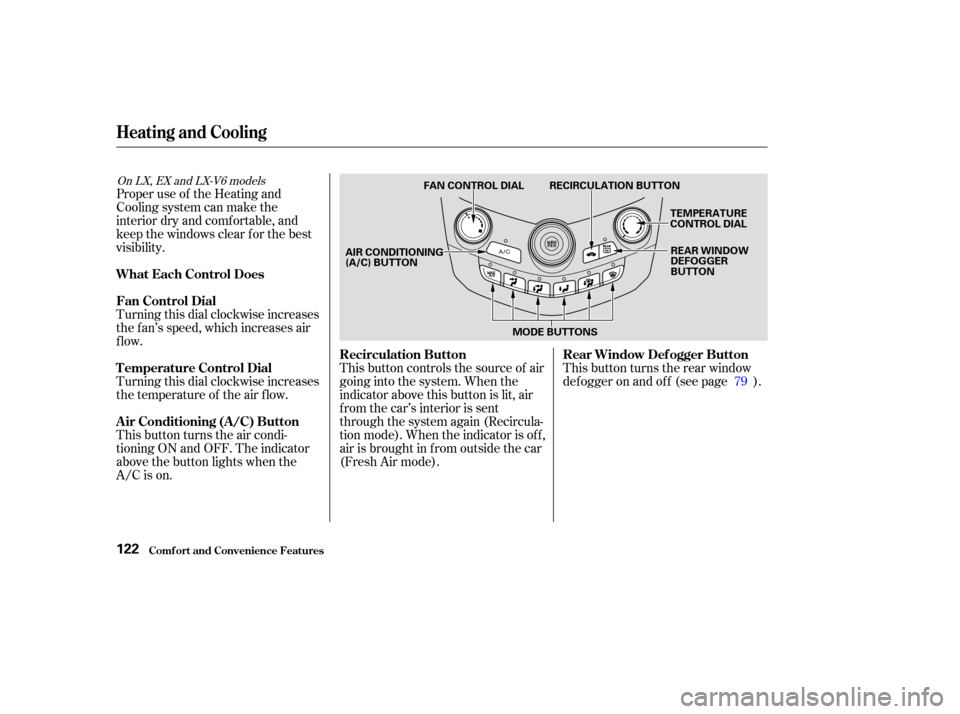
Turning this dial clockwise increases
the f an’s speed, which increases air
flow.
Turning this dial clockwise increases
the temperature of the air flow.
This button turns the air condi-
tioning ON and OFF. The indicator
above the button lights when the
A/C is on.This button controls the source of air
going into the system. When the
indicator above this button is lit, air
from the car’s interior is sent
through the system again (Recircula-
tion mode). When the indicator is off,
air is brought in f rom outside the car
(Fresh Air mode).
This button turns the rear window
def ogger on and of f (see page ).
79
On LX, EX and LX-V6 models
Comf ort and Convenience Feat ures
Heating and Cooling
What Each Control Does
Fan Control Dial
T emperature Control Dial
Air Conditioning (A/C) Button Recirculation Button
Rear Window Def ogger Button
122
TEMPERATURE
CONTROL DIAL
FAN CONTROL DIAL RECIRCULATION BUTTON
REAR WINDOW
DEFOGGER
BUTTON
AIR CONDITIONING
(A/C) BUTTON
MODE BUTTONS
Page 156 of 429

For example:
1:06 will reset to 1:00
1:52 will reset to 2:00
If your car’s battery is disconnected
or goes dead, the time setting will be
lost. To set the time again, f ollow the
setting procedure.
The audio system usually shows the
time when the ignition switch is in
ACCESSORY (I) or ON (II).
To set the time, press the Clock Set
button (SOUND) until you hear a
beep. The displayed time begins to
blink.
Press and hold the H (Preset 4) side
of the bar until the hour advances to
the desired time.
Press and hold the M (Preset 5) side
of the bar until the minutes advance
to the desired time.
Press the Clock Set button
(SOUND) again to enter the set time.
You can use the R (Preset 6) side of
the bar to quickly set the time to the
nearest hour. Press the Clock Set
button (SOUND) until you hear a
beep, then press the R (Preset 6)
side of the bar. If the displayed time
is bef ore the half hour, pressing R
sets the clock back to the previous
hour. If the displayed time is af ter
the half hour, pressing R sets the
clock f orward to the beginning of the
next hour.
Digital Clock
Audio System
Comf ort and Convenience Feat ures153
DIGITAL CLOCK
PRESET BARS
CLOCK SET
BUTTON