Page 205 of 429
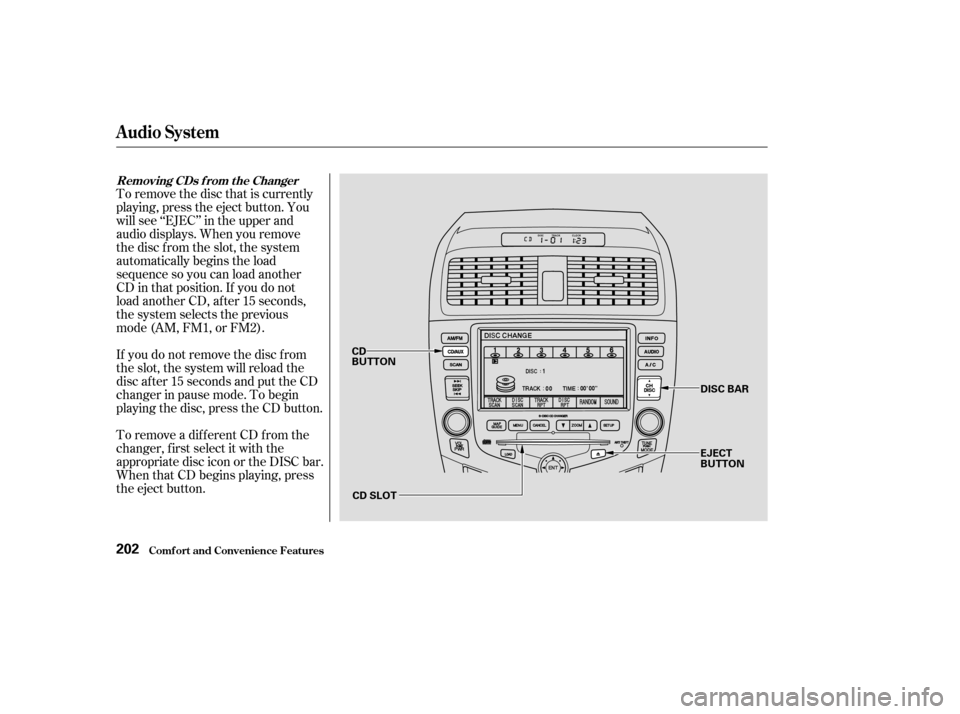
To remove the disc that is currently
playing, press the eject button. You
will see ‘‘EJEC’’ in the upper and
audio displays. When you remove
the disc f rom the slot, the system
automatically begins the load
sequence so you can load another
CD in that position. If you do not
load another CD, after 15 seconds,
the system selects the previous
mode (AM, FM1, or FM2).
If you do not remove the disc f rom
the slot, the system will reload the
disc af ter 15 seconds and put the CD
changer in pause mode. To begin
playing the disc, press the CD button.
To remove a different CD from the
changer,firstselectitwiththe
appropriate disc icon or the DISC bar.
When that CD begins playing, press
the eject button.
Removing CDs f rom t he Changer
Audio System
Comf ort and Convenience Feat ures202
CD SLOTDISC BAR
EJECT
BUTTON
CD
BUTTON
Page 206 of 429
For inf ormation on how to handle
and protect compact discs, see page.
If you press the eject button while
listening to the radio, or with the
audio system turned of f , the disc
that was last selected is ejected.
Af ter that disc is ejected, pressing
the eject button again will eject the
next disc in numerical order. By
doing this six times, you can remove
all the CDs f rom the changer.
In any mode, if you press the eject
button and hold it until you hear a
beep, the system will eject all of the
discs in the changer.
You can also eject discs when the
ignition switch is of f by pressing the
eject button. The disc that was last
selected is ejected f irst. You can
eject all six discs, one at a time. 205
Protecting Compact Discs
Audio System
Comf ort and Convenience Feat ures203
Page 207 of 429
Indication
If you see an error indication in the
upper display while operating the CD
changer, f ind the cause in the chart
to the right. If you cannot clear the
error indication, take the car to your
Honda dealer. Solution
Cause
Press the CD eject button and pull out the CDs.
Check for an error indication. Insert the CDs
again. If the code does not disappear or the
CDs cannot be pulled out, consult your Honda
dealer.
Press the CD eject button and pull out the CDs.
Check for an error indication. Insert the CDs
again. If the code does not disappear or the
CDs cannot be pulled out, consult your Honda
dealer.
Will disappear when the temperature returns to
normal.
FOCUS Error
Mechanical Error
High Temperature
CD Changer Error Indications
Audio System
Comf ort and Convenience Feat ures204
Page 421 of 429

�Î
...................
Capacities Chart . 396,398
.............
Carbon Monoxide Hazard . 56
......................................
Cargo Net .237
.............................
Carrying Cargo .234
..............
CAUTION, Explanation of . ii
..................
CD Changer . 156,173,196
.......................................
CD Player .154
........................
CD Pocket, Center .113
........................
Certif ication Label .394
............................................
Chains .338
....................
Changing a Flat Tire .365
............
Changing Engine Coolant . 301
Changing Oil ........................................
How to .296
.............................
When to .276, 284
...
Charging System Indicator . 62,380
............
Checklist, Bef ore Driving . 240
.......................................
Child Seats .26
.........................................
LATCH .43
..........
Tether Anchorage Points . 42
...................................
Cleaner, Air .316
Cleaning ....................
Aluminum Wheels .357
...................................
Carpeting .358 ......................................
Exterior .356
.........................................
Fabric .359
.......................................
Interior .358
.......................................
Leather .359
...................................
Seat Belts .359
...........................................
Vinyl .359
......................................
Window .360
...............
Climate Control System . 129
.........
Clock, Setting the . 153,171,193
...................................
Clutch Fluid .314
........................
CO in the Exhaust .406
...................................
Coin Pocket .113
............
Cold Weather, Starting in . 242
..............................
Compact Spare .364
.................
Console Compartment . 111
...............
Consumer Inf ormation . 412
.............
Controls, Instruments and . 59
Coolant ........................................
Adding .299
....................................
Checking .230
.........................
Proper Solution .299
...................
Temperature Gauge . 70
....................
Corrosion Protection .361
Crankcase Emissions Control ........................................
System .405
............
Cruise Control Operation . 214..........
Customer Relations Of f ice . 412
................
DANGER, Explanation of . ii
...................................
Dashboard .2, 60
................
Daytime Running Lights . 76
............
Def ects, Reporting Saf ety . 414
................
Def ogger, Rear Window . 79
Defrosting the ....................
Windows .127, 136,144
............................
Dimensions .396, 398
...............
Dimming the Headlights . 74
Dipstick .
Automatic Transmission . 307,308
..................................
Engine Oil .228
..........................
Directional Signals .77
........
Disc Brake Wear Indicators . 254
.....................
Disposal of Used Oil .298
Doors ..............
Locking and Unlocking . 86
......................
Power Door Locks .86
..........
DOT Tire Quality Grading . 400
Downshif ting, Manual .....................
Transmission .243, 245
.......................................
Drive Belt .332
Index
C
D
II
Page:
< prev 1-8 9-16 17-24