2003 GMC ENVOY lock
[x] Cancel search: lockPage 196 of 442

INFO (Information):If the current station has a
message, the information symbol will appear on the
display. Press this button to see the message. The
message may display the artist and song title, call in
phone numbers, etc.
If the whole message is not displayed, parts of it will
appear every three seconds. To scroll through the
message at your own speed, press the INFO button
repeatedly. A new group of words will appear on
the display with each press. Once the complete
message has been displayed, the information symbol
will disappear from the display until another new
message is received. The old message can be displayed
by pressing the INFO button until a new message is
received or a different station is tuned to.
When a message is not available from a station, NO
INFO will be displayed.
TRAF (Traffic):If TRAF appears on the display, the
tuned station broadcasts traffic announcements
and when a traffic announcement comes on the tuned
radio station you will hear it.If the current tuned station does not broadcast traffic
announcements, press this button and the radio
will seek to a station that does. When the radio ®nds a
station that broadcasts tra®ic announcements, it will
stop and TRAF will be displayed. When a traffic
announcement comes on the tuned radio station you
will hear it. If no station is found, NO TRAF will appear
on the display.
If TRAF is on the display you can press the TRAF
button to turn of the traffic announcements.
Your radio will play the traffic announcement even if the
volume is muted or interrupt the play of a cassette
tape or CD if the last tuned station broadcasts traffic
announcements.
Radio Messages
CAL ERR (Calibration Error):This message is
displayed when the radio has not been calibrated
properly for the vehicle. You must return to the
dealership for service.
LOCKED:This message is displayed when the
THEFTLOCK
žsystem has locked up. You must return
to the dealership for service.
3-76
Page 198 of 442

4 FWD (Forward):Press this pushbutton to advance
quickly to another part of the tape. Press this pushbutton
again to return to playing speed. The radio will play while
the tape advances. The station frequency and FWD will
appear on the display. You may select stations during
forward operation by using TUNE and SEEK.
5 SIDE:Press this pushbutton to play the other side of
the tape.
qSEEKr:The right arrow is the same as the
NEXT pushbutton, and the left arrow is the same as the
PREV pushbutton. If the arrow is held or pressed
more than once, the player will continue moving forward
or backward through the tape. SEEK and a positive
or negative number will appear on the display.
AM FM:Press this button to listen to the radio when a
tape is playing. The tape will stop but remain in the
player.
TAPE CD:Press this button to play a tape when
listening to the radio. Press this button to switch
between the tape and compact disc if both are loaded.
The inactive tape or CD will remain safely inside the
radio for future listening.
ZEJT (Eject):Press this button to stop a tape when
it is playing or to eject a tape when it is not playing. Eject
may be activated with the radio off. Cassette tapes may
be loaded with the radio off if this button is pressed ®rst.
Cassette Tape Messages
CHK TAPE (Check Tape):If CHK TAPE appears on
the radio display, the tape won't play because of one of
the following errors.
·The tape is tight and the player can't turn the tape
hubs. Remove the tape. Hold the tape with the
open end down and try to turn the right hub
counterclockwise with a pencil. Turn the tape over
and repeat. If the hubs do not turn easily, your
tape may be damaged and should not be used in
the player. Try a new tape to make sure your player
is working properly.
·The tape is broken. Try a new tape.
·The tape is wrapped around the tape head. Attempt
to get the cassette out. Try a new tape.
CLEAN:If this message appears on the display, the
cassette tape player needs to be cleaned. It will still play
tapes, but you should clean it as soon as possible to
prevent damage to the tapes and player. See
Care
of Your Cassette Tape Player on page 3-106.
If any error occurs repeatedly or if an error can't be
corrected, contact your dealer.
3-78
Page 214 of 442

Audio Speakers
Audio from the DVD player can only be heard either
through the IR headphones or wired headphones
(not included). The sound will not come through the
vehicle's speakers.
Video Screen
The video screen is located in the overhead console.To use the video screen, do the following:
1. Push forward on the release button and the screen
will fold down.
2. Push the screen away from you and adjust its
position as desired.
When the video screen is not in use, push it up into its
locked position.
The DVD player and display will continue to operate
when the display is in either the up or the down position.
Notice:Avoid directly touching the video screen,
as damage may occur. SeeCleaning the Video
Screen on page 3-107 for more information.
3-94
Page 217 of 442

Remote Control
To use the remote control, aim it at the small square
window to the left of the disc slot and press the desired
button. Direct sunlight or very bright light may affect
the ability of the entertainment system to receive signals
from the remote control. Be sure the remote's batteries
are not discharged, as this will also affect the function
of the remote control. Objects blocking the line of sight
may also affect the function of the remote control.
Notice:Do not store the remote control in heat or
direct sunlight. This could damage the remote
control and would not be covered by your warranty.
Keep the remote control stored in a cool, dry
place.
Remote Control Buttons
OPWR (Power):Press this button to turn the DVD
player on or off.
kPLAY/PAUSE:Press this button to play a disc.
Press this button while a disc is playing to pause. Press
it again to continue playing.
cSTOP:Press this button to stop playing, reversing
or fast forwarding the DVD.
3-97
Page 223 of 442
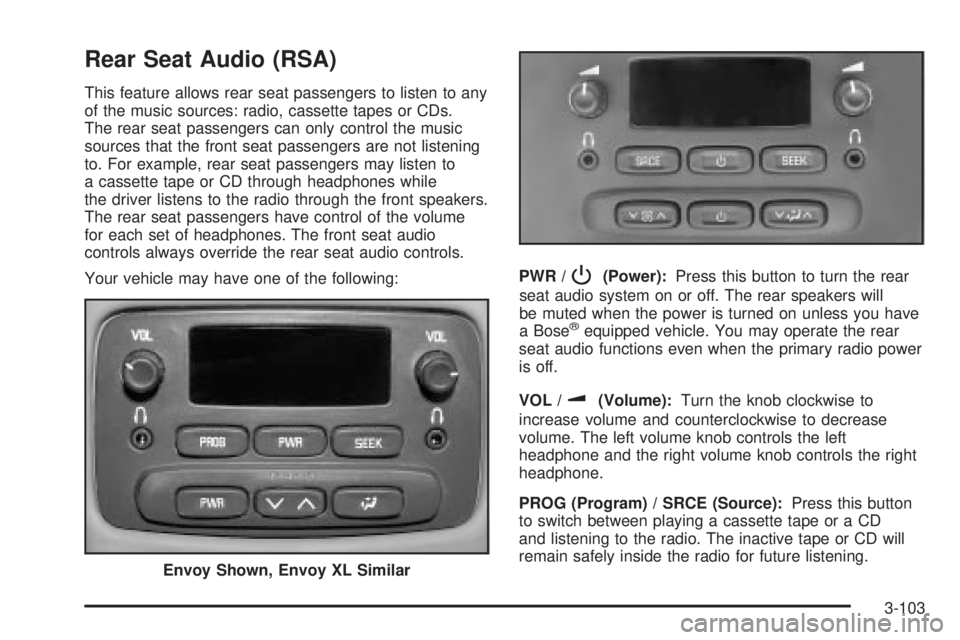
Rear Seat Audio (RSA)
This feature allows rear seat passengers to listen to any
of the music sources: radio, cassette tapes or CDs.
The rear seat passengers can only control the music
sources that the front seat passengers are not listening
to. For example, rear seat passengers may listen to
a cassette tape or CD through headphones while
the driver listens to the radio through the front speakers.
The rear seat passengers have control of the volume
for each set of headphones. The front seat audio
controls always override the rear seat audio controls.
Your vehicle may have one of the following:PWR /
P(Power):Press this button to turn the rear
seat audio system on or off. The rear speakers will
be muted when the power is turned on unless you have
a Bose
žequipped vehicle. You may operate the rear
seat audio functions even when the primary radio power
is off.
VOL /
u(Volume):Turn the knob clockwise to
increase volume and counterclockwise to decrease
volume. The left volume knob controls the left
headphone and the right volume knob controls the right
headphone.
PROG (Program) / SRCE (Source):Press this button
to switch between playing a cassette tape or a CD
and listening to the radio. The inactive tape or CD will
remain safely inside the radio for future listening.
Envoy Shown, Envoy XL Similar
3-103
Page 224 of 442
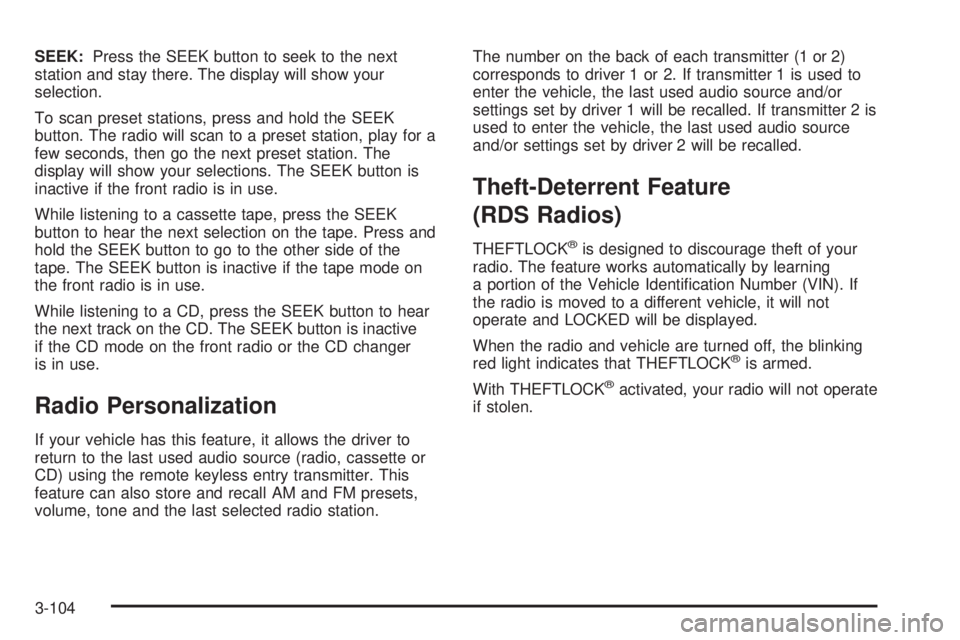
SEEK:Press the SEEK button to seek to the next
station and stay there. The display will show your
selection.
To scan preset stations, press and hold the SEEK
button. The radio will scan to a preset station, play for a
few seconds, then go the next preset station. The
display will show your selections. The SEEK button is
inactive if the front radio is in use.
While listening to a cassette tape, press the SEEK
button to hear the next selection on the tape. Press and
hold the SEEK button to go to the other side of the
tape. The SEEK button is inactive if the tape mode on
the front radio is in use.
While listening to a CD, press the SEEK button to hear
the next track on the CD. The SEEK button is inactive
if the CD mode on the front radio or the CD changer
is in use.
Radio Personalization
If your vehicle has this feature, it allows the driver to
return to the last used audio source (radio, cassette or
CD) using the remote keyless entry transmitter. This
feature can also store and recall AM and FM presets,
volume, tone and the last selected radio station.The number on the back of each transmitter (1 or 2)
corresponds to driver 1 or 2. If transmitter 1 is used to
enter the vehicle, the last used audio source and/or
settings set by driver 1 will be recalled. If transmitter 2 is
used to enter the vehicle, the last used audio source
and/or settings set by driver 2 will be recalled.
Theft-Deterrent Feature
(RDS Radios)
THEFTLOCKžis designed to discourage theft of your
radio. The feature works automatically by learning
a portion of the Vehicle Identi®cation Number (VIN). If
the radio is moved to a different vehicle, it will not
operate and LOCKED will be displayed.
When the radio and vehicle are turned off, the blinking
red light indicates that THEFTLOCK
žis armed.
With THEFTLOCK
žactivated, your radio will not operate
if stolen.
3-104
Page 229 of 442

Your Driving, the Road, and Your Vehicle..........4-2
Defensive Driving...........................................4-2
Drunken Driving.............................................4-2
Control of a Vehicle........................................4-5
Braking.........................................................4-5
Traction Assist System (TAS)...........................4-8
Locking Rear Axle........................................4-10
Steering......................................................4-10
Off-Road Recovery.......................................4-12
Passing.......................................................4-12
Loss of Control.............................................4-14
Off-Road Driving with Your Four-Wheel-Drive
Vehicle....................................................4-15
Driving at Night............................................4-28
Driving in Rain and on Wet Roads..................4-30City Driving..................................................4-33
Freeway Driving...........................................4-34
Before Leaving on a Long Trip.......................4-35
Highway Hypnosis........................................4-36
Hill and Mountain Roads................................4-37
Winter Driving..............................................4-39
If You Are Stuck: In Sand, Mud,
Ice or Snow..............................................4-44
Towing..........................................................4-45
Towing Your Vehicle.....................................4-45
Recreational Vehicle Towing...........................4-45
Loading Your Vehicle....................................4-47
Adding a Snow Plow or Similar Equipment.......4-50
Towing a Trailer...........................................4-50
Section 4 Driving Your Vehicle
4-1
Page 234 of 442

Avoid needless heavy braking. Some people drive
in spurts Ð heavy acceleration followed by heavy
braking Ð rather than keeping pace with traffic. This is
a mistake. Your brakes may not have time to cool
between hard stops. Your brakes will wear out much
faster if you do a lot of heavy braking. If you keep pace
with the traffic and allow realistic following distances,
you will eliminate a lot of unnecessary braking.
That means better braking and longer brake life.
If your engine ever stops while you're driving, brake
normally but don't pump your brakes. If you do,
the pedal may get harder to push down. If your engine
stops, you will still have some power brake assist.
But you will use it when you brake. Once the power
assist is used up, it may take longer to stop and
the brake pedal will be harder to push.Anti-lock Brake System
Your vehicle has anti-lock brakes. ABS is an advanced
electronic braking system that will help prevent a
braking skid.
When you start your engine and begin to drive away,
your anti-lock brake system will check itself. You
may hear a momentary motor or clicking noise while
this test is going on. This is normal.
If there's a problem with
the anti-lock brake system,
this warning light will
stay on. See
Anti-Lock
Brake System Warning
Light on page 3-41
.
Along with ABS, your vehicle has a Dynamic Rear
Proportioning (DRP) system. If there's a DRP problem,
both the brake and ABS warning lights will come on
accompanied by a 10-second chime. The lights
and chime will come on each time the ignition is turned
on until the problem is repaired. See your dealer for
service.
4-6