Page 1 of 200
Introduction 3
Instrument Cluster 8
Warning and control lights 8
Gauges 12
Entertainment Systems 14
AM/FM stereo with CD 14
Climate Controls 19
Electronic automatic temperature control 19
Lights 24
Headlamps 24
Turn signal control 27
Bulb replacement 28
Driver Controls 35
Windshield wiper/washer control 35
Steering wheel adjustment 36
Power windows 37
Mirrors 38
Speed control 39
Locks and Security 55
Keys 55
Locks 55
Anti-theft system 58
Seating and Safety Restraints 66
Seating 66
Safety restraints 70
Air bags 80
Child restraints 91
Driving 102
Starting 102
Table of Contents
1
Page 36 of 200

POWER TILT/TELESCOPE STEERING COLUMN
The steering column can be
adjusted manually by moving the
four-way rocker adjustment control
located below the turn signal/wiper
control stalk. Hold the control to
adjust.
The telescope function is adjusted
by moving the control toward the
driver to telescope out and toward
the instrument panel to telescope
in.
The tilt function is adjusted by moving the control up or down.
During easy exit, when you remove the key, the column will move to the
full in and up position. When the key is inserted into the ignition, the
column will return to the previous setting.
Never adjust the steering wheel when the vehicle is moving.
AUXILIARY POWER POINT
The power point is an additional
power source for electrical
accessories.
A power point is located on the
instrument panel.
Do not use the auxiliary power point
as a cigarette lighter.
The use of non-Ford approved electrical accessories could cause damage
not covered by your warranty.
Power outlets are designed for accessory plugs only. Do not hang
any type of accessory or accessory bracket from the plug.
Improper use of the power outlet can cause damage not covered
by your warranty.
P
A
S
S
E
N
G
E
R
A
I
R
B
A
G
OFF ON
Driver Controls
36
Page 40 of 200
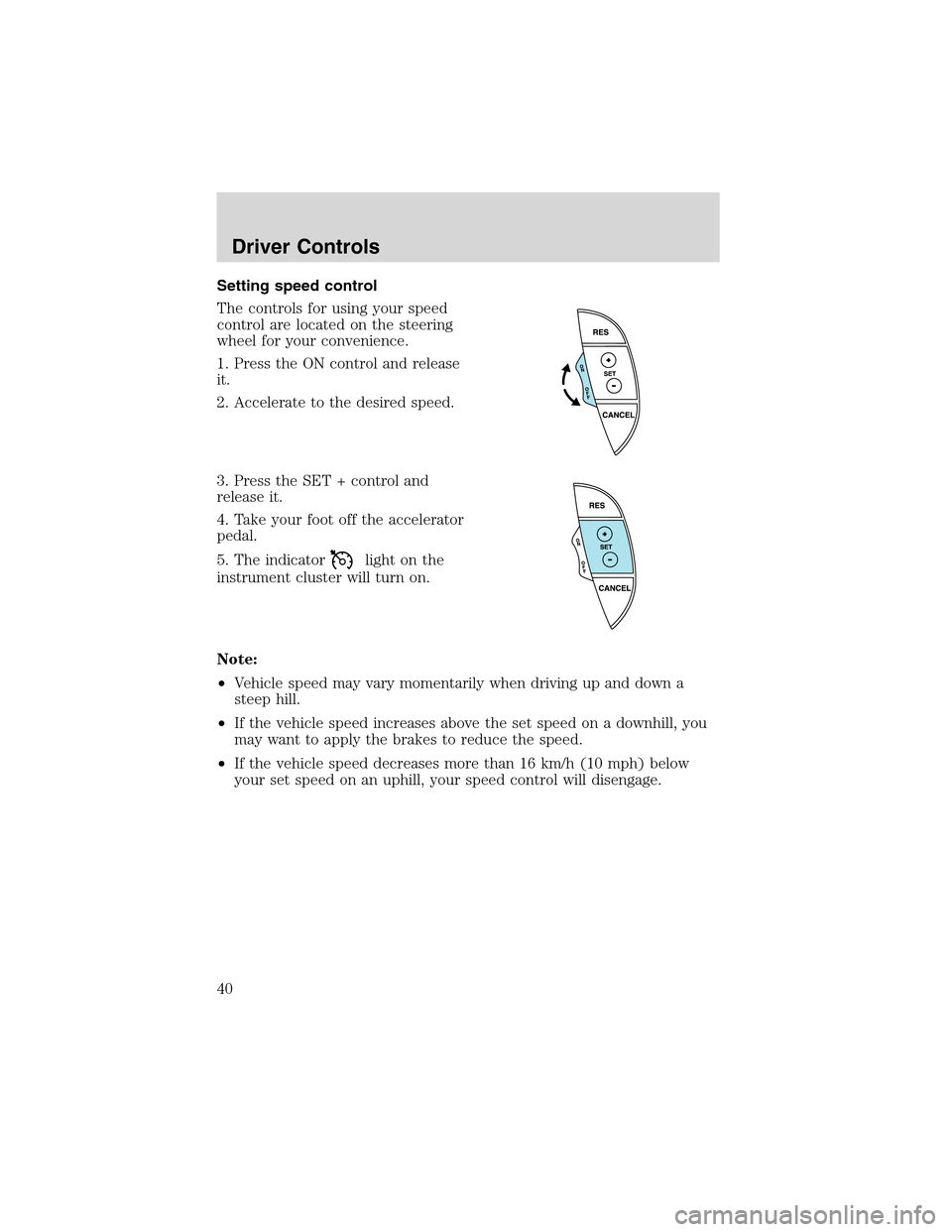
Setting speed control
The controls for using your speed
control are located on the steering
wheel for your convenience.
1. Press the ON control and release
it.
2. Accelerate to the desired speed.
3. Press the SET + control and
release it.
4. Take your foot off the accelerator
pedal.
5. The indicator
light on the
instrument cluster will turn on.
Note:
•Vehicle speed may vary momentarily when driving up and down a
steep hill.
•If the vehicle speed increases above the set speed on a downhill, you
may want to apply the brakes to reduce the speed.
•If the vehicle speed decreases more than 16 km/h (10 mph) below
your set speed on an uphill, your speed control will disengage.
Driver Controls
40
Page 42 of 200
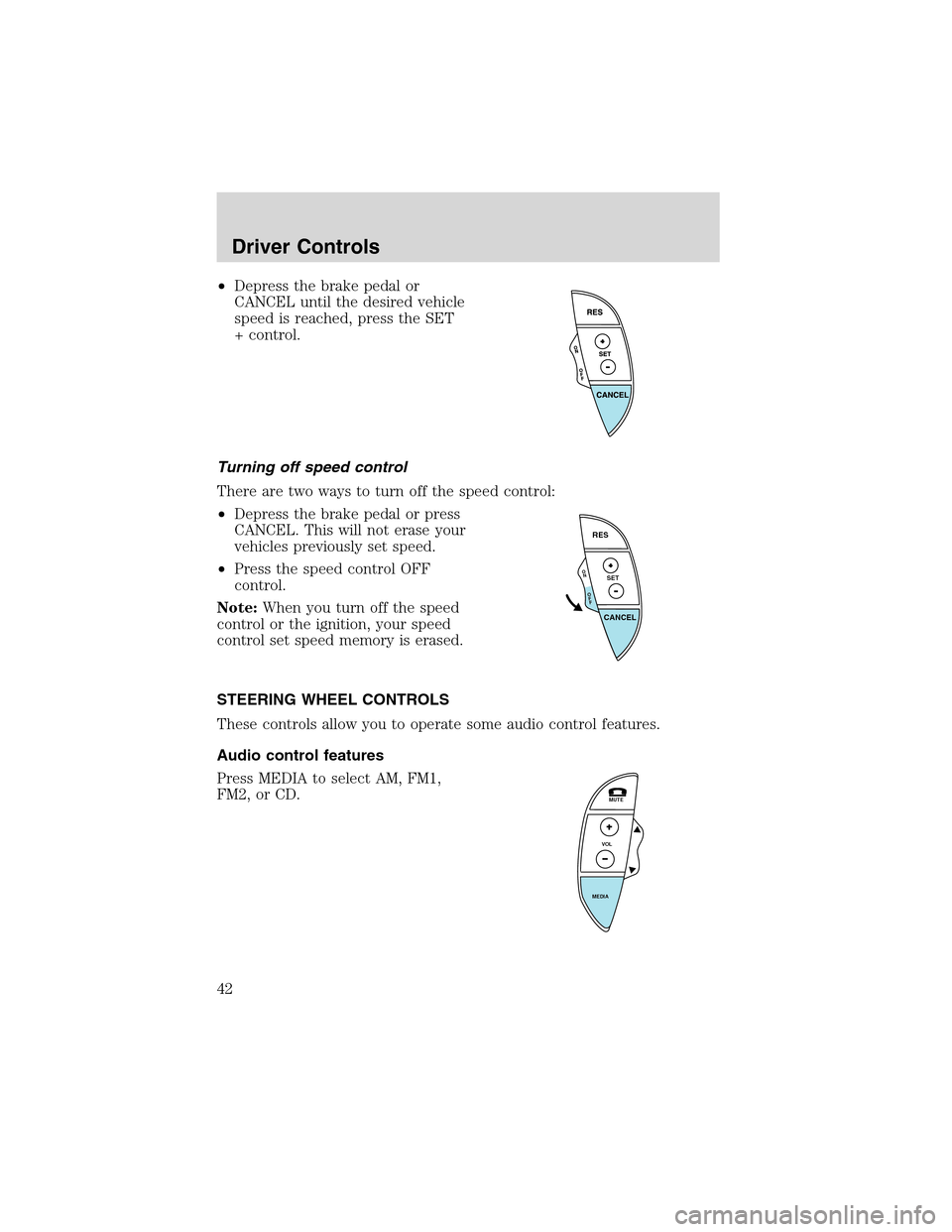
•Depress the brake pedal or
CANCEL until the desired vehicle
speed is reached, press the SET
+ control.
Turning off speed control
There are two ways to turn off the speed control:
•Depress the brake pedal or press
CANCEL. This will not erase your
vehicles previously set speed.
•Press the speed control OFF
control.
Note:When you turn off the speed
control or the ignition, your speed
control set speed memory is erased.
STEERING WHEEL CONTROLS
These controls allow you to operate some audio control features.
Audio control features
Press MEDIA to select AM, FM1,
FM2, or CD.
O
N
O
F
F
RES
SET
CANCEL
MUTE
VOL
MEDIA
Driver Controls
42
Page 48 of 200
REMOVABLE TOP (IF EQUIPPED)
For more information see the CD Rom included with this guide.
Installing the removable top
The front screw fittings must be checked to see that they are
firmly seated after driving a distance of approximately 50 to 60
km (30 to 40 miles).
The removable top does not have the same crush resistance as
an integrated steel roof in case of collision or rollover.
The removable top is not, under any circumstances, to be used
to carry or support external loads.
Movement of the removable top requires at least two people.
The removable top weighs approximately 38 kg (84 lb). Also,
due to its shape, the weight is biased to the rear of the removable top.
Your vehicle must be turned OFF and placed in PARK on a level
surface prior to installing or removing the top.
Before installing the removable top, unsnap and properly store the
convertible top tonneau cover. Refer toInstallation of the tonneau
coverin theConvertiblesection. Also, thoroughly dry the convertible
top and then lower. Open the doors, lower the windows, and clean the
area where the removable top mounts on the body.
1. Remove the protective cover from the top. Using a mild detergent,
clean the weather-strips on the top before installing it on the vehicle.
2. Ensure that the removable top levers are rotated rearward to the fully
open position. Lock the wheels on the storage cart, loosen the
restraining straps on the cart, and with the help of at least another
person remove the top from the cart.
Driver Controls
48
Page 52 of 200
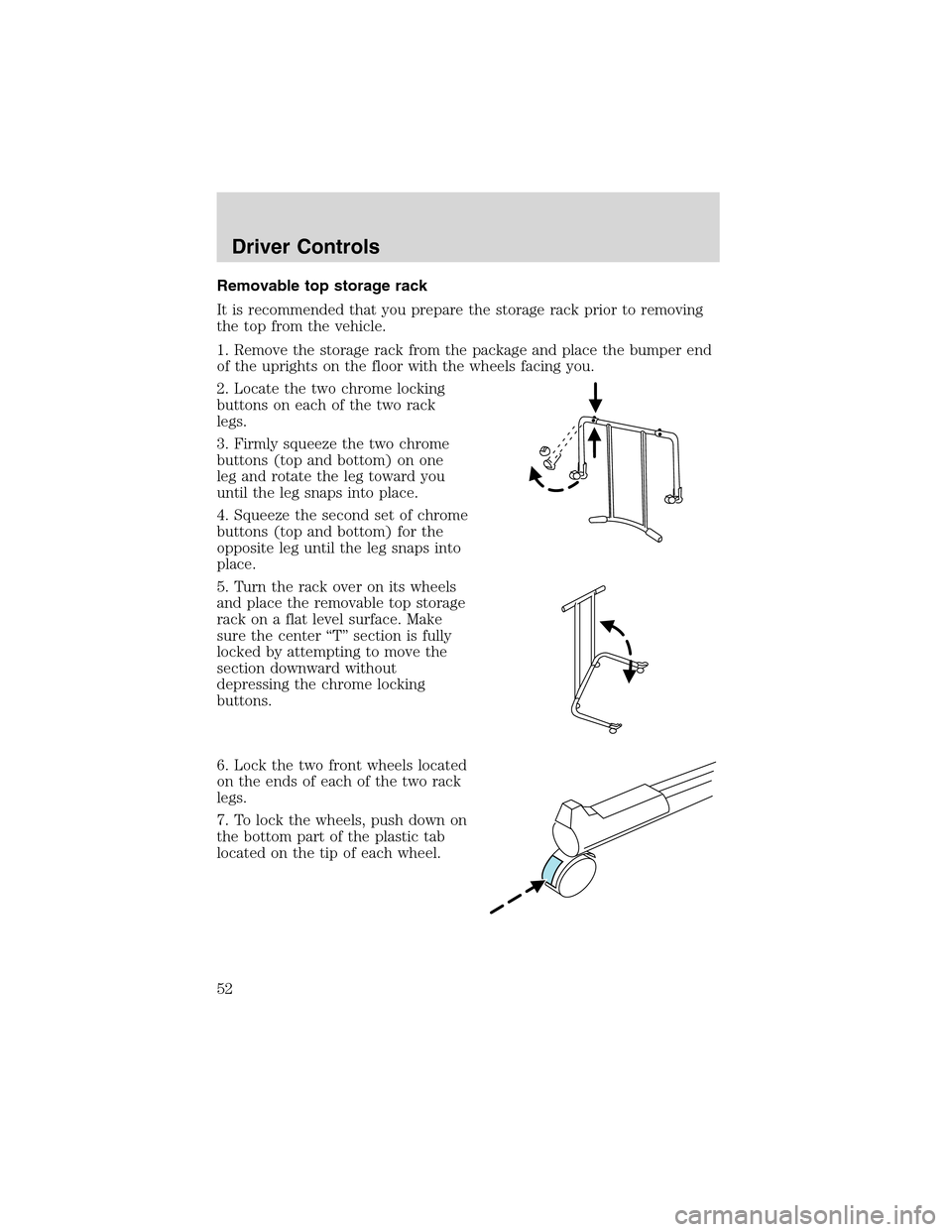
Removable top storage rack
It is recommended that you prepare the storage rack prior to removing
the top from the vehicle.
1. Remove the storage rack from the package and place the bumper end
of the uprights on the floor with the wheels facing you.
2. Locate the two chrome locking
buttons on each of the two rack
legs.
3. Firmly squeeze the two chrome
buttons (top and bottom) on one
leg and rotate the leg toward you
until the leg snaps into place.
4. Squeeze the second set of chrome
buttons (top and bottom) for the
opposite leg until the leg snaps into
place.
5. Turn the rack over on its wheels
and place the removable top storage
rack on a flat level surface. Make
sure the center“T”section is fully
locked by attempting to move the
section downward without
depressing the chrome locking
buttons.
6. Lock the two front wheels located
on the ends of each of the two rack
legs.
7. To lock the wheels, push down on
the bottom part of the plastic tab
located on the tip of each wheel.
Driver Controls
52
Page 53 of 200
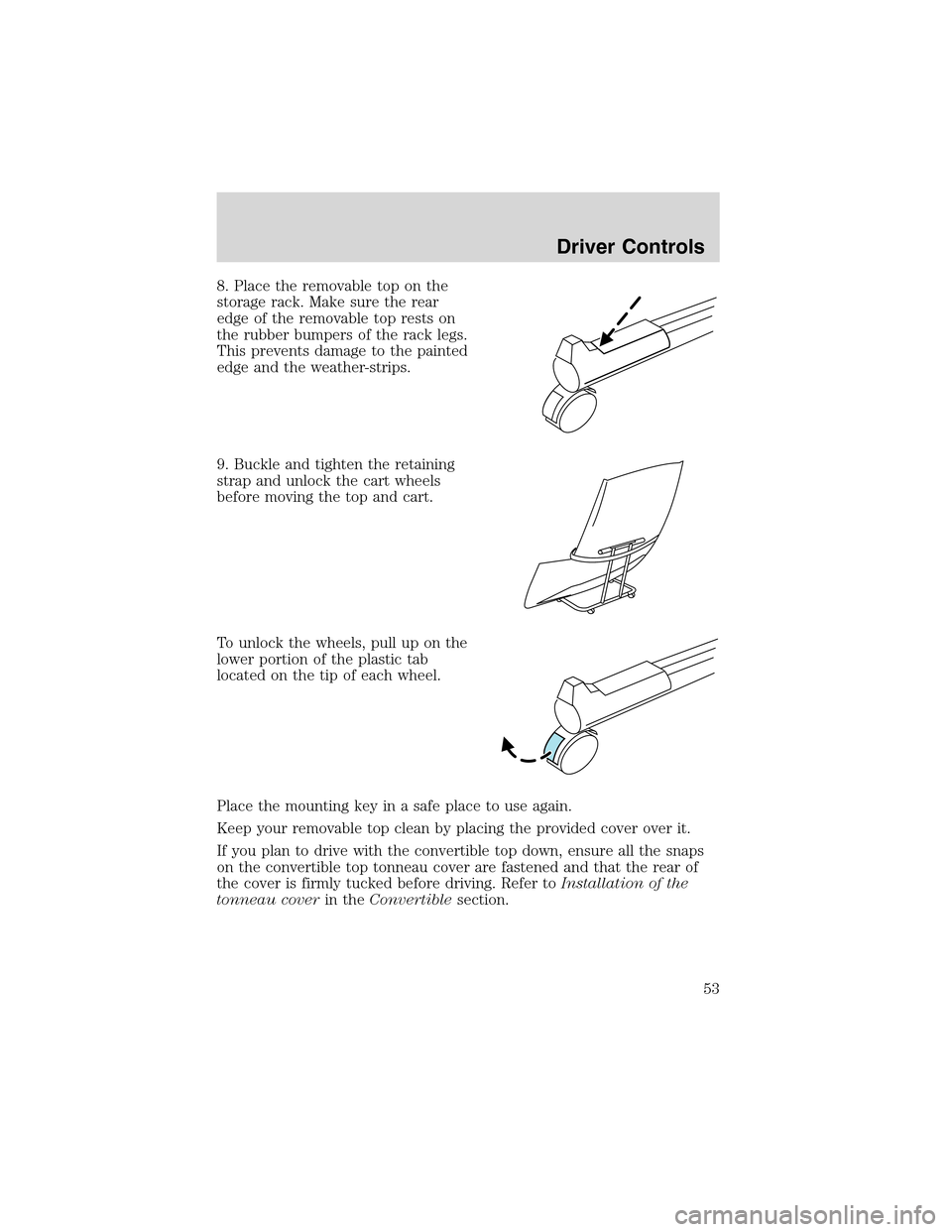
8. Place the removable top on the
storage rack. Make sure the rear
edge of the removable top rests on
the rubber bumpers of the rack legs.
This prevents damage to the painted
edge and the weather-strips.
9. Buckle and tighten the retaining
strap and unlock the cart wheels
before moving the top and cart.
To unlock the wheels, pull up on the
lower portion of the plastic tab
located on the tip of each wheel.
Place the mounting key in a safe place to use again.
Keep your removable top clean by placing the provided cover over it.
If you plan to drive with the convertible top down, ensure all the snaps
on the convertible top tonneau cover are fastened and that the rear of
the cover is firmly tucked before driving. Refer toInstallation of the
tonneau coverin theConvertiblesection.
Driver Controls
53
Page 102 of 200

STARTING
Positions of the ignition
1. LOCK, locks the gearshift lever
and allows key removal. (The
steering wheel will not lock after
key removal.)
2. OFF, shuts off the engine and all
accessories except the radio,
convertible top control and the
power windows if accessory delay is
active. This position also allows the
automatic transmission shift lever to be moved from the P (Park)
position without the brake pedal being depressed.
When the key is in the ignition OFF position, the automatic
transmission shift lever can be moved from the P (Park) position
without the brake pedal depressed. To avoid unwanted vehicle
movement, always set the parking brake.
3. ACCESSORY, allows the electrical accessories such as the radio to
operate while the engine is not running.
4. RUN, all electrical circuits operational. Warning lights illuminated. Key
position when driving.
5. START, cranks the engine. Release the key as soon as the engine
starts.
Preparing to start your vehicle
Engine starting is controlled by the powertrain control system. This
system meets all Canadian Interference-Causing Equipment standard
requirements regulating the impulse electrical field strength of radio
noise.
When starting a fuel-injected engine, don’t press the accelerator before
or during starting. Only use the accelerator when you have difficulty
starting the engine. For more information on starting the vehicle, refer to
Starting the enginein this chapter.
2
3
4
5
1
Driving
102