Page 1 of 256
Introduction 4
Instrument Cluster 10
Warning and control lights 10
Gauges 13
Entertainment Systems 17
AM/FM stereo 17
AM/FM stereo cassette 18
AM/FM stereo cassette with CD 21
AM/FM stereo with CD 25
CD changer 28
Climate Controls 32
Heater only32
Manual heating and air conditioning 33
Lights 35
Headlamps 35
Turn signal control 37
Bulb replacement 38
Driver Controls 44
Windshield wiper/washer control 44
Power windows 47
Mirrors 47
Speed control 48
Message center 51
Locks and Security 56
Keys 56
Locks 56
Anti-theft system 58
Table of Contents
1
Page 8 of 256
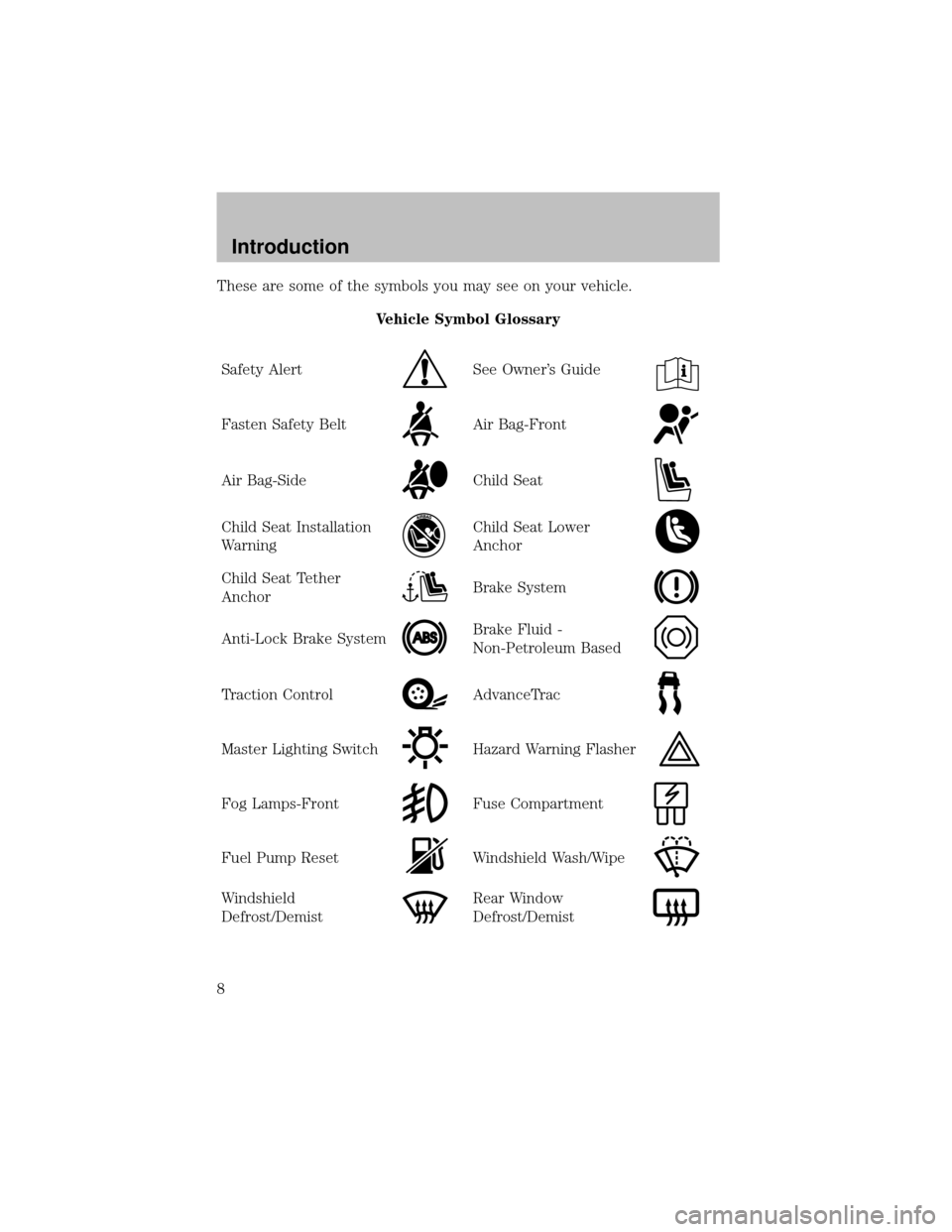
These are some of the symbols you may see on your vehicle.
Vehicle Symbol Glossary
SafetyAlert
See Owner’s Guide
Fasten SafetyBeltAir Bag-Front
Air Bag-SideChild Seat
Child Seat Installation
WarningChild Seat Lower
Anchor
Child Seat Tether
AnchorBrake System
Anti-Lock Brake SystemBrake Fluid -
Non-Petroleum Based
Traction ControlAdvanceTrac
Master Lighting SwitchHazard Warning Flasher
Fog Lamps-FrontFuse Compartment
Fuel Pump ResetWindshield Wash/Wipe
Windshield
Defrost/DemistRear Window
Defrost/Demist
Introduction
8
Page 9 of 256
Vehicle Symbol Glossary
Power Windows
Front/Rear
Power Window Lockout
Child SafetyDoor
Lock/UnlockInterior Luggage
Compartment Release
Symbol
Panic AlarmEngine Oil
Engine CoolantEngine Coolant
Temperature
Do Not Open When HotBattery
Avoid Smoking, Flames,
or SparksBatteryAcid
Explosive GasFan Warning
Power Steering FluidMaintain Correct Fluid
LevelMAX
MIN
Emission SystemEngine Air Filter
Passenger Compartment
Air FilterJack
Check fuel capLow tire warning
Introduction
9
Page 11 of 256

Brake system warning light:To
confirm the brake system warning
light is functional, it will
momentarilyilluminate when the
ignition is turned to the ON position when the engine is not running, or
in a position between ON and START, or byapplying the parking brake
when the ignition is turned to the ON position. If the brake system
warning light does not illuminate at this time, seek service immediately
from your dealership. Illumination after releasing the parking brake
indicates low brake fluid level and the brake system should be inspected
immediatelybyyour servicing dealership.
Driving a vehicle with the brake system warning light on is
dangerous. A significant decrease in braking performance may
occur. It will take you longer to stop the vehicle. Have the vehicle
checked byyour dealer immediately.
Anti-lock brake system:If the
ABS light stays illuminated or
continues to flash, a malfunction has
been detected, have the system
serviced immediately. Normal
braking is still functional unless the brake warning light also is
illuminated.
Air bag readiness:If this light fails
to illuminate when ignition is turned
to ON, continues to flash or remains
on, have the system serviced
immediately. A chime will also sound when a malfunction in the
supplemental restraint system has been detected.
Safety belt:Reminds you to fasten
your safety belt. A chime will also
sound to remind you to fasten your
safetybelt.
Charging system:Illuminates when
the batteryis not charging properly.
ABS
Instrument Cluster
11
Page 13 of 256
Door ajar:Illuminates when the
ignition is in the ON position and
anydoor is open.
Turn signal:Illuminates when the
left or right turn signal or the
hazard lights are turned on. If the
indicators stayon or flash faster, check for a burned out bulb.
High beams:Illuminates when the
high beam headlamps are turned on.
Key-in-ignition warning chime:Sounds when the keyis left in the
ignition in the OFF/LOCK or ACC position and the driver’s door is
opened.
Headlamps on warning chime:Sounds when the headlamps or parking
lamps are on, the ignition is off (and the keyis not in the ignition) and
the driver’s door is opened.
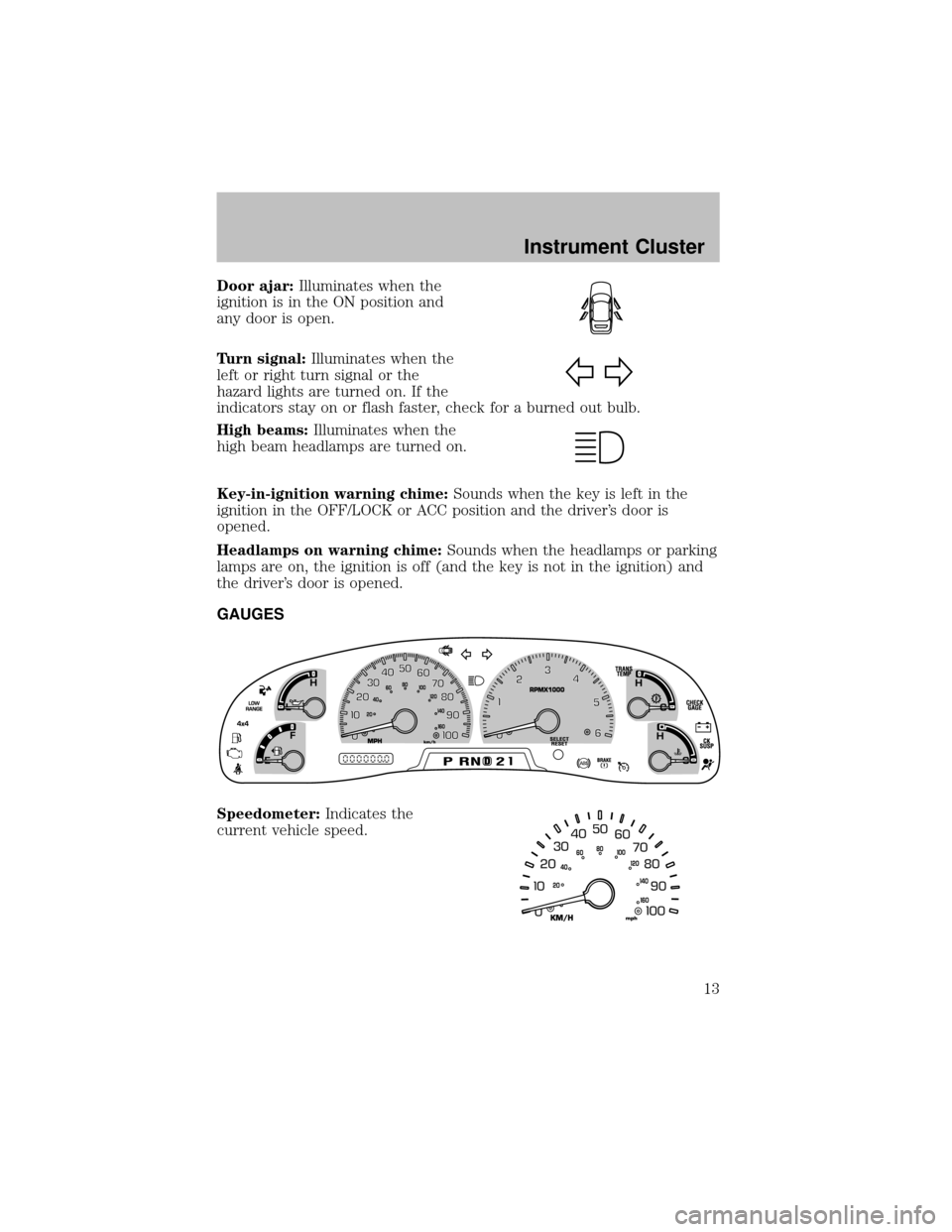
GAUGES
Speedometer:Indicates the
current vehicle speed.
Instrument Cluster
13
Page 16 of 256
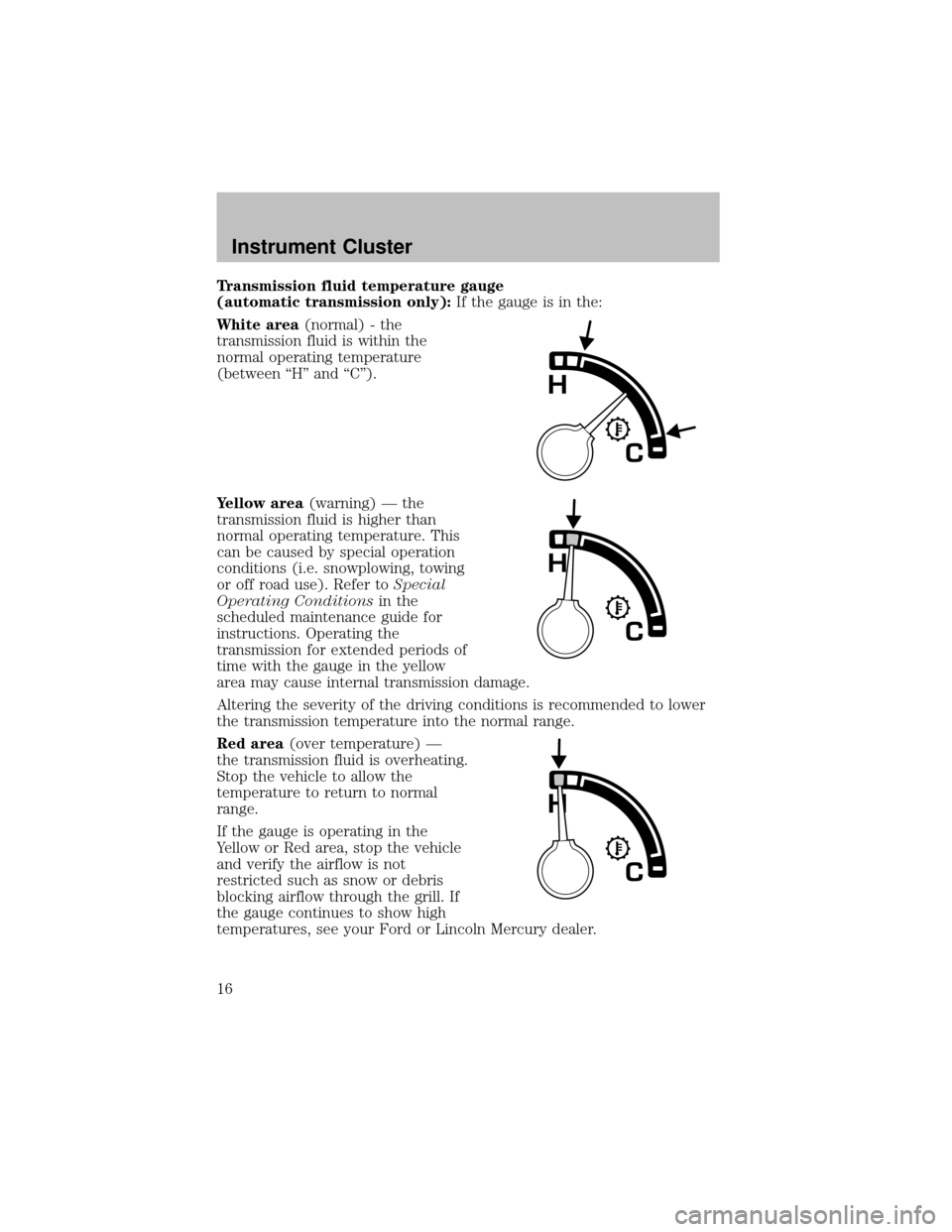
Transmission fluid temperature gauge
(automatictransmission only):If the gauge is in the:
White area(normal) - the
transmission fluid is within the
normal operating temperature
(between “H” and “C”).
Yellow area(warning) — the
transmission fluid is higher than
normal operating temperature. This
can be caused byspecial operation
conditions (i.e. snowplowing, towing
or off road use). Refer toSpecial
Operating Conditionsin the
scheduled maintenance guide for
instructions. Operating the
transmission for extended periods of
time with the gauge in the yellow
area maycause internal transmission damage.
Altering the severityof the driving conditions is recommended to lower
the transmission temperature into the normal range.
Red area(over temperature) —
the transmission fluid is overheating.
Stop the vehicle to allow the
temperature to return to normal
range.
If the gauge is operating in the
Yellow or Red area, stop the vehicle
and verifythe airflow is not
restricted such as snow or debris
blocking airflow through the grill. If
the gauge continues to show high
temperatures, see your Ford or Lincoln Mercury dealer.
Instrument Cluster
16
Page 18 of 256
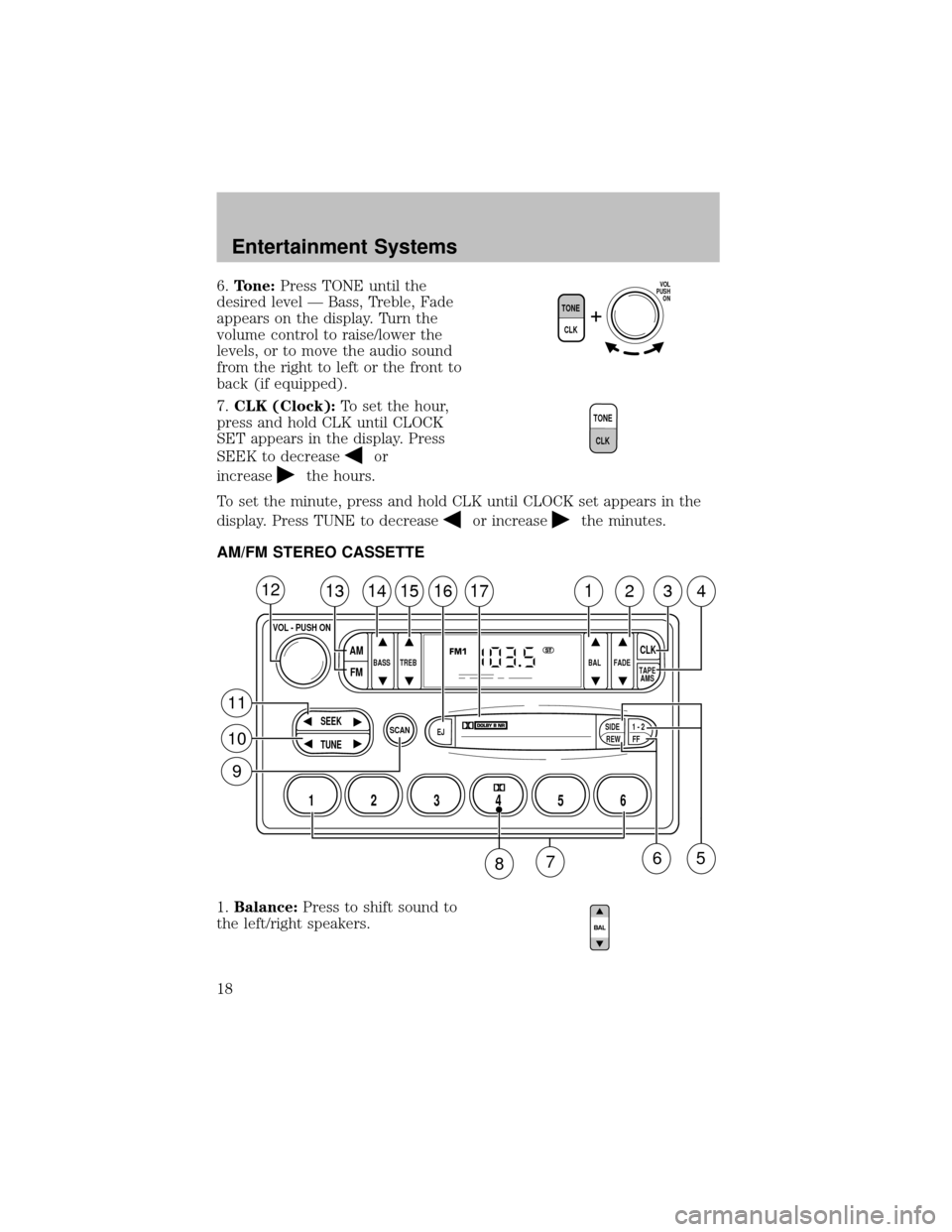
6.Tone:Press TONE until the
desired level — Bass, Treble, Fade
appears on the display. Turn the
volume control to raise/lower the
levels, or to move the audio sound
from the right to left or the front to
back (if equipped).
7.CLK (Clock):To set the hour,
press and hold CLK until CLOCK
SET appears in the display. Press
SEEK to decrease
or
increase
the hours.
To set the minute, press and hold CLK until CLOCK set appears in the
display. Press TUNE to decrease
or increasethe minutes.
AM/FM STEREO CASSETTE
1.Balance:Press to shift sound to
the left/right speakers.
TONE
CLK
VOL
PUSH
ON
T
O
N
E
C
L
K
SCAN
BASS TREB BAL FADE
SIDE
EJ
REW FF1 - 2TAPE
AMS
SEEK
TUNE
AM
FMCLK
12 3456
FM1ST
13141516171234
VOL - PUSH ON
12
11
10
9
65
87
Entertainment Systems
18
Page 22 of 256
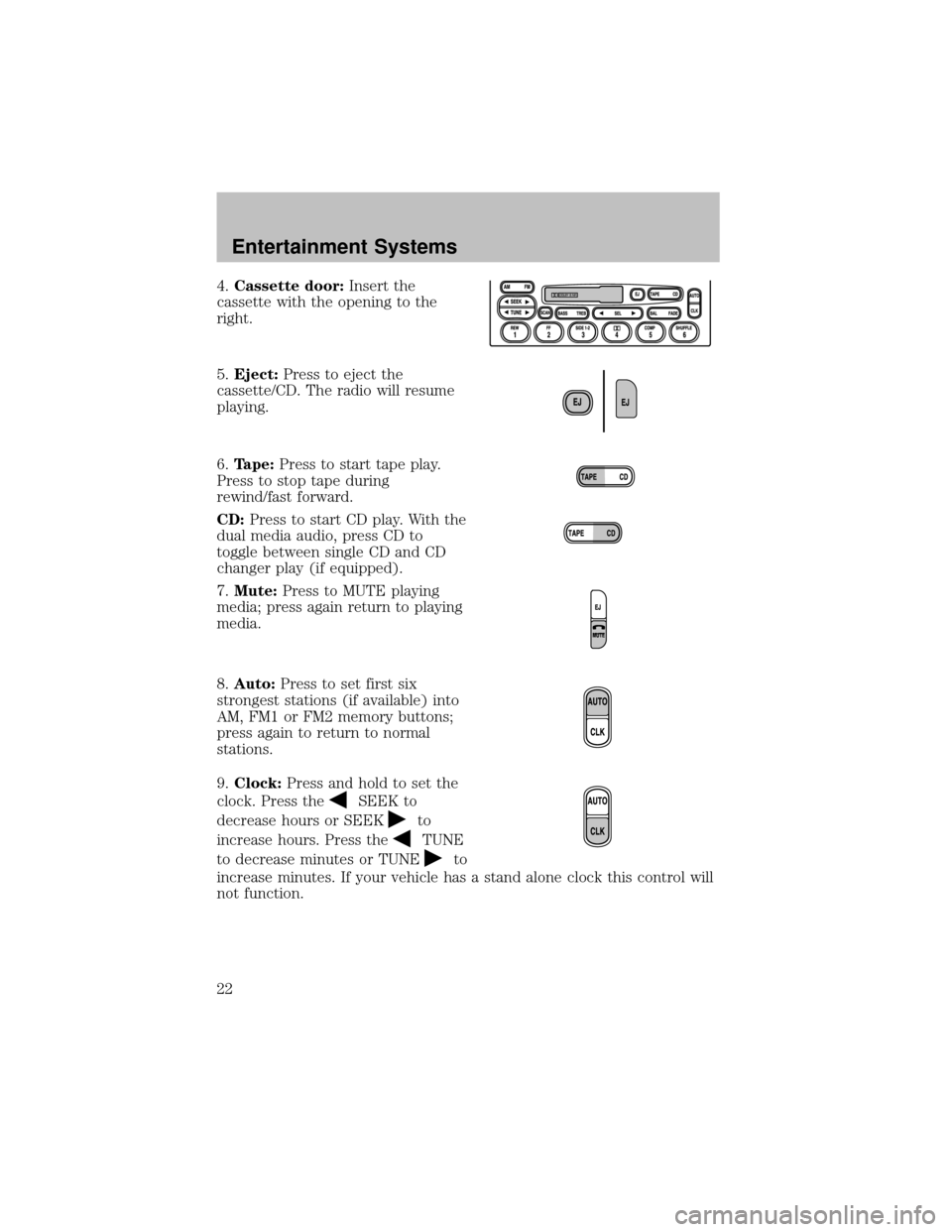
4.Cassette door:Insert the
cassette with the opening to the
right.
5.Eject:Press to eject the
cassette/CD. The radio will resume
playing.
6.Tape:Press to start tape play.
Press to stop tape during
rewind/fast forward.
CD:Press to start CD play. With the
dual media audio, press CD to
toggle between single CD and CD
changer play(if equipped).
7.Mute:Press to MUTE playing
media; press again return to playing
media.
8.Auto:Press to set first six
strongest stations (if available) into
AM, FM1 or FM2 memorybuttons;
press again to return to normal
stations.
9.Clock:Press and hold to set the
clock. Press the
SEEK to
decrease hours or SEEK
to
increase hours. Press the
TUNE
to decrease minutes or TUNE
to
increase minutes. If your vehicle has a stand alone clock this control will
not function.
Entertainment Systems
22