Page 52 of 232

•Under normal weather conditions, do not leave the air flow selector in
MAX A/C or OFF when the vehicle is parked. This allows the vehicle
to“breathe”using the outside air inlet vents.
•Do not put objects under the front seats that will interfere with the
airflow to the back seats.
•Remove any snow, ice or leaves from the air intake area at the base of
the windshield.
To aid in side window defogging/demisting in cold weather:
1. Select
2. Select A/C
3. Modulate the temperature control to maintain comfort.
4. Set the fan speed to HI
5. Direct the outer instrument panel vents towards the side windows
To increase airflow to the outer instrument panel vents, close the vents
located in the middle of the instrument panel.
Do not place objects on top of the instrument panel as these
objects may become projectiles in a collision or sudden stop.
AUXILIARY SYSTEM (IF EQUIPPED)
Your vehicle may be equipped with
auxiliary climate controls which
allow you to control the airflow level
in the rear of the vehicle. The front
controls will still control the
temperature setting.
To allow the rear passengers to
control the fan speed, the front
auxiliary unit must be turned to the
REAR CTRL position.
Once the front auxiliary control is
set to REAR CTRL, the rear
passengers may select the fan speed
from the rear auxiliary unit located
in the overhead between the second
and third row seating.
Climate Controls
52
Page 65 of 232
![FORD E SERIES 2003 4.G Owners Manual •Drive the vehicle slowly (less than 5 km/h [3 mph]) in circles until
CAL indicator turns off in about 2–3 complete circles.
•The compass is now calibrated.
CELL PHONE USE
The use of Mobile Comm](/manual-img/11/4801/w960_4801-64.png "FORD E SERIES 2003 4.G Owners Manual •Drive the vehicle slowly (less than 5 km/h [3 mph]) in circles until
CAL indicator turns off in about 2–3 complete circles.
•The compass is now calibrated.
CELL PHONE USE
The use of Mobile Comm")
•Drive the vehicle slowly (less than 5 km/h [3 mph]) in circles until
CAL indicator turns off in about 2–3 complete circles.
•The compass is now calibrated.
CELL PHONE USE
The use of Mobile Communications Equipment has become increasingly
important in the conduct of business and personal affairs. However,
driver’s must not compromise their own or other’s safety when using
such equipment. Mobile Communications can enhance personal safety
and security when appropriately used, particularly in emergency
situations. Safety must be paramount when using mobile communications
equipment to avoid negating these benefits.
Mobile Communication Equipment includes, but is not limited to cellular
phones, pagers, portable email devices, in vehicle communications
systems, telematics devices and portable two-way radios.
A driver’s first responsibility is the safe operation of the vehicle.
The most important thing you can do to prevent a crash is to
avoid distractions and pay attention to the road. Wait until it is safe to
operate Mobile Communications Equipment.
AUXILIARY POWER POINT
Power outlets are designed for
accessory plugs only. Do not
hang any type of accessory or
accessory bracket from the plug.
Improper use of the power
outlet can cause damage not
covered by your warranty.
The auxiliary power point is located
on the instrument panel.
A second power point (if equipped)
is located behind the driver’s seat on the upper trim panel.
Do not plug optional electrical accessories into the cigarette
lighter. Use the power point.
Driver Controls
65
Page 143 of 232

Fuse/Relay
LocationFuse Amp
RatingPassenger Compartment Fuse
Panel Description
6 10A Brake shift interlock, Speed control,
DRL module
7 10A Multi-function switch, Turn signals
8 30A Radio capacitor(s), Ignition coil, PCM
diode, PCM power relay, Fuel heater
(Diesel only), Glow plug relay (Diesel
only)
9 30A Wiper control module, Windshield
wiper motor
10 20A Main light switch, Park lamps, License
lamp (external lamps), Multi-function
switch (flash-to-pass)
11 15A Brake pressure switch, Multi-function
switch (hazards), Brake lamp switch,
Brake lamps
12 15A Transmission Range (TR) sensor,
Backup lamps, Auxiliary battery relay
13 15A Blend door actuator, A/C heater,
Function selector switch
14 5A Instrument cluster (air bag and
charge indicator)
15 5A Trailer battery charge relay
16 30A Power seats
17—Not used
18—Not used
19 10A Air bag diagnostic monitor
20 5A Overdrive cancel switch
21 30A Power windows*
22 15A Memory power radio, Rear seat
control unit, Video screen
23 20A Cigar lighter, Data Link Connector
(DLC)
24—Not used
25 10A Left headlamp (low beam)
Roadside Emergencies
143
Page 145 of 232
If the battery has been disconnected and reconnected, refer to the
Batterysection of theMaintenance and specificationschapter.
The high-current fuses are coded as follows.
Fuse/Relay
LocationFuse Amp
RatingPower Distribution Box
Description
1—Not used
2—Not used
3—Not used
4 10A* Powertrain Control Module (PCM)
Keep Alive Memory, Instrument
cluster, Voltmeter
5 10A* Right trailer turn signal
6 10A* Left trailer turn signal
7 20A* Clearance lamps
8 60A** I/P fuses 4, 5, 10, 11, 16, 22, 23, 28,
32, 38
9 30A** PCM power relay, Engine
compartment fuse 4
10 60A** Auxiliary battery relay, Engine
compartment fuses 14, 22
AB3
2
146 5715 14 13 12 11 10 9 823 22 21 20 19 18 17 1624 26 25 27
29
CDG F EK J H
28
Roadside Emergencies
145
Page 146 of 232

Fuse/Relay
LocationFuse Amp
RatingPower Distribution Box
Description
11 30A** IDM relay (Diesel only)
12 60A** Engine compartment fuses 25, 27
13 50A** Blower motor relay (blower motor)
14 30A** Trailer running lamps relay, Trailer
backup lamps relay
15 40A** Main light switch, Daytime Running
Lights (DRL)
16 50A** Auxiliary blower motor relay
17 30A** Fuel pump relay
18 60A** I/P fuses 33, 37, 39, 40, 41
19 60A** 4WABS module
20 20A** Electric brake controller
21 50A** Modified vehicle power
22 40A** Trailer battery charge relay, Modified
vehicles
23 60A** Ignition switch, Fuse panel
24 30A* Natural gas tank valves (NGV only)
25 20A* NGV module (NGV only)
26 10A* A/C clutch (4.2L only)
27 15A* DRL module, Horn relay
28—PCM diode
29—Not used
A—Marker lamps relay
B—Stop lamp relay
C—Trailer backup lamps relay
D—Trailer running lamps relay
E—Trailer battery charge relay
F—IDM relay (Diesel only), A/C clutch
relay (4.2L only)
G—PCM relay
H—Blower motor relay
Roadside Emergencies
146
Page 177 of 232
OPENING THE HOOD
1. Inside the vehicle, pull the hood
release handle located under the
bottom left corner of the instrument
panel.
2. Go to the front of the vehicle and release the auxiliary latch that is
located in the center top of the grill.
3. Lift the hood and secure it with the prop rod.
IDENTIFYING COMPONENTS IN THE ENGINE COMPARTMENT
Engine compartment component locations
Refer to the7.3 Liter Power Stroke Direct Injection Turbo Diesel
Owner’s Guide Supplementfor diesel engine component locations.
HOOD
Maintenance and Specifications
177
Page 184 of 232
If the battery has been disconnected or a new battery has been installed,
the clock and radio settings must be reset once the battery is
reconnected.
•Always dispose of automotive
batteries in a responsible manner.
Follow your local authorized
standards for disposal. Call your
local authorized recycling center
to find out more about recycling
automotive batteries.
Disconnecting dual batteries (if equipped)
The primary battery is located under the hood.
The auxiliary battery is located on the passenger side frame rail.
LEAD
RETURN
RECYCLE
Maintenance and Specifications
184
Page 185 of 232
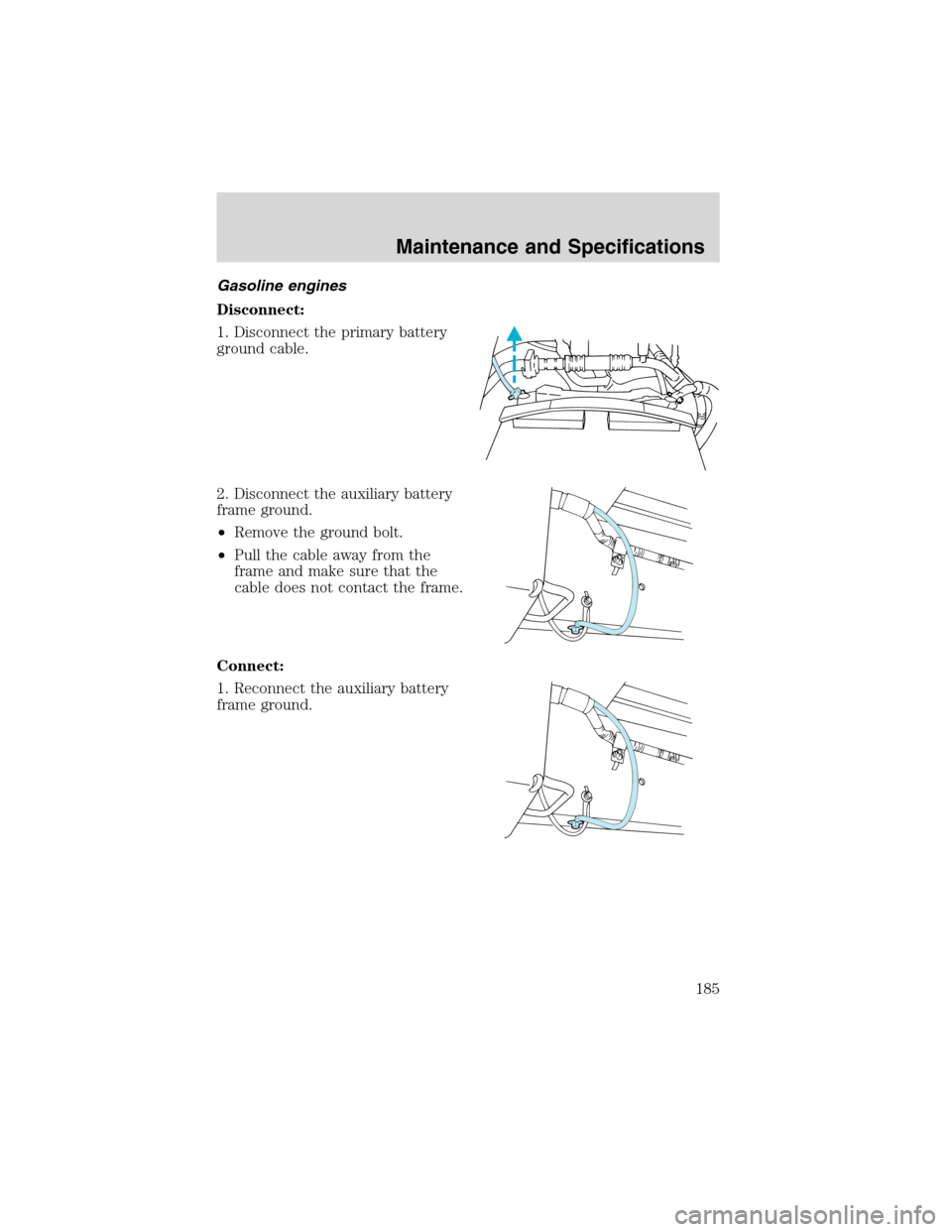
Gasoline engines
Disconnect:
1. Disconnect the primary battery
ground cable.
2. Disconnect the auxiliary battery
frame ground.
•Remove the ground bolt.
•Pull the cable away from the
frame and make sure that the
cable does not contact the frame.
Connect:
1. Reconnect the auxiliary battery
frame ground.
Maintenance and Specifications
185