Page 70 of 486

When choosing a child restraint, be sure the child
restraint is designed to be used in a vehicle. If it is, it
will have a label saying that it meets federal
motor vehicle safety standards.
Then follow the instructions for the restraint. You
may ®nd these instructions on the restraint itself or
in a booklet, or both. These restraints use the
belt system in your vehicle, but the child also has to
be secured within the restraint to help reduce the
chance of personal injury. When securing an add-on
child restraint, refer to the instructions that come
with the restraint which may be on the restraint itself
or in a booklet, or both, and to this manual. The
child restraint instructions are important, so if they
are not available, obtain a replacement copy
from the manufacturer.Q:When securing an aftermarket child seat in a
bucket seat, I am unable to get the seat
fastened in snugly enough. What should I do?
A:With some child seats, it may be difficult to tighten
the vehicle belts so that there is less side-to-side
or front-to-back movement of the child seat. A
replacement buckle, which makes it easier
to secure your child seat, is available from your
dealer at no charge to you.
1-64
Page 75 of 486
Lower Anchorages and Top Tethers
for Children (LATCH System)
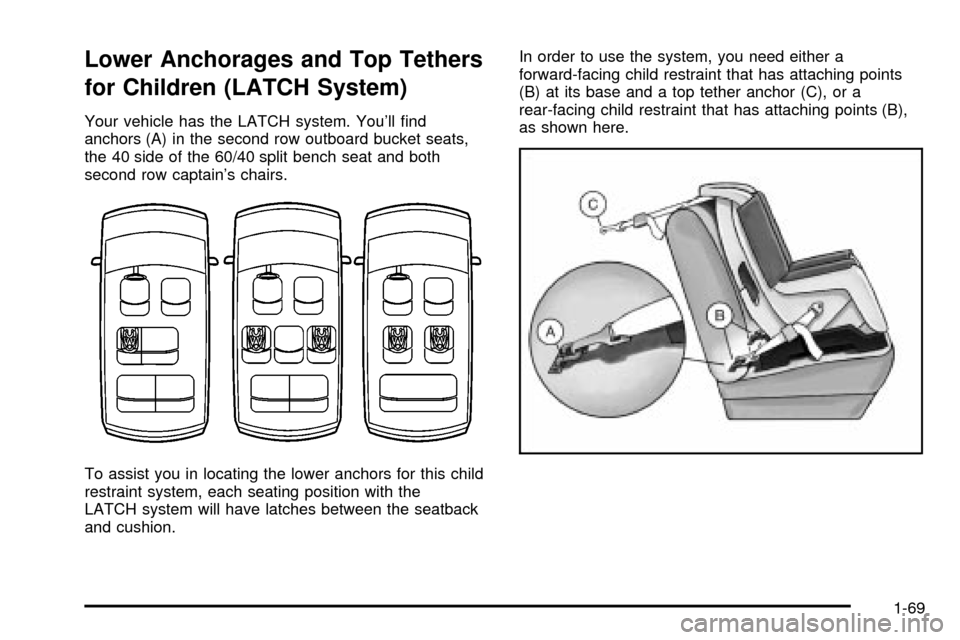
Your vehicle has the LATCH system. You'll ®nd
anchors (A) in the second row outboard bucket seats,
the 40 side of the 60/40 split bench seat and both
second row captain's chairs.
To assist you in locating the lower anchors for this child
restraint system, each seating position with the
LATCH system will have latches between the seatback
and cushion.In order to use the system, you need either a
forward-facing child restraint that has attaching points
(B) at its base and a top tether anchor (C), or a
rear-facing child restraint that has attaching points (B),
as shown here.
1-69
Page 86 of 486
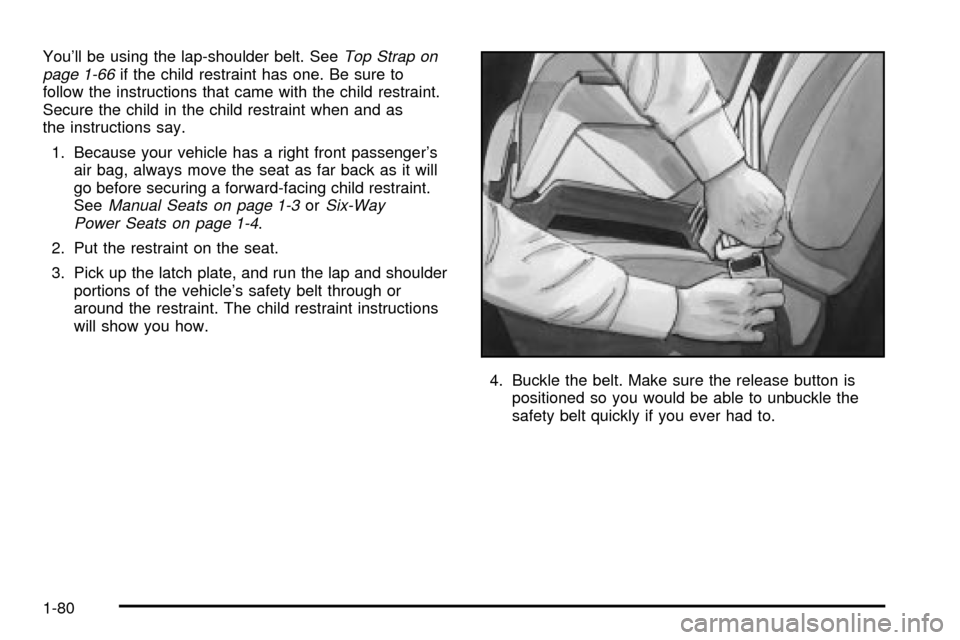
You'll be using the lap-shoulder belt. SeeTop Strap on
page 1-66if the child restraint has one. Be sure to
follow the instructions that came with the child restraint.
Secure the child in the child restraint when and as
the instructions say.
1. Because your vehicle has a right front passenger's
air bag, always move the seat as far back as it will
go before securing a forward-facing child restraint.
See
Manual Seats on page 1-3orSix-Way
Power Seats on page 1-4.
2. Put the restraint on the seat.
3. Pick up the latch plate, and run the lap and shoulder
portions of the vehicle's safety belt through or
around the restraint. The child restraint instructions
will show you how.
4. Buckle the belt. Make sure the release button is
positioned so you would be able to unbuckle the
safety belt quickly if you ever had to.
1-80
Page 89 of 486
If your vehicle has this option in a bucket seat, each
bucket seat that has the built-in child restraint ®ts in only
one location in your vehicle. To ®nd out where a
bucket seat that has a built-in child restraint must be
located in your vehicle see
Rear Seat Operation
on page 1-7. If your vehicle has this option in a 60/40
bench seat, this bench seat will only ®t in the second
row of your vehicle. In both types of seats, the built-in
child restraint works the same way.
This child restraint system conforms to all applicable
Federal Motor Vehicle Safety Standards.
Each child restraint is designed for use only by children
who weigh between 22 and 40 pounds (10 and 18 kg)
and whose height is between 33.5 and 40 inches
(850 and 1 016 mm) and who are capable of sitting
upright alone.
The child should also be at least one year old. It is
important to use a rear-facing infant restraint until the
child is about a year old. A rear-facing restraint gives the
infant's head, neck and body the support they would
need in a crash. See
Older Children on page 1-55orInfants and Young Children on page 1-58.
Q:What if the top of my child's shoulders is above
the shoulder belt slots for the ®ve-point child
restraint harness system?
A:A child whose shoulders are above the shoulder
belt slots for the ®ve point child restraint harness
system shouldn't use this child restraint. Instead,
the child should sit on the vehicle's regular
seat cushion and use the vehicle's adult
safety belts.
{CAUTION:
BEFORE YOU USE THIS CHILD RESTRAINT,
BE SURE THE TOP OF THE CHILD'S
SHOULDERS IS BELOW THE SLOTS THAT
THE HARNESS GOES THROUGH. A CHILD
WHOSE SHOULDERS ARE ABOVE THOSE
SLOTS COULD BE INJURED DURING A
SUDDEN STOP OR CRASH. IF THE TOP OF
THE CHILD'S SHOULDERS IS ABOVE THE
SLOTS, DON'T USE THIS CHILD RESTRAINT
WHILE THE VEHICLE IS IN MOTION.
1-83
Page 95 of 486
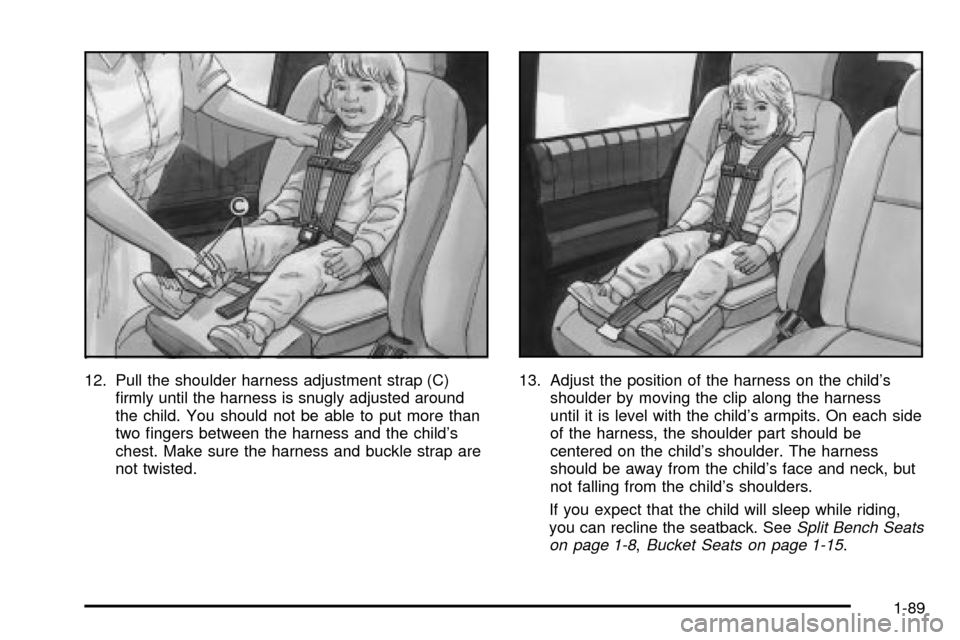
12. Pull the shoulder harness adjustment strap (C)
®rmly until the harness is snugly adjusted around
the child. You should not be able to put more than
two ®ngers between the harness and the child's
chest. Make sure the harness and buckle strap are
not twisted.13. Adjust the position of the harness on the child's
shoulder by moving the clip along the harness
until it is level with the child's armpits. On each side
of the harness, the shoulder part should be
centered on the child's shoulder. The harness
should be away from the child's face and neck, but
not falling from the child's shoulders.
If you expect that the child will sleep while riding,
you can recline the seatback. See
Split Bench Seats
on page 1-8,Bucket Seats on page 1-15.
1-89
Page 161 of 486

Reprogramming a Single HomeLinkž
Button
To program a device to HomeLinkžusing a HomeLinkž
button previously trained, follow these steps:
1. Press and hold the desired HomeLink
žbutton. Do
not release the button.
2. The indicator light will begin to ¯ash after
20 seconds. While still holding the HomeLink
ž
button, proceed with Step 2 under ªProgramming
HomeLinkž.º
Resetting Defaults
To reset HomeLinkžto default settings do the following:
1. Hold down the two outside buttons for about
20 seconds until the indicator light begins to ¯ash.
2. Continue to hold both buttons until the HomeLink
ž
indicator light turns off.
3. Release both buttons.
For questions or comments, contact HomeLink
žat
1-800-355-3515, or on the internet at
www.homelink.com.
Storage Areas
Your vehicle's large carrying capacity can store many
items. If you have the extended wheelbase version, you
can carry things as large as a 4' x 8' piece of plywood.
You can also use the ¯oor pins that are used to
attach the seats, to secure larger loads.
Glove Box
Your vehicle has a glove box below the instrument
panel. To open the glove box, lift the latch release.
The glove box door has a detent to prevent the door
from lowering too far. Open the glove box until the door
is partway open, then pull the door down if you need
it fully open. To close the glove box, the door must
be pushed up past the detent.
Cupholder(s)
There are cupholders located below the center
instrument panel switchbank. The cupholders have a
removable liner for larger size cups and for cleaning the
cupholders.
To use the cupholders, simply pull out the tray. Keep
the tray stowed in when not in use.
Your vehicle also has cupholders on the bottom inboard
side of the second row driver's side captain's chairs
and the seatbacks have cupholders that can be
used when the seatbacks are folded forward.
2-51
Page 164 of 486
5. Add one peg at a time until your garage door
opener operates with the compartment door
closed when you press on it.
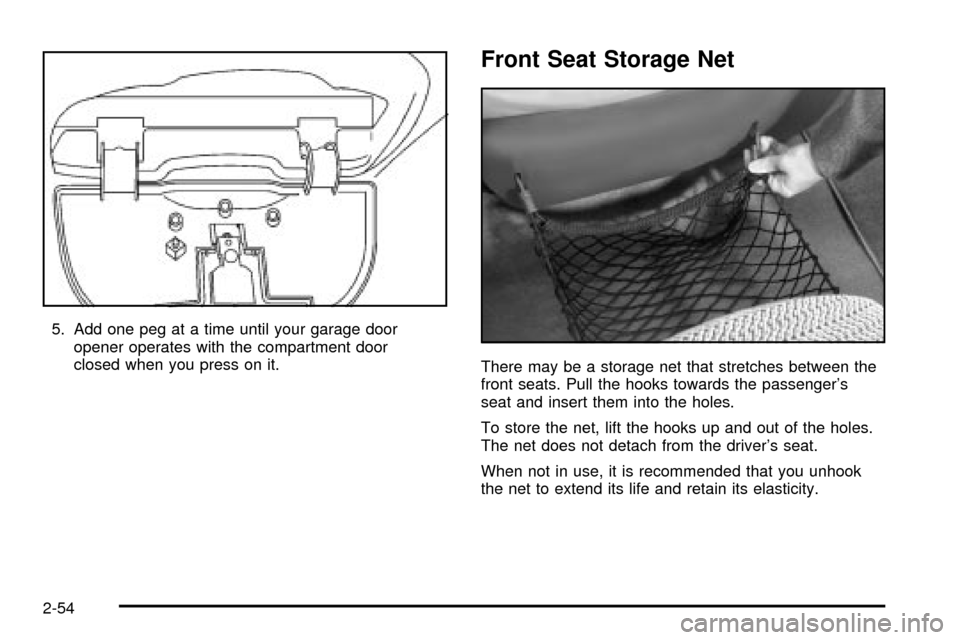
Front Seat Storage Net
There may be a storage net that stretches between the
front seats. Pull the hooks towards the passenger's
seat and insert them into the holes.
To store the net, lift the hooks up and out of the holes.
The net does not detach from the driver's seat.
When not in use, it is recommended that you unhook
the net to extend its life and retain its elasticity.
2-54
Page 206 of 486

)(Bi-Level):This mode directs half of the air to the
instrument panel outlets, then directs the remaining
air to the ¯oor outlets. Cooler air is directed to the upper
outlets and warmer air to the ¯oor outlets.
6(Floor):This mode directs most of the air to the
¯oor outlets. Use this mode to send air to the rear of the
vehicle. Keep the area under the front seats free of
objects that could obstruct air¯ow to the rear of
the vehicle.
The right knob can also be used to select defog or
defrost mode. For more information, see ªDefogging and
Defrostingº later in this section.
9(Fan):Turn the left knob clockwise or
counterclockwise to increase or decrease the fan speed.
Turn the knob to OFF to turn off the fan. The fan
must be turned on for the air conditioning compressor to
operate.
:(Outside Air):Press this button to turn the
outside air mode on or off. When this mode is on,
outside air will circulate throughout your vehicle. When
this mode is on, an indicator light in the button will
come on to let you know that it is activated. The outside
air mode can be used with all modes, but it cannot
be used with the recirculation mode.
?(Recirculation):This mode keeps outside air
from coming in the vehicle. It can be used to prevent
outside air and odors from entering your vehicle or help
heat or cool the air inside your vehicle more quickly.
Press this button to turn the recirculation mode on or off.
When the button is pressed, an indicator light will
come on. The air-conditioning compressor also comes
on. The recirculation mode can be used with vent
and bi-level modes, but it cannot be used with ¯oor,
defog, defrost or outside air modes.
Temperature Control:Turn the center knob clockwise
or counterclockwise to increase or decrease the air
temperature inside your vehicle.
#A/C (Air Conditioning):Press this button to turn
the air-conditioning system on or off. When A/C is
pressed, an indicator light in the button will come on to
let you know that air conditioning is activated.
You may notice a slight change in engine performance
when the air-conditioning compressor shuts off and
turns on again. This is normal. The system is designed
to make adjustments to help with fuel economy while
still maintaining the selected temperature.
On hot days, open the windows to let hot inside air
escape; then close them. This helps to reduce the time
it takes for your vehicle to cool down. It also helps
the system to operate more efficiently.
3-26