2003 CHEVROLET VENTURE climate control
[x] Cancel search: climate controlPage 201 of 486

Instrument Panel Switchbank
This switchbank is located in the instrument panel below
the comfort controls. The switchbank may include the
rear fan knob, the rear window wiper/washer and
the traction control switches. If your vehicle does not
have some of these options, there will be a blank.
For more information, see each of these features in
the Index.
If your vehicle is not equipped with the rear climate
control system, there will be a storage space in
this switchbank. The rubber mat can be removed for
cleaning. Snap the mat into place after cleaning.
Overhead Console Switchbank
This switchbank is located in the overhead console. The
switchbank may include the interior lamps override,
the power sliding door(s)/override, the power rear
quarter windows and the Ultrasonic Rear Parking
Aid (URPA) disable switches. If your vehicle does not
have some of these options, there will be a blank.
For more information, see each of these features in
the Index.
3-21
Page 205 of 486
Certain electrical accessories may not be compatible
with the accessory power outlet and could result
in blown vehicle or adapter fuses. If you experience a
problem see your dealer for additional information
on accessory power outlets.
Notice:Adding any electrical equipment to your
vehicle may damage it or keep other components
from working as they should. The repairs would not
be covered by your warranty. Check with your
dealer before adding electrical equipment.
When adding electrical equipment, be sure to follow the
proper installation instructions included with the
equipment.
Notice:Improper use of the power outlet can cause
damage not covered by your warranty. Do not
hang any type of accessory or accessory bracket
from the plug because the power outlets are
designed for accessory power plugs only.
Climate Controls
Climate Control System
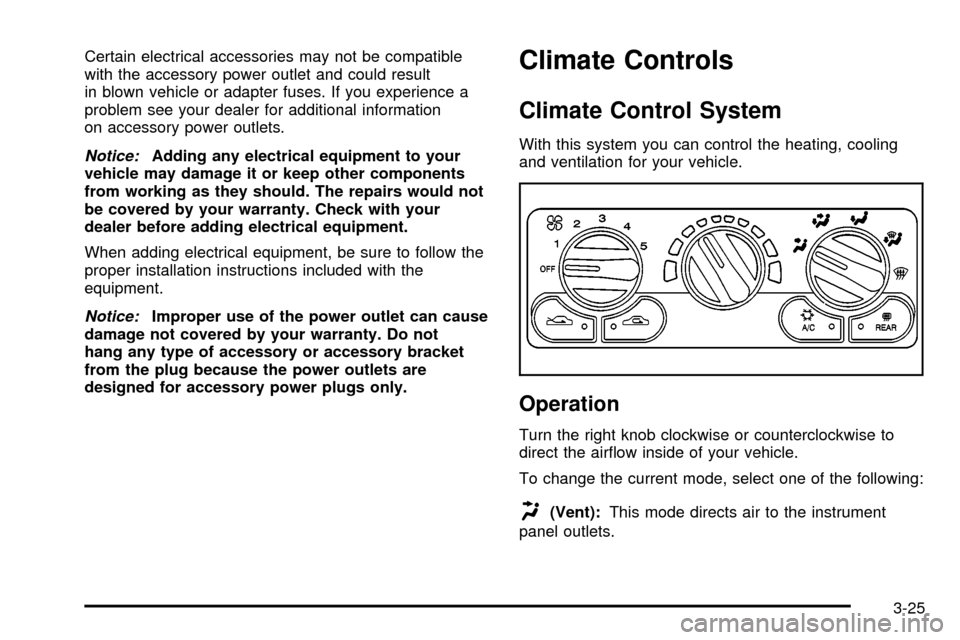
With this system you can control the heating, cooling
and ventilation for your vehicle.
Operation
Turn the right knob clockwise or counterclockwise to
direct the air¯ow inside of your vehicle.
To change the current mode, select one of the following:
H(Vent):This mode directs air to the instrument
panel outlets.
3-25
Page 207 of 486

For quick cool down on hot days, do the following:
1. Select the vent mode.
2. Select the recirculation mode.
3. Select A/C.
4. Select the coolest temperature.
5. Select the highest fan speed.
Using these settings together for long periods of time
may cause the air inside of your vehicle to become too
dry. To prevent this from happening, after the air
inside of your vehicle has cooled, turn the recirculation
mode off.
The air-conditioning system removes moisture from the
air, so you may sometimes notice a small amount of
water dripping underneath your vehicle while idling
or after turning off the engine. This is normal.
Defogging and Defrosting
Fog on the inside of windows is a result of high humidity
(moisture) condensing on the cool window glass. This
can be minimized if the climate control system is
used properly. There are two modes to clear fog or frostfrom your windshield. Use the defog mode to clear the
windows of fog or moisture and warm the passengers.
Use the defrost mode to remove fog or frost from
the windshield more quickly.
Turn the right knob to select the defog or defrost mode.
-(Defog):This mode directs air to the windshield
and the ¯oor outlets. When you select this mode,
the system turns off recirculation and runs the
air-conditioning compressor unless the outside
temperature is at or below freezing. The recirculation
mode cannot be selected while in the defog mode.
0(Defrost):Pressing this button directs most of the
air to the windshield and the side window outlets,
with some air directed to the ¯oor outlets. In this mode,
the system will automatically turn off recirculation
and run the air-conditioning compressor, unless the
outside temperature is at or below freezing.
Recirculation cannot be selected while in the
defrost mode.
Do not drive the vehicle until all the windows are clear.
3-27
Page 209 of 486

Rear Climate Control System
(Without Entertainment System)
Your vehicle may have a rear climate-control system
that allows the driver to adjust the fan speed or a
rear-seat passenger to set a separate temperature and
adjust the fan speed, for the rear-seating area. This
system works with the main climate-control system in
your vehicle.
This knob is located below
the main climate-control
system on the instrument
panel switchbank. Use
this knob to adjust the fan
speed for the rear-seat
passengers, from the
front-seating area.These controls are overhead, on the control panel
located behind the driver's seat. A rear-seat passenger
can use these controls to personally adjust the
temperature and the fan speed for the rear-seating
area.
The fan knob located on the switchbank must be turned
to R (Rear) to allow the rear-seat passengers to use
the controls located on the control panel in the
rear-seating area. Performing this action disables the
fan knob on the switchbank. To return control to
that knob, turn the knob out of R.
3-29
Page 210 of 486

Directing the Air¯ow
To direct the air¯ow to the rear-seating area, use the
right knob located on the main climate-control panel.
·Select vent or bi-level mode to direct air to the
rear of the vehicle through the overhead outlets.
·Select ¯oor, defog or defrost mode to direct air to
the rear of the vehicle through the ¯oor outlets.
Generally the upper outlets are used for air conditioning
and the ¯oor outlets are used for heating.
Selecting the Fan Speed
9
(Fan):Turn the fan knob on either rear fan control
to numeral 1, 2, or 3 to increase or decrease air¯ow
to the rear-seating area. Turn the fan knob on either rear
fan control to 0 or OFF to turn off the fan.
Setting the Temperature
If the driver is adjusting the temperature, do the
following:
To increase or decrease the temperature for the entire
vehicle, use the temperature controls located on the
main climate-control panel.If using the main climate-control panel, then the
air-conditioning system must be on to direct cooled air
to the rear of the vehicle. If it is not on, then the
temperature in the rear of the vehicle will remain at
cabin temperature.
If a rear-seat passenger is adjusting the temperature, do
the following:
Turn the right knob, located on the overhead rear-control
panel, behind the driver's seat, clockwise or
counterclockwise to raise or lower the temperature in
the rear-seating area only.
Rear Air Outlets
To increase air¯ow through the rear ¯oor outlets, place
the left bucket seat in the second row in the forward
position. For more information, see
Rear Seat Operation
on page 1-7.
The outlet behind the left rear seat is the cold air return
outlet. Be sure to keep it free from obstructions.
Also, keep the area around the base of the center
instrument panel console, between and under the front
seats, free of objects that could also obstruct air¯ow
to the rear-seating area.
For more information on how to use the main climate
control system, see ªClimate Control Systemº listed
previously in this section. For information on ventilation,
see ªOutlet Adjustmentº under ªClimate Control
Systemº listed previously in this section.
3-30
Page 211 of 486
Rear Climate Control System
(With Entertainment System)
Your vehicle may have a rear climate-control system
that allows the driver to adjust the fan speed or a
rear-seat passenger to set a separate temperature and
adjust the fan speed, for the rear-seating area. This
system works with the main climate-control system in
your vehicle.
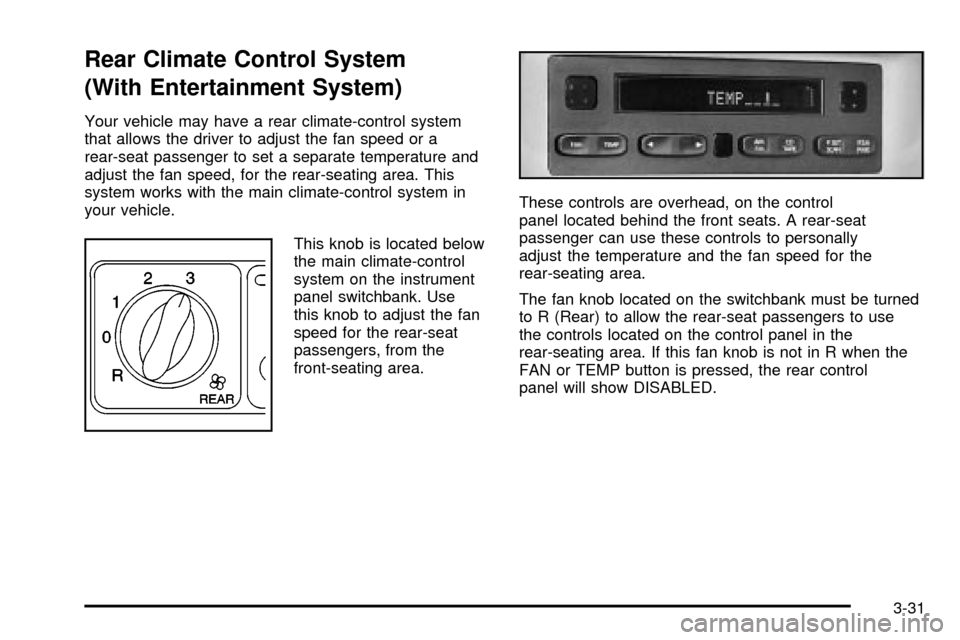
This knob is located below
the main climate-control
system on the instrument
panel switchbank. Use
this knob to adjust the fan
speed for the rear-seat
passengers, from the
front-seating area.These controls are overhead, on the control
panel located behind the front seats. A rear-seat
passenger can use these controls to personally
adjust the temperature and the fan speed for the
rear-seating area.
The fan knob located on the switchbank must be turned
to R (Rear) to allow the rear-seat passengers to use
the controls located on the control panel in the
rear-seating area. If this fan knob is not in R when the
FAN or TEMP button is pressed, the rear control
panel will show DISABLED.
3-31
Page 212 of 486

Directing the Air¯ow
To direct the air¯ow to the rear-seating area, use the
right knob located on the main climate-control panel.
·Select vent or bi-level mode to direct air to the
rear of the vehicle through the overhead outlets.
·Select ¯oor, defog or defrost mode to direct air to
the rear of the vehicle through the ¯oor outlets.
Generally the upper outlets are used for air conditioning
and the ¯oor outlets are used for heating.
Selecting the Fan Speed
If the driver is adjusting the fan speed, use the following
control:
9(Fan):Turn the fan knob on the rear fan control
located below the main climate-control system on
the switchbank to numeral 1, 2, or 3 to increase or
decrease air¯ow to the rear-seating area. Turn the fan
knob on the rear fan control to 0 to turn off the fan.If a rear-seat passenger is adjusting the fan speed, use
the following control:
FAN:Press the FAN button on the rear control panel.
The display will show the current setting. Press the
left and right arrow buttons to cycle through the available
settings: OFF, LOW, MED and HIGH.
Setting the Temperature
If the driver is adjusting the temperature, do the
following:
To increase or decrease the temperature for the entire
vehicle, use the temperature controls located on the
main climate-control panel.
If using the main climate-control panel, then the
air-conditioning system must be on to direct cooled air
to the rear of the vehicle. If it is not on, then the
temperature in the rear of the vehicle will remain at
cabin temperature.
If a rear-seat passenger is adjusting the temperature, do
the following:
Press the TEMP button on the rear control panel. Use
the left arrow button to make the air cooler. Use the right
arrow button to make the air warmer.
3-32
Page 213 of 486
Rear Air Outlets
To increase air¯ow through the rear ¯oor outlets, place
the left bucket seat in the second row in the forward
position. For more information, see
Rear Seat Operation
on page 1-7.
The outlet behind the left rear seat is the cold air return
outlet. Be sure to keep it free from obstructions.
Also, keep the area around the base of the center
instrument panel console, between and under the front
seats, free of objects that could also obstruct air¯ow
to the rear-seating area.
For more information on how to use the main climate
control system, see ªClimate Control Systemº listed
previously in this section. For information on ventilation,
see ªOutlet Adjustmentº under ªClimate Control
Systemº listed previously in this section.
Passenger Compartment Air Filter
Passenger compartment air, both outside and
recirculated air, is routed through a passenger
compartment ®lter. The ®lter removes certain
contaminants from the air, including pollen and dust
particles. Reductions in air¯ow, which may occur more
quickly in dusty areas, indicate that the ®lter needs
to be replaced early. For how often to change the air
®lter, see
Part A: Scheduled Maintenance Services
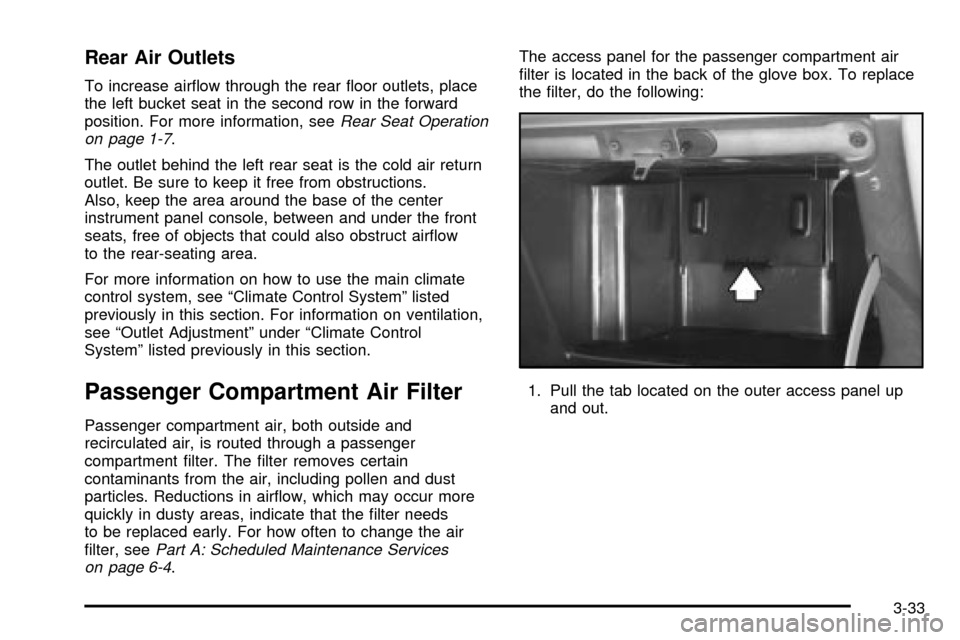
on page 6-4.The access panel for the passenger compartment air
®lter is located in the back of the glove box. To replace
the ®lter, do the following:
1. Pull the tab located on the outer access panel up
and out.
3-33