2003 CHEVROLET S10 fuses
[x] Cancel search: fusesPage 90 of 432

Here's how to avoid setting off the alarm by accident:
·If you don't want to activate the theft-deterrent
system, the vehicle should be locked with the door
key
afterthe doors are closed.
·Always unlock a door with a key, or use the remote
keyless entry transmitter. Unlocking a door any
other way will set off the alarm.
If you set off the alarm by accident, unlock any door
with the key. You can also turn off the alarm by pressing
UNLOCK on the remote keyless entry transmitter.
The alarm won't stop if you try to unlock a door any
other way.
Testing the Alarm
The alarm can be tested by following these steps:
1. From inside the vehicle, lower the driver's window
and open the driver's door.
2. Activate the system by locking the doors with the
power door lock switch while the door is open, or
with the remote keyless entry transmitter.
3. Get out of the vehicle, close the door and wait for
the SECURITY light to go out.
4. Then reach in through the window, unlock the door
with the manual door lock and open the door. This
should set off the alarm.
If the alarm does not sound when it should but the
vehicle's headlamps ¯ash, check to see if the horn
works. The horn fuse may be blown. To replace
the fuse, see
Fuses and Circuit Breakers on page 5-93.
If the alarm does not sound or the vehicle's headlamps
do not ¯ash, the vehicle should be serviced by an
authorized service center.
2-18
Page 91 of 432

Passlockž
Your vehicle is equipped with the
Passlockžtheft-deterrent system.
Passlock
žis a passive theft-deterrent system.
Passlockženables fuel if the ignition lock cylinder is
turned with a valid key. If a correct key is not used or the
ignition lock cylinder is tampered with, fuel is disabled.
During normal operation, the SECURITY light will
go off approximately ®ve seconds after the key is turned
to RUN.
If the engine stalls and the SECURITY light ¯ashes,
wait about 10 minutes until the light stops ¯ashing before
trying to restart the engine. Remember to release the
key from START as soon as the engine starts.
If the engine does not start after three tries, the vehicle
needs service.
If the engine is running and the SECURITY message
comes on, you will be able to restart the engine if
you turn the engine off. However, your
Passlock
žsystem is not working properly and must be
serviced by your dealer. Your vehicle is not protected
by Passlock
žat this time. You may also want to check
the fuse. SeeFuses and Circuit Breakers on page 5-93.
See your dealer for service.
In an emergency, call the GM Roadside Assistance
Center. See
Roadside Assistance Program on page 7-6.
Starting and Operating Your
Vehicle
New Vehicle Break-In
Notice:Your vehicle doesn't need an elaborate
ªbreak-in.º But it will perform better in the long run
if you follow these guidelines:
·Keep your speed at 55 mph (88 km/h) or less for
the ®rst 500 miles (805 km).
·Don't drive at any one speed Ð fast or
slow Ð for the ®rst 500 miles (805 km). Don't
make full-throttle starts.
·Avoid making hard stops for the ®rst 200 miles
(322 km) or so. During this time your new
brake linings aren't yet broken in. Hard stops
with new linings can mean premature wear and
earlier replacement. Follow this breaking-in
guideline every time you get new brake linings.
·Don't tow a trailer during break-in. See ªTowing
a Trailerº in the Index for more information.
2-19
Page 132 of 432

Turn Signal/Multifunction Lever
The lever on the left side of the steering column
includes the following:
·Turn and Lane-Change Signals
·Headlamp High/Low-Beam Changer
·Flash-to-Pass Feature
·Windshield Wipers
·Windshield Washer
·Cruise Control (If Equipped)
Turn and Lane-Change Signals
The turn signal has two upward (for right) and two
downward (for left) positions. These positions allow you
to signal a turn or a lane change.
To signal a turn, move the lever all the way up or down.
When the turn is ®nished, the lever will return
automatically.
An arrow on the instrument
panel cluster will ¯ash in
the direction of the
turn or lane change.
To signal a lane change, just raise or lower the lever
until the arrow starts to ¯ash. Hold it there until you
complete your lane change. The lever will return by itself
when you release it.
As you signal a turn or a lane change, if the arrows
don't ¯ash but just stay on, a signal bulb may be burned
out and other drivers won't see your turn signal.
If a bulb is burned out, replace it to help avoid an
accident. If the arrows don't go on at all when you signal
a turn, check the fuse (see
Fuses and Circuit Breakers
on page 5-93) and for burned-out bulbs.
3-6
Page 143 of 432

Battery Rundown Protection
This feature shuts off the dome, courtesy, vanity,
reading, glove box, cargo and underhood lamps if they
are left on for more than 20 minutes when the ignition
is off. This will keep your battery from running down.
If the battery rundown protection shuts off the interior
lamps, it may be necessary to do one of the following to
return it to normal operation:
·Shut off all lamps and close all doors, or
·turn the ignition key to RUN.
Accessory Power Outlets
Your vehicle may be equipped with an accessory power
outlet.
With accessory power outlets you can plug in auxiliary
electrical equipment such as a cellular telephone or
CB radio.
There may be an accessory power outlet located near
the center of the vehicle on the lower part of the
instrument panel. A small cap must be pulled down to
access an accessory power outlet. When not using
an outlet be sure to cover it with the protective cap.
Notice:When using an accessory power outlet,
maximum electrical load must not exceed 20 amps.
Always turn off any electrical equipment when
not in use. Leaving electrical equipment on for
extended periods will drain your battery.
Certain electrical accessories may not be compatible
with the accessory power outlet and could result
in blown vehicle or adapter fuses. If you experience a
problem, see your dealer for additional information
on accessory power outlets.
Notice:Adding some electrical equipment to your
vehicle can damage it or keep other things from
working as they should. This wouldn't be covered by
your warranty. Check with your dealer before
adding electrical equipment, and never use anything
that exceeds the amperage rating.
When adding electrical equipment, be sure to follow the
proper installation instructions included with the
equipment.
Notice:Power outlets are designed for accessory
plugs only. Do not hang any type of accessory
or accessory bracket from the plug. Improper use of
the power outlet can cause damage not covered
by your warranty.
3-17
Page 248 of 432

When towing your vehicle, turn the ignition to OFF. To
prevent your battery from draining while towing,
remove the RDO BATT and CLSTR fuses from the
instrument panel fuse block. Be sure to replace the fuse
when you reach your destination. See
Fuses and
Circuit Breakers on page 5-93. Be sure to use the proper
towing equipment designed for recreational vehicle
towing. Follow the instructions for the towing equipment.
{CAUTION:
Shifting a four-wheel-drive vehicle's transfer
case into NEUTRAL can cause your vehicle to
roll even if the transmission is in Park (P) for
an automatic transmission, or if your vehicle is
in gear, for a manual transmission. You or
others could be injured. Make sure the parking
brake is ®rmly set before you shift the transfer
case to NEUTRAL.
If your vehicle has four-wheel-drive it cannot be dinghy
towed. A four-wheel-drive vehicle must be towed by
¯atbed.
Dolly Towing
Notice:Towing your vehicle with all four wheels on
the ground will damage drivetrain components.Two-Wheel-Drive Vehicles Only
4-46
Page 268 of 432

Tires..............................................................5-62
In¯ation -- Tire Pressure................................5-63
Tire Inspection and Rotation...........................5-64
When It Is Time for New Tires.......................5-65
Buying New Tires.........................................5-66
Uniform Tire Quality Grading..........................5-67
Wheel Alignment and Tire Balance..................5-68
Wheel Replacement......................................5-68
Tire Chains..................................................5-70
If a Tire Goes Flat........................................5-71
Changing a Flat Tire.....................................5-72
Compact Spare Tire......................................5-83
Appearance Care............................................5-83
Cleaning the Inside of Your Vehicle.................5-84
Care of Safety Belts......................................5-86
Weatherstrips...............................................5-87
Cleaning the Outside of Your Vehicle..............5-87
Sheet Metal Damage.....................................5-89Finish Damage.............................................5-89
Underbody Maintenance................................5-90
Chemical Paint Spotting.................................5-90
Vehicle Care/Appearance Materials..................5-90
Vehicle Identi®cation......................................5-92
Vehicle Identi®cation Number (VIN).................5-92
Service Parts Identi®cation Label.....................5-92
Electrical System............................................5-93
Add-On Electrical Equipment..........................5-93
Headlamps..................................................5-93
Windshield Wiper Fuses................................5-93
Power Windows and Other Power Options.......5-93
Fuses and Circuit Breakers............................5-93
Capacities and Speci®cations..........................5-99
Capacities and Speci®cations........................5-100
Normal Maintenance Replacement Parts.........5-101
Section 5 Service and Appearance Care
5-2
Page 359 of 432

Electrical System
Add-On Electrical Equipment
Notice:Don't add anything electrical to your
vehicle unless you check with your dealer ®rst.
Some electrical equipment can damage your vehicle
and the damage wouldn't be covered by your
warranty. Some add-on electrical equipment can
keep other components from working as they
should.
Your vehicle has an air bag system. Before attempting
to add anything electrical to your vehicle, see
Servicing Your Air Bag-Equipped Vehicle on page 1-64.
Headlamps
The headlamp wiring is protected by an internal circuit
breaker. An electrical overload will cause the lamps to go
on and off, or in some cases to remain off. If this
happens, have your headlamp wiring checked right away.
Windshield Wiper Fuses
The windshield wiper motor is protected by a circuit
breaker and a fuse. If the motor overheats due to heavy
snow or ice, the wiper will stop until the motor cools.
If the overload is caused by some electrical problem, be
sure to get it ®xed.
Power Windows and Other Power
Options
Circuit breakers protect the power windows and other
power accessories. When the current load is too heavy,
the circuit breaker opens and closes, protecting the
circuit until the problem is ®xed or goes away.
Fuses and Circuit Breakers
The wiring circuits in your vehicle are protected from
short circuits by a combination of fuses and circuit
breakers. This greatly reduces the chance of ®res
caused by electrical problems.
Look at the silver-colored band inside the fuse. If the
band is broken or melted, replace the fuse. Be sure you
replace a bad fuse with a new one of the identical
size and rating.
5-93
Page 360 of 432
If you ever have a problem on the road and don't have
a spare fuse, you can borrow one that has the same
amperage. Just pick some feature of your vehicle
that you can get along withoutÐ like the radio or
cigarette lighterÐand use its fuse, if it is the correct
amperage. Replace it as soon as you can.
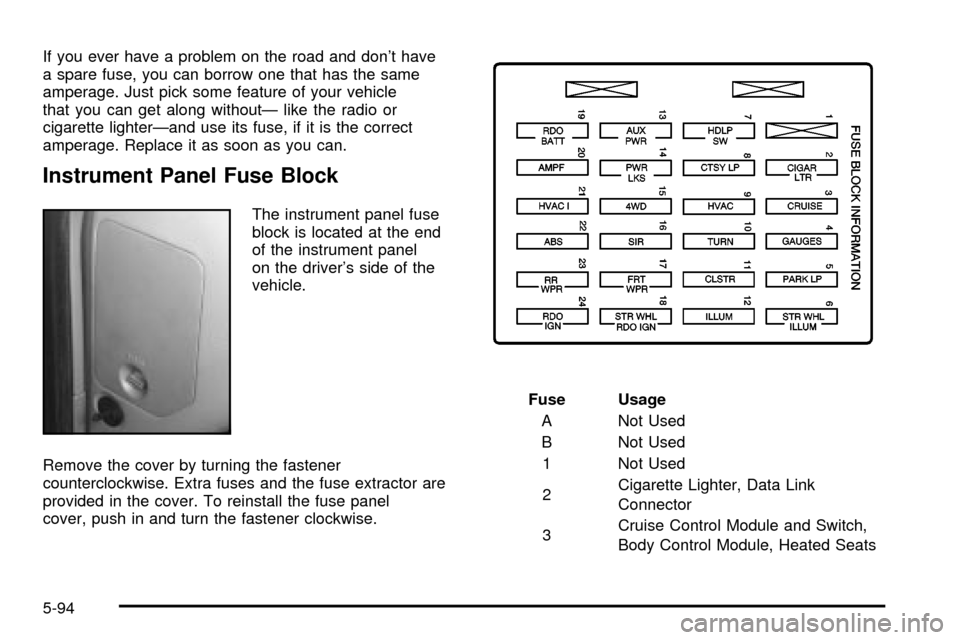
Instrument Panel Fuse Block
The instrument panel fuse
block is located at the end
of the instrument panel
on the driver's side of the
vehicle.
Remove the cover by turning the fastener
counterclockwise. Extra fuses and the fuse extractor are
provided in the cover. To reinstall the fuse panel
cover, push in and turn the fastener clockwise.Fuse Usage
A Not Used
B Not Used
1 Not Used
2Cigarette Lighter, Data Link
Connector
3Cruise Control Module and Switch,
Body Control Module, Heated Seats
5-94