2003 CHEVROLET S10 warning
[x] Cancel search: warningPage 1 of 432

Seats and Restraint Systems........................... 1-1
Front Seats
............................................... 1-3
Rear Seats
............................................... 1-9
Safety Belts
.............................................1-10
Child Restraints
.......................................1-30
Air Bag System
.......................................1-55
Restraint System Check
............................1-65
Features and Controls..................................... 2-1
Keys
........................................................ 2-3
Doors and Locks
....................................... 2-8
Windows
.................................................2-14
Theft-Deterrent Systems
............................2-17
Starting and Operating Your Vehicle
...........2-19
Mirrors
....................................................2-39
Storage Areas
.........................................2-41
Sunroof
..................................................2-51
Vehicle Personalization
.............................2-53
Instrument Panel............................................. 3-1
Instrument Panel Overview
.......................... 3-2
Climate Controls
......................................3-18
Warning Lights, Gages and Indicators
.........3-22
Audio System(s)
.......................................3-40
Driving Your Vehicle....................................... 4-1
Your Driving, the Road, and Your Vehicle
..... 4-2
Towing
...................................................4-44Service and Appearance Care.......................... 5-1
Service
..................................................... 5-3
Fuel
......................................................... 5-4
Checking Things Under
the Hood
.............................................5-10
Rear Axle
...............................................5-51
Four-Wheel Drive
.....................................5-52
Front Axle
...............................................5-53
Bulb Replacement
....................................5-54
Windshield Wiper Blade Replacement
.........5-60
Tires
......................................................5-62
Appearance Care
.....................................5-83
Vehicle Identi®cation
.................................5-92
Electrical System
......................................5-93
Capacities and Speci®cations
.....................5-99
Normal Maintenance Replacement Parts
....5-101
Maintenance Schedule..................................... 6-1
Maintenance Schedule
................................ 6-2
Customer Assistance Information.................... 7-1
Customer Assistance Information
.................. 7-2
Reporting Safety Defects
............................ 7-9
Index................................................................ 1
2003 Chevrolet S10 Pickup Owner ManualM
Page 3 of 432

Safety Warnings and Symbols
You will ®nd a number of safety cautions in this book.
We use a box and the word CAUTION to tell you about
things that could hurt you if you were to ignore the
warning.
{CAUTION:
These mean there is something that could hurt
you or other people.
In the caution area, we tell you what the hazard is.
Then we tell you what to do to help avoid or reduce the
hazard. Please read these cautions. If you don't, you
or others could be hurt.You will also ®nd a circle
with a slash through it in
this book. This safety
symbol means ªDon't,º
ªDon't do thisº or ªDon't let
this happen.º
iii
Page 4 of 432

Vehicle Damage Warnings
Also, in this book you will ®nd these notices:
Notice:These mean there is something that could
damage your vehicle.
A notice will tell you about something that can damage
your vehicle. Many times, this damage would not be
covered by your warranty, and it could be costly. But the
notice will tell you what to do to help avoid the
damage.
When you read other manuals, you might see CAUTION
and NOTICE warnings in different colors or in different
words.
You'll also see warning labels on your vehicle. They use
the same words, CAUTION or NOTICE.
Vehicle Symbols
Your vehicle has components and labels that use
symbols instead of text. Symbols, used on your vehicle,
are shown along with the text describing the operation
or information relating to a speci®c component, control,
message, gage or indicator.
If you need help ®guring out a speci®c name of a
component, gage or indicator, reference the following
topics:
·Seats and Restraint Systems in Section 1
·Features and Controls in Section 2
·Instrument Panel Overview in Section 3
·Climate Controls in Section 3
·Warning Lights, Gages and Indicators in Section 3
·Audio System(s) in Section 3
·Engine Compartment Overview in Section 5
iv
Page 104 of 432

Parking Brake
The parking brake is located near the bottom of the
instrument panel on the driver's side of the vehicle.
To set the parking brake, hold the regular brake pedal
down with your right foot. Push down the parking
brake pedal with your left foot. If the ignition is on, the
brake system warning light will come on.
Notice:Driving with the parking brake on can
cause your rear brakes to overheat. You may have
to replace them, and you could also damage
other parts of your vehicle.
To release the parking brake, hold the regular brake
pedal down. Pull the BRAKE RELEASE lever fully. It is
located on the bottom off the instrument panel on
the driver's side of the vehicle.If you are towing a trailer and you must park on a hill,
see
Towing a Trailer on page 4-54. That section
shows what to do ®rst to keep the trailer from moving.
2-32
Page 116 of 432
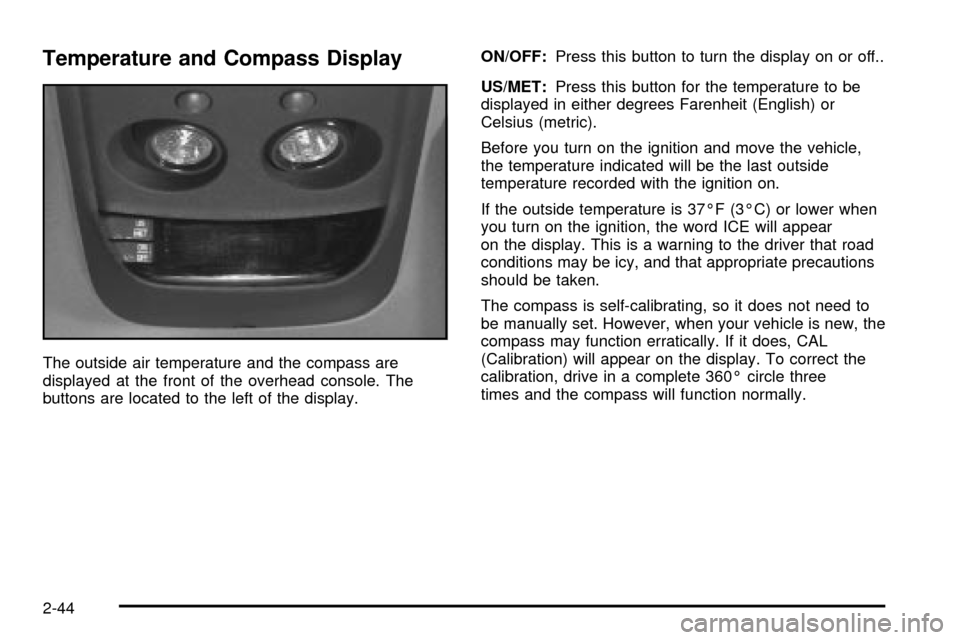
Temperature and Compass Display
The outside air temperature and the compass are
displayed at the front of the overhead console. The
buttons are located to the left of the display.ON/OFF:Press this button to turn the display on or off..
US/MET:Press this button for the temperature to be
displayed in either degrees Farenheit (English) or
Celsius (metric).
Before you turn on the ignition and move the vehicle,
the temperature indicated will be the last outside
temperature recorded with the ignition on.
If the outside temperature is 37ÉF (3ÉC) or lower when
you turn on the ignition, the word ICE will appear
on the display. This is a warning to the driver that road
conditions may be icy, and that appropriate precautions
should be taken.
The compass is self-calibrating, so it does not need to
be manually set. However, when your vehicle is new, the
compass may function erratically. If it does, CAL
(Calibration) will appear on the display. To correct the
calibration, drive in a complete 360É circle three
times and the compass will function normally.
2-44
Page 118 of 432

Driver Information Center (DIC)
If your vehicle is equipped with a Driver Information
Center (DIC), this system displays the outside air
temperature, compass direction and trip information in
the overhead console.
US/MET (United States/Metric):The US/MET (United
States/metric) button allows you to switch the display
between the English and metric system.
MODE:The MODE button can be used to toggle
between three modes of operation: OFF, COMP/TEMP
and TRIP.
COMP/TEMP (Compass/Temperature):The display
provides the outside temperature and one of eight
compass readings to indicate the direction the vehicle is
facing.Before you turn on the ignition and move the vehicle,
the temperature indicated will be the last outside
temperature recorded with the ignition on. If the outside
temperature is 37ÉF (3ÉC) or lower, the display will
toggle between the ICE and the current temperature
every eight seconds. This is a warning to the drive that
road conditions may be icy, and that appropriate
precautions should be taken.
The compass is self-calibrating, so it does not need to be
manually set. However, if C (Calibration) is displayed, the
compass will need to be calibrated. You may also place
the compass in a noncalibrated mode by pressing the
holding the MODE and US/MET buttons at the same time
while in the COMP/TEMP mode. After about 10 seconds,
the compass will display C and you can release the
buttons. Drive the vehicle in a complete 360É circle three
times at a speed of less than 5 mph (8 km/h), and the
compass will function normally. Once the calibration is
complete, the display will return to a compass reading.
2-46
Page 127 of 432

Instrument Panel Overview...............................3-2
Hazard Warning Flashers................................3-4
Other Warning Devices...................................3-5
Horn.............................................................3-5
Tilt Wheel.....................................................3-5
Turn Signal/Multifunction Lever.........................3-6
Exterior Lamps.............................................3-12
Interior Lamps..............................................3-15
Accessory Power Outlets...............................3-17
Ashtrays and Cigarette Lighter........................3-18
Climate Controls............................................3-18
Climate Control System.................................3-18
Outlet Adjustment.........................................3-21
Warning Lights, Gages and Indicators.............3-22
Instrument Panel Cluster................................3-23
Speedometer and Odometer...........................3-25
Trip Odometer..............................................3-25
Tachometer.................................................3-26
Safety Belt Reminder Light.............................3-26
Air Bag Readiness Light................................3-27
Air Bag Off Light..........................................3-28
Charging System Light..................................3-29
Voltmeter Gage............................................3-30
Up-Shift Light...............................................3-30
Brake System Warning Light..........................3-31
Anti-Lock Brake System Warning Light.............3-32Engine Coolant Temperature Gage..................3-32
Malfunction Indicator Lamp.............................3-33
Oil Pressure Gage........................................3-36
Security Light...............................................3-37
Service Four-Wheel Drive Warning Light..........3-37
Check Gages Warning Light...........................3-38
Fuel Gage...................................................3-38
Low Fuel Warning Light.................................3-39
Audio System(s).............................................3-40
Setting the Time for Radios without Radio
Data Systems (RDS)..................................3-40
Setting the Time for Radios with Radio Data
Systems (RDS).........................................3-41
AM-FM Radio...............................................3-41
Radio with CD..............................................3-44
Radio with Cassette and CD..........................3-52
Radio with Six-Disc CD.................................3-62
Theft-Deterrent Feature
(Non-RDS Radios).....................................3-74
Theft-Deterrent Feature
(RDS Radios)...........................................3-74
Understanding Radio Reception......................3-74
Care of Your Cassette Tape Player.................3-75
Care of Your CDs.........................................3-76
Care of Your CD Player................................3-76
Fixed Mast Antenna......................................3-76
Section 3 Instrument Panel
3-1
Page 130 of 432
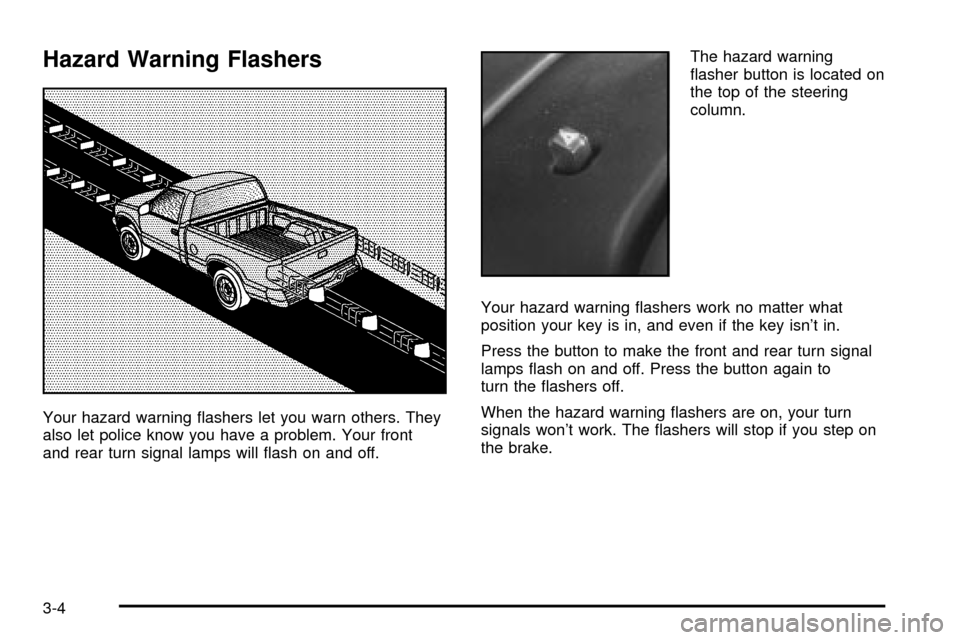
Hazard Warning Flashers
Your hazard warning ¯ashers let you warn others. They
also let police know you have a problem. Your front
and rear turn signal lamps will ¯ash on and off.The hazard warning
¯asher button is located on
the top of the steering
column.
Your hazard warning ¯ashers work no matter what
position your key is in, and even if the key isn't in.
Press the button to make the front and rear turn signal
lamps ¯ash on and off. Press the button again to
turn the ¯ashers off.
When the hazard warning ¯ashers are on, your turn
signals won't work. The ¯ashers will stop if you step on
the brake.
3-4