2003 CHEVROLET IMPALA horn
[x] Cancel search: hornPage 73 of 408

L(Remote Alarm):Press this button to activate an
alarm. The ignition must be in OFF or ACC for the
remote alarm to work. When you press the remote
button, the headlamps will ¯ash, the horn will sound
repeatedly and your interior lamps will turn on attracting
attention if you need it. The alarm will continue until
one of the following occurs:
·The remote alarm button is pressed a second time,
·the vehicle's ignition is turned to ON or
·an alarm period of 110 seconds has elapsed.
V(Trunk Release):Press the button to release
the trunk.
Operating the remote keyless entry transmitter may
interact with the content theft-deterrent system, if your
vehicle has this option. See
Content Theft-Deterrent
on page 2-16.
Transmitter Veri®cation
This feature provides feedback that a command has
been received by the vehicle. The headlamps and
back-up lamps will ¯ash on every lock and on the ®rst
unlock command. The horn will also sound once
for every lock and twice for the ®rst unlock command.
Silent operation and other options may be selected
for this feature. See
Vehicle Personalization on
page 2-45.
If your vehicle has the optional content theft-deterrent
system, the ®rst time the remote unlock is received,
three ¯ashes from the headlamps will be seen and three
chirps will be heard to indicate an alarm condition has
occurred since last arming. See
Content Theft-Deterrent
on page 2-16.
2-5
Page 75 of 408
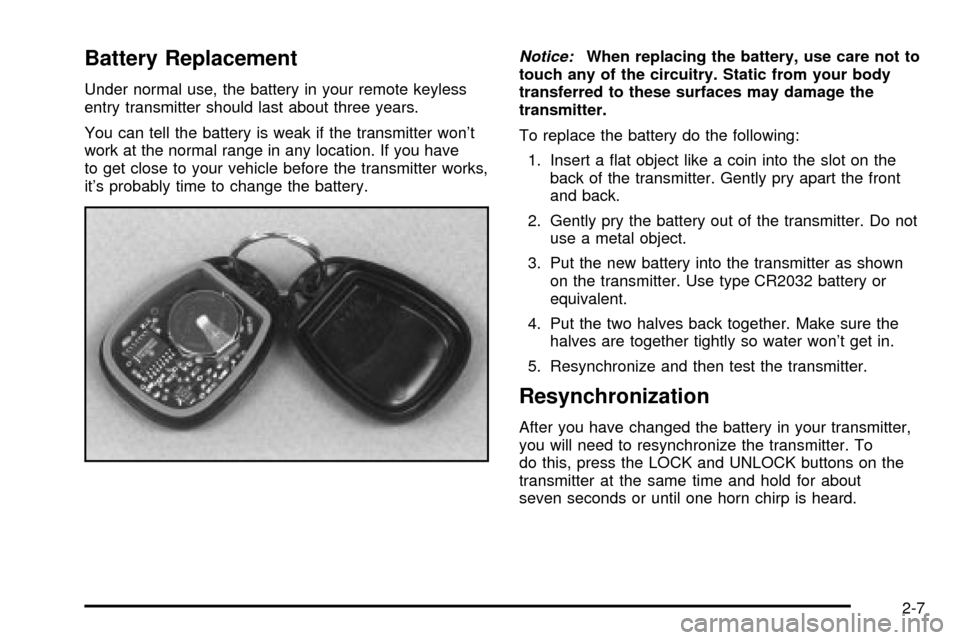
Battery Replacement
Under normal use, the battery in your remote keyless
entry transmitter should last about three years.
You can tell the battery is weak if the transmitter won't
work at the normal range in any location. If you have
to get close to your vehicle before the transmitter works,
it's probably time to change the battery.
Notice:When replacing the battery, use care not to
touch any of the circuitry. Static from your body
transferred to these surfaces may damage the
transmitter.
To replace the battery do the following:
1. Insert a ¯at object like a coin into the slot on the
back of the transmitter. Gently pry apart the front
and back.
2. Gently pry the battery out of the transmitter. Do not
use a metal object.
3. Put the new battery into the transmitter as shown
on the transmitter. Use type CR2032 battery or
equivalent.
4. Put the two halves back together. Make sure the
halves are together tightly so water won't get in.
5. Resynchronize and then test the transmitter.
Resynchronization
After you have changed the battery in your transmitter,
you will need to resynchronize the transmitter. To
do this, press the LOCK and UNLOCK buttons on the
transmitter at the same time and hold for about
seven seconds or until one horn chirp is heard.
2-7
Page 84 of 408

Theft-Deterrent Systems
Vehicle theft is big business, especially in some cities.
Although your vehicle has a number of theft-deterrent
features, we know that nothing we put on it can make it
impossible to steal.
Content Theft-Deterrent
Your vehicle may have the optional content
theft-deterrent alarm system.
With this system, a light on the radio will ¯ash.
This light reminds you to activate the theft-deterrent
system. Here's how to do it:
1. Open the door.
2. Lock the door with the power door lock switch or
the remote keyless entry transmitter. The light on
the radio should come on and stay on. If you
are using the remote keyless entry transmitter, the
door does not need to be open.
3. Close all doors. The light on the radio will slowly
¯ash once the system is armed.
Once armed, the alarm will go off if someone tries to
enter the vehicle (without using the remote keyless entry
transmitter or a key) or turns the ignition on with anincorrect key. The horn will sound and the headlamps
and back-up lamps will ¯ash for approximately
two minutes.
When the alarm is armed, the trunk may be opened
with the remote keyless entry transmitter. If you use the
key to open the trunk, the alarm will sound. The
power door lock switches are also disabled. You must
use your remote keyless entry transmitter or your key to
unlock the doors when the system is armed.
Arming with the Power Lock Switch
Your alarm system will arm when you use either power
lock switch to lock the doors while any door or the
trunk is open and the key is removed from the ignition.
The light on the radio ¯ashes quickly to let you know
when the system is ready to arm with the power
door lock switches. The light on the radio will stop
¯ashing and stay on when you press the bottom of the
power lock switch, to let you know the system is
arming. After all doors and the trunk are closed and
locked, the light on the radio will ¯ash slowly to let you
know the system is armed.
2-16
Page 85 of 408

Arming with the Remote Keyless Entry
Transmitter
Your alarm system will arm when you use your remote
keyless entry transmitter to lock the doors, if the key
is not in the ignition. The light on the radio will turn on to
let you know the system is arming. After all doors and
the trunk are closed and locked, the light on the
radio will begin ¯ashing at a very slow rate to let you
know the system is armed.
Disarming with the Remote Keyless
Entry Transmitter
Your alarm system will disarm when you use your
remote keyless entry transmitter to unlock the doors.
The light on the radio will go off to let you know
the system is no longer armed.
The ®rst time a remote UNLOCK command is received,
three ¯ashes will be seen and three horn chirps
heard to indicate an alarm condition has occurred since
last arming.
Disarming with Your Key
Your alarm system will disarm when you use your key
to unlock the doors. The light on the radio will go
off to let you know the system is no longer armed.
Passlockž
Your vehicle is equipped with the Passlockž
theft-deterrent system.
Passlock
žis a passive theft-deterrent system. Passlockž
enables fuel if the ignition lock cylinder is turned with
a valid key. If a correct key is not used or the ignition
lock cylinder is tampered with, fuel is disabled and
the engine will not start.
During normal operation, the SECURITY message will
be displayed after the key is turned to the ON ignition
position. See
Security Message on page 3-46.
If the engine stalls and the SECURITY message
¯ashes, wait until the light stops ¯ashing before trying to
restart the engine.
If the engine is running and the SECURITY message
comes on, you will be able to restart the engine if
you turn the engine off. However, your Passlock
ž
system is not working properly and must be serviced by
your dealer. Your vehicle is not protected by Passlockž
at this time. You may also want to check the fuse.
SeeFuses and Circuit Breakers on page 5-95. See your
dealer for service.
In an emergency, contact Chevrolet Roadside
Assistance. See
Roadside Assistance Program on
page 7-5for more information.
2-17
Page 113 of 408

Vehicle Personalization
Some of the convenience features can be reset or
customized to perform according to your preference.
Features you can program depend upon the options that
came with your vehicle. The following list shows
features that can be reset or customized along with the
options.
·Settings (Available for All)
·GM Oil Life System Reset (Available for All)
·Low Tire Pressure Reset (If Equipped)
·Delayed Headlamp Illumination (Available for All)
·Automatic Door Lock and Unlock (Available for All)
·Remote Visual Veri®cation (Available with Remote
Keyless Entry)
·Remote Audible Veri®cation (Available with Remote
Keyless Entry)
·Content Theft Operation (Optional with Content
Theft System)
·Trunk Jamb (Optional with Content Theft System)
·Horn Chirp On Timer (Available with Remote
Keyless Entry)
·Remote Keyless Entry Transmitter Programming
(Available with Remote Keyless Entry)
·Return to Original Factory Settings (Available
for All)
·Exit Vehicle Customization Mode
Programmable Modes
To reset or customize the features, ®rst enter the
vehicle customization main menu. To enter the main
menu, do the following:
1. Turn the ignition to ACC or ON. The radio must be
off.
2. Press and hold the TUNE or DISP knob on the
radio for at least ®ve seconds until SETTINGS is
displayed.
3. Press the SEEK or PSCAN up or down arrows to
scroll through each available feature on your main
menu.
4. Press the PREV or NEXT buttons to scroll through
the lower menu. An asterisk (*) will appear next to
the item that is the current setting.
The following information shows how to reset or
customize features after entering the main menu.
SETTINGS (Display Current Settings)
This feature displays your vehicle personalization
settings.
2-45
Page 117 of 408

3. Scroll, using the PREV or NEXT buttons, through
the modes to change the current mode.
4. With your preference displayed, press the
TUNE/DISP button to select. A chime will be heard
to verify the new setting. A new selection will be
displayed with an asterisk (*) for one second.
If your vehicle has the optional content theft-deterrent
system, the ®rst time a remote UNLOCK command
is received, three ¯ashes will be seen and three horn
chirps heard to indicate an alarm condition has occurred
since last arming. See
Theft-Deterrent Systems on
page 2-16.
The mode you selected is now set. You can either exit
the programming mode by following the instructions
later in this section or program the next feature available
on your vehicle.
FOB HORN (Remote Audible
Veri®cation)
This feature allows the horn to chirp when the remote
keyless entry transmitter is used to lock or unlock
the vehicle or to program no veri®cation.
Programmable Modes
Mode 1:OFF
Mode 2:PARTIAL Ð One chirp for each remote LOCK
command/no chirp for remote UNLOCK command.
Mode 3:FULL Ð One chirp for each remote LOCK
command/two chirps for the ®rst remote UNLOCK
command.
Your vehicle was originally programmed to Mode 1. The
mode may have been changed since then. To
determine the current mode, or to change the mode, do
the following:
1. Scroll, using the SEEK/PSCAN up or down arrows,
until FOB HORN appears on the display.
2. Press the PREV or NEXT button to enter the
submenu. The current selection will have an
asterisk (*) next to it. If you do not wish to change
the current mode, you can either exit the
programming mode by following the directions later
in this section or program the next feature
available on your vehicle.
3. Scroll, using the PREV or NEXT buttons, through
the modes to change the current mode.
2-49
Page 119 of 408

TRNKJAMB (Trunk Jamb)
This feature allows the content theft system trunk lock
sensor to be disabled or enabled.
Programmable Modes
Mode 1:TRNK OFF
Mode 2:TRNK ON
Your vehicle was originally programmed to Mode 2. The
mode may have been changed since then. To
determine the current mode, or to change the mode, do
the following:
1. Scroll, using the SEEK /PSCAN up or down arrows,
until TRNKJAMB appears on the display.
2. Press the PREV or NEXT button to enter the
submenu. The current selection will have an
asterisk (*) next to it. If you do not wish to change
the current mode, you can either exit the
programming mode by following the directions later
in this section or program the next feature
available on your vehicle.
3. Scroll, using the PREV or NEXT buttons, through
the modes to change the current mode.4. With your preference displayed, press the
TUNE/DISP button to select. A chime will be heard
to verify the new setting. The new selection will
be displayed with an asterisk (*) for one second.
The mode you selected is now set. You can either exit
the programming mode by following the instructions
later in this section or program the next feature available
on your vehicle.
CHIRP (Horn Chirp Timer)
This feature allows you to choose between short or long
horn chirp sounds when the remote keyless entry
transmitter is used.
Programmable Modes
Mode 1:SHORT
Mode 2:LONG
Your vehicle was originally programmed to Mode 1. The
mode may have been changed since then. To
determine the current mode, or to change the mode, do
the following:
1. Scroll, using the SEEK/PSCAN up or down arrows,
until CHIRP appears on the display.
2-51
Page 123 of 408

Instrument Panel Overview...............................3-4
Hazard Warning Flashers................................3-6
Other Warning Devices...................................3-6
Horn.............................................................3-7
Tilt Wheel.....................................................3-7
Turn Signal/Multifunction Lever.........................3-7
Exterior Lamps.............................................3-14
Interior Lamps..............................................3-17
Accessory Power Outlets...............................3-19
Auxiliary Power Connection
(Power Drop)............................................3-20
Ashtrays and Cigarette Lighter........................3-21
Climate Controls............................................3-22
Dual Climate Control System..........................3-22
Outlet Adjustment.........................................3-25
Passenger Compartment Air Filter...................3-26
Warning Lights, Gages and Indicators.............3-28
Instrument Panel Cluster................................3-29
Speedometer and Odometer...........................3-31
Tachometer.................................................3-32
Safety Belt Reminder Light.............................3-32
Air Bag Readiness Light................................3-33
Brake System Warning Light..........................3-34Anti-Lock Brake System Warning Light.............3-35
Traction Control System (TCS) Warning Light . . .3-35
Engine Coolant Temperature Gage..................3-36
Malfunction Indicator Lamp.............................3-37
Cruise Control Light......................................3-39
Fuel Gage...................................................3-40
Message Center.............................................3-40
Service Traction System Warning Message......3-41
Traction Active Message................................3-41
Battery Warning Message..............................3-42
Hot Coolant Temperature Warning Message.....3-42
Low Oil Pressure Message............................3-43
Low Engine Oil Level Message.......................3-43
Change Engine Oil Message..........................3-44
Low Tire Message........................................3-44
Door Ajar Warning Message...........................3-45
Trunk Ajar Warning Message.........................3-45
Security Message.........................................3-46
Low Washer Fluid Warning Message...............3-46
Low Fuel Warning Message...........................3-47
Low Brake Fluid Warning Message.................3-47
Service Vehicle Soon Message.......................3-48
Highbeam Out Warning Message....................3-48
Section 3 Instrument Panel
3-1