Page 118 of 408

4. With your preference displayed, press the TUNE/
DISP button to select. A chime will be heard to
verify the new setting. The new selection will
be displayed with an asterisk (*) for one second.
If your vehicle has the optional content theft-deterrent
system, the ®rst time the remote UNLOCK command is
received three ¯ashes will be seen and three chirps
will be heard to indicate an alarm condition has occurred
since last arming. See
Theft-Deterrent Systems on
page 2-16.
The mode you selected is now set. You can either exit
the programming mode by following the instructions
later in this section or program the next feature available
on your vehicle.
ALARM (Content Theft Operation)
This feature allows the content theft-deterrent system to
be turned on or off.
Programmable Modes
Mode 1:ALRM OFF
Mode 2:ALRM ONYour vehicle was originally programmed to Mode 2. The
mode may have been changed since then. To
determine the current mode, or to change the mode, do
the following:
1. Scroll, using the SEEK/PSCAN up or down arrows,
until ALARM appears on the display.
2. Press the PREV or NEXT button to enter the
submenu. The current selection will have an
asterisk (*) next to it. If you do not wish to change
the current mode, you can either exit the
programming mode by following the directions later
in this section or program the next feature
available on your vehicle.
3. Scroll, using the PREV or NEXT buttons, through
the modes to change the current mode.
4. With your preference displayed, press the
TUNE/DISP button to select. A chime will be heard
to verify the new setting. The new selection will
be displayed with an asterisk (*) for one second.
The mode you selected is now set. You can either exit
the programming mode by following the instructions
later in this section or program the next feature available
on your vehicle.
2-50
Page 119 of 408

TRNKJAMB (Trunk Jamb)
This feature allows the content theft system trunk lock
sensor to be disabled or enabled.
Programmable Modes
Mode 1:TRNK OFF
Mode 2:TRNK ON
Your vehicle was originally programmed to Mode 2. The
mode may have been changed since then. To
determine the current mode, or to change the mode, do
the following:
1. Scroll, using the SEEK /PSCAN up or down arrows,
until TRNKJAMB appears on the display.
2. Press the PREV or NEXT button to enter the
submenu. The current selection will have an
asterisk (*) next to it. If you do not wish to change
the current mode, you can either exit the
programming mode by following the directions later
in this section or program the next feature
available on your vehicle.
3. Scroll, using the PREV or NEXT buttons, through
the modes to change the current mode.4. With your preference displayed, press the
TUNE/DISP button to select. A chime will be heard
to verify the new setting. The new selection will
be displayed with an asterisk (*) for one second.
The mode you selected is now set. You can either exit
the programming mode by following the instructions
later in this section or program the next feature available
on your vehicle.
CHIRP (Horn Chirp Timer)
This feature allows you to choose between short or long
horn chirp sounds when the remote keyless entry
transmitter is used.
Programmable Modes
Mode 1:SHORT
Mode 2:LONG
Your vehicle was originally programmed to Mode 1. The
mode may have been changed since then. To
determine the current mode, or to change the mode, do
the following:
1. Scroll, using the SEEK/PSCAN up or down arrows,
until CHIRP appears on the display.
2-51
Page 120 of 408

2. Press the PREV or NEXT button to enter the
submenu. The current selection will have an
asterisk (*) next to it. If you do not wish to change
the current mode, you can either exit the
programming mode by following the directions later
in this section or program the next feature
available on your vehicle.
3. Scroll, using the PREV or NEXT buttons, through
the modes to change the current mode.
4. With your preference displayed, press the
TUNE/DISP button to select. A chime will be heard
to verify the new setting. The new selection will
be displayed with an asterisk (*) for one second.
The mode you selected is now set. You can either exit
the programming mode by following the instructions
later in this section or program the next feature available
on your vehicle.ORIG. SET (Return to the Original
Settings)
This feature allows you to return all feature
customization settings back to their original factory
settings. To reset do the following:
1. Scroll, using the SEEK/PSCAN up or down arrows,
until ORIG. SET appears on the display.
2. Press the PREV or NEXT button to enter the
submenu. SET ALL will appear.
3. With your preference displayed, press the
TUNE/DISP button to select. A chime will be heard
to verify the new setting. The new selection will
be displayed with an asterisk (*) for one second.
The original factory settings are now reset. You can
either exit the programming mode by following the
instructions later in this section or program the next
feature available on your vehicle.
2-52
Page 121 of 408

FOB PROG (Remote Keyless Entry
Transmitter Programming)
This feature allows you to match the remote keyless
entry transmitter to your vehicle. To match the
transmitter do the following:
1. Scroll, using the SEEK/PSCAN up or down arrows,
until FOB PROG appears on the display.
2. Press the PREV or NEXT button to enter the
submenu. BEGIN will be displayed.
3. Press the TUNE/DISP button to start programming.
When the message PUSH FOB ¯ashes, press and
hold the LOCK and UNLOCK buttons on the
®rst transmitter at the same time for 15 seconds. A
chime will be heard to verify the transmitter is
learned.
4. Repeat Step 3 for each additional transmitter.
The transmitter is programmed now. You can either exit
the programming mode by following the instructions
later in this section or program the next feature available
on your vehicle.
EXIT (Exit Feature Customization
Mode)
This feature allows you to exit the vehicle customization
programming. To exit do the following:
·Scroll until EXIT appears on the display.
·Press the TUNE/DISP button to exit programming.
A chime will be heard to verify the exit.
2-53
Page 140 of 408

Delayed Exit Lighting
This feature illuminates the interior for a period of time
after the key is removed from the ignition.
The ignition must be off for delayed exit lighting to work.
When the key is removed, interior illumination will
activate and remain on until one of the following occurs:
·The ignition is moved to ON,
·the power door locks are activated, or
·an illumination period of 25 seconds has elapsed.
If during the illumination period a door is opened,
the timed illumination period will be canceled and the
interior lamps will remain on because a door is open.
Parade Dimming
The instrument panel has an added feature called
parade mode. This feature prohibits the dimming of your
instrument panel displays during the daylight while
the headlamps are on so that you'll still be able to see
the displays.
Reading Lamps
Your vehicle may be equipped with reading lamps that
are located on the assist handles in the headliner.
These lamps and the interior courtesy lamps come on
when any door is opened. Press the lens to turn
them on. Press it again to turn them off.
Dome Lamp
If your vehicle has this feature, the dome lamp will
come on when you open a door. You can also turn this
lamp on by turning the exterior lamps control clockwise
as far as it will go. Vehicles that have the optional
sunroof do not have a dome lamp.
Battery Rundown Protection
Your vehicle has a feature to help prevent you from
draining the battery in case you accidentally leave on the
interior courtesy lamps, reading/map lamps, visor
vanity lamps, trunk lamp or glove box lamps. If you leave
any of these lamps on, they will automatically turn off
after 10 minutes, if the ignition is moved to OFF.
The lamps won't come back on again until you do
the following:
·Turn the ignition on, or
·turn the exterior lamps control off, then on again.
If your vehicle has less than 15 miles (25 km) on
the odometer, the battery saver will turn off the lamps
after only three minutes.
Battery rundown protection will also work if the
headlamps are left on. After having been left on for
10 minutes, the headlamps and the parking lamps will
¯ash three times. They will remain on for one more
minute before being turned off automatically.
3-18
Page 154 of 408
Tachometer
Your vehicle may have a
tachometer that displays
the engine speed in
thousands of revolutions
per minute (rpm).
Notice:Do not operate the engine with the
tachometer in the shaded warning area, or engine
damage may occur.
Safety Belt Reminder Light
When the key is turned to ON, a chime will come on for
about several seconds to remind people to fasten
their safety belts, unless the driver's safety belt is
already buckled.
The safety belt light will
also come on and stay on
for several seconds,
then it will ¯ash for
several more.
3-32
Page 163 of 408
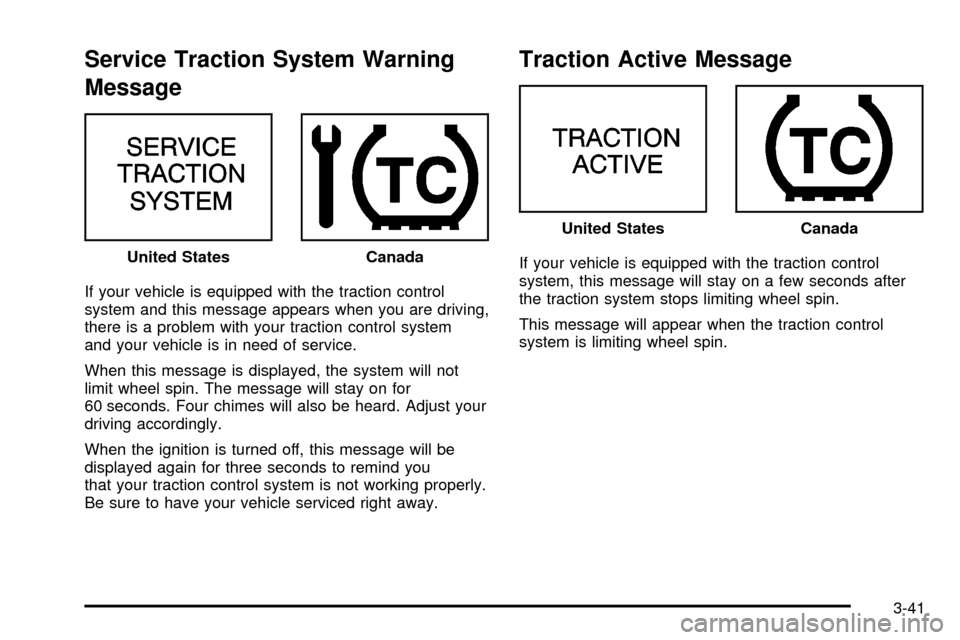
Service Traction System Warning
Message
If your vehicle is equipped with the traction control
system and this message appears when you are driving,
there is a problem with your traction control system
and your vehicle is in need of service.
When this message is displayed, the system will not
limit wheel spin. The message will stay on for
60 seconds. Four chimes will also be heard. Adjust your
driving accordingly.
When the ignition is turned off, this message will be
displayed again for three seconds to remind you
that your traction control system is not working properly.
Be sure to have your vehicle serviced right away.
Traction Active Message
If your vehicle is equipped with the traction control
system, this message will stay on a few seconds after
the traction system stops limiting wheel spin.
This message will appear when the traction control
system is limiting wheel spin. United StatesCanada
United StatesCanada
3-41
Page 164 of 408

Battery Warning Message
When the vehicle is started
this message will be
displayed for three
seconds.
If the message is displayed when the engine is running,
you may have a problem with your charging system.
If there is a problem with the charging system, four
chimes will sound when the message comes on. The
battery display will also stay on while the key is in
ON until the engine is started.
If the message stays on after starting the engine it could
indicate a problem with the generator drive belt, or
some other charging system problem. Have it checked
right away. Driving with this message on could drain
your battery.
If you must drive a short distance with this message
displayed, it helps to turn off all your accessories.
Hot Coolant Temperature Warning
Message
This message is displayed when the cooling
system temperature gets hot. A chime will sound
continuously, also.
Check the coolant temperature gage and the coolant
level. See
Engine Coolant on page 5-27,Engine Coolant
Temperature Gage on page 3-36andEngine
Overheating on page 5-30for further information.
United StatesCanada
3-42