2003 CHEVROLET CORVETTE ignition
[x] Cancel search: ignitionPage 175 of 368
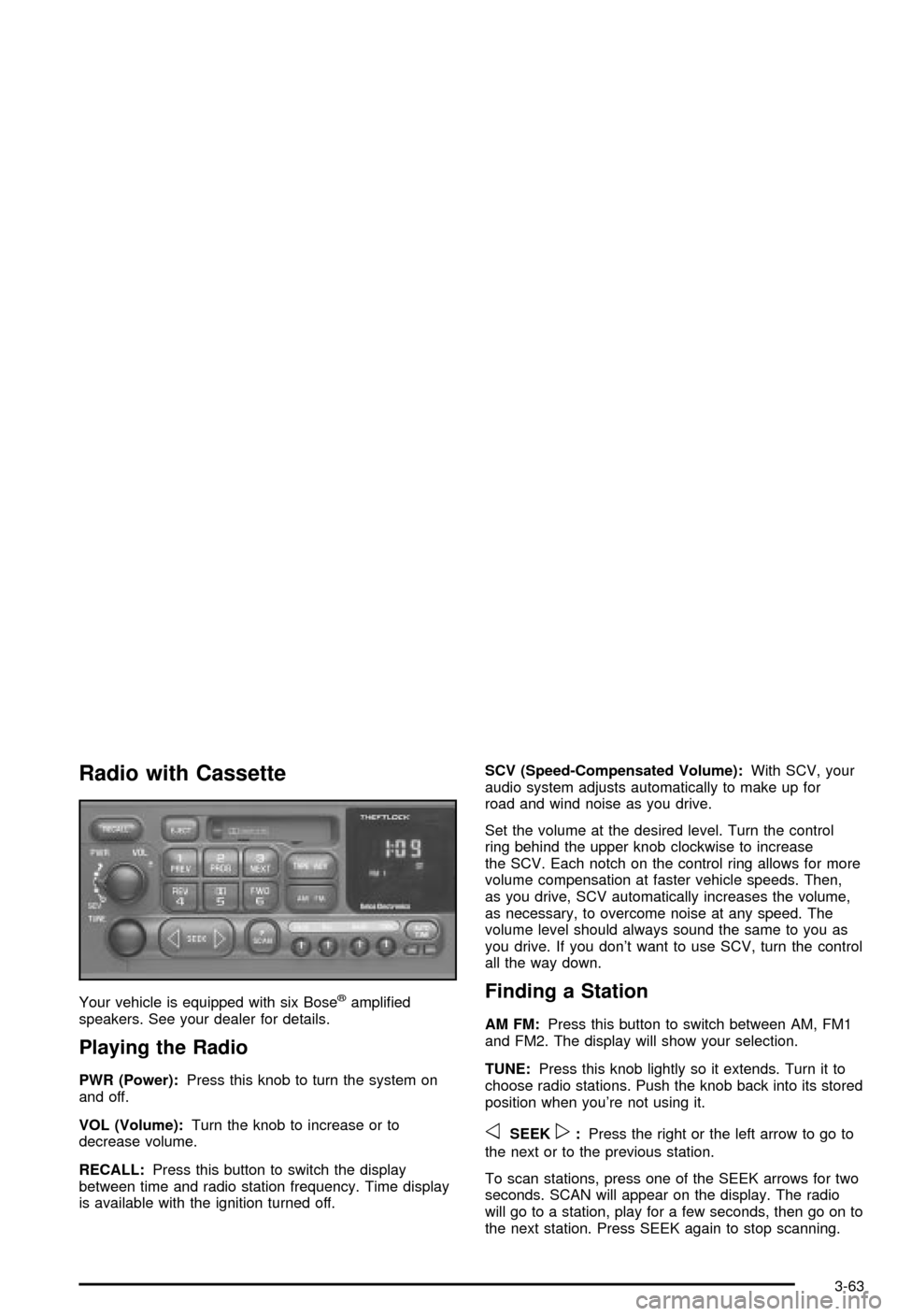
Radio with Cassette
Your vehicle is equipped with six Bosežampli®ed
speakers. See your dealer for details.
Playing the Radio
PWR (Power):Press this knob to turn the system on
and off.
VOL (Volume):Turn the knob to increase or to
decrease volume.
RECALL:Press this button to switch the display
between time and radio station frequency. Time display
is available with the ignition turned off.SCV (Speed-Compensated Volume):With SCV, your
audio system adjusts automatically to make up for
road and wind noise as you drive.
Set the volume at the desired level. Turn the control
ring behind the upper knob clockwise to increase
the SCV. Each notch on the control ring allows for more
volume compensation at faster vehicle speeds. Then,
as you drive, SCV automatically increases the volume,
as necessary, to overcome noise at any speed. The
volume level should always sound the same to you as
you drive. If you don't want to use SCV, turn the control
all the way down.
Finding a Station
AM FM:Press this button to switch between AM, FM1
and FM2. The display will show your selection.
TUNE:Press this knob lightly so it extends. Turn it to
choose radio stations. Push the knob back into its stored
position when you're not using it.
oSEEKp:Press the right or the left arrow to go to
the next or to the previous station.
To scan stations, press one of the SEEK arrows for two
seconds. SCAN will appear on the display. The radio
will go to a station, play for a few seconds, then go on to
the next station. Press SEEK again to stop scanning.
3-63
Page 177 of 368

Adjusting the Speakers (Balance/Fade)
BAL (Balance):To adjust the balance between the
right and the left speakers, press this knob lightly so it
extends. Turn the knob to move the sound toward
the right or the left speakers.
FADE:To adjust the fade between the front and the
rear speakers, press this knob lightly so it extends. Turn
the knob to move the sound toward the front or the
rear speakers.
Return these knobs to their stored positions when
you're not using them.
Playing a Cassette Tape
Your tape player is built to work best with tapes that are
up to 30 to 45 minutes long on each side. Tapes longer
than that are so thin they may not work well in this player.
If a tape is inserted when the ignition is on but the radio is
off, the tape will begin playing. A tape symbol is shown in
the center of the graphic display whenever a tape is
inserted. When a tape is active, the tape symbol will be
accompanied by a direction arrow.
While the tape is playing, use the VOL, AUTO TONE,
BAL, FADE, BASS and TREB controls just as you do for
the radio. Other controls may have different functions
when a tape is inserted. The display will show the tape
symbol and an arrow to show which side of the tape
is playing.If you hear nothing or hear just a garbled sound, it may
not be in squarely. Press EJECT to remove the tape
and start over.
The player is able to detect a tight or broken tape, and
will eject the tape. The radio will go back to playing
the last station selected.
The player automatically senses the cassette for metal
or CrO 2 and sets the pre-emphasis. Anytime a tape
is inserted, the top side is selected to play ®rst.
If an error appears on the display, see ªCassette Tape
Messagesº later in this section.
1 PREV (Previous):Your tape must have at least three
seconds of silence between each selection for previous
to work. Press this pushbutton to go to the previous
selection on the tape if the current selection has been
playing for less than eight seconds. If pressed when the
current selection has been playing for more than
eight seconds, it will go to the beginning of the current
selection.
2 PROG (Program):Press this pushbutton to play the
other side of the tape.
3 NEXT:Your tape must have at least three seconds of
silence between each selection for next to work.
Press this pushbutton to go to the next selection on the
tape. If you hold this pushbutton or press it more
than once, the player will continue moving forward
through the tape.
3-65
Page 178 of 368

4 REV (Reverse):Press this pushbutton to reverse the
tape rapidly. Press it again to return to playing speed.
The radio will play while the tape reverses.
W5 (Dolbyž):Press this pushbutton to reduce
background noise. The double-D symbol will appear on
the display.
Dolby
žNoise Reduction is manufactured under a
license from DolbyžLaboratories Licensing Corporation.
Dolbyžand the double-D symbol are trademarks of
DolbyžLaboratories Licensing Corporation.
FWD 6 (Forward):Press this pushbutton to advance
quickly to another part of the tape. Press it again
to return to playing speed. The radio will play while the
tape advances.
oSEEKp:Your tape must have at least three
seconds of silence between each selection for seek to
work. Press the right or the left arrow to go to the next or
to the previous selection on the tape.
AM FM:Press this button to listen to the radio when a
tape is playing.
TAPE AUX (Auxiliary):Press this button to play a
cassette tape when listening to the radio. The tape
symbol with an arrow will appear on the display while
the tape is active. If your system is equipped with
a remote playback device, pressing this button a second
time will allow the remote device to play.EJECT:Press this button to remove the tape. The radio
will play. EJECT may be used with the ignition or radio
off. Cassettes may be loaded with the radio off if this
button is pressed ®rst. If you leave a cassette tape in the
player while listening to the radio, it may become warm.
Cassette Tape Messages
CLN (Clean):If this message appears on the display,
the cassette tape player needs to be cleaned. It will
still play tapes, but you should clean it as soon as
possible to prevent damage to the tapes and player.
See
Care of Your Cassette Tape Player on page 3-78.
CD Adapter Kits
It is possible to use a portable CD player adapter kit
with your cassette tape player after activating the bypass
feature on your tape player.
To activate the bypass feature, use the following steps:
1. Turn the ignition on.
2. Turn the radio off.
3. Press and hold the TAPE AUX button for ®ve
seconds. The tape symbol on the display will
¯ash for two seconds, indicating the feature is
active.
4. Insert the adapter into the cassette slot. It will
power up the radio and begin playing.
The override feature will remain active until EJECT is
pressed.
3-66
Page 179 of 368

Radio with CD
Your vehicle is equipped with six Bosežampli®ed
speakers. See your dealer for details.
Playing the Radio
PWR (Power):Press this knob to turn the system on
and off.
VOL (Volume):Turn the knob to increase or to
decrease volume.
RECALL:Press this button to switch the display
between time and radio station frequency. Time display
is available with the ignition turned off.
SCV (Speed-Compensated Volume):With SCV, your
audio system adjusts automatically to make up for
road and wind noise as you drive.Set the volume at the desired level. Turn the control
ring behind the upper knob clockwise to increase
the SCV. Each notch on the control ring allows for more
volume compensation at faster vehicle speeds. Then,
as you drive, SCV automatically increases the volume,
as necessary, to overcome noise at any speed. The
volume level should always sound the same to you as
you drive. If you don't want to use SCV, turn the control
all the way down.
Finding a Station
AM FM:Press this button to switch between AM, FM1
and FM2. The display will show your selection.
TUNE:Press this knob lightly so it extends. Turn it to
choose radio stations. Push the knob back into its stored
position when you're not using it.
oSEEKp:Press the right or the left arrow to go to
the next or to the previous station.
To scan stations, press one of the SEEK arrows for two
seconds. SCAN will appear on the display. The radio
will go to a station, play for a few seconds, then go on to
the next station. Press SEEK again to stop scanning.
The radio will seek or scan only to stations that are
in the selected band and only to those with a strong
signal.
3-67
Page 181 of 368

Adjusting the Speakers (Balance/Fade)
BAL (Balance):To adjust the balance between the
right and the left speakers, press this knob lightly so it
extends. Turn the knob to move the sound toward
the right or the left speakers.
FADE:To adjust the fade between the front and the
rear speakers, press this knob lightly so it extends. Turn
the knob to move the sound toward the front or the
rear speakers.
Return these knobs to their stored positions when
you're not using them.
Playing a Compact Disc
Insert a CD partway into the slot, label side up. The
player will pull it in. The disc should begin playing. The
display will show CD and the CD symbol. If you want
to insert a CD with the ignition off, ®rst press RECALL or
EJECT.
The integral CD player can play the smaller 8 cm single
discs with an adapter ring. Full-size compact discs
and the smaller discs are loaded in the same manner.
If playing a CD-R the sound quality may be reduced due
to CD-R quality, the method of recording, the quality
of the music that has been recorded and the way
the CD-R has been handled. You may experience anincrease in skipping, difficulty in ®nding tracks and/or
difficulty in loading and ejecting. If these problems occur
try a known good CD.
Do not add paper labels to discs, they could get caught
in the CD player.
Do not play 3 inch discs without a standard
adapter disc.
If an error appears on the display, see ªCompact Disc
Messagesº later in this section.
1 PREV (Previous):Press this pushbutton to go to the
previous track if the current track has been playing
for less than eight seconds. If pressed when the current
track has been playing for more than eight seconds,
it will go to the beginning of the current track. If you hold
this pushbutton or press it more than once, the player
will continue moving back through the disc.
2 RDM (Random):Press this pushbutton to hear the
tracks in random order, rather than sequential,
order. RANDOM will appear on the display. Press this
pushbutton again to turn off random play. Random
is reset to off when the disc is ejected.
3 NEXT:Press this pushbutton to go to the next track.
If you hold this pushbutton or press it more than
once, the player will continue moving forward through
the disc.
3-69
Page 182 of 368

REV 4 (Reverse):Press and hold this pushbutton to
quickly reverse within a track. Release it to play
the passage. You can use the counter reading on the
display to locate a passage easily.
FWD 6 (Forward):Press and hold this pushbutton to
quickly advance within a track. Release it to play
the passage. You can use the counter reading on the
display to locate a passage easily.
oSEEKp:Press the left arrow to go to the start of
the current or to the previous track. Press the right
arrow to go to the start of the next track. If either arrow
is held or pressed more than once, the player will
continue moving backward or forward through the CD.
RECALL:Press this button to see which track is
playing. Press it again within ®ve seconds to see how
long it has been playing (elapsed time). The track
number will also appear when you change the volume
or when a new track starts to play.
AM FM:Press this button to listen to the radio when a
CD is playing.
CD AUX (Auxiliary):Press this button to play a CD
when listening to the radio. CD will appear on the display
when a disc is in the player, whether it is active or
not. If your system is equipped with a remote playback
device, pressing this button a second time will allow
the remote device to play.EJECT:Press this button to eject the CD. The radio
will play. EJECT may be used with the ignition or radio
off. CDs may be loaded with the radio off if this
button is pressed ®rst.
If you turn off the ignition or radio with a CD in the
player, it will stay in the player. When you turn on the
ignition or radio, the disc will start playing where it
was stopped. If you press EJECT but do not remove the
disc, the player will pull the disc back in to protect it
after about one minute. If you leave the CD in the player
while listening to the radio, it may become warm.
Compact Disc Messages
ERR (Error):If this message appears on the display,
and/or the disc comes out, it could be for one of
the following reasons:
·You're driving on a very rough road. When the road
becomes smoother, the disc should play.
·It's very hot. When the temperature returns to
normal, the disc should play.
·The disc is dirty, scratched, wet or upside down.
·It is very humid. If so, wait about an hour and
try again.
·There may have been a problem while burning
the CD.
·The label may be caught in the CD player.
3-70
Page 188 of 368

Activating the Theft-Deterrent Feature
The instructions which follow explain how to enter
your secret code to activate the THEFTLOCK system.
Read through all nine steps before starting the
procedure.
If you allow more than 15 seconds to elapse between
any steps, the radio automatically reverts to time
and you must start the procedure over at Step 4.
1. Write down any three or four-digit number from 000
to 1999 and keep it in a safe place separate from
the vehicle.
2. Turn the ignition on.
3. Turn the radio off.
4. Press the 1 and 4 pushbuttons at the same time.
Hold them down until --- shows on the display.
Next you will use the secret code number which you
have written down.
5. Press MN and 000 will appear on the display.
6. Press MN again to make the last two digits agree
with your code.
7. Press HR to make the ®rst one or two digits agree
with your code.8. Press AM FM after you have con®rmed that the
code matches the secret code you have written
down. The display will show REP to let you know
that you need to repeat Steps 5 through 7 to con®rm
your secret code.
9. Press AM FM and this time the display will show
SEC to let you know that your radio is secure.
Unlocking the Theft-Deterrent Feature
After a Power Loss
Enter your secret code as follows; pause no more than
15 seconds between steps:
1. Turn the ignition on. LOC will appear on the
display.
2. Press MN and 000 will appear on the display.
3. Press MN again to make the last two digits agree
with your code.
4. Press HR to make the ®rst one or two digits agree
with your code.
5. Press AM FM after you have con®rmed that the
code matches the secret code you have written
down. The display will show SEC, indicating
the radio is now operable and secure.
3-76
Page 189 of 368

If you enter the wrong code eight times, INOP will
appear on the display. You will have to wait an hour
with the ignition on before you can try again. When you
try again, you will only have three chances to enter
the correct code before INOP appears.
If you lose or forget your code, contact your dealer.
Disabling the Theft-Deterrent Feature
Enter your secret code as follows; pause no more than
15 seconds between steps:
1. Turn the ignition on.
2. Turn the radio off.
3. Press the 1 and 4 pushbuttons at the same time.
Hold them down until SEC shows on the display.
4. Press MN and 000 will appear on the display.
5. Press MN again to make the last two digits agree
with your code.
6. Press HR to make the ®rst one or two digits agree
with your code.
7. Press AM FM after you have con®rmed that the
code matches the secret code you have written
down. The display will show ---, indicating that the
radio is no longer secured.If the code entered is incorrect, SEC will appear on the
display. The radio will remain secured until the correct
code is entered.
When battery power is removed and later applied to a
secured radio, the radio won't turn on and LOC will
appear on the display.
To unlock a secured radio, see ªUnlocking the
Theft-Deterrent Feature After a Power Lossº earlier in
this section.
Understanding Radio Reception
AM
The range for most AM stations is greater than for FM,
especially at night. The longer range, however, can
cause stations to interfere with each other. AM can pick
up noise from things like storms and power lines. Try
reducing the treble to reduce this noise if you ever get it.
FM
FM stereo will give you the best sound, but FM signals
will reach only about 10 to 40 miles (16 to 65 km).
Tall buildings or hills can interfere with FM signals,
causing the sound to come and go.
3-77