2003 CHEVROLET CORVETTE instrument panel
[x] Cancel search: instrument panelPage 156 of 368

Driver Information Center (DIC)
The Driver Information Center (DIC) will display
information about how your vehicle is functioning, as
well as warning messages if a system problem is
detected. The DIC display area is located in the
instrument panel cluster below the speedometer and
tachometer, directly above the steering column.
The following buttons are located on the DIC control
panel which is located to the right of the instrument
panel cluster.1 FUEL:Press this button to display fuel information
such as fuel economy and range.
2 GAGES:Press this button to display gage information
like oil pressure and temperature, coolant temperature,
automatic transmission ¯uid temperature, battery
voltage and front/rear tire pressures.
3 TRIP:Press this button to display your total and trip
miles, the elapsed time function, your average speed
and the engine oil life.
4 OPTIONS:This button allows you to choose personal
options that are available on your vehicle, depending
on the options your vehicle is equipped with, such
as security, door locks, easy entry seats and language.
5 E/M (English/Metric):Press this button to change
the display between English and metric units.
RESET:This button, used along with the other buttons,
will reset system functions and turn off or acknowledge
messages on the Driver Information Center (DIC).
At the top of the DIC control buttons is a light sensor.
Be sure not to block the sensor or your lighting functions
may be disrupted.
3-44
Page 165 of 368

Blank Page
There is a blank page at the end of the OPTIONS
menu. When the blank page is displayed, you
can access the following items:
FOB TRAINING:This option allows you to match the
RKE transmitter(s) to your vehicle. You can access this
option by pressing and holding RESET for three
seconds while you are on the blank page at the end of
the OPTIONS menu. The message FOB TRAINING
will be displayed. See ªMatching Transmitter(s) To Your
Vehicleº under
Remote Keyless Entry System
Operation on page 2-5
TIRE TRAINING (Except Z06):The Tire Pressure
Monitor (TPM) operates with battery-powered sensors
that are located inside the valve stems on each tire.
Each sensor has a unique ID code so the vehicle knows
the tire location of the sensor. When the vehicle
reaches a speed of greater than 15 mph (24 km/h), the
sensors begin to send the tire pressure readings to
a receiver inside the vehicle. These readings are
displayed when using the GAGES button on the DIC. If
you are unable to display your tire pressures while
the vehicle speed is greater than 15 mph (24 km/h), you
may need to have your sensor ID codes learned by
the vehicle. See your dealer.
DIC Warnings and Messages
The following messages and warnings may appear in
the DIC display. The DIC display area is located in
the instrument panel cluster below the speedometer and
tachometer, directly above the steering column. You
may receive more than one message at a time.
Messages will appear one behind the other. To
acknowledge a message and remove it from the display,
press RESET. You may scroll through the messages
that may have been sent at the same time. The
message center is continuously updated with the vehicle
performance status.
ABS ACTIVE (Anti-Lock Brake System
Active):When your anti-lock system is adjusting brake
pressure to help avoid a braking skid, the ABS
ACTIVE message will be displayed.
Slippery road conditions may exist if this message is
displayed, so adjust your driving accordingly. The
message will stay on for a few seconds after the system
stops adjusting brake pressure.
3-53
Page 166 of 368

ACT HNDLG ± WARMING UP:When you ®rst start
your vehicle (especially during cold winter weather), and
begin to drive away (up to 6 mph (10 km/h)), the
message ACT HNDLG ± WARMING UP may be
displayed in the DIC, the instrument panel cluster light
will be on, and a chime will sound. This is normal.
You can acknowledge this message by pressing the
RESET button. The Active Handling System
performance is affected until the next message WARM
UP COMPLETE is displayed in the DIC.
During hot or cold temperature conditions, this message
may be displayed in the DIC after exceeding 12 mph
(20 km/h) for 30 seconds. The Active Handling System is
off until the WARM UP COMPLETE message is
displayed.
WARM UP COMPLETE:If you receive this message
and hear a chime, the system has completed the
functional check of the Active Handling System.
TRAC/ACT HNDLG ± ON:If the Traction Control and
Active Handling Systems are off, pressing the Active
Handling System console button momentarily will
turn both systems on. The message TRAC/ACT
HNDLG ± ON will be displayed temporarily in the DIC,
the instrument panel cluster light will be off and a
chime will sound.TRAC/ACT HNDLG ± OFF:By pressing the Active
Handling System console button brie¯y, the driver can
turn the Traction Control and Active Handling Systems
off. The message TRAC/ACT HNDLG ± OFF will be
displayed in the DIC, the instrument panel cluster light
will be on and a chime will sound. You can acknowledge
this message by pressing the RESET button. The
anti-lock brake systems remains on with the Traction
Control and Active Handling Systems off. You should
adjust your driving accordingly.
COMPETITIVE DRIVING:When the Competitive
Driving mode is selected, this message will be displayed
in the DIC. The instrument panel cluster light will not
be on when the Competitive Driving mode is selected.
The Traction Control System will not be operating
while in the Competitive Driving mode. You should
adjust your driving accordingly.
SERVICE ABS (Anti-Lock Brake System):If the
SERVICE ABS message is displayed when you
are driving, stop as soon as possible and turn the
ignition off. Then start the engine again to reset the
system. If the message stays on, or comes back
on again while you are driving, your vehicle is in need
of service. If the regular brake system warning light isn't
on, you still have brakes, but don't have anti-lock
brakes. If the regular brake system light is also on, you
don't have anti-lock brakes and there is a problem
with your brakes. See
Brake System Warning Light on
page 3-35.
3-54
Page 170 of 368

COOLANT OVER TEMP:You will hear four chimes
and the CHECK GAGES telltale will come on when this
message is displayed. To acknowledge the warning,
press the RESET button. After you press the RESET
button, a message will be displayed and you will hear a
chime every minute until this condition changes. If
you do not press RESET, the message will remain on
the digital display until the condition changes.
If the engine coolant exceeds 255ÉF (124ÉC), this
message is displayed. If you have been operating your
vehicle under normal driving conditions, you should
pull off the road, stop your vehicle and turn off the
engine as soon as possible. You can monitor the coolant
temperature with the GAGES button on the DIC or
the engine coolant gage on the instrument panel cluster.
See
Engine Overheating on page 5-26.
REDUCE ENGINE RPM:You will hear four chimes
when this message is displayed. To acknowledge
the warning, press the RESET button. After you press
the RESET button, a message will be displayed and you
will hear a chime every minute until this condition
changes. If you do not press RESET, the message will
remain on the digital display until the condition
changes.
If the engine oil temperature exceeds 320ÉF (160ÉC),
this message is displayed. You should check the engine
coolant temperature and engine oil level. If your
engine is too hot, see
Engine Overheating on page 5-26.Your vehicle may need service, so see your dealer. You
can monitor the oil temperature with the GAGES
button on the DIC.
HIGH TRANS TEMP (Automatic Transmission
Only):You will hear four chimes when this message is
displayed. To acknowledge this warning, press the
RESET button. After you press the RESET button, the
message will be displayed every 10 minutes until
the condition changes. If you do not press RESET, the
message remains on the display until the condition
changes.
If the transmission ¯uid temperature rises above 270ÉF
(132ÉC) or rises rapidly, this message is displayed.
The transmission may shift gears or apply the torque
converter clutch to reduce the ¯uid temperature. Driving
aggressively or driving on long hills can cause the
transmission ¯uid temperature to be higher than normal.
If this message appears, you may continue to drive at
a slower speed. You should also monitor the
transmission ¯uid temperature and allow it to cool to at
least 230ÉF (110ÉC). The transmission ¯uid temperature
can be monitored with the GAGES button on the
DIC. See
Automatic Transmission Fluid on page 5-20.
You should also check the engine coolant temperature.
If it is also hot, see
Engine Overheating on page 5-26.
If the HIGH TRANS TEMP message is displayed during
normal vehicle operation on ¯at roads, your vehicle
may need service. See your dealer for an inspection.
3-58
Page 239 of 368
Hood Release
Notice:In order to avoid possible contact of the
hood to the headlamp doors, either take care
in raising the hood with the headlamps up, or turn
off the headlamps prior to opening the hood.
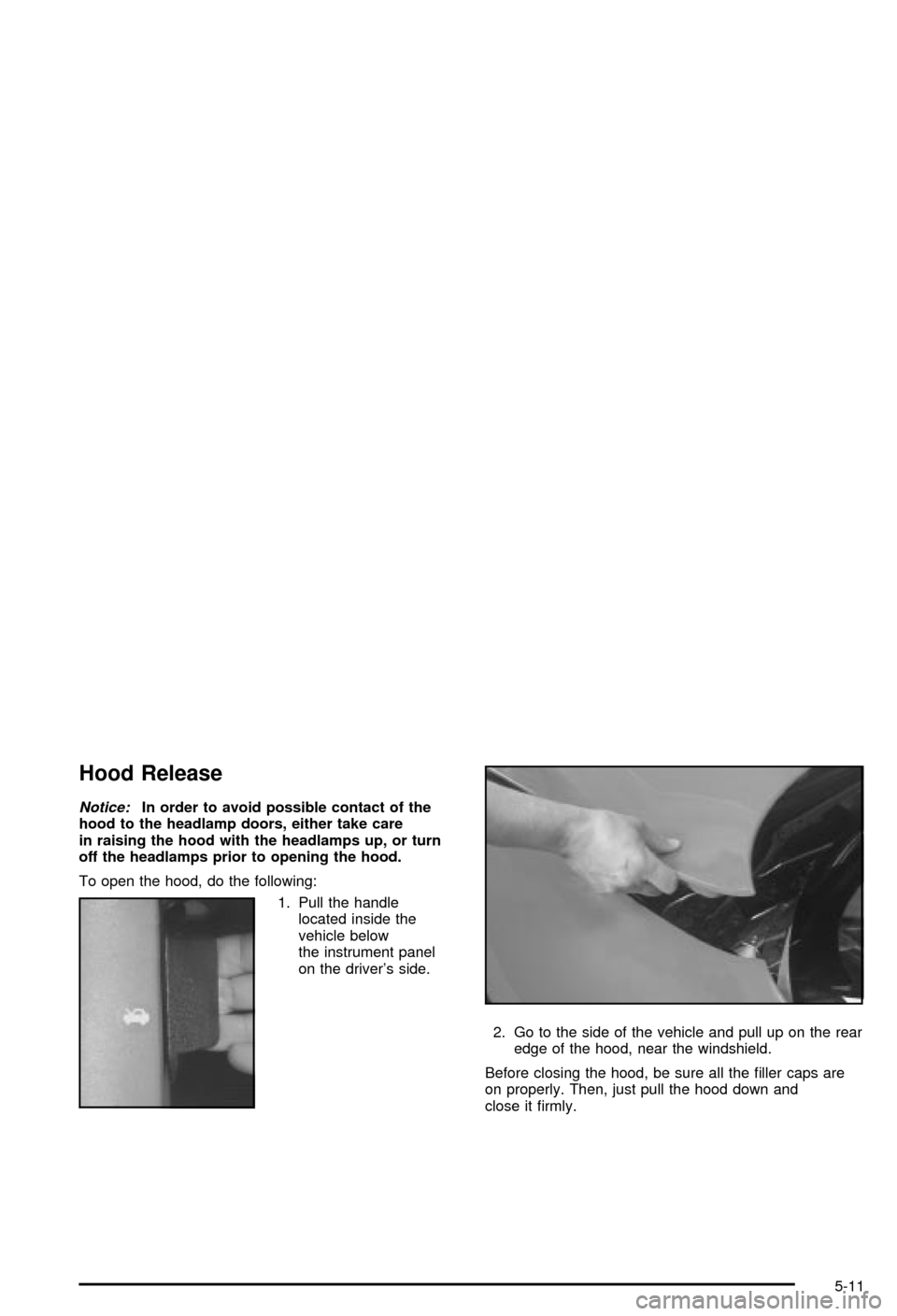
To open the hood, do the following:
1. Pull the handle
located inside the
vehicle below
the instrument panel
on the driver's side.
2. Go to the side of the vehicle and pull up on the rear
edge of the hood, near the windshield.
Before closing the hood, be sure all the ®ller caps are
on properly. Then, just pull the hood down and
close it ®rmly.
5-11
Page 254 of 368
Adding Coolant
If you need more coolant, add the proper DEX-COOLž
coolant mixtureat the surge tank,but only when the
engine is cool.
{CAUTION:
You can be burned if you spill coolant on hot
engine parts. Coolant contains ethylene glycol,
and it will burn if the engine parts are hot
enough. Don't spill coolant on a hot engine.
When replacing the pressure cap, make sure it is
hand-tight.
Coolant Surge Tank Pressure Cap
Notice:Your pressure cap is a pressure-type
cap and must be tightly installed to prevent coolant
loss and possible engine damage from overheating.
See ªCapacities and Speci®cationsº for more
information.
See
Engine Compartment Overview on page 5-12for
information on location.
Engine Overheating
You will ®nd an engine coolant temperature gage on the
instrument panel cluster and a COOLANT OVER
TEMP message on the Driver Information Center (DIC).
See
Engine Coolant Temperature Gage on page 3-38andDIC Warnings and Messages on page 3-53.
Overheated Engine Protection
Operating Mode
If an overheated engine condition exists and the
messages COOLANT OVER TEMP and REDUCED
ENGINE POWER are displayed, along with the Check
Engine light, an overheat protection mode which
alternates ®ring groups of cylinders helps prevent engine
damage. In this mode, you will notice a loss in power
and engine performance. This operating mode
allows your vehicle to be driven to a safe place in an
emergency; you may drive up to 50 miles (80 km).
Notice:After driving in the overheated engine
protection operating mode, to avoid engine damage,
allow the engine to cool before attempting any
repair. The engine oil will be severely degraded.
Repair the cause of coolant loss, change the oil
and reset the oil life system. See ªEngine Oilº in
the Index.
5-26
Page 285 of 368

If the display doesn't show tire pressure, or if the
SERVICE TIRE MON SYS message appears see your
dealer for service. For more information, see
Tire
Pressure Monitor System (Except Z06) on page 5-57
andDriver Information Center (DIC) on page 3-44.
Tire Pressure Monitor System
(Except Z06)
The Tire Pressure Monitor (TPM) has a sensor on each
road wheel that transmits to a receiver on the
instrument panel.
The system operates on a radio frequency subject to
Federal Communications Commission (FCC) Rules and
with Industry and Science Canada.
This device complies with Part 15 of the FCC Rules.
Operation is subject to the following two conditions:
(1) this device may not cause harmful interference, and
(2) this device must accept any interference received,
including interference that may cause undesired
operation.This device complies with RSS±210 of Industry and
Science Canada. Operation is subject to the following
two conditions: (1) this device may not cause
interference, and (2) this device must accept any
interference received, including interference that may
cause undesired operation of the device.
Changes or modi®cations to this system by other than
an authorized service facility could void authorization to
use this equipment.
If a tire's in¯ation pressure is between 5 psi (35 kPa)
and 25 psi (170 kPa), you will see a message on
the Driver Information Center. This message will show
which tire is underin¯ated and two chimes will sound. An
example would be LOW TIRE PRESSURE-LR. This
would mean that the in¯ation pressure in your left rear
tire is between 5 psi (35 kPa) and 25 psi (170 kPa).
If the in¯ation pressure in the tire drops below
5 psi (35 kPa), the message would read FLAT TIRE-LR
and four chimes will sound. See
Driver Information
Center (DIC) on page 3-44.
The TPM will also alert you if a tire's pressure is higher
than 42 psi (290 kPa). The message will show which
tire is overin¯ated and two chimes will sound. An
example would be HIGH PRESSURE-LR. This would
mean that the in¯ation pressure in your left rear tire
is higher than 42 psi (290 kPa). See
Driver Information
Center (DIC) on page 3-44.
5-57
Page 304 of 368

Here are some cleaning tips:
·Always read the instructions on the cleaner label.
·Clean up stains as soon as you can ± before
they set.
·Carefully scrape off any excess stain.
·Use a clean cloth or sponge, and change to a clean
area often. A soft brush may be used if stains are
stubborn.
·If a ring forms on fabric after spot cleaning, clean
the entire area immediately or it will set.
Cleaning Coated Moldings
These moldings are around the hatch opening in the
rear area.
·When lightly soiled, wipe with a sponge or soft
lint-free cloth dampened with water.
·When heavily soiled, use warm soapy water.
Cleaning Leather
Use a soft cloth with lukewarm water and a mild soap or
saddle soap and wipe dry with a soft cloth. Then, let
the leather dry naturally. Do not use heat to dry.
·For stubborn stains, use a leather cleaner.
·Neveruse oils, varnishes, solvent-based or abrasive
cleaners, furniture polish or shoe polish on leather.
·Soiled or stained leather should be cleaned
immediately. If dirt is allowed to work into the ®nish,
it can harm the leather.
Cleaning the Top of the Instrument
Panel
Use only mild soap and water to clean the top surfaces
of the instrument panel. Sprays containing silicones
or waxes may cause annoying re¯ections in the
windshield and even make it difficult to see through the
windshield under certain conditions.
5-76