2003 CHEVROLET CORVETTE brake
[x] Cancel search: brakePage 109 of 368
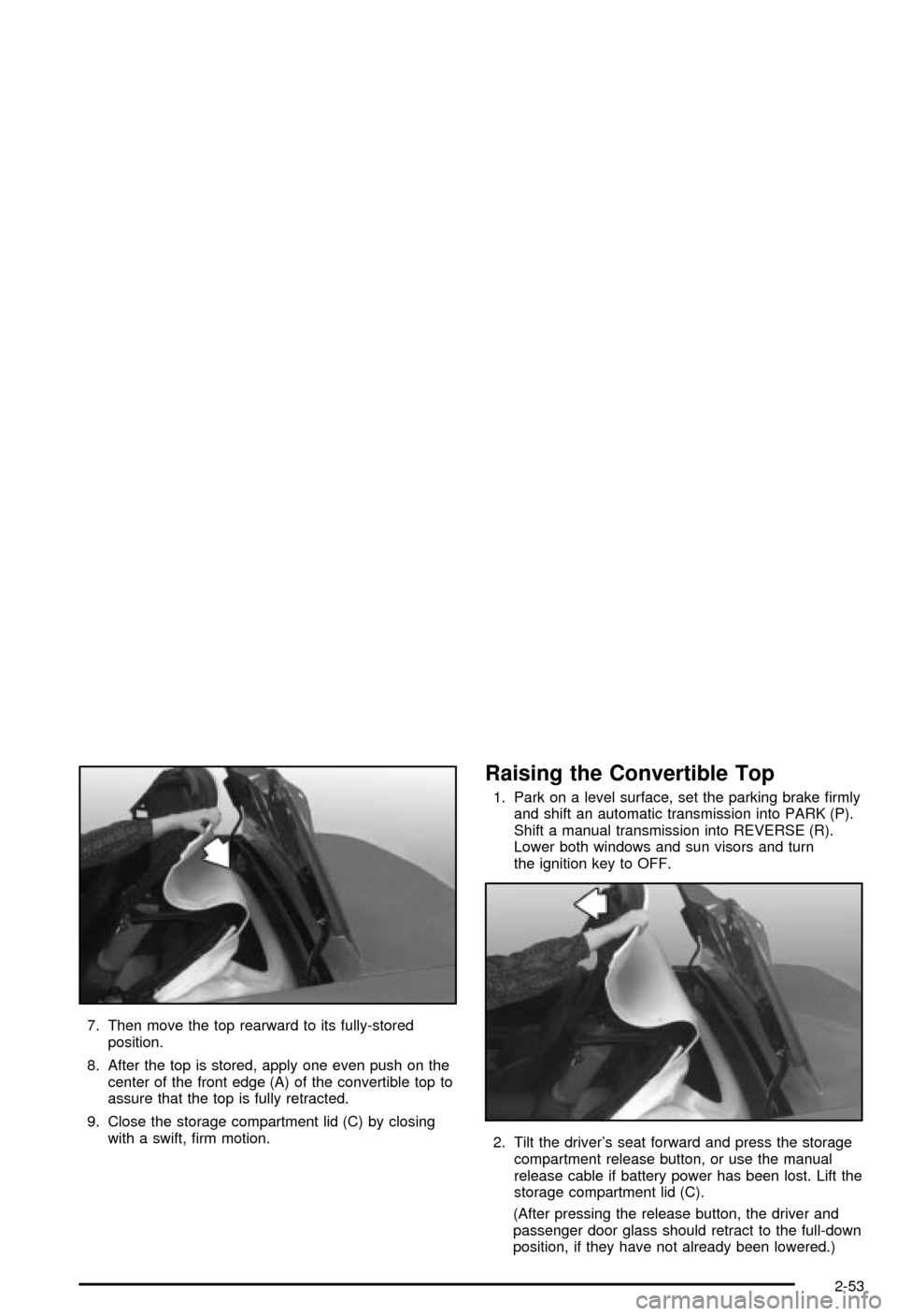
7. Then move the top rearward to its fully-stored
position.
8. After the top is stored, apply one even push on the
center of the front edge (A) of the convertible top to
assure that the top is fully retracted.
9. Close the storage compartment lid (C) by closing
with a swift, ®rm motion.
Raising the Convertible Top
1. Park on a level surface, set the parking brake ®rmly
and shift an automatic transmission into PARK (P).
Shift a manual transmission into REVERSE (R).
Lower both windows and sun visors and turn
the ignition key to OFF.
2. Tilt the driver's seat forward and press the storage
compartment release button, or use the manual
release cable if battery power has been lost. Lift the
storage compartment lid (C).
(After pressing the release button, the driver and
passenger door glass should retract to the full-down
position, if they have not already been lowered.)
2-53
Page 113 of 368

Instrument Panel Overview...............................3-2
Hazard Warning Flashers................................3-4
Other Warning Devices...................................3-4
Horn.............................................................3-5
Tilt Wheel.....................................................3-5
Turn Signal/Multifunction Lever.........................3-6
Exterior Lamps.............................................3-12
Interior Lamps..............................................3-15
Head-Up Display (HUD).................................3-17
Accessory Power Outlets...............................3-20
Ashtrays and Cigarette Lighter........................3-21
Climate Controls............................................3-22
Dual Automatic Climate Control System...........3-22
Outlet Adjustment.........................................3-28
Warning Lights, Gages and Indicators.............3-29
Instrument Panel Cluster................................3-30
Speedometer and Odometer...........................3-31
Tachometer.................................................3-31
Safety Belt Reminder Light.............................3-31
Air Bag Readiness Light................................3-32
Air Bag Off Light..........................................3-33
Voltmeter Gage............................................3-34
Brake System Warning Light..........................3-35
Anti-Lock Brake System Warning Light.............3-36
Traction Control System (TCS) Warning Light . . .3-36Active Handling System Light.........................3-37
Engine Coolant Temperature Gage..................3-38
Malfunction Indicator Lamp.............................3-38
Engine Oil Pressure Gage.............................3-41
Security Light...............................................3-42
Check Gages Warning Light...........................3-42
Fuel Gage...................................................3-42
Driver Information Center (DIC).......................3-44
DIC Controls and Displays.............................3-45
DIC Warnings and Messages.........................3-53
Other Messages...........................................3-61
Audio System(s).............................................3-62
Setting the Time...........................................3-62
Radio with Cassette......................................3-63
Radio with CD..............................................3-67
Trunk-Mounted CD Changer...........................3-71
Theft-Deterrent Feature..................................3-75
Understanding Radio Reception......................3-77
Care of Your Cassette Tape Player.................3-78
Care of Your CDs.........................................3-79
Care of Your CD Player................................3-79
Fixed Mast Antenna (Z06)..............................3-79
Power Antenna Mast Care (Convertible)...........3-79
Integrated Windshield and Rear Window
Antennas (Coupe).....................................3-80
Section 3 Instrument Panel
3-1
Page 115 of 368

The main components of your instrument panel are the
following:
A. Instrument Panel Brightness Control
B. Head-Up Display Controls
C. Turn Signal/Multifunction Lever
D. Driver Information Center (DIC) (Located in the
Instrument Cluster)
E. Instrument Panel Cluster
F. Windshield Wiper/Washer Lever
G. Driver Information Center (DIC) Buttons
H. Hazard Warning Flasher Button
I. Center Air Outlets
J. Audio System
K. Climate Controls
L. Fog Lamp Button
M. Remote Hatch Release Button (Coupe) or Remote
Trunk Release Button (Convertible/Z06)N. Ignition Switch
O. Shift Lever (Automatic Shown)
P. Active Handling Button
Q. Accessory Power Outlet (Located in the Center
Console)
R. Selective Ride Control Switch
S. Air Bag Off Light
T. Instrument Panel Cupholder
U. Remote Fuel Door Release Button (Located in the
Center Console)
V. Ashtray and Cigarette Lighter
W. Parking Brake
X. Glove Box
Y. Instrument Panel Fuse Block (Located Behind the
Toe-Board)
Z. Air Bag Off Switch (Located in Glove Box)
3-3
Page 121 of 368
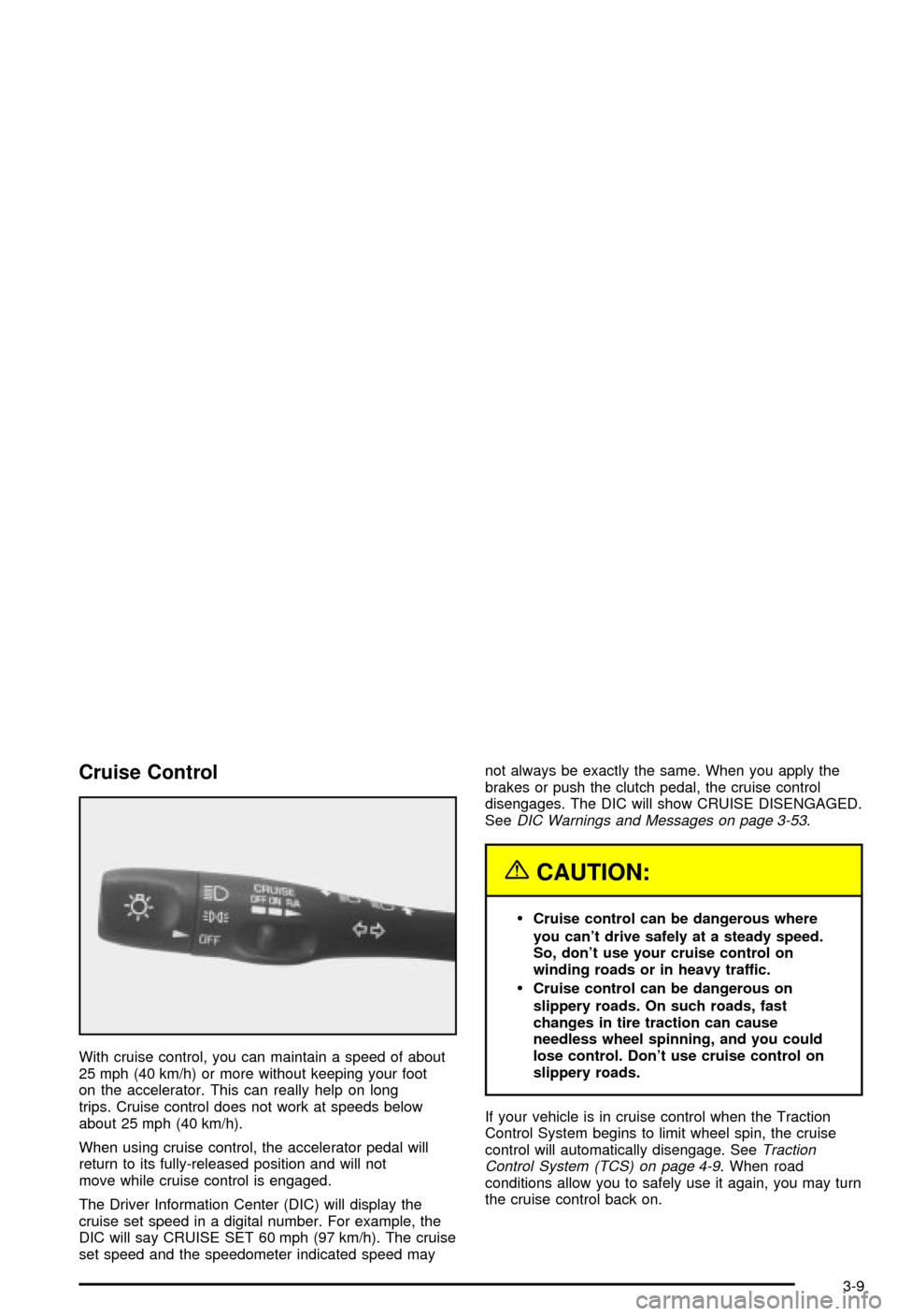
Cruise Control
With cruise control, you can maintain a speed of about
25 mph (40 km/h) or more without keeping your foot
on the accelerator. This can really help on long
trips. Cruise control does not work at speeds below
about 25 mph (40 km/h).
When using cruise control, the accelerator pedal will
return to its fully-released position and will not
move while cruise control is engaged.
The Driver Information Center (DIC) will display the
cruise set speed in a digital number. For example, the
DIC will say CRUISE SET 60 mph (97 km/h). The cruise
set speed and the speedometer indicated speed maynot always be exactly the same. When you apply the
brakes or push the clutch pedal, the cruise control
disengages. The DIC will show CRUISE DISENGAGED.
See
DIC Warnings and Messages on page 3-53.
{CAUTION:
·Cruise control can be dangerous where
you can't drive safely at a steady speed.
So, don't use your cruise control on
winding roads or in heavy traffic.
·Cruise control can be dangerous on
slippery roads. On such roads, fast
changes in tire traction can cause
needless wheel spinning, and you could
lose control. Don't use cruise control on
slippery roads.
If your vehicle is in cruise control when the Traction
Control System begins to limit wheel spin, the cruise
control will automatically disengage. See
Traction
Control System (TCS) on page 4-9. When road
conditions allow you to safely use it again, you may turn
the cruise control back on.
3-9
Page 122 of 368
Setting Cruise Control
{CAUTION:
If you leave your cruise control on when you're
not using cruise, you might hit a button and go
into cruise when you don't want to. You could
be startled and even lose control. Keep the
cruise control switch off until you want to use
cruise control.
1. Move the cruise control switch to ON.
2. Get up to the speed you want.
3. Press the SET button at the end of the lever and
release it. The cruise set speed will be displayed
by the Driver Information Center (DIC).
4. Take your foot off the accelerator pedal. The pedal
will return to an idle position.
Resuming a Set Speed
Suppose you set the cruise control at a desired speed
and then you apply the brake or clutch pedal. This,
of course, disengages the cruise control. But you don't
need to reset it.Once you're going about 25 mph (40 km/h) or more, you
can move the cruise control switch to R/A
(Resume/Accelerate) brie¯y. The Driver Information
Center (DIC) will display the cruise set speed.
You'll go right back up to your chosen speed and
stay there.
Increasing Speed While Using Cruise
Control
There are two ways to go to a higher speed:
·Use the accelerator pedal to get to the higher
speed. The speed will not begin to increase
until sufficient pedal travel is achieved. Press the
SET button at the end of the lever, then release the
button and the accelerator pedal. You'll now
cruise at the higher speed.
·Move the cruise switch to R/A. Hold it there until
you get up to the speed you want, then release
the switch. (To increase your speed in very small
amounts, move the switch to R/A brie¯y, then
release it. Each time you do this, the vehicle will go
about 1 mph (1.6 km/h) faster.)
The Driver Information Center (DIC) will display the
cruise set speed.
3-10
Page 123 of 368

Reducing Speed While Using Cruise
Control
There are two ways to reduce speed while using cruise
control:
·Press in the SET button at the end of the lever until
you reach the lower speed you want, then release it.
·To slow down in very small amounts, press the SET
button brie¯y. Each time you do this, you'll go about
1 mph (1.6 km/h) slower.
The Driver Information Center (DIC) will display the
cruise set speed.
Passing Another Vehicle While Using
Cruise Control
Use the accelerator pedal to increase speed. When you
take your foot off the pedal, the vehicle will slow
down to the cruise control speed you set earlier.
Using Cruise Control on Hills
How well your cruise control will work on hills depends
upon your speed, load and the steepness of the
hills. When going downhill, you may have to brake or
shift to a lower gear to keep your speed down. Of
course, applying the brake takes you out of cruise
control. Many drivers ®nd this to be too much trouble
and don't use cruise control on steep hills.
Ending Cruise Control
There are two ways to turn off the cruise control:
·Step lightly on the brake pedal or push the clutch
pedal, if you have a manual transmission vehicle.
·Move the cruise switch to OFF.
The Driver Information Center (DIC) will display the
message CRUISE DISENGAGED.
Erasing Speed Memory
When you turn off the cruise control or the ignition,
cruise control set speed memory is erased.
3-11
Page 125 of 368

You can open the doors manually using the knob next
to the headlamp assembly. Turn the knob
counterclockwise until the doors are open. Turn the
knob clockwise to close the doors manually.
The headlamp doors should be open when driving in icy
or snowy conditions to prevent the doors from freezing
closed and when washing the vehicle to help clean
the headlamps.
Notice:In order to avoid possible contact of the
hood to the headlamp doors, either take care
in raising the hood with the headlamps up, or turn
off the headlamps prior to opening the hood.
Daytime Running Lamps
Daytime Running Lamps (DRL) can make it easier for
others to see the front of your vehicle during the
day. DRL can be helpful in many different driving
conditions, but they can be especially helpful in the short
periods after dawn and before sunset. Fully functional
daytime running lamps are required on all vehicles
®rst sold in Canada.The DRL system will make the front turn signal lamps
come on when the following conditions are met:
·The ignition is on,
·the exterior lamp switch is off and
·the parking brake is released.
When the DRL are on, only the front turn signal lamps
will be on. The headlamps, taillamps, sidemarker
and other lamps won't be on. Your instrument panel
won't be lit up either.
To idle the vehicle with the DRL off, set the parking
brake while the ignition is in OFF. Then start the vehicle.
The DRL, headlamps and parking lamps will stay off
until you release the parking brake.
As with any vehicle, you should turn on the regular
headlamp system when you need it.
3-13
Page 127 of 368

Make sure your instrument panel brightness control is in
full bright position. See ªInstrument Panel Brightness
Controlº under
Interior Lamps on page 3-15.
With Twilight Sentinel
žturned on, you can idle the
vehicle with the lamps off, even when it's dark outside.
First set the parking brake while the ignition is in
OFF. Then start the vehicle. The lamps will stay off until
you release the parking brake.
Twilight Sentinel
žalso provides exterior illumination as
you leave the vehicle. If Twilight Sentinelžhas turned
on the lamps when you turn off the ignition, your lamps
will remain on until:
·The exterior lamp switch is moved from OFF to the
parking lamp position, or
·a delay time that you select has elapsed.
See
Driver Information Center (DIC) on page 3-44to
select the delay time that you want. You can also select
no delay time.
If you turn off the ignition with the exterior lamp switch
in the parking lamp or headlamp position, the Twilight
Sentinel
ždelay will not occur. The lamps will turn off as
soon as the switch is turned off.
As with any vehicle, you should turn on the regular
headlamp system when you need it.
Interior Lamps
Instrument Panel Brightness
The knob for this feature is
located on the left side of
the instrument panel.
Push and release the knob and it will pop out. Turn the
knob clockwise to brighten the lights or counterclockwise
to dim them.
Be sure not to have this knob turned all the way down
with the lamps on during the day. Your Driver
Information Center (DIC) may not be visible.
3-15