Page 3 of 386
ii
GENERAL MOTORS, GM, the GM Emblem,
CHEVROLET and the CHEVROLET Emblem are
registered trademarks of General Motors Corporation.
This manual includes the latest information at the time
it was printed. We reserve the right to make changes
after that time without further notice. For vehicles first
sold in Canada, substitute the name ªGeneral Motors of
Canada Limitedº for GM Medium Duty Truck Division
whenever it appears in this manual.
Please keep this manual in your vehicle, so it will
be there if you ever need it when you're on the road.
If you sell the vehicle, please leave this manual in it
so the new owner can use it.
We support voluntary
technician certification.
Litho in U.S.A.�Copyright General Motors Corporation 12/03/01
Part Number C2301 A First Edition All Rights Reserved
Page 48 of 386
1-41
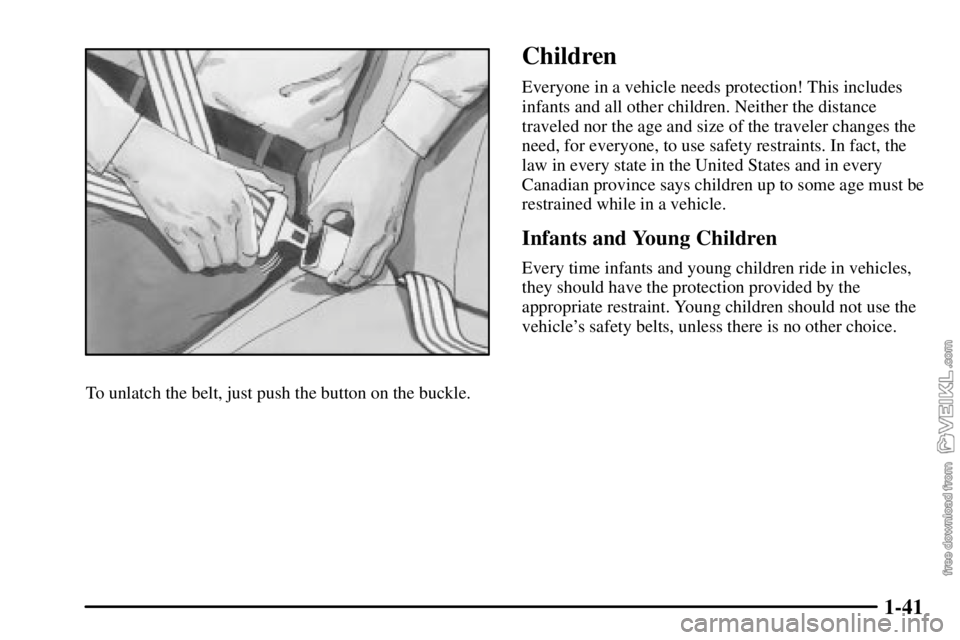
To unlatch the belt, just push the button on the buckle.
Children
Everyone in a vehicle needs protection! This includes
infants and all other children. Neither the distance
traveled nor the age and size of the traveler changes the
need, for everyone, to use safety restraints. In fact, the
law in every state in the United States and in every
Canadian province says children up to some age must be
restrained while in a vehicle.
Infants and Young Children
Every time infants and young children ride in vehicles,
they should have the protection provided by the
appropriate restraint. Young children should not use the
vehicle's safety belts, unless there is no other choice.
Page 84 of 386

2-9
Changes or modifications to this system by other than an
authorized service facility could void authorization to
use this equipment.
At times you may notice a decrease in range. This is
normal for any remote keyless entry system. If the
transmitter does not work or if you have to stand closer
to your vehicle for the transmitter to work, try this:
�Check the distance. You may be too far from your
vehicle. You may need to stand closer during rainy
or snowy weather.
�Check the location. Other vehicles or objects may be
blocking the signal. Take a few steps to the left or
right, hold the transmitter higher, and try again.
�Check to determine if battery replacement is
necessary. See the instructions that follow.
�If you're still having trouble, see your dealer or a
qualified technician for service.Operation
To unlock the driver's door, press the UNLOCK
button one time. If you press the button again within
five seconds, all of the doors will unlock. When the
UNLOCK button is pressed, the interior dome lamps
are turned on for about 40 seconds or until the ignition
switch is activated. Press the LOCK button to lock
all doors.
Page 85 of 386

2-10 Matching Transmitter(s) to Your Vehicle
Each remote keyless entry transmitter is coded to
prevent another transmitter from unlocking your vehicle.
If a transmitter is lost or stolen, a replacement can be
purchased through your dealer. Remember to bring any
remaining transmitters with you when you go to your
dealer. When the dealer matches the replacement
transmitter to your vehicle, any remaining transmitters
must also be matched. Once your dealer has coded the
new transmitter, the lost transmitter will not unlock your
vehicle. Each vehicle can have a maximum of four
transmitters matched to it.
Battery Replacement
Under normal use, the battery in your remote keyless
entry transmitter should last about two years.
You can tell the battery is weak if the transmitter won't
work at the normal range in any location. If you have to
get close to your vehicle before the transmitter works,
it's probably time to change the battery.
NOTICE:
When replacing the battery, use care not to touch
any of the circuitry. Static from your body
transferred to these surfaces may damage the
transmitter.
1. Insert a thin object, such as a coin, into the slot
between the covers of the transmitter housing near
the key ring hole. Remove the bottom by twisting
the object.
Page 95 of 386

2-20 Cold Weather Starting
(Caterpillar
� Diesel)
Because the diesel engine uses compression ignition, it
is harder to start in cold weather than a gasoline engine.
The air intake heater and use of the proper engine oil,
optional engine coolant heaters and optional ether
injection systems help cold weather starting. See the
Caterpillar
� Diesel Engine Operation & Maintenance
Manual for more information.
NOTICE:
Your diesel engine has an electric air intake
heater system which reduces white smoke and
helps start the engine in cold weather. Do not
spray starting fluid into the air intake where it
can contact the heater elements.
If you don't have the GM Automatic Ether
Injection System, don't use starting fluid or you
could damage your engine. If you have the GM
system, use only GM approved starting fluid that
has been tested to establish compatibility with the
air inlet heater system.
Diesel Engine Warm-Up
Several factors affect how quickly your diesel engine
warms up. These can include outside temperature,
engine load, idle time and your vehicle's option content.
Your vehicle may be equipped with some features that
can help the engine reach operating temperature sooner.
Some of these features are discussed below.
Also, remember that an automatic transmission adds
heat to the cooling system through the heat exchanger in
the radiator. Because of this, vehicles equipped with
automatic transmissions are often able to retain engine
coolant heat better than manual transmission vehicles.
See your Caterpillar
� Operation & Maintenance manual
for additional diesel engine warm
-up information.
Page 101 of 386

2-26 If Your Diesel Engine Won't Start
If you've run out of fuel, look at ªRunning Out of Fuel.º
See ªDiesel Fuel Requirements and Fuel Systemº in
the Index.
If you're not out of fuel, and your engine won't start,
do this:
Turn your ignition key to RUN. IMMEDIATELY
after the wait to start light goes off, turn the ignition
key to START.
If the light doesn't go off, wait a few seconds, then try
starting your engine again. And, see your dealer as soon
as you can for a starting system check.
If the light comes on and then goes off and you know
your batteries are charged, but your engine still won't
start, your vehicle needs service.
If the light does not come on when the engine is cold,
your vehicle needs service.If your batteries don't have enough charge to start your
engine, see ªBatteryº in the owner's manual.
Be sure you have the right oil for your engine, and that
you've changed the oil at the proper times. If you use
the wrong oil, your engine may be harder to start.
Be sure you are using the proper fuel for existing
weather conditions. See ªDiesel Fuel Requirements and
Fuel Systemº in the Index.
If the engine starts, runs a short time, then stops, your
vehicle needs service.
CAUTION:
Do not use gasoline or starting ªaids,º such as
ether, in the air intake. They could damage your
engine. There could also be a fire, which could
cause serious personal injury.
Page 178 of 386

3-9
Setting Preset Stations
The six numbered pushbuttons let you return to
your favorite stations. You can set up to 18 stations
(six AM, six FM1 and six FM2) by performing the
following steps:
1. Turn the radio on.
2. Press AM FM to select AM, FM1 or FM2.
3. Tune in the desired station.
4. Press and hold one of the six numbered pushbuttons
until you hear a beep. Whenever you press that
numbered pushbutton, the station you set will return.
5. Repeat the steps for each pushbutton.Setting the Tone (Bass/Treble)
AUDIO: To adjust bass and treble, press and release
AUDIO repeatedly until BAS or TRE appears on the
display. Then press and hold the up or the down arrow to
increase or to decrease. If a station is weak or noisy, you
may want to decrease the treble.
To adjust bass or treble to the middle position, select
BAS or TRE. Then press and hold AUDIO for more
than two seconds until you hear a beep. B and a zero or
T and a zero will appear on the display.
To adjust both tone controls and both speaker controls to
the middle position, end out of audio by waiting for the
display to change to the time display. Then press and
hold AUDIO for more than two seconds until you hear a
beep. CEN will appear on the display.
Page 179 of 386

3-10
Adjusting the Speakers (Balance/Fade)
AUDIO: To adjust the balance between the right and
the left speakers, press and release AUDIO until BAL
appears on the display. Then press and hold the up or
the down arrow to move the sound toward the right or
the left speakers.
To adjust the fade between the front and the rear
speakers, press and release AUDIO until FAD appears
on the display. Then press and hold the up or the
down arrow to move the sound toward the front or
the rear speakers.
To adjust balance or fade to the middle position, select
BAL or FAD. Then press and hold AUDIO for more
than two seconds until you hear a beep. L and a zero or
F and a zero will appear on the display.To adjust both tone controls and both speaker controls to
the middle position, end out of audio by waiting for the
display to change to the time display. Then press and
hold AUDIO for more than two seconds until you hear a
beep. CEN will appear on the display.
Fade may not be available if you have a regular
cab model.
Radio Messages
CAL (Calibrated): Your audio system has been
calibrated for your vehicle from the factory. If CAL
appears on the display it means that your radio has not
been configured properly for your vehicle and must be
returned to the dealership for service.
LOC (Locked): This message is displayed when the
Theftlock
� system has locked up. Your vehicle must be
returned to the dealership for service.