Page 139 of 386
To idle your vehicle with the automatic headlamp
system
off, set the parking brake while the ignition is off.
Then start your vehicle. The automatic headlamp
system will stay
off until you release the parking brake.
You may be able to turn
off your automatic headlamp
system. See “Daytime Running Lamps (DRL)” later
in this section for more information.
As with any vehicle, you should turn on the regular
headlamps when you need them.
Lamps On Reminder
A reminder tone will sound when your headlamps or
parking lamps are manually turned on and your ignition
is
in OFF, LOCK or ACCESSORY. To disable the
tone, turn the instrument panel brightness thumbwheel
all the way down. In the automatic mode, the
headlamps turn off once the ignition key is in OFF.
Daytime Running Lamps (DRL)
Daytime Running Lamps (DRL) can make it easier
for others to see the front of your vehicle during the day.
DRL can be helpful in many different driving conditions,
but they can be especially helpful in the short periods
after dawn and before sunset. Fully functional daytime
running lamps are required on all vehicles first sold
in Canada.
The DRL system will make your headlamps come on
at a reduced brightness when the following conditions
are met:
The ignition is on,
the exterior lamp control is off.
the automatic transmission is not in PARK (P),
the light sensor determines it is daytime and
the parking brake is released.
When the DRL are on, only your DRL lamps will be on.
The taillamps, sidemarker and other lamps won’t be on.
Your instrument panel won’t be lit up either.
3-1 4
Page 140 of 386

When it begins to get dark, the automatic headlamp
system will switch from DRL to the headlamps or the
last chosen headlamp setting that was used.
To idle your vehicle with the DRL
off, put the transmission
in PARK (P). The DRL
will stay off until you shift out
of PARK (P).
The following does not apply to vehicles first sold
in Canada.
When necessary, you may turn off the automatic
headlamp system and the Daytime Running Lamps
(DRL) feature by following the steps below:
1. Turn the ignition to RUN.
2. Press the DOME OVERRIDE button four times
within six seconds. After the fourth press of the
button, a chime will sound informing you that
the system is
off.
To return to the automatic mode, push the DOME
OVERRIDE button four times within six seconds
(the chime will sound), or turn the ignition to
off and
then to RUN again.
As with any vehicle, you should turn on the regular
headlamp system when you need it.
Interior Lamps
Instrument Panel Brightness Control
The thumbwheel for this feature is located to the right of
the exterior lamps control.
(Instrument Panel Brightness): Turn the thumbwheel
up to brighten the lights or down to dim them.
Moving the thumbwheel up to the first position will
activate the interior dome lamps.
Exit Lighting
With exit lighting, the interior lamps will come on when
you remove the key from the ignition. The lights will not
come on
if the DOME OVERRIDE button is pressed in.
Entry Lighting
Your vehicle is equipped with an illuminated entry
feature.
When a door is opened, the dome lamps will come on
if the DOME OVERRIDE button is in the out position.
When all the doors are closed, the lamps will stay on
for a short period of time and will then go out.
If the
DOME OVERRIDE button is pressed in, the lamps will
not come on.
3-1 5
Page 143 of 386
Climate Controls
Climate Control System
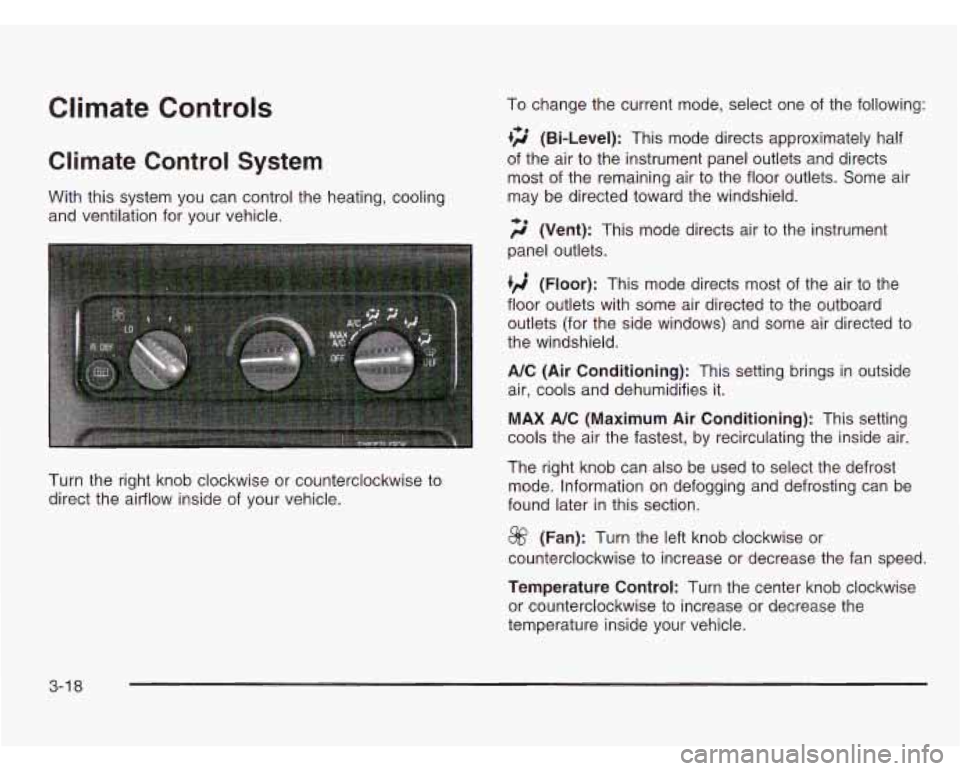
With this system you can control the heating, cooling
and ventilation for your vehicle.
Turn the right knob clockwise or counterclockwise to
direct the airflow inside of your vehicle. To change
the current mode, select one of the following:
+2 (Bi-Level): This mode directs approximately half
of the air to the instrument panel outlets and directs
most of the remaining air to the floor outlets. Some air
may be directed toward the windshield.
;$’ (Vent): This mode directs air to the instrument
panel outlets.
(Floor): This mode directs most of the air to the
floor outlets with some air directed to the outboard
outlets (for the side windows) and some air directed to
the windshield.
A/C (Air Conditioning): This setting brings in outside
air, cools and dehumidifies it.
MAX A/C (Maximum Air Conditioning): This setting
cools the air the fastest, by recirculating the inside air.
The right knob can also be used to select the defrost
mode. Information on defogging and defrosting can be
found later in this section.
@ (Fan): Turn the left knob clockwise or
counterclockwise to increase or decrease the fan speed.
Temperature Control: Turn the center knob clockwise
or counterclockwise to increase or decrease the
temperature inside your vehicle.
3-1 8
Page 149 of 386
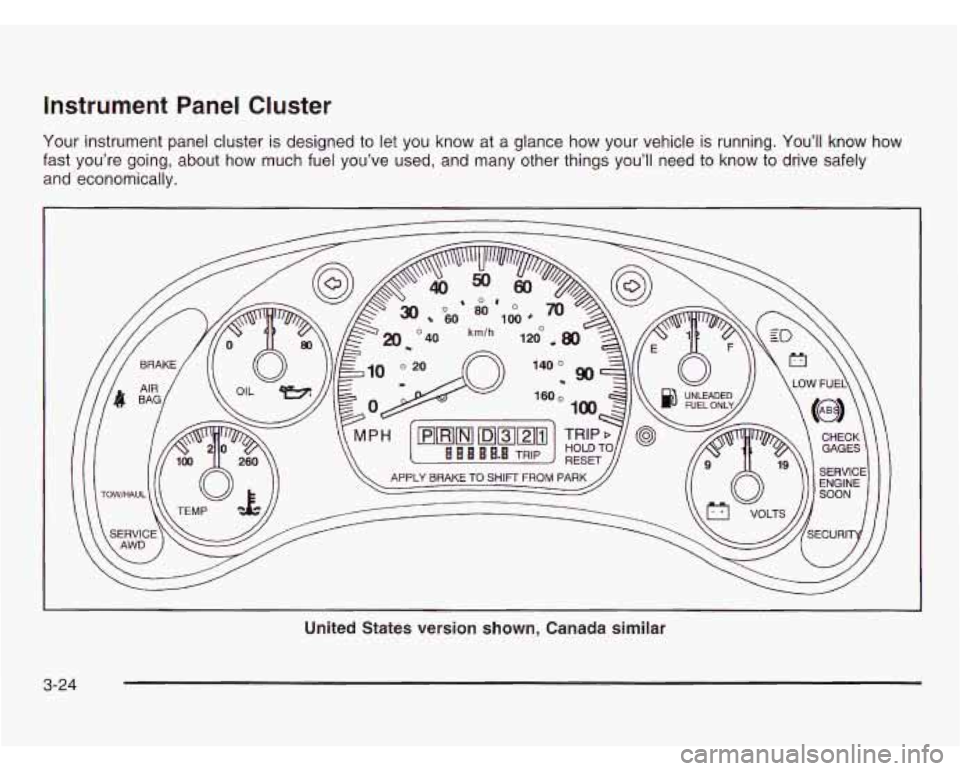
Instrument Panel Cluster
Your instrument panel cluster is designed to let you know at a glance how your vehicle is running. You’ll know how
fast you’re going, about how much fuel you’ve used, and many other things you’ll need
to know to drive safely
and economically.
United States version shown, Canada similar
3-24
Page 151 of 386

Safety Belt Reminder Light
When the key is turned to RUN or START, a tone will
come on for several seconds to remind people to fasten
their safety belts, unless the driver’s safety belt is
already buckled.
The safety belt light will
also come on and stay on
for several seconds,
then it will flash for
several more.
If the driver’s belt is already buckled, neither the tone
nor the light will come
on.
Air Bag Readiness Light
There is an air bag readiness light on the instrument
panel, which shows AIR BAG or the air bag symbol.
The system checks the air bag’s electrical system
for malfunctions. The light tells you
if there is an
electrical problem. The system check includes the
air bag sensor, the air bag modules, the wiring and
the crash sensing and diagnostic module. For more
information on the air bag system, see
Air Bag System
on page 1-62.
AIR
BAG
United States Canada
This light will
come on when you start your vehicle, and
it will flash for a few seconds. Then the light should
go out. This means the system is ready.
3-26
Page 208 of 386
Tow/Haul Mode
The tow/haul mode is a feature that assists when pulling
a heavy trailer. The purpose of the tow/haul mode is:
e to reduce the frequency of shifts when pulling a
heavy trailer.
to provide the same shift feel when pulling a heavy
trailer as when the vehicle is unloaded.
to reduce the need to change throttle position when
pulling a heavy trailer.
This feature is turned on or off by pressing a button on
the column shift lever. When the feature
is on, a
light on the instrument panel will illuminate to indicate
that the tow/haul mode has been selected.
See
Tow/Haul Mode Light on page 3-36. The tow/haul
mode is automatically turned
off each time the vehicle
is started.
The tow/haul mode is most effective when the vehicle
and trailer combined weight is at least
75% of the Gross
Vehicle Weight Rating (GVWR) and the maximum
trailer weight rating for the vehicle. The tow/haul
mode for hauling a heavy trailer is most
useful under the following conditions:
When driving through hilly terrain at speeds below
55 mph
(88 km/h).
When driving in low speed or stop and go traffic
below
55 mph (88 km/h).
When driving in parking lots.
Operating in the tow/haul mode when not pulling a
heavy trailer will not cause damage to the vehicle,
but you may experience reduced fuel economy
and undesirable petformance from the engine and
transmission. The tow/haul mode should be used only
when pulling a heavy trailer.
Weight of the Trailer
How heavy can a trailer safely be?
It depends on how you plan to use your rig. For example,
speed, altitude, road grades, outside temperature and
how much your vehicle is used to pull a trailer are all
important. And, it can also depend on any special
equipment that you have on your vehicle.
4-33
Page 213 of 386
Following Distance
Stay at least twice as far behind the vehicle ahead as
you would when driving your vehicle without a trailer.
This can help you avoid situations that require
heavy braking and sudden turns.
Passing
You’ll need more passing distance up ahead when
you’re towing a trailer. And, because you’re a good deal
longer, you’ll need to go much farther beyond the
passed vehicle before you can return to your lane.
Backing Up
Hold the bottom of the steering wheel with one hand.
Then, to move the trailer to the left, just move that hand
to the left.
To move the trailer to the right, move your
hand to the right. Always back up slowly and,
if possible,
have someone guide you.
Making Turns
Notice: Making very sharp turns while trailering
could cause the trailer to come in contact with the
vehicle. Your vehicle could be damaged. Avoid
making very sharp turns while trailering.
When you’re turning with a trailer, make wider turns than
normal.
Do this so your trailer won’t strike soft shoulders,
curbs, road signs, trees or other objects. Avoid jerky or
sudden maneuvers. Signal well in advance.
Turn Signals When Towing a Trailer
When you tow a trailer, your vehicle has to have extra
wiring (included in the optional trailering package).
The arrows on your instrument panel will flash whenever
you signal a turn or lane change. Properly hooked up,
the trailer lamps will also flash, telling other drivers
you’re about to turn, change lanes or stop.
When towing a trailer, the arrows on your instrument
panel will flash for turns even
if the bulbs on the trailer
are burned out. Thus, you may think drivers behind
you are seeing your signal when they are not. It’s
important to check occasionally to be sure the trailer
bulbs are still working.
4-38
Page 239 of 386
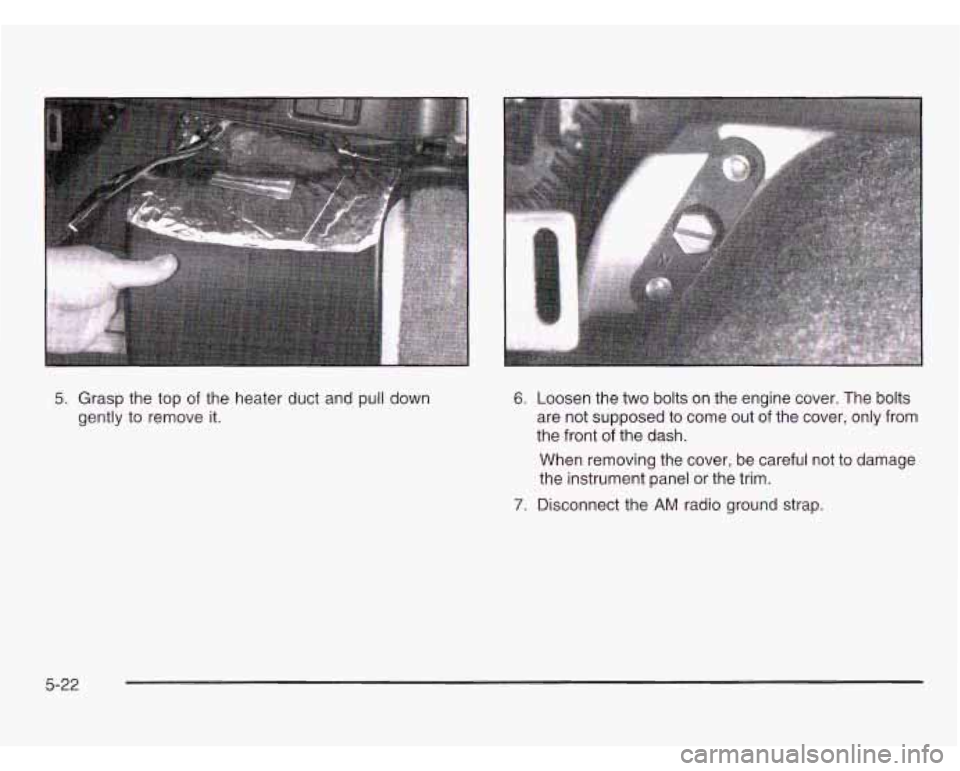
5. Grasp the top of the heater duct and pull down
gently to remove it. 6. Loosen the two bolts on the engine cover. The bolts
are not supposed to come out of the cover, only from
the front of the dash.
When removing the cover, be careful not to damage
the instrument panel or the trim.
7. Disconnect the AM radio ground strap.
5-22