2003 CADILLAC SEVILLE warning
[x] Cancel search: warningPage 158 of 408

Engine Coolant Temperature
Warning Light
This light tells you that
your engine has
overheated. As a check,
the light should come
on for a few seconds when
you start your engine.
If this light comes on and stays on, you should
stop your vehicle and turn the engine off as soon as
possible. A warning chime should also sound if this light
comes on.
See
Engine Overheating on page 5-28.
Engine Coolant Temperature Gage
This gage shows the engine coolant temperature. If the
gage pointer moves into the shaded area, the engine
is too hot.
That reading means the same thing as the warning
light ± the engine coolant has overheated. See
Engine
Overheating on page 5-28.
United StatesCanada
3-46
Page 165 of 408
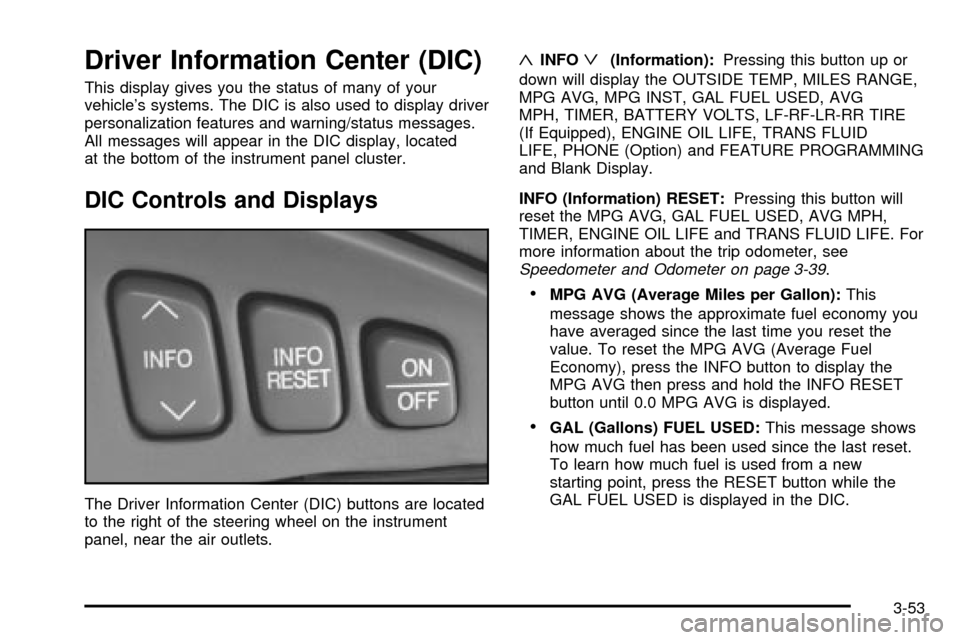
Driver Information Center (DIC)
This display gives you the status of many of your
vehicle's systems. The DIC is also used to display driver
personalization features and warning/status messages.
All messages will appear in the DIC display, located
at the bottom of the instrument panel cluster.
DIC Controls and Displays
The Driver Information Center (DIC) buttons are located
to the right of the steering wheel on the instrument
panel, near the air outlets.
«INFOª(Information):Pressing this button up or
down will display the OUTSIDE TEMP, MILES RANGE,
MPG AVG, MPG INST, GAL FUEL USED, AVG
MPH, TIMER, BATTERY VOLTS, LF-RF-LR-RR TIRE
(If Equipped), ENGINE OIL LIFE, TRANS FLUID
LIFE, PHONE (Option) and FEATURE PROGRAMMING
and Blank Display.
INFO (Information) RESET:Pressing this button will
reset the MPG AVG, GAL FUEL USED, AVG MPH,
TIMER, ENGINE OIL LIFE and TRANS FLUID LIFE. For
more information about the trip odometer, see
Speedometer and Odometer on page 3-39.
·MPG AVG (Average Miles per Gallon):This
message shows the approximate fuel economy you
have averaged since the last time you reset the
value. To reset the MPG AVG (Average Fuel
Economy), press the INFO button to display the
MPG AVG then press and hold the INFO RESET
button until 0.0 MPG AVG is displayed.
·GAL (Gallons) FUEL USED:This message shows
how much fuel has been used since the last reset.
To learn how much fuel is used from a new
starting point, press the RESET button while the
GAL FUEL USED is displayed in the DIC.
3-53
Page 167 of 408

OUTSIDE TEMP (Temperature):This message shows
the outside temperature. After this display has been
on the DIC for about ®ve seconds, the words OUTSIDE
TEMP will disappear so that only the temperature
remains.
MILES RANGE:This message shows about how many
miles you can drive without re®lling your fuel tank.
Once the range drops below 40 miles (64 km) remaining,
the display will show LOW.
MPG INST (Instantaneous Miles per Gallon):This
message shows the instantaneous fuel economy which
varies with your driving conditions, such as acceleration,
braking and the grade of the road being traveled.
The INFO RESET button does not function in this mode.
BATTERY VOLTS:This message shows the current
battery voltage. If the voltage is normal the display
will show BATTERY VOLTS OK. If the voltage drops
below 10.5 volts, the display will show BATTERY
VOLTS LOW. If the voltage is above 16 volts, the
display will show BATTERY VOLTS HIGH. If the display
shows the high or low message, you will need to
have your battery checked. See
DIC Warnings and
Messages on page 3-56for more information.LF-RF-LR-RR TIRE (If Equipped):On vehicles
equipped with the tire pressure monitor, this message
shows the tire pressure for each tire (left front, right
front, left rear and right rear). Pressing the INFO button
will scroll through the tire pressure for each of the
four tires, such as the following:
·34 PSI LF TIRE OK or
·234 kPa LF TIRE OK
If a tire pressure is below 25 PSI (172 kPa) or above
38 PSI (265 kPa), the message will appear as shown
above except it will show TIRE LOW or TIRE HIGH as
appropriate. If desired, the tire pressure information
can be programmed not to appear when using the INFO
button to scroll through the DIC displays. See
DIC
Vehicle Personalization on page 3-64.
If a low or high tire pressure is detected by the system
while driving, a CHECK TIRE PRESSURE message
will appear in the display. If this occurs, press the INFO
button to scroll to the tire(s) with a low or high
pressure condition. See
DIC Warnings and Messages
on page 3-56for more information.
ENG/MET (English/Metric):Press this button to
display information in the English (miles) or metric
(kilometers) system.
3-55
Page 168 of 408

DIC Warnings and Messages
These messages will appear if there is a problem
sensed in one of your vehicle's systems. Vehicles that
are ®rst sold in Canada will have a number after
each message. This number helps to identify the
problem. You must then press INFO or INFO RESET to
clear the display screen for further use. However, be
sure to take any message that appears on the display
screen seriously and remember that pressing the
INFO or INFO RESET button will only make the
message disappear, not the problem.
DIC messages can also be displayed in French,
German, Spanish and Japanese. Contact your dealer to
have the language display adjusted for your vehicle.
BATTERY NOT CHARGING ± 7:This message
will appear if the battery is not being charged. Have the
electrical system checked by your dealership at your
earliest convenience.
BATTERY SAVER ACTIVE ± 27:This message is
displayed when the vehicle has detected that the battery
voltage is dropping beyond a reasonable point. The
battery saver system will start reducing certain features
of the vehicle that you may not be able to notice. At
the point that features are disabled, this message
is displayed. It means that the vehicle is trying to save
the charge in the battery. Turn off unnecessary
accessories to allow the battery to recharge.BATTERY VOLTAGE HIGH ± 8:This message shows
that the electrical charging system is overcharging
(more than 16 volts). To avoid being stranded, have the
electrical system checked by your dealership. You
can reduce the charging overload by using the
accessories. Turn on the lamps and radio, set the
climate control on AUTO and the fan speed on HI, and
turn the rear window defogger on. You can monitor
battery voltage on the DIC by pressing the INFO button.
The normal range is 11.5 to 15.5 volts when the
engine is running.
BATTERY VOLTAGE LOW ± 6:This message will
appear when the electrical system is charging less than
10 volts or if the battery has been drained. If this
message appears immediately after starting, it is
possible that the generator can still recharge the battery.
The battery should recharge while driving but may
take a few hours to do so. Consider using an auxiliary
charger (be sure to follow the manufacturer's
instructions) to boost the battery after returning home or
to a ®nal destination. If this message appears while
driving or after starting your vehicle and stays on, have
it checked immediately to determine the cause of
this problem. To help the generator recharge the battery
quickly, you can reduce the load on the electrical
system by turning off the accessories. You can monitor
battery voltage on the DIC by pressing the INFO
button. The normal range is 11.5 to 15.5 volts.
3-56
Page 169 of 408

CHANGE ENGINE OIL ± 82:This means that the life
of the engine oil has expired and it should be changed
within 200 miles. After an oil change, the Oil Life
Indicator must be reset. See
Oil Life Indicator on
page 3-77. SeeEngine Oil on page 5-13.
CHANGE TRANS FLUID ± 47:This message will
appear when it is time to change the transaxle ¯uid. See
Part A: Scheduled Maintenance Services on page 6-4for the proper ¯uid and change intervals.
CHECK BRAKE FLUID ± 37:This message will
display if the ignition is in ON to inform the driver that
the brake ¯uid level is low. Have the brake system
serviced by a technician as soon as possible. See
Brake
System Warning and Parking Brake Indicator Light on
page 3-43
.
CHECK COOLANT LEVEL ± 2:This message will
appear when there is a low level of engine coolant. Have
the cooling system serviced by a technician as soon
as possible. See
Engine Coolant on page 5-25.CHECK FUEL GAGE ± 50:This message will appear
when the fuel supply is less than 5 gallons (18.9 L)
and the display is turned off. A single chime will also
sound when this message is displayed.
CHECK GAS CAP ± 61:This message will appear if
the gas cap has not been fully tightened. You should
recheck your gas cap to ensure that it's on properly.
CHECK OIL LEVEL ± 36:For correct operation of the
low oil sensing system, your vehicle should be on a
level surface. A false CHECK OIL LEVEL message may
appear if the vehicle is parked on a grade. The oil
level sensing system does not check for actual oil level
if the engine has been off for a short period of time,
and the oil level is never checked while the engine is
running. If the CHECK OIL LEVEL message appears,
and your vehicle has been parked on level ground
with the engine off for at least 30 minutes, the oil level
should be checked by observing the oil dipstick. Prior to
checking the oil level, be sure the engine has been
off for a few minutes and your vehicle is on a level
surface. Then check the dipstick and add oil if
necessary. See
Engine Oil on page 5-13.
3-57
Page 171 of 408

CHECK WASHER FLUID ± 25:This message means
that your vehicle is low on windshield washer ¯uid.
See
Windshield Washer Fluid on page 5-39.
DRIVER DOOR AJAR ± 140:This message will
display anytime the key is in ON, the transaxle is not in
PARK (P) and the driver's door is open or ajar. A
chime will sound when the vehicle's speed is greater
than 3 mph (4.8 km/h).
DRIVE NO. X (1 OR 2):This message will be displayed
with the key in ON and while entering FEATURE
PROGRAMMING, but only if the vehicle is equipped
with memory seats. The message will show which driver
is activating the personalization feature. It will only
stay on for ®ve seconds. This message can be
customized for you by your dealer.
ENGINE COOLANT HOT, IDLE ENGINE ± 44:This
message will appear when the engine coolant
temperature is over 262ÉF (128ÉC). Stop and allow your
vehicle to idle in PARK (P) until it cools down and the
message is removed. Do not increase engine speed
above a normal idle. If it does not cool down, turn off the
engine and have it serviced before driving it again.
Severe engine damage can result from an overheated
engine. See
Engine Overheating on page 5-28.ENGINE HOT±AC OFF ± 16:This message displays
when the engine coolant becomes hotter than the normal
operating temperature. To avoid added strain on a hot
engine, the air conditioning compressor is automatically
turned off. When the coolant temperature returns to
normal, the A/C operation will automatically resume. You
can continue to drive your vehicle. If this message
continues to appear, have the system repaired as soon
as possible to avoid compressor damage.
ENGINE OVERHEATED, STOP ENGINE ± 42:This
message will appear when the engine has overheated.
Stop and turn the engine off immediately to avoid
severe engine damage. See
Engine Overheating on
page 5-28. A multiple chime will also sound when this
message is displayed.
ENGINE POWER REDUCED ± 41:This message
informs you that the vehicle is reducing engine power
because the transaxle is being placed in gear under
conditions that may cause damage to the vehicle's
engine, transaxle or ability to accelerate.
FUEL LEVEL LOW ± 11:This message serves as a
warning that the fuel level in the tank is critically
low. Stop for fuel soon. A single chime will sound when
this message is displayed.
3-59
Page 175 of 408

TRACTION SUSPENDED ± 56:This message displays
when the traction control system has been temporarily
shut off because your vehicle's brakes have overheated.
This message does not indicate a problem with your
vehicle's traction control system. After a few minutes,
the traction control system will be available again
and the TRACTION READY message will appear.
TRANS HOT IDLE ENGINE ± 112:This message
indicates that the transaxle ¯uid in your vehicle is too
hot. Stop and allow your vehicle to idle until it cools
down or until this message is removed.
TRUNK OPEN ± 24:This message indicates that the
trunk is open when the ignition is on.
TURN SIGNAL ON ± 20:If you drive your vehicle for
more than a mile with a turn signal on, this message will
appear as a reminder to turn off the turn signal. A
multiple chime will sound when this message is
displayed.
VEHICLE OVERSPEED ± 52:This message is
displayed when the vehicle speed exceeds a certain
limit as required by some export countries. A continuous
chime will sound when this message is displayed.Climate Controls and Radio System
Personalization
These features allow both drivers to personalize their
own climate control settings as well as their radio
settings. For more information, see
Climate Controls
Personalization on page 3-36andRadio Personalization
with Home and Away Feature on page 3-102.
The outside temperature is always available for display
if it has been selected for a DIC display when your
vehicle is running unless an overriding DIC message
appears. You can change the temperature from
Fahrenheit to Celsius by pressing the ENG/MET
(English/metric) button on the instrument panel. For
more information on the DIC, see
DIC Warnings
and Messages on page 3-56.
The electronic sensor can be affected by road or engine
heat during idling, slow driving or when the engine is
®rst started after a short trip. To ensure proper automatic
climate control operation, the outside air temperature
display may not update as quickly as expected. This is
to allow the air surrounding the outside temperature
sensor to be as close to the actual outside conditions as
possible. This is determined by how much time has
elapsed since the vehicle has been turned off and by
vehicle speed.
3-63
Page 187 of 408

Before your vehicle was shipped from the factory, it was
programmed to Mode 2. The mode to which the
vehicle was programmed may have been changed since
it left the factory. To determine the mode to which the
vehicle is programmed or to program the vehicle to
a different mode, do the following:
1. Enter FEATURE PROGRAMMING following the
instructions listed previously.
2. Press the down arrow on the INFO button until
MIRROR TO CURB IN REV appears on the DIC
display.
3. To turn on the feature, press the ON/OFF button
until ON appears on the DIC display. To turn it off,
press the ON/OFF button until OFF appears on
the display.
The mode you selected is now set. You can either exit
the programming mode by following the instructions
later in this section or program the next feature available
on your vehicle.Tire Pressure Display
If your vehicle has the optional Tire Pressure Monitor
(TPM) System, you will have this feature. This feature
will allow the individual tire pressure readings to be
displayed when using the INFO button to scroll through
the DIC displays. Even with this feature programmed
to be turned off, a low or high tire pressure condition will
still cause the CHECK TIRE PRESSURE message to
be displayed on the DIC. See
DIC Warnings and
Messages on page 3-56for more information.
Programmable Modes
Mode 1:ON
Mode 2:OFF
3-75