2003 CADILLAC SEVILLE key battery
[x] Cancel search: key batteryPage 58 of 408

Servicing Your Air Bag-Equipped
Vehicle
Air bags affect how your vehicle should be serviced.
There are parts of the air bag systems in several places
around your vehicle. Your dealer and the service
manual have information about servicing your vehicle
and the air bag systems. To purchase a service manual,
see
Service Publications Ordering Information on
page 7-10.
{CAUTION:
For up to 10 seconds after the ignition key is
turned off and the battery is disconnected, an
air bag can still in¯ate during improper
service. You can be injured if you are close to
an air bag when it in¯ates. Avoid yellow
connectors. They are probably part of the air
bag system. Be sure to follow proper service
procedures, and make sure the person
performing work for you is quali®ed to do so.
The air bag systems do not need regular maintenance.
Restraint System Check
Checking Your Restraint Systems
Now and then, make sure the safety belt reminder light
and all your belts, buckles, latch plates, retractors
and anchorages are working properly. Look for any other
loose or damaged safety belt system parts. If you see
anything that might keep a safety belt system from doing
its job, have it repaired.
Torn or frayed safety belts may not protect you in a
crash. They can rip apart under impact forces. If a belt
is torn or frayed, get a new one right away.
Also look for any opened or broken air bag covers, and
have them repaired or replaced. (The air bag system
does not need regular maintenance.)
1-52
Page 65 of 408

Remote Keyless Entry System
Your keyless entry system operates on a radio
frequency subject to Federal Communications
Commission (FCC) Rules and with Industry Canada.
This device complies with Part 15 of the FCC Rules.
Operation is subject to the following two conditions:
1. This device may not cause interference, and
2. This device must accept any interference received,
including interference that may cause undesired
operation of the device.
This device complies with RSS-210 of Industry Canada.
Operation is subject to the following two conditions:
1. This device may not cause interference, and
2. This device must accept any interference received,
including interference that may cause undesired
operation of the device.
Changes or modi®cations to this system by other than
an authorized service facility could void authorization to
use this equipment.At times you may notice a decrease in range. This is
normal for any remote keyless entry system. If the
transmitter does not work or if you have to stand closer
to your vehicle for the transmitter to work, try this:
·Check the distance. You may be too far from your
vehicle. You may need to stand closer during
rainy or snowy weather.
·Check the location. Other vehicles or objects may
be blocking the signal. Take a few steps to the
left or right, hold the transmitter higher, and
try again.
·Check to determine if battery replacement is
necessary. See ªBattery Replacementº under
Remote Keyless Entry System Operation on
page 2-6.
·If you are still having trouble, see your dealer or a
quali®ed technician for service.
2-5
Page 68 of 408
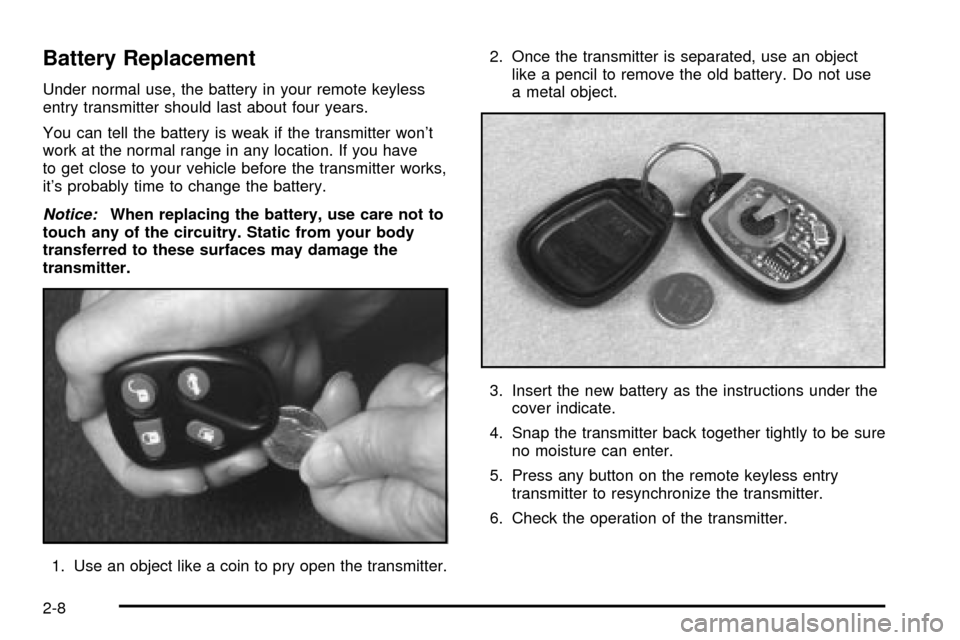
Battery Replacement
Under normal use, the battery in your remote keyless
entry transmitter should last about four years.
You can tell the battery is weak if the transmitter won't
work at the normal range in any location. If you have
to get close to your vehicle before the transmitter works,
it's probably time to change the battery.
Notice:When replacing the battery, use care not to
touch any of the circuitry. Static from your body
transferred to these surfaces may damage the
transmitter.
1. Use an object like a coin to pry open the transmitter.2. Once the transmitter is separated, use an object
like a pencil to remove the old battery. Do not use
a metal object.
3. Insert the new battery as the instructions under the
cover indicate.
4. Snap the transmitter back together tightly to be sure
no moisture can enter.
5. Press any button on the remote keyless entry
transmitter to resynchronize the transmitter.
6. Check the operation of the transmitter.
2-8
Page 85 of 408

Retained Accessory Power (RAP)
The following accessories on your vehicle may be used
for up to 10 minutes after the ignition key is turned
from ON to OFF:
·Cellular Phone (If Equipped)
·Radio
·Power Windows
·Audio Steering Wheel Controls
·Sunroof (Option)
Power to these accessories stops after 10 minutes or if
a door is opened. If you want power for another
10 minutes, close all the doors and turn the ignition key
to ON and then back to OFF. If the cellular phone is
being used while retained accessory power is active, the
timer is suspended to avoid interruption of the call.
The timer resets to 10 minutes at the end of the call.
Starting Your Engine
Move your shift lever to PARK (P) or NEUTRAL (N).
Your engine won't start in any other position ± that's a
safety feature. To restart when you're already moving,
use NEUTRAL (N) only.
Notice:Do not try to shift to PARK (P) if your
vehicle is moving. If you do, you could damage the
transaxle. Shift to PARK (P) only when your
vehicle is stopped.
1. With your foot off the accelerator pedal, turn your
ignition key to START. When the engine starts, let
go of the key. The idle speed will go down as
your engine gets warm.
Notice:Holding your key in START for longer than
15 seconds at a time will cause your battery to
be drained much sooner. And the excessive heat
can damage your starter motor. Wait about
15 seconds between each try to help avoid draining
your battery or damaging your starter.
2-25
Page 155 of 408

Charging System Light
When you turn the key to
ON or START, this light
will come on brie¯y
to show that the generator
and battery charging
systems are working
properly.
If this light stays on, you need service and you should
take your vehicle to the dealer at once. To save
your battery until you get there, turn off all accessories.
Brake System Warning and Parking
Brake Indicator Light
Your vehicle's hydraulic brake system is divided into two
parts. If one part isn't working, the other part can still
work and stop you. For good braking, though, you need
both parts working well.
If the warning light comes on, there is a brake problem.
Have your brake system inspected right away.
This light should come on
brie¯y when you turn the
ignition key to ON. If it
doesn't come on
then, have it ®xed so it will
be ready to warn you if
there's a problem.
3-43
Page 214 of 408

Radio Personalization with Home
and Away Feature
If DRIVER 1 (HOME or AWAY) PRESETS or DRIVER 2
(HOME or AWAY) PRESETS appears in the display
when the radio is ®rst turned on, your vehicle is
equipped with this feature.
This feature allows the driver to return to the last used
audio source (radio, cassette, or CD) using the
remote keyless entry transmitter. This feature can also
store and recall AM and FM presets, volume, tone,
and the last selected radio station. The number on the
back of each transmitter (1 or 2) corresponds to
driver 1 or 2. If transmitter 1 is used to enter the vehicle,
the last used audio source and/or settings set by
driver 1 will be recalled. If transmitter 2 is used to enter
the vehicle, the last used audio source and/or settings
set by driver 2 will be recalled. The settings can also be
recalled by pressing the MEMORY seat buttons 1 or 2
located on the driver's door.
Your radio can store home and away presets. Home
and away presets allow you to use one set of preset
radio settings in the area where you live, and another set
when you go out of town. You will not need to
reprogram your presets every time you travel. With the
radio off and the time displayed, use fast forward
and reverse to select home or away presets. To selectthe away presets, press and hold FF for ®ve seconds
until you hear a beep. The next time the radio comes on,
the away presets will be active. To select the home
presets, press and hold RW for ®ve seconds until you
hear a beep. The next time the radio comes on,
the home presets will be active.
When battery power is removed and later applied, you
will not have to reset your home radio presets
because the radio remembers them. However, you will
have to reset your away radio presets.
Theft-Deterrent Feature
THEFTLOCKžis designed to discourage theft of your
radio. Your vehicle has a ªbuilt inº theft-deterrent feature
on each radio that is automatic ± there is no
programming required. The radio in your vehicle cannot
be used in any other vehicle. When the radio was
originally installed in your vehicle at the factory, it stored
the Vehicle Identi®cation Number (VIN). Each time
the ignition is turned on, the VIN is veri®ed. If the
vehicle's VIN does not match the VIN stored in the
radio, THEFTLOCK
žwill be activated and the audio
system will not play. If the radio is removed from your
vehicle, the original VIN in the radio can be used to trace
the radio back to your vehicle.
3-102