Page 169 of 408

CHANGE ENGINE OIL ± 82:This means that the life
of the engine oil has expired and it should be changed
within 200 miles. After an oil change, the Oil Life
Indicator must be reset. See
Oil Life Indicator on
page 3-77. SeeEngine Oil on page 5-13.
CHANGE TRANS FLUID ± 47:This message will
appear when it is time to change the transaxle ¯uid. See
Part A: Scheduled Maintenance Services on page 6-4for the proper ¯uid and change intervals.
CHECK BRAKE FLUID ± 37:This message will
display if the ignition is in ON to inform the driver that
the brake ¯uid level is low. Have the brake system
serviced by a technician as soon as possible. See
Brake
System Warning and Parking Brake Indicator Light on
page 3-43
.
CHECK COOLANT LEVEL ± 2:This message will
appear when there is a low level of engine coolant. Have
the cooling system serviced by a technician as soon
as possible. See
Engine Coolant on page 5-25.CHECK FUEL GAGE ± 50:This message will appear
when the fuel supply is less than 5 gallons (18.9 L)
and the display is turned off. A single chime will also
sound when this message is displayed.
CHECK GAS CAP ± 61:This message will appear if
the gas cap has not been fully tightened. You should
recheck your gas cap to ensure that it's on properly.
CHECK OIL LEVEL ± 36:For correct operation of the
low oil sensing system, your vehicle should be on a
level surface. A false CHECK OIL LEVEL message may
appear if the vehicle is parked on a grade. The oil
level sensing system does not check for actual oil level
if the engine has been off for a short period of time,
and the oil level is never checked while the engine is
running. If the CHECK OIL LEVEL message appears,
and your vehicle has been parked on level ground
with the engine off for at least 30 minutes, the oil level
should be checked by observing the oil dipstick. Prior to
checking the oil level, be sure the engine has been
off for a few minutes and your vehicle is on a level
surface. Then check the dipstick and add oil if
necessary. See
Engine Oil on page 5-13.
3-57
Page 189 of 408
Trip Computer
Oil Life Indicator
This feature lets you know when to change the engine
oil. It's based on the engine oil temperatures and
your driving patterns.To see the display, press the INFO button several times
until ENGINE OIL LIFE appears. If you see 99%
ENGINE OIL LIFE, 99 percent of your current oil life
remains.
The DIC may display a CHANGE ENGINE OIL
message. For more information, see
Scheduled
Maintenance on page 6-4. If you see CHANGE ENGINE
OIL, it means the oil life is gone and you should
change the oil right away. The system doesn't check
how much oil you have, so you'll still have to check for
that. To see how, see
Engine Oil on page 5-13.
When the oil is changed, you'll need to reset the system.
See
Engine Oil on page 5-13. Always keep a written
record of the mileage and date when you changed
your oil.
3-77
Page 260 of 408

When You Are Ready to Leave After
Parking on a Hill:
1. Apply your regular brakes and hold the pedal down
while you:
·start your engine,
·shift into a gear, and
·make sure the parking brake has released.
2. Let up on the brake pedal.
3. Drive slowly until the trailer is clear of the chocks.
4. Stop and have someone pick up and store the
chocks.
Maintenance When Trailer Towing
Your vehicle will need service more often when you're
pulling a trailer. See the Maintenance Schedule for more
on this. Things that are especially important in trailer
operation are automatic transaxle ¯uid (don't over®ll),
engine oil, drive belt, cooling system and brake system.
Each of these is covered in this manual, and the
Index will help you ®nd them quickly. If you're trailering,
it's a good idea to review this information before you
start your trip.
Check periodically to see that all hitch nuts and bolts
are tight.
Engine Cooling When Trailer Towing
Your cooling system may temporarily overheat during
severe operating conditions. SeeEngine Overheating on
page 5-28.
4-42
Page 262 of 408

Buying New Tires.........................................5-68
Uniform Tire Quality Grading..........................5-69
Wheel Alignment and Tire Balance..................5-71
Wheel Replacement......................................5-71
Tire Chains..................................................5-72
If a Tire Goes Flat........................................5-73
Changing a Flat Tire.....................................5-74
Compact Spare Tire......................................5-83
Appearance Care............................................5-83
Cleaning the Inside of Your Vehicle.................5-84
Care of Safety Belts......................................5-86
Weatherstrips...............................................5-86
Cleaning the Outside of Your Vehicle..............5-86
Sheet Metal Damage.....................................5-88
Finish Damage.............................................5-89
Underbody Maintenance................................5-89Chemical Paint Spotting.................................5-89
Vehicle Care/Appearance Materials..................5-90
Vehicle Identi®cation......................................5-91
Vehicle Identi®cation Number (VIN).................5-91
Service Parts Identi®cation Label.....................5-92
Electrical System............................................5-92
Add-On Electrical Equipment..........................5-92
Headlamp Wiring..........................................5-92
Windshield Wiper Fuses................................5-92
Power Windows and Other Power Options.......5-92
Fuses and Circuit Breakers............................5-93
Removing the Rear Seat Cushion...................5-96
Capacities and Speci®cations........................5-100
Normal Maintenance Replacement Parts.........5-101
Section 5 Service and Appearance Care
5-2
Page 263 of 408
Service
Your dealer knows your vehicle best and wants you to
be happy with it. We hope you will go to your dealer
for all your service needs. You will get genuine GM parts
and GM-trained and supported service people.
We hope you will want to keep your GM vehicle all GM.
Genuine GM parts have one of these marks:
Doing Your Own Service Work
If you want to do some of your own service work, you'll
want to use the proper service manual. It tells you
much more about how to service your vehicle than this
manual can. To order the proper service manual,
see
Service Publications Ordering Information on
page 7-10.
Your vehicle has an air bag system. Before attempting
to do your own service work, see
Servicing Your Air
Bag-Equipped Vehicle on page 1-52.
You should keep a record with all parts receipts and list
the mileage and the date of any service work you
perform. See
Part E: Maintenance Record on page 6-16.
{CAUTION:
You can be injured and your vehicle could be
damaged if you try to do service work on a
vehicle without knowing enough about it.
·Be sure you have sufficient knowledge,
experience, the proper replacement parts
and tools before you attempt any vehicle
maintenance task.
CAUTION: (Continued)
5-3
Page 264 of 408
CAUTION: (Continued)
·
Be sure to use the proper nuts, bolts and
other fasteners. ªEnglishº and ªmetricº
fasteners can be easily confused. If you
use the wrong fasteners, parts can later
break or fall off. You could be hurt.
Adding Equipment to the Outside of
Your Vehicle
Things you might add to the outside of your vehicle can
affect the air¯ow around it. This may cause wind
noise and affect windshield washer performance. Check
with your dealer before adding equipment to the
outside of your vehicle.
Fuel
Use of the recommended fuel is an important part of the
proper maintenance of your vehicle.
Gasoline Octane
Use regular unleaded gasoline with a posted octane of
87 or higher. However, for best performance and for
trailer towing, you may wish to use middle grade
or premium unleaded gasoline. If the octane is less than
87, you may get a heavy knocking noise when you
drive. If this occurs, use a gasoline rated at 87 octane
or higher as soon as possible. Otherwise, you might
damage your engine.
5-4
Page 280 of 408
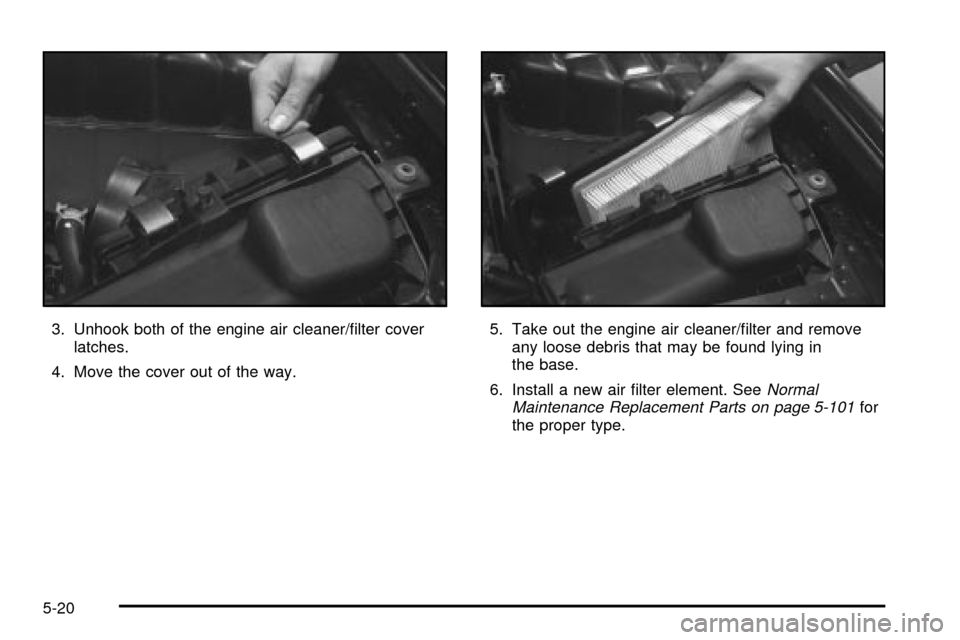
3. Unhook both of the engine air cleaner/®lter cover
latches.
4. Move the cover out of the way.5. Take out the engine air cleaner/®lter and remove
any loose debris that may be found lying in
the base.
6. Install a new air ®lter element. See
Normal
Maintenance Replacement Parts on page 5-101for
the proper type.
5-20
Page 281 of 408
Follow these steps to reinstall the engine air
cleaner/®lter assembly:
1. Slide the cover into the slots in the bottom of
the base.
2. Close the cover and make sure that both latches
are secure and fully engaged.
3. Reinstall the clean air duct over the mass air¯ow
sensor. Make sure that the duct is secure around
the entire outer edge of the sensor.
4. Tighten the air duct clamp.
{CAUTION:
Operating the engine with the air cleaner/®lter
off can cause you or others to be burned. The
air cleaner not only cleans the air, it helps to
stop ¯ame if the engine back®res. If it is not
there and the engine back®res, you could be
burned. Do not drive with it off, and be
careful working on the engine with the air
cleaner/®lter off.
Notice:If the air cleaner/®lter is off, a back®re can
cause a damaging engine ®re. And, dirt can easily get
into your engine, which will damage it. Always have
the air cleaner/®lter in place when you're driving.
Automatic Transaxle Fluid
When to Check and Change
A good time to check your automatic transaxle ¯uid
level is when the engine oil is changed.
Change both the ¯uid and ®lter every 50,000 miles
(83 000 km) if the vehicle is mainly driven under one or
more of these conditions:
·In heavy city traffic where the outside temperature
regularly reaches 90É F (32É C) or higher.
·In hilly or mountainous terrain.
·When doing frequent trailer towing.
·Uses such as found in taxi, police or delivery
service.
If you do not use your vehicle under any of these
conditions, the ¯uid and ®lter do not require change until
the message CHANGE TRANS FLUID appears on
the Driver Information Center.
See
Part A: Scheduled Maintenance Services on
page 6-4.
5-21