2003 CADILLAC SEVILLE climate control
[x] Cancel search: climate controlPage 139 of 408

Ashtrays and Cigarette Lighter
The ashtrays and cigarette lighters may be ordered
through your dealer.
Notice:Don't put papers or other ¯ammable
items into your ashtrays. Hot cigarettes or other
smoking materials could ignite them, causing
a damaging ®re.
Front Ashtray
The front ashtray is located below the climate control
system on the instrument panel.
Press on the lower edge of the cover to access the
ashtray. To clean the ashtray, lift it out by pulling on the
snuffer.
Rear Ashtray
The ashtrays are located on the door armrests. To use
an ashtray, lift the lid.
Cigarette Lighter
Notice:Don't hold a cigarette lighter in with your
hand while it is heating. If you do, it won't be able to
back away from the heating element when it's
ready. That can make it overheat, damaging the
lighter and the heating element.
The front cigarette lighter is located on the center
console in the passenger's side footwell. Open the ¯ip
out door to access the cigarette lighter. Your vehicle
may also have a lighter on the back of the center
console near the rear seat air outlet.
Press the lighter all the way in and release it. It will
pop back out by itself once the element has heated
for use.
Cigarette lighters can be used to provide electrical
power to accessories. See
Accessory Power Outlets on
page 3-26for more information.
3-27
Page 140 of 408
Climate Controls
Dual Climate Control System
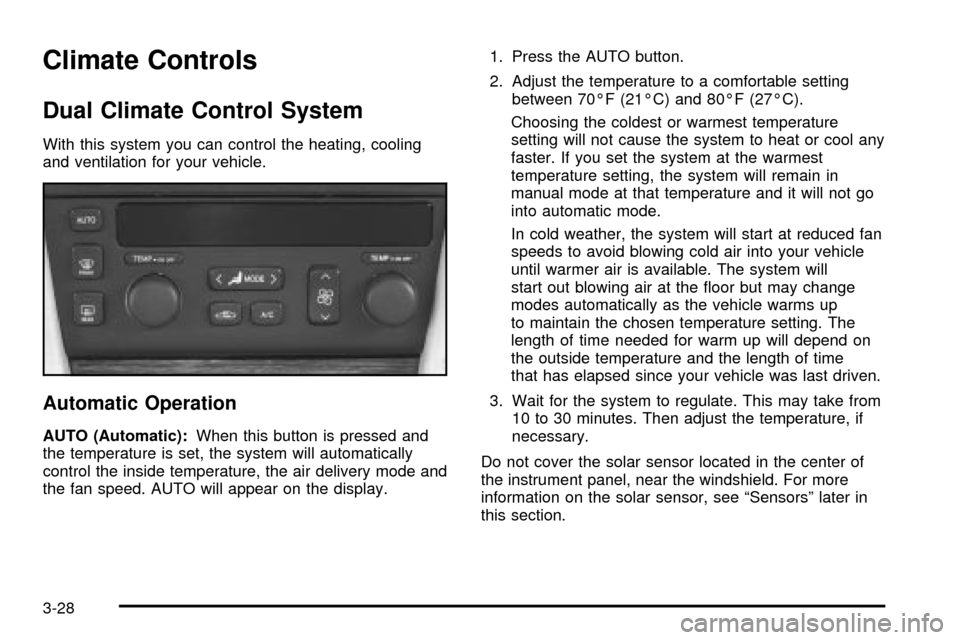
With this system you can control the heating, cooling
and ventilation for your vehicle.
Automatic Operation
AUTO (Automatic):When this button is pressed and
the temperature is set, the system will automatically
control the inside temperature, the air delivery mode and
the fan speed. AUTO will appear on the display.1. Press the AUTO button.
2. Adjust the temperature to a comfortable setting
between 70ÉF (21ÉC) and 80ÉF (27ÉC).
Choosing the coldest or warmest temperature
setting will not cause the system to heat or cool any
faster. If you set the system at the warmest
temperature setting, the system will remain in
manual mode at that temperature and it will not go
into automatic mode.
In cold weather, the system will start at reduced fan
speeds to avoid blowing cold air into your vehicle
until warmer air is available. The system will
start out blowing air at the ¯oor but may change
modes automatically as the vehicle warms up
to maintain the chosen temperature setting. The
length of time needed for warm up will depend on
the outside temperature and the length of time
that has elapsed since your vehicle was last driven.
3. Wait for the system to regulate. This may take from
10 to 30 minutes. Then adjust the temperature, if
necessary.
Do not cover the solar sensor located in the center of
the instrument panel, near the windshield. For more
information on the solar sensor, see ªSensorsº later in
this section.
3-28
Page 142 of 408

TEMP (Driver's Temperature Knob):Press this knob
to turn the climate control system on or off. Turn this
knob clockwise or counterclockwise to manually
increase or decrease the temperature inside your
vehicle.
TEMP (Passenger's Temperature Knob):Press this
knob to turn the passengers' climate control system
controls on or off. Turn this knob to manually increase
or decrease the temperature for the front passenger.
If the passenger's climate controls are turned off,
the driver's temperature knob will control the
temperature for the entire vehicle.
A/C (Air Conditioning):Press this button to override
the automatic system and turn the air-conditioning
system on or off. When in AUTO the air-conditioning
compressor will come on automatically, as necessary.
On hot days, open the windows to let hot inside air
escape; then close them. This helps to reduce the time
it takes for your vehicle to cool down. It also helps
the system to operate more efficiently.For quick cool down on hot days:
1. Select the vent mode.
2. Select the recirculation mode.
3. Select A/C.
4. Select the coolest temperature.
5. Select the highest fan speed.
6. Open all outlets.
Using these settings together for long periods of time
may cause the air inside your vehicle to become too dry.
To prevent this from happening, after the air in your
vehicle has cooled, turn the recirculation mode off.
The air-conditioning system removes moisture from the
air, so you may sometimes notice a small amount of
water dripping underneath your vehicle while idling
or after turning off the engine. This is normal.
If your vehicle has the memory option, it can be used to
recall your climate control settings. For more information,
see
Climate Controls Personalization on page 3-36.
3-30
Page 144 of 408

Defogging and Defrosting
Fog on the inside of windows is a result of high humidity
(moisture) condensing on the cool window glass. This
can be minimized if the climate control system is
used properly. There are two modes to clear fog from
your windshield. Use the ¯oor/defog mode to clear
the windows of fog or moisture and warm the
passengers. Use the defrost mode (FRONT) to remove
fog or frost from the windshield more quickly.
SMODET:Press this switch until ¯oor/defog
appears on the display.
/(Floor/Defog):This mode directs the air equally
between the windshield and the ¯oor outlets. When you
select this mode, the system turns off recirculation
and runs the air-conditioning compressor unless
the outside temperature is at or below freezing. The
recirculation mode cannot be selected while in the
¯oor/defog mode.
1FRONT (Defrost):Pressing FRONT directs most of
the air to the windshield and the side window outlets, with
some air directed to the ¯oor outlets. In this mode, the
system will automatically turn off recirculation and run the
air-conditioning compressor, unless the outside
temperature is at or below freezing. Recirculation cannot
be selected while in the defrost mode. Do not drive the
vehicle until all the windows are clear.
Rear Window Defogger
The rear window defogger uses a warming grid to
remove fog or frost from the rear window.
The rear window defogger will only work when the
ignition is in ON.
=REAR:Press this button to turn the rear window
defogger on or off. Be sure to clear as much snow from
the rear window as possible.
The rear window defogger will turn off approximately 10
minutes after the button is pressed. If turned on
again, the defogger will only run for approximately ®ve
minutes before turning off. The defogger can also
be turned off by pressing the button again or by turning
off the engine.
The heated outside rearview mirrors will heat to help
clear fog or frost from the surface of the mirror when the
REAR button is pressed.
Notice:Don't use a razor blade or something else
sharp on the inside of the rear window. If you
do, you could cut or damage the defogger and the
repairs would not be covered by your warranty.
Do not attach a temporary vehicle license, tape, a
decal or anything similar to the defogger grid.
3-32
Page 146 of 408

Rear Climate Control System
Your vehicle has a rear climate-control system that
allows the rear-seat passengers to adjust the direction
of the air¯ow and the fan speed for the rear seating
area. This system also works with the main
climate-control system in your vehicle.
The control panel for this system is located on the back
of the center console.
OFF:Turn the mode knob located on the rear climate
control panel to this position to turn off the air¯ow.
If the passenger's temperature knob located on the main
climate control panel is off, the rear climate control
system will be turned off and the settings selected for
the main climate control panel will also be selected
for the rear seat passengers.For more information on how to use the climate control
system, seeDual Climate Control System on
page 3-28. For more information on the air outlets, seeOutlet Adjustment on page 3-33.
Operation
Mode Knob:Turn the knob to direct the air¯ow in the
rear-seating area.
To change the current mode, select one of the following:
G(Vent):This mode directs air to the upper outlets,
with some air directed to the ¯oor outlets.
+(Bi-Level):This mode directs half the air to the
upper outlets, and then directs the remaining air to the
¯oor outlets.
8(Floor):This mode directs the air to the ¯oor
outlets.
9(Fan):Slide this lever to the left or right, between
LO and HI, to decrease or increase the fan speed.
Be sure to keep the area under the front seats clear of
any objects so that the air inside of your vehicle can
circulate effectively. Rear Climate Control Panel
3-34
Page 147 of 408
Passenger Compartment Air Filter
Passenger compartment air, both outside air and
recirculated air, is routed through a passenger
compartment ®lter. The ®lter removes certain
contaminants from the air, including pollen and
dust particles.
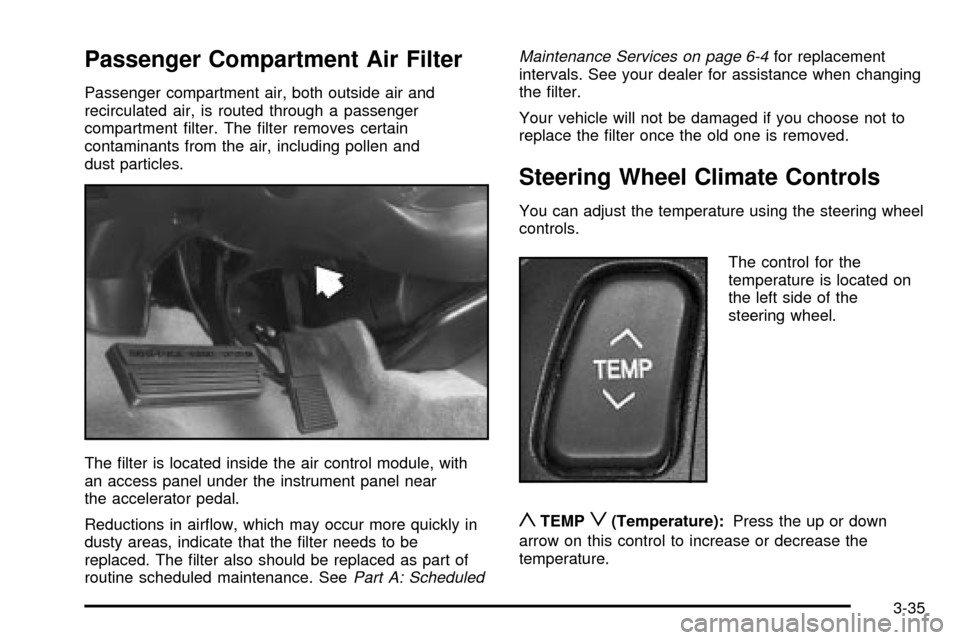
The ®lter is located inside the air control module, with
an access panel under the instrument panel near
the accelerator pedal.
Reductions in air¯ow, which may occur more quickly in
dusty areas, indicate that the ®lter needs to be
replaced. The ®lter also should be replaced as part of
routine scheduled maintenance. See
Part A: ScheduledMaintenance Services on page 6-4
for replacement
intervals. See your dealer for assistance when changing
the ®lter.
Your vehicle will not be damaged if you choose not to
replace the ®lter once the old one is removed.
Steering Wheel Climate Controls
You can adjust the temperature using the steering wheel
controls.
The control for the
temperature is located on
the left side of the
steering wheel.
yTEMPz(Temperature):Press the up or down
arrow on this control to increase or decrease the
temperature.
3-35
Page 148 of 408

Climate Controls Personalization
If your vehicle is equipped with this feature, you
can store and recall climate control settings for the
temperature, the fan speed and the direction of
the air¯ow.
Memory buttons 1 and 2 are located on the driver's door
panel and correspond to the numbers 1 or 2 found on
the back of each remote keyless entry transmitter.
To recall the climate control settings last stored on your
transmitter, press the unlock button on your remote
keyless entry transmitter and put the ignition in ACC or
ON. The settings will be recalled.
To change the stored settings, do the following:
1. Select the desired temperature, fan speed and
air¯ow mode. If desired, a separate temperature
setting may also be selected for the front seat
passenger. For information on how to do this, see
Dual Climate Control System on page 3-28.2. Locate memory buttons 1 and 2 on the driver's
door panel.
3. Press the memory button on the door panel that
corresponds to the number on the back of the
transmitter you are programming, until you hear two
beeps. The beeps con®rm that your selection has
been saved and can now be recalled. For more
information on the memory feature, see
Memory
Seat, Mirrors and Steering Wheel on page 2-51.
Follow these steps each time you want to change the
stored settings.
3-36
Page 168 of 408

DIC Warnings and Messages
These messages will appear if there is a problem
sensed in one of your vehicle's systems. Vehicles that
are ®rst sold in Canada will have a number after
each message. This number helps to identify the
problem. You must then press INFO or INFO RESET to
clear the display screen for further use. However, be
sure to take any message that appears on the display
screen seriously and remember that pressing the
INFO or INFO RESET button will only make the
message disappear, not the problem.
DIC messages can also be displayed in French,
German, Spanish and Japanese. Contact your dealer to
have the language display adjusted for your vehicle.
BATTERY NOT CHARGING ± 7:This message
will appear if the battery is not being charged. Have the
electrical system checked by your dealership at your
earliest convenience.
BATTERY SAVER ACTIVE ± 27:This message is
displayed when the vehicle has detected that the battery
voltage is dropping beyond a reasonable point. The
battery saver system will start reducing certain features
of the vehicle that you may not be able to notice. At
the point that features are disabled, this message
is displayed. It means that the vehicle is trying to save
the charge in the battery. Turn off unnecessary
accessories to allow the battery to recharge.BATTERY VOLTAGE HIGH ± 8:This message shows
that the electrical charging system is overcharging
(more than 16 volts). To avoid being stranded, have the
electrical system checked by your dealership. You
can reduce the charging overload by using the
accessories. Turn on the lamps and radio, set the
climate control on AUTO and the fan speed on HI, and
turn the rear window defogger on. You can monitor
battery voltage on the DIC by pressing the INFO button.
The normal range is 11.5 to 15.5 volts when the
engine is running.
BATTERY VOLTAGE LOW ± 6:This message will
appear when the electrical system is charging less than
10 volts or if the battery has been drained. If this
message appears immediately after starting, it is
possible that the generator can still recharge the battery.
The battery should recharge while driving but may
take a few hours to do so. Consider using an auxiliary
charger (be sure to follow the manufacturer's
instructions) to boost the battery after returning home or
to a ®nal destination. If this message appears while
driving or after starting your vehicle and stays on, have
it checked immediately to determine the cause of
this problem. To help the generator recharge the battery
quickly, you can reduce the load on the electrical
system by turning off the accessories. You can monitor
battery voltage on the DIC by pressing the INFO
button. The normal range is 11.5 to 15.5 volts.
3-56