2003 CADILLAC SEVILLE display
[x] Cancel search: displayPage 284 of 408

How to Add Fluid
Refer to the Maintenance Schedule to determine what
kind of transaxle ¯uid to use. SeePart D:
Recommended Fluids and Lubricants on page 6-15.
If the ¯uid level is low, add only enough of the proper
¯uid to bring the level into the cross-hatched area on the
dipstick.
1. Pull out the dipstick.
2. Using a long-neck funnel, add enough ¯uid at the
dipstick hole to bring it to the proper level.
It doesn't take much ¯uid, generally less than one
pint (0.5 L). Don't over®ll.
Notice:We recommend you use only ¯uid labeled
DEXRONž±III, because ¯uid with that label is
made especially for your automatic transaxle.
Damage caused by ¯uid other than DEXRON
ž±III is
not covered by your new vehicle warranty.
3. After adding ¯uid, recheck the ¯uid level as
described under
How to Check.
4. When the correct ¯uid level is obtained, push the
dipstick back in all the way and turn the handle
clockwise. Reinstall the engine air cleaner/®lter
assembly.
How to Reset the Transaxle Fluid
Change Indicator
Once the transaxle ¯uid has been changed, the
transaxle ¯uid change indicator must be reset. Use the
following steps to reset the indicator:
1. Press the INFO button on the Driver Information
Center (DIC) until TRANS FLUID LIFE is displayed.
2. Press and hold the INFO RESET button until 100%
is displayed.
The indicator is now reset. The percentage of transaxle
¯uid life remaining may be checked at any time by
pressing the INFO button several times until the TRANS
FLUID LIFE message appears.
5-24
Page 288 of 408
Adding Coolant
If you need more coolant, add the proper DEX-COOLž
coolant mixtureat the surge tank, but only when the
engine is cool.
{CAUTION:
You can be burned if you spill coolant on hot
engine parts. Coolant contains ethylene glycol,
and it will burn if the engine parts are hot
enough. Don't spill coolant on a hot engine.
When replacing the pressure cap, make sure it is
hand-tight.
Coolant Surge Tank Pressure Cap
Notice:Your coolant surge tank pressure cap is a
pressure-type cap and must be tightly installed
to prevent coolant loss and possible engine damage
from overheating. Two and one-half turns are
required to seal the cap. See ªEngine Compartment
Overviewº in the Index for more information on
location.
Engine Overheating
You will ®nd an ENGINE COOLANT HOT, IDLE
ENGINE message or an ENGINE OVERHEATED,
STOP ENGINE message displayed in the Driver
Information Center (DIC). You will also hear a chime.
There is also an engine temperature warning light and/or
gage on the instrument panel cluster. See
Engine
Coolant Temperature Warning Light on page 3-46andEngine Coolant Temperature Gage on page 3-46.
Overheated Engine Protection
Operating Mode
If an overheated engine condition exists and the
message ENGINE OVERHEATED, STOP ENGINE is
displayed, an overheat protection mode which alternates
®ring groups of cylinders helps prevent engine damage.
In this mode, you will notice a loss in power and
engine performance. This operating mode allows your
vehicle to be driven to a safe place in an emergency;
you may drive up to 50 miles (80 km). Driving extended
miles (km) and/or towing a trailer in the overheat
protection mode should be avoided.
5-28
Page 300 of 408
Brakes
Brake Fluid
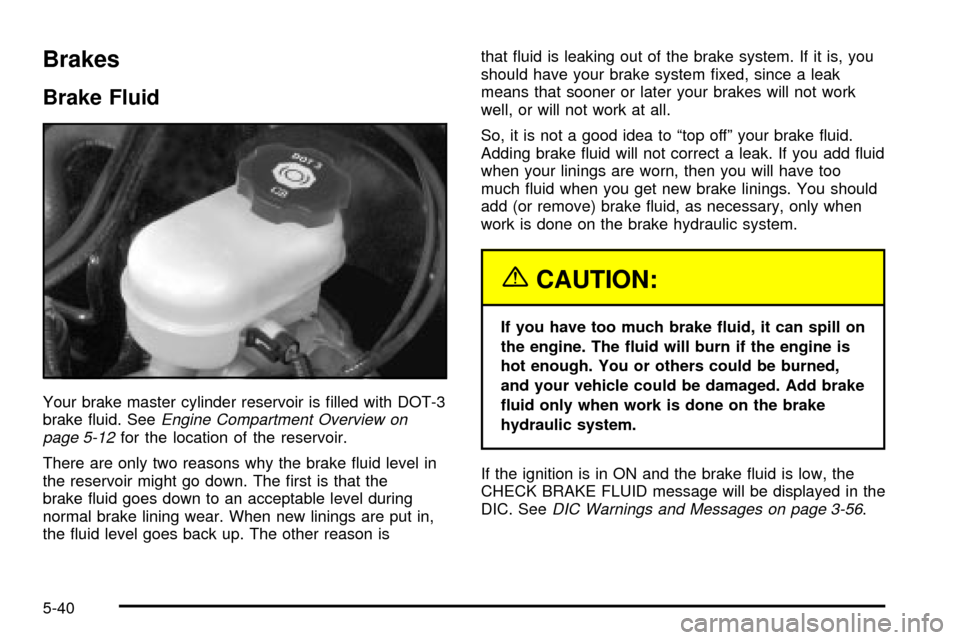
Your brake master cylinder reservoir is ®lled with DOT-3
brake ¯uid. SeeEngine Compartment Overview on
page 5-12for the location of the reservoir.
There are only two reasons why the brake ¯uid level in
the reservoir might go down. The ®rst is that the
brake ¯uid goes down to an acceptable level during
normal brake lining wear. When new linings are put in,
the ¯uid level goes back up. The other reason isthat ¯uid is leaking out of the brake system. If it is, you
should have your brake system ®xed, since a leak
means that sooner or later your brakes will not work
well, or will not work at all.
So, it is not a good idea to ªtop offº your brake ¯uid.
Adding brake ¯uid will not correct a leak. If you add ¯uid
when your linings are worn, then you will have too
much ¯uid when you get new brake linings. You should
add (or remove) brake ¯uid, as necessary, only when
work is done on the brake hydraulic system.
{CAUTION:
If you have too much brake ¯uid, it can spill on
the engine. The ¯uid will burn if the engine is
hot enough. You or others could be burned,
and your vehicle could be damaged. Add brake
¯uid only when work is done on the brake
hydraulic system.
If the ignition is in ON and the brake ¯uid is low, the
CHECK BRAKE FLUID message will be displayed in the
DIC. See
DIC Warnings and Messages on page 3-56.
5-40
Page 325 of 408

When to Check
Check your tires once a month or more.
Don't forget your compact spare tire. It should be at
60 psi (420 kPa).
How to Check
Use a good quality pocket-type gage to check tire
pressure. You can't tell if your tires are properly in¯ated
simply by looking at them. Radial tires may look
properly in¯ated even when they're underin¯ated.
Be sure to put the valve caps back on the valve stems.
They help prevent leaks by keeping out dirt and
moisture.
Tire Pressure Monitor System
Your vehicle may have a Tire Pressure Monitor System
(TPM). The TPM system uses radio and sensor
technology to check tire pressure levels. Sensors,
mounted on each road wheel, transmit tire pressure
readings to a receiver located in the trunk. Tire pressure
status and tire pressure warnings are shown on the
Driver Information Center (DIC) display. See
Driver
Information Center (DIC) on page 3-53, for details
regarding DIC controls and displays.The system operates on a radio frequency subject to
Federal Communications Commission (FCC) Rules and
with Industry and Science Canada.
This device complies with Part 15 of the FCC Rules.
Operation is subject to the following two conditions:
(1) this device may not cause harmful interference, and
(2) this device must accept any interference received,
including interference that may cause undesired
operation.
This device complies with RSS-210 of Industry and
Science Canada. Operation is subject to the following
two conditions: (1) this device may not cause
interference, and (2) this device must accept any
interference received, including interference that may
cause undesired operation of the device.
Changes or modi®cations to this system by anyone
other than an authorized service facility could void
authorization to use this equipment.
5-65
Page 326 of 408

If the TPM system detects low tire pressure, below
25 psi (172 kPa), or high tire pressure, above 38 psi
(262 kPa), a message, CHECK TIRE PRESSURE, will
appear on the Driver Information Center (DIC)
display. By pressing the INFO button, the DIC screen
will show which tire(s) has the low or high pressure
condition. See
In¯ation -- Tire Pressure on page 5-64for
information regarding correct tire in¯ation. If a tire is
low, you should stop as soon as possible and check all
your tires for damage. If a tire is ¯at, see
If a Tire
Goes Flat on page 5-73.
Notice:Do not use a tire sealant if your vehicle is
equipped with Tire Pressure Monitors. The liquid
sealant can damage the tire pressure monitor
sensors.
Once a low or high tire pressure condition is detected,
the TPM system will display the CHECK TIRE
MESSAGE each time the engine is started, until the
tire(s) are set to the correct in¯ation pressure.
The Tire-Loading Information Label, which is located on
the rear edge of the driver's door, shows the correct
in¯ation pressure for the tires on your vehicle.
The TPM system also allows the driver to check the air
pressure status of each road tire using the Driver
Information Center (DIC). Each tire's air pressure will belisted individually, in the following order: LF (left front or
driver's side front tire), RF (right front or passenger's
side front tire), RR (right rear or passenger's side
rear tire) and LR (left rear or driver's side rear tire). See
In¯ation -- Tire Pressure on page 5-64for information
regarding correct tire in¯ation. Also, seeDriver
Information Center (DIC) on page 3-53for information
on the DIC controls and displays.
If the DIC display doesn't show tire pressures or the
SERVICE TPM SYSTEM message appears, see
your dealer for service. The TPM system may not work
properly while the compact spare tire is installed.
Anytime you replace one or more tires or rotate your
tires, the TPM system will need to be reset. A special
tool is needed to reset the sensor identi®cation
codes. See your dealer for service.
Your vehicle was delivered from the factory with
aluminum valve stem caps. If you ever have to replace
the valve stem caps on your vehicle, you should
replace them with aluminum or plastic caps.
The TPM system can alert you about a low or high tire
pressure condition, but it doesn't replace normal tire
maintenance. See
Tires on page 5-63.
5-66
Page 396 of 408

Coolant (cont.)
Engine Temperature Warning Light.................3-46
Heater, Engine............................................2-26
Surge Tank Pressure Cap.............................5-28
Cooling System..............................................5-31
Cornering Lamps............................................3-19
Cruise Control Light........................................3-51
Cruise Control................................................3-13
Current and Past Model Order Forms................7-11
Customer Assistance Information........................ 7-7
Courtesy Transportation.................................. 7-7
Customer Assistance for Text Telephone
(TTY) Users.............................................. 7-4
Customer Assistance Offices........................... 7-4
Customer Satisfaction Procedure..................... 7-2
GM Mobility Program for Persons with
Disabilities................................................ 7-5
Reporting Safety Defects to General Motors....7-10
Reporting Safety Defects to the
Canadian Government..............................7-10
Reporting Safety Defects to the United
States Government.................................... 7-9
Roadside Service.......................................... 7-6
Service Publications Ordering Information........7-10
D
Daytime Running Lamps..................................3-17
Defensive Driving............................................. 4-2Defogging and Defrosting.................................3-32
Dinghy Towing................................................4-32
Display Mode.................................................3-40
Diversity Antenna System...............................3-106
Doing Your Own Service Work........................... 5-3
Dolly Towing..................................................4-32
Door.............................................................2-10
Central Door Unlocking System.....................2-10
Locks.......................................................... 2-9
Power Door Locks.......................................2-10
Programmable Automatic Door Locks.............2-10
Rear Door Security Locks.............................2-11
Doors Lock in Gear.........................................3-71
Doors Unlock in PARK (P)................................3-73
Doors Unlock Key Off......................................3-74
Driver Information Center (DIC).........................3-53
Climate Controls and Radio System
Personalization........................................3-63
DIC Controls and Displays............................3-53
DIC Vehicle Personalization..........................3-64
DIC Warnings and Messages........................3-56
Driver Unlock in PARK (P)................................3-71
Driver Unlock Key Off......................................3-72
Driver............................................................1-12
Position, Safety Belt.....................................1-12
Driver's Name Set/Recall.................................3-76
Driving on Grades...........................................4-41
Driving on Snow or Ice....................................4-27
Driving Through Deep Standing Water...............4-20
Driving Through Flowing Water.........................4-20
4
Page 397 of 408

Driving with a Trailer.......................................4-39
Driving..........................................................4-17
At Night.....................................................4-17
City...........................................................4-21
Defensive..................................................... 4-2
Drunken....................................................... 4-3
Freeway.....................................................4-22
Hill and Mountain Roads..............................4-24
In Rain and on Wet Roads...........................4-18
Winter........................................................4-26
Dual Climate Control System............................3-28
E
Electrical System............................................5-92
Add-On Equipment......................................5-92
Fuses and Circuit Breakers...........................5-93
Headlamp Wiring.........................................5-92
Power Windows and Other Power Options......5-92
Removing the Rear Seat Cushion..................5-96
Windshield Wiper Fuses...............................5-92
Emergency Trunk Release Handle.....................2-14
Emissions Inspection and Maintenance
Programs...................................................3-49
Engine Coolant Level Check.............................. 6-9
Engine Cooling When Trailer Towing..................4-42
Engine Oil Additives........................................5-17Engine Oil Level Check..................................... 6-9
Engine Oil Scheduled Maintenance..................... 6-5
Engine Speed Limiter......................................3-41
Engine..........................................................5-19
Air Cleaner/Filter.........................................5-19
Battery.......................................................5-43
Check and Service Engine Soon Light............3-47
Compartment Overview................................5-12
Coolant Heater............................................2-26
Coolant Temperature Gage...........................3-46
Coolant Temperature Warning Light................3-46
Coolant......................................................5-25
Cooling System Inspection............................6-14
Exhaust.....................................................2-35
Oil .............................................................5-13
Overheating................................................5-28
Starting......................................................2-25
English Metric Display.....................................3-40
Entering Feature Programming..........................3-64
Entry Lighting.................................................3-22
Erasing HomeLink
žButtons..............................2-47
Exiting Feature Programming............................3-76
Express-Down Window....................................2-16
Express-Up Window........................................2-16
Extender, Safety Belt.......................................1-23
Exterior Lamps...............................................3-16
Exterior Lighting Battery Saver..........................3-20
Exterior Lights at Unlock..................................3-70
5
Page 403 of 408

Parking (cont.)
Brake........................................................2-31
Over Things That Burn.................................2-35
Part A - Scheduled Maintenance Services............ 6-4
Part B - Owner Checks and Services.................. 6-9
Part C - Periodic MaintenanceInspections..........6-13
Part D - Recommended Fluids and Lubricants....6-15
Part E - Maintenance Record...........................6-16
Passenger Compartment Air Filter.....................3-35
Passing.................................................4-14, 4-39
PASS-Key
žIII Operation..................................2-21
PASS-KeyžIII ................................................2-21 .
ii
Performance Shift Display (STS Only)................2-30
Personalization, Climate Controls......................3-36
Plan Ahead When Possible................................ 7-8
Playing a Cassette Tape..........................3-84, 3-95
Playing a Compact Disc..........................3-85, 3-96
Playing the Radio...................................3-79, 3-88
Power Steering...............................................4-11
Power Tilt Wheel and Telescopic Steering
Column........................................................ 3-8
Power...........................................................3-26
Accessory Outlets........................................3-26
Door Locks.................................................2-10
Electrical System.........................................5-92
Lumbar Controls........................................... 1-2
Seat............................................................ 1-2Power (cont.)
Steering Fluid.............................................5-38
Windows....................................................2-16
Pretensioners, Safety Belt................................1-23
Programmable Automatic Door Locks.................2-10
Programming the HomeLink Transmitter.............2-45
Programming the Power Windows.....................2-17
Q
Questions and Answers About Safety Belts.........1-10
R
Radio Data System (RDS)...............................3-87
Radios..........................................................3-78
Care of Your Cassette Tape Player...............3-104
Care of Your CD Player..............................3-105
Care of Your CDs......................................3-105
Console-Mounted CD Changer......................3-99
DIC Personalization.....................................3-63
Navigation/Radio System..............................3-98
Radio Personalization with Home and
Away Feature........................................3-102
Radio with Cassette and CD.................3-79, 3-87
Setting the Time for Radios with Radio
Data Systems (RDS)................................3-78
11