2003 CADILLAC DEVILLE service
[x] Cancel search: servicePage 92 of 423

Notice:If your key seems stuck in OFF and you
can't turn it, be sure you are using the correct key;
if so, is it all the way in? If it is, then turn the
steering wheel left and right while you turn the key
hard. Turn the key only with your hand. Using a
tool to force it could break the key or the ignition
switch. If none of these works, then your vehicle
needs service.
A (OFF):This is the only position in which you can
insert or remove the key. This position locks the ignition,
steering wheel and transaxle. It's a theft-deterrent
feature.
B (ACCESSORY):This position allows you to use
things like the radio and the windshield wipers when the
engine is off. This position will allow you to turn off
the engine, but still turn the steering wheel. If your
vehicle has a column shifter, you will still be able to
move the shift lever. Use ACCESSORY if you must have
your vehicle in motion while the engine is off (for
example, if your vehicle is being pushed or towed).
C (ON):This position is for driving. If your vehicle has a
console shifter and you turn off the engine, the
transaxle will lock. If you need to shift the transaxle out
of PARK (P), the ignition key has to be in ON.
D (START):This position starts the engine.Retained Accessory Power (RAP)
The following accessories on your vehicle may be used
for up to 10 minutes after the ignition key is turned
from ON to OFF:
·Cellular Telephone
·Radio
·Power Windows
·Audio Steering Wheel Controls
·Sunroof
Power to these accessories stops after 10 minutes or if
a door is opened. If you want power for another 10
minutes, close all the doors and turn the ignition key to
ON and then back to OFF. If the cellular phone is
being used while retained accessory power is active,
the timer is suspended to avoid interruption of the call.
The timer resets to 10 minutes at the end of the call.
2-24
Page 97 of 423

REVERSE (R):Use this gear to back up.
Notice:Shifting to REVERSE (R) while your vehicle
is moving forward could damage your transaxle.
Shift to REVERSE (R) only after your vehicle is
stopped.
Also use this gear to rock your vehicle back and forth to
get out of snow, ice or sand without damaging your
transaxle. See
If You Are Stuck: In Sand, Mud, Ice or
Snow on page 4-30for additional information.
NEUTRAL (N):In this position, the engine doesn't
connect with the wheels. To restart when you're already
moving, use NEUTRAL (N) only. Also, use
NEUTRAL (N) when your vehicle is being towed.
{CAUTION:
Shifting into a drive gear while your engine is
ªracingº (running at high speed) is dangerous.
Unless your foot is ®rmly on the brake pedal,
your vehicle could move very rapidly. You
could lose control and hit people or objects.
Don't shift into a drive gear while your engine
is racing.
Notice:Damage to your transaxle caused by
shifting into a drive gear with the engine racing isn't
covered by your warranty.
AUTOMATIC OVERDRIVE (
X):This position is for
normal driving. If you need more power for passing, and
you're:
·Going less than 35 mph (55 km/h), push the
accelerator pedal about halfway down.
·Going about 35 mph (55 km/h) or more, push the
accelerator all the way down.
The transaxle will shift down to the next gear and have
more power.
Notice:If your vehicle seems to start up rather
slowly, or if it seems not to shift gears as you go
faster, something may be wrong with the transaxle
system sensor. If your drive very far that way,
your vehicle can be damaged. So, if this happens,
have your vehicle serviced right away. Until
then, you can use SECOND (2) when you are driving
less than 35 mph (55 km/h) and AUTOMATIC
OVERDRIVE (
X) for higher speeds.
THIRD (3):This position is also used for normal driving,
however, it offers more power and lower fuel economy
than AUTOMATIC OVERDRIVE (
X).
2-29
Page 101 of 423

If the ignition is on, the brake system warning and
parking brake indicator light on the instrument panel
cluster should come on. If it doesn't, you need to have
your vehicle serviced.
When you move out of PARK (P) or NEUTRAL (N) and
the engine is running, the parking brake should
release. If the parking brake has not been fully released
and you try to drive off with the parking brake on, the
brake system warning and parking brake indicator
light will come on and stay on and a multiple chime will
sound. See
Brake System Warning and Parking
Brake Indicator Light on page 3-47for more information.If the parking brake doesn't fully release, you can
manually release the pedal. However, be sure to read
the following paragraphs:
{CAUTION:
Always shift to PARK (P) before pulling the
manual release lever. If your hand or arm is in
the way of the pedal you could be hurt. The
pedal springs back quickly. Keep your hand
and arm away when you use the manual
release lever.
2-33
Page 102 of 423

Before releasing the manual parking brake, be sure to
put the vehicle in PARK (P) and turn the ignition to OFF.
Reach under the driver's side of the instrument panel
and pull down on the manual release lever, which
is located behind the parking brake pedal. Pull down on
the yellow tab as shown by the arrow in the illustration.
If the parking brake does not release, you should
have your vehicle towed to your dealer for service.Notice:Driving with the parking brake on can
cause your rear brakes to overheat. You may have
to replace them, and you could also damage
other parts of your vehicle.
If you are towing a trailer and are parking on a hill, see
Towing a Trailer on page 4-34.
Shifting Into Park (P)
{CAUTION:
It can be dangerous to get out of your vehicle
if the shift lever is not fully in PARK (P) with
the parking brake ®rmly set. Your vehicle can
roll. If you have left the engine running, the
vehicle can move suddenly. You or others
could be injured. To be sure your vehicle won't
move, even when you're on fairly level ground,
use the steps that follow. If you're pulling a
trailer, see ªTowing a Trailerº in the Index.
2-34
Page 113 of 423

OnStaržSystem
OnStaržuses global positioning system (GPS) satellite
technology, wireless communications, and call centers
to provide you with a wide range of safety, security,
information and convenience services. An OnStar
ž
subscription plan is included in the price of your vehicle.
You can upgrade or extend your OnStaržservices to
meet your needs.
A complete OnStar
žuser's guide and the terms and
conditions of the OnStaržSubscription Service
Agreement are included in your vehicle's glove box
literature. For more information, visit www.onstar.com,
contact OnStar
žat 1-888-4-ONSTAR (1-888-466-7827),
or press the blue OnStaržbutton to speak to an
OnStaržadvisor 24 hours a day, 7 days a week.
OnStaržServices
OnStaržprovides a number of service plans. Some of
the services currently provided by OnStaržare:
·Automatic Noti®cation of Air Bag Deployment
·Emergency Services
·Roadside Assistance Stolen Vehicle Tracking
·AccidentAssist
·Remote Door Unlock
·Remote Diagnostics
·Online and Personal Concierge Services
·Route Support
·RideAssist
·Information and Convenience Services
OnStaržPersonal Calling
With OnStaržPersonal Calling, you have a safer way to
stay connected while driving. It's a hands-free wireless
phone that's integrated into your vehicle. You can place
calls nationwide using voice-activated dialing with no
contracts, no roaming charges and no access fees.
To ®nd out more about OnStar
žPersonal Calling, refer
to the OnStaržuser's guide in your vehicle's glove
box, or call OnStaržat 1-888-4-ONSTAR
(1-888-466-7827).
2-45
Page 114 of 423

OnStaržVirtual Advisor
With OnStaržVirtual Advisor you can listen to the news,
entertainment and informative topics, such as traffic
and weather reports. You are able to listen and reply to
your e-mail through your vehicle's speakers.
A completed Subscription Service Agreement is required
prior to delivery of OnStar
žservices and prepaid
calling minutes are also required for OnStaržPersonal
Calling and OnStaržVirtual Advisor use. Terms and
conditions of the Subscription Service Agreement can be
found at www.onstar.com.
OnStaržSteering Wheel Controls
You can use the steering wheel controls with OnStarž.
The controls are located
on the left side of the
steering wheel.Press the top part of the control to access OnStar
ž.
You will hear a ready prompt from the system, and
then you can begin your OnStar
žsession or begin
making calls.
If your vehicle has the optional Navigation system or
cellular phone, the ready prompt will come from
that system ®rst. You must say the word phone to
access OnStar
ž.
If your vehicle has both optional systems, the ready
prompt will come from the Navigation system ®rst. When
you say the word phone after the ready prompt, you
will access the cellular phone.
If you prefer to use OnStar
žto make calls, you must
repeat the word phone again after the cellular
phone ready prompt.
To end a communication session, press the bottom part
of the control that says END.
2-46
Page 115 of 423

HomeLinkžTransmitter
HomeLinkž, a combined universal transmitter and
receiver, provides a way to replace up to three
hand-held transmitters used to activate devices such as
gate operators, garage door openers, entry door
locks, security systems and home lighting. Additional
Homelink
žinformation can be found on the internet at
www.homelink.com or by calling 1-800-355-3515.If your vehicle is equipped with the HomeLink
ž
Transmitter, it complies with Part 15 of the FCC Rules.
Operation is subject to the following two conditions:
(1) this device may not cause harmful interference, and
(2) this device must accept any interference received,
including interference that may cause undesired
operation.
This device complies with RSS-210 of Industry Canada.
Operation is subject to the following two conditions:
(1) this device may not cause interference, and (2) this
device must accept any interference, including
interference that may cause undesired operation of the
device.
Changes and modi®cations to this system by other than
an authorized service facility could void authorization
to use this equipment.
2-47
Page 146 of 423
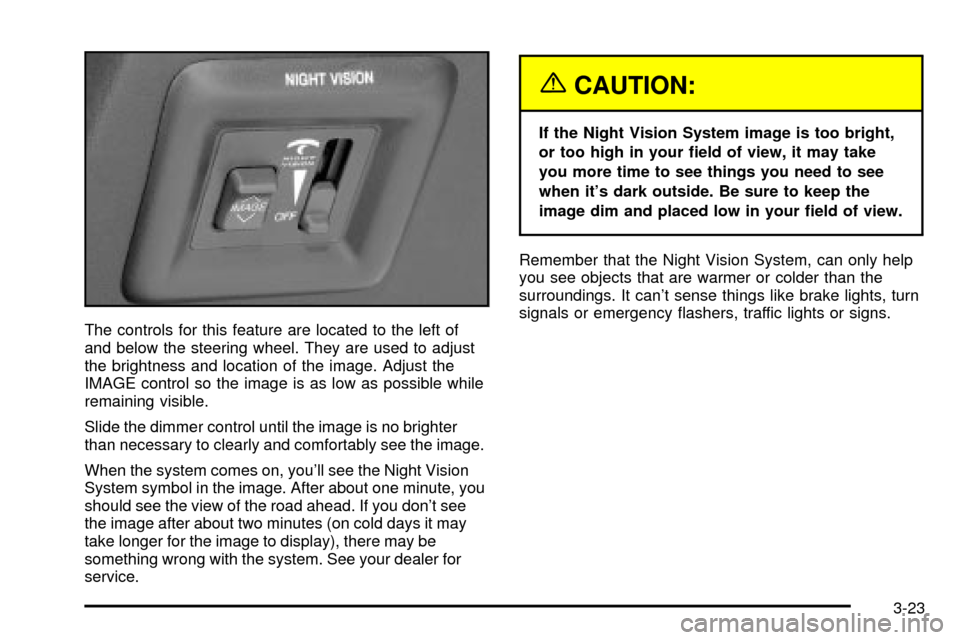
The controls for this feature are located to the left of
and below the steering wheel. They are used to adjust
the brightness and location of the image. Adjust the
IMAGE control so the image is as low as possible while
remaining visible.
Slide the dimmer control until the image is no brighter
than necessary to clearly and comfortably see the image.
When the system comes on, you'll see the Night Vision
System symbol in the image. After about one minute, you
should see the view of the road ahead. If you don't see
the image after about two minutes (on cold days it may
take longer for the image to display), there may be
something wrong with the system. See your dealer for
service.
{CAUTION:
If the Night Vision System image is too bright,
or too high in your ®eld of view, it may take
you more time to see things you need to see
when it's dark outside. Be sure to keep the
image dim and placed low in your ®eld of view.
Remember that the Night Vision System, can only help
you see objects that are warmer or colder than the
surroundings. It can't sense things like brake lights, turn
signals or emergency ¯ashers, traffic lights or signs.
3-23