Page 229 of 372
Notice:If you need a new fuel cap, be sure to get
the right type. Your dealer can get one for you. If you
get the wrong type, it may not ®t properly. This may
cause your malfunction indicator lamp to light and
may damage your fuel tank and emissions system.
See ªMalfunction Indicator Lampº in the Index.
Filling a Portable Fuel Container
{CAUTION:
Never ®ll a portable fuel container while it is in
your vehicle. Static electricity discharge from
the container can ignite the gasoline vapor.
You can be badly burned and your vehicle
damaged if this occurs. To help avoid injury to
you and others:
·Dispense gasoline only into approved
containers.
CAUTION: (Continued)
CAUTION: (Continued)
·
Do not ®ll a container while it is inside a
vehicle, in a vehicle's trunk, pickup bed or
on any surface other than the ground.
·Bring the ®ll nozzle in contact with the
inside of the ®ll opening before operating
the nozzle. Contact should be maintained
until the ®lling is complete.
·Do not smoke while pumping gasoline.
5-9
Page 230 of 372
Checking Things Under
the Hood
{CAUTION:
An electric fan under the hood can start up
and injure you even when the engine is not
running. Keep hands, clothing and tools away
from any underhood electric fan.
{CAUTION:
Things that burn can get on hot engine parts
and start a ®re. These include liquids like fuel,
oil, coolant, brake ¯uid, windshield washer and
other ¯uids, and plastic or rubber. You or
others could be burned. Be careful not to drop
or spill things that will burn onto a hot engine.
Hood Release
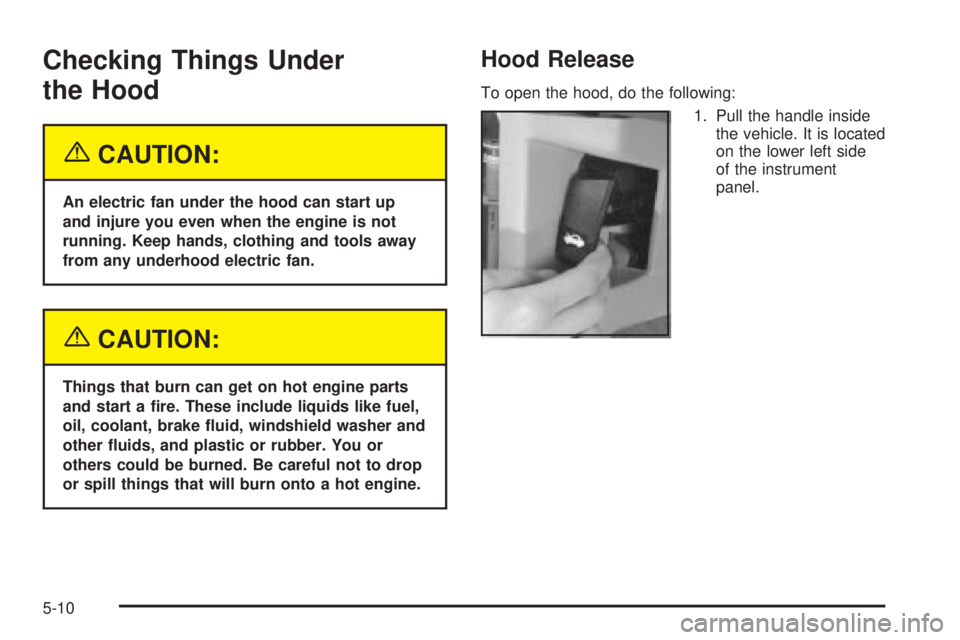
To open the hood, do the following:
1. Pull the handle inside
the vehicle. It is located
on the lower left side
of the instrument
panel.
5-10
Page 234 of 372
Engine Oil
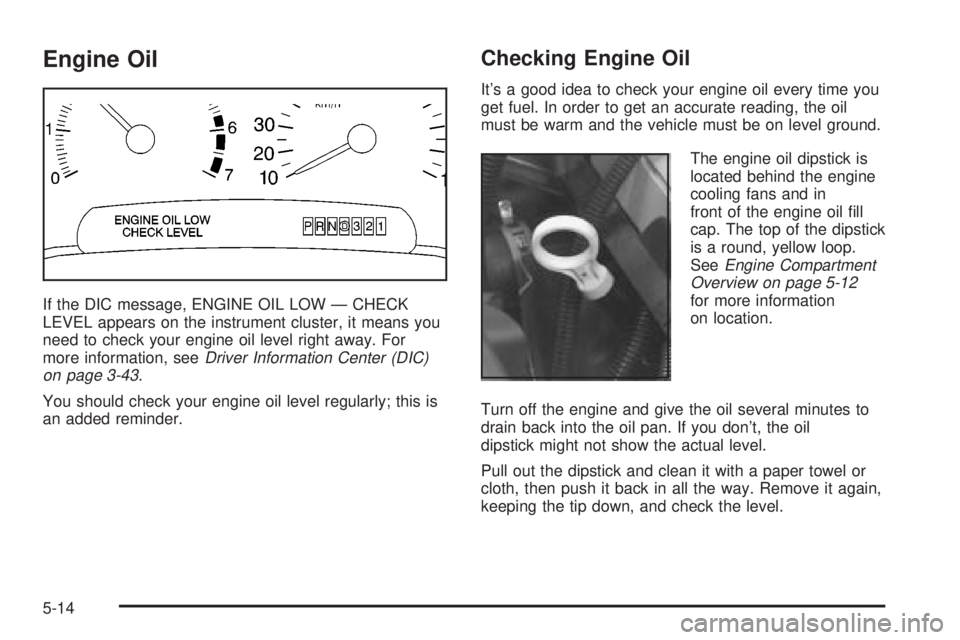
If the DIC message, ENGINE OIL LOW Ð CHECK
LEVEL appears on the instrument cluster, it means you
need to check your engine oil level right away. For
more information, see
Driver Information Center (DIC)
on page 3-43.
You should check your engine oil level regularly; this is
an added reminder.
Checking Engine Oil
It's a good idea to check your engine oil every time you
get fuel. In order to get an accurate reading, the oil
must be warm and the vehicle must be on level ground.
The engine oil dipstick is
located behind the engine
cooling fans and in
front of the engine oil ®ll
cap. The top of the dipstick
is a round, yellow loop.
See
Engine Compartment
Overview on page 5-12
for more information
on location.
Turn off the engine and give the oil several minutes to
drain back into the oil pan. If you don't, the oil
dipstick might not show the actual level.
Pull out the dipstick and clean it with a paper towel or
cloth, then push it back in all the way. Remove it again,
keeping the tip down, and check the level.
5-14
Page 238 of 372
When the system has calculated that oil life has been
diminished, it will indicate that an oil change is
necessary. A CHANGE ENGINE OIL SOON message
will come on. Change your oil as soon as possible within
the next two times you stop for fuel. It is possible that,
if you are driving under the best conditions, the oil
life system may not indicate that an oil change is
necessary for over a year. However, your engine oil and
®lter must be changed at least once a year and at
this time the system must be reset. Your dealer has
GM-trained service people who will perform this
work using genuine GM parts and reset the system. It is
also important to check your oil regularly and keep it
at the proper level.
If the system is ever reset accidentally, you must
change your oil at 3,000 miles (5 000 km) since your
last oil change. Remember to reset the oil life system
whenever the oil is changed.
How to Reset the Oil Life System
The GM Oil Life System calculates when to change
your engine oil and ®lter based on vehicle use. Anytime
your oil is changed, reset the system so it can
calculate when the next oil change is required. If a
situation occurs where you change your oil prior to a
CHANGE ENGINE OIL SOON message being
turned on, reset the system.Always reset the engine oil life to 100% after every oil
change. It will not reset itself. To reset the Oil Life
System, do the following:
1. Display OIL LIFE INDEX on the DIC.
2. Press and hold the DIC RESET button for
more than ®ve seconds. The oil life will change
to 100%.
What to Do with Used Oil
Used engine oil contains certain elements that may be
unhealthy for your skin and could even cause cancer.
Don't let used oil stay on your skin for very long. Clean
your skin and nails with soap and water, or a good
hand cleaner. Wash or properly dispose of clothing or
rags containing used engine oil. See the manufacturer's
warnings about the use and disposal of oil products.
Used oil can be a threat to the environment. If you
change your own oil, be sure to drain all the oil from the
®lter before disposal. Never dispose of oil by putting it
in the trash, pouring it on the ground, into sewers, or into
streams or bodies of water. Instead, recycle it by
taking it to a place that collects used oil. If you have a
problem properly disposing of your used oil, ask
your dealer, a service station or a local recycling center
for help.
5-18
Page 268 of 372

Your vehicle has a headlamp system equipped with
horizontal and vertical aim indicators. The aim has been
pre-set at the factory and should need no further
adjustment. This is true even though your vertical and
horizontal aim indicators may not fall exactly on the
ª0º (zero) marks on their scales.
If your vehicle is damaged in an accident, the headlamp
aim may be affected. Aim adjustment may be necessary
if it is difficult to see lane markers (for horizontal
aim), or if oncoming drivers ¯ash their high beams at
you (for vertical aim). If you believe your headlamps
need to be re-aimed, we recommend that you take it to
your dealer for service; however, it is possible for
you to re-aim your headlamps as described in the
following procedure.
Notice:To make sure your headlamps are aimed
properly, read all the instructions before beginning.
Failure to follow these instructions could cause
damage to headlamp parts.To check the aim, the vehicle should be properly
prepared as follows:
·The vehicle must have all four tires on a perfectly
level surface.
·If necessary, pads may be used on an uneven
surface.
·The vehicle should not have any snow, ice or mud
attached to it.
·The vehicle should be fully assembled and all other
work stopped while headlamp aiming is being done.
·There should not be any cargo or loading of
the vehicle, except it should have a full tank of
fuel and one person or 160 lbs. (75 kg) on
the driver's seat.
·Close all doors.
·Tires should be properly in¯ated.
·Rock the vehicle to stabilize the suspension.
Start with the horizontal aim. The adjustment screws
can be turned with an E8 Torx
žsocket or T15 Torxž
screwdriver.
5-48
Page 280 of 372
Notice:Don't let anyone tell you that underin¯ation
or overin¯ation is all right. It's not. If your tires
don't have enough air (underin¯ation), you can get
the following:
·Too much ¯exing
·Too much heat
·Tire overloading
·Bad wear
·Bad handling
·Bad fuel economy
If your tires have too much air (overin¯ation), you
can get the following:
·Unusual wear
·Bad handling
·Rough ride
·Needless damage from road hazards
When to Check
Check your tires once a month or more.
Don't forget your compact spare tire. It should be at
60 psi (420 kPa).
How to Check
Use a good quality pocket-type gage to check tire
pressure. You can't tell if your tires are properly in¯ated
simply by looking at them. Radial tires may look
properly in¯ated even when they're underin¯ated.
Be sure to put the valve caps back on the valve stems.
They help prevent leaks by keeping out dirt and
moisture.
Check Tire Pressure System
If your vehicle has this feature, the check tire pressure
system can alert you to a large change in the
pressure of one tire. The system won't alert you before
you drive that a tire is low or ¯at. You must begin
driving before the system will work properly.
5-60
Page 304 of 372

Finish Damage
Any stone chips, fractures or deep scratches in the
®nish should be repaired right away. Bare metal
will corrode quickly and may develop into major
repair expense.
Minor chips and scratches can be repaired with touch-up
materials avaliable from your dealer. Larger areas of
®nish damage can be corrected in your dealer's
body and paint shop.
Underbody Maintenance
Chemicals used for ice and snow removal and dust
control can collect on the underbody. If these are not
removed, corrosion and rust can develop on the
underbody parts such as fuel lines, frame, ¯oor pan and
exhaust system even though they have corrosion
protection.
At least every spring, ¯ush these materials from the
underbody with plain water. Clean any areas where mud
and debris can collect. Dirt packed in close areas of
the frame should be loosened before being ¯ushed.
Your dealer or an underbody car washing system can
do this for you.
Chemical Paint Spotting
Some weather and atmospheric conditions can create a
chemical fallout. Airborne pollutants can fall upon and
attack painted surfaces on your vehicle. This damage
can take two forms: blotchy, ring-shaped discolorations,
and small, irregular dark spots etched into the paint
surface.
Although no defect in the paint job causes this, GM will
repair, at no charge to the owner, the surfaces of
new vehicles damaged by this fallout condition within
12 months or 12,000 miles (20 000 km) of purchase,
whichever occurs ®rst.
Vehicle Care/Appearance Materials
See your GM dealer for more information on purchasing
the following products.
Vehicle Care/Appearance Materials
Description Usage
Polishing Cloth
Wax-TreatedInterior and exterior
polishing cloth.
Tar and Road Oil
RemoverRemoves tar, road oil and
asphalt.
Chrome Cleaner and
PolishUse on chrome or
stainless steel.
5-84
Page 311 of 372
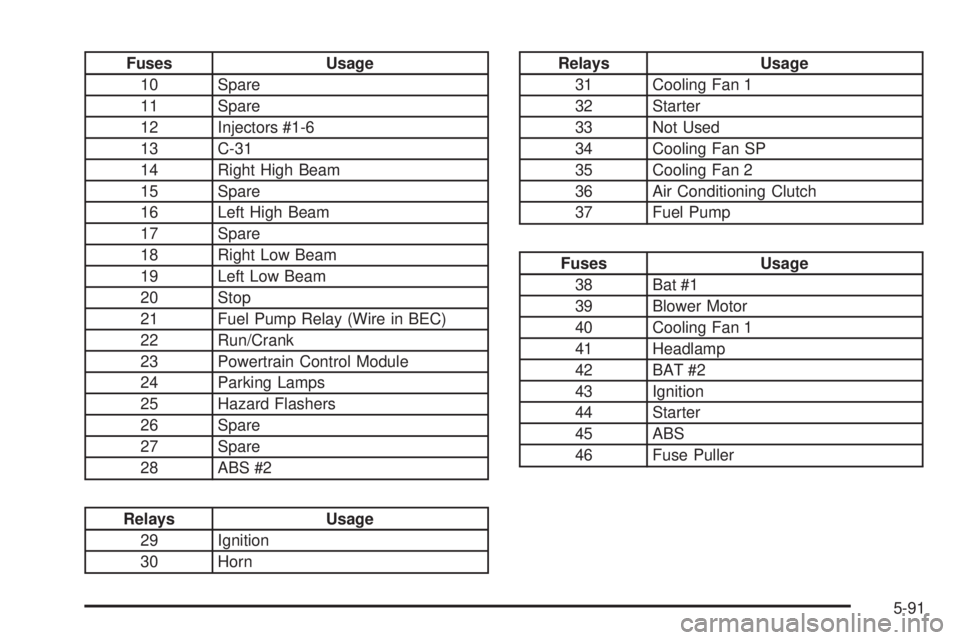
Fuses Usage
10 Spare
11 Spare
12 Injectors #1-6
13 C-31
14 Right High Beam
15 Spare
16 Left High Beam
17 Spare
18 Right Low Beam
19 Left Low Beam
20 Stop
21 Fuel Pump Relay (Wire in BEC)
22 Run/Crank
23 Powertrain Control Module
24 Parking Lamps
25 Hazard Flashers
26 Spare
27 Spare
28 ABS #2
Relays Usage
29 Ignition
30 Horn
Relays Usage
31 Cooling Fan 1
32 Starter
33 Not Used
34 Cooling Fan SP
35 Cooling Fan 2
36 Air Conditioning Clutch
37 Fuel Pump
Fuses Usage
38 Bat #1
39 Blower Motor
40 Cooling Fan 1
41 Headlamp
42 BAT #2
43 Ignition
44 Starter
45 ABS
46 Fuse Puller
5-91