Page 105 of 344
OnStaržPersonal Calling
With OnStaržPersonal Calling, you have a safer way to
stay connected while driving. It's a hands-free wireless
phone that's integrated into your vehicle. You can place
calls nationwide using voice-activated dialing with no
contracts, no roaming charges and no access fees. To
®nd out more about OnStar
žPersonal Calling, refer
to the OnStaržuser's guide in your vehicle's glove box,
or call OnStaržat 1-888-4-ONSTAR (1-888-466-7827).
OnStaržVirtual Advisor
With OnStaržVirtual Advisor you can listen to the news,
entertainment and informative topics, such as traffic
and weather reports. You are able to listen and reply to
your e-mail through your vehicle's speakers.
A completed Subscription Service Agreement is required
prior to delivery of OnStar
žservices and prepaid
calling minutes are also required for OnStaržPersonal
Calling and OnStaržVirtual Advisor use. Terms and
conditions of the Subscription Service Agreement can be
found at www.onstar.com.
Storage Areas
Glove Box
Use the door key to lock and unlock the glove box.
To open, lift the latch.
Convenience Net
Your vehicle has a convenience net located on the back
wall of the trunk.
Put small loads, like grocery bags, behind the net. It can
help keep them from falling over.
The net isn't for larger, heavier loads. Store those in the
trunk as far forward as you can.
You can unhook the net so that it will lie ¯at when
you're not using it.
2-35
Page 110 of 344
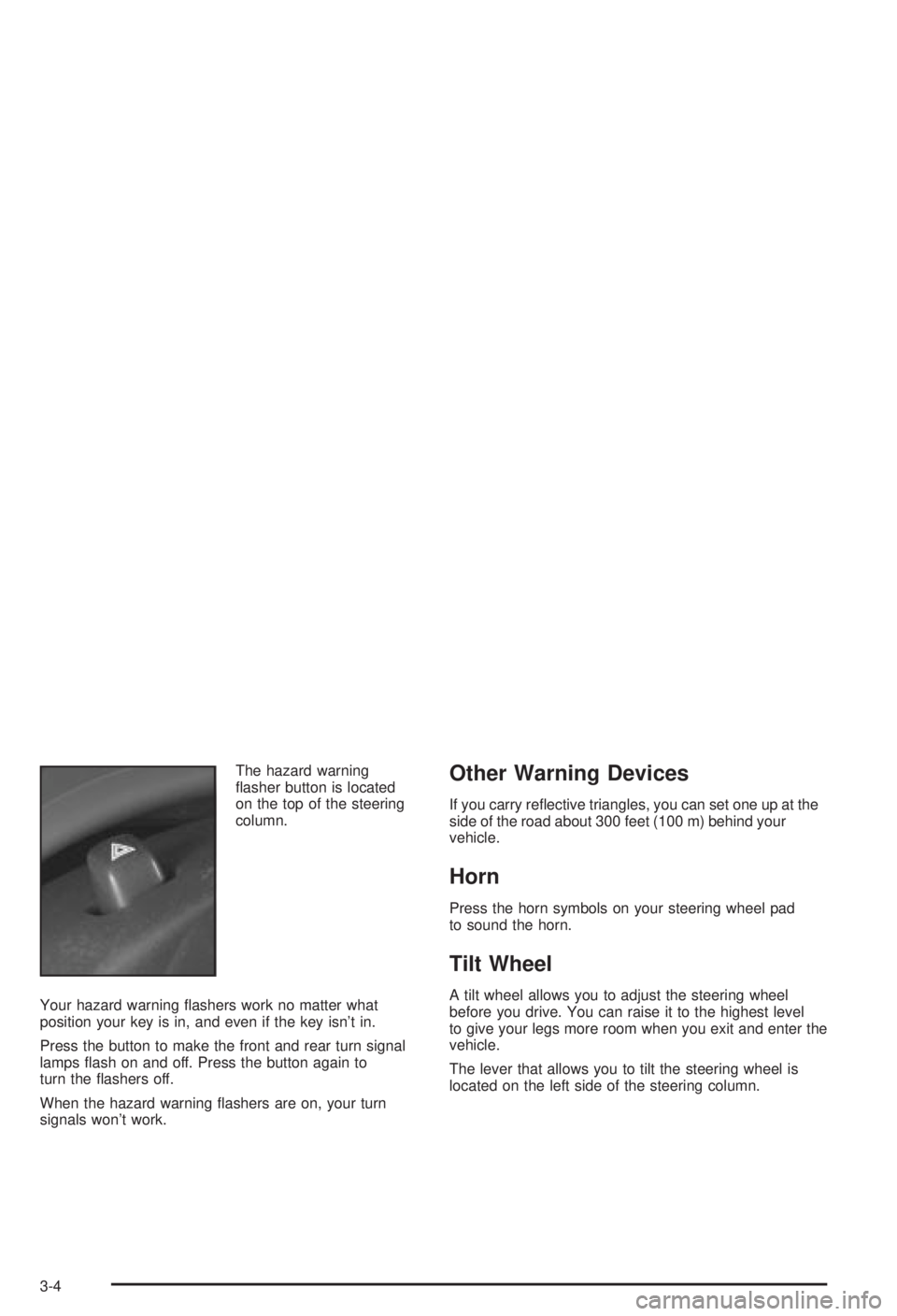
The hazard warning
¯asher button is located
on the top of the steering
column.
Your hazard warning ¯ashers work no matter what
position your key is in, and even if the key isn't in.
Press the button to make the front and rear turn signal
lamps ¯ash on and off. Press the button again to
turn the ¯ashers off.
When the hazard warning ¯ashers are on, your turn
signals won't work.Other Warning Devices
If you carry re¯ective triangles, you can set one up at the
side of the road about 300 feet (100 m) behind your
vehicle.
Horn
Press the horn symbols on your steering wheel pad
to sound the horn.
Tilt Wheel
A tilt wheel allows you to adjust the steering wheel
before you drive. You can raise it to the highest level
to give your legs more room when you exit and enter the
vehicle.
The lever that allows you to tilt the steering wheel is
located on the left side of the steering column.
3-4
Page 112 of 344

Turn and Lane-Change Signals
The turn signal has two upward positions for right and
two downward positions for left. These positions
allow you to signal a turn or a lane change.
To signal a turn, move the lever all the way up or down.
When the turn is ®nished, the lever will return
automatically.
An arrow on the instrument
panel cluster will ¯ash in
the direction of the
turn or lane change.
To signal a lane change, just raise or lower the lever
until the arrow starts to ¯ash. Hold it there until you
complete your lane change. The lever will return by itself
when you release it.If the arrow ¯ashes faster than normal as you signal a
turn or a lane change, a signal bulb may be burned
out and other drivers won't see your turn signal.
If a bulb is burned out, replace it to help avoid an
accident. If the arrows don't go on at all when you signal
a turn, check for burned-out bulbs and then check the
fuse. See
Fuses and Circuit Breakers on page 5-89.
A chime will sound if you leave your turn signal on for
more than 3/4 mile (1.2 km).
Headlamp High/Low-Beam Changer
To change your headlamps from low beams to
high beams, or high to low, pull the multifunction lever
all the way toward you. Then release it.
This light, located on the
instrument panel cluster,
will come on while the
high-beam lamps are on.
3-6
Page 114 of 344
Windshield Washer
J
(Windshield Washer):At the top of the
multifunction lever, there is a paddle with the word
PUSH on it. To spray washer ¯uid on the windshield,
push on the paddle. The wipers will run for several
sweeps and then either stop or return to your preset
speed. See
Windshield Washer Fluid on page 5-38.
{CAUTION:
In freezing weather, don't use your washer
until the windshield is warmed. Otherwise the
washer ¯uid can form ice on the windshield,
blocking your vision.
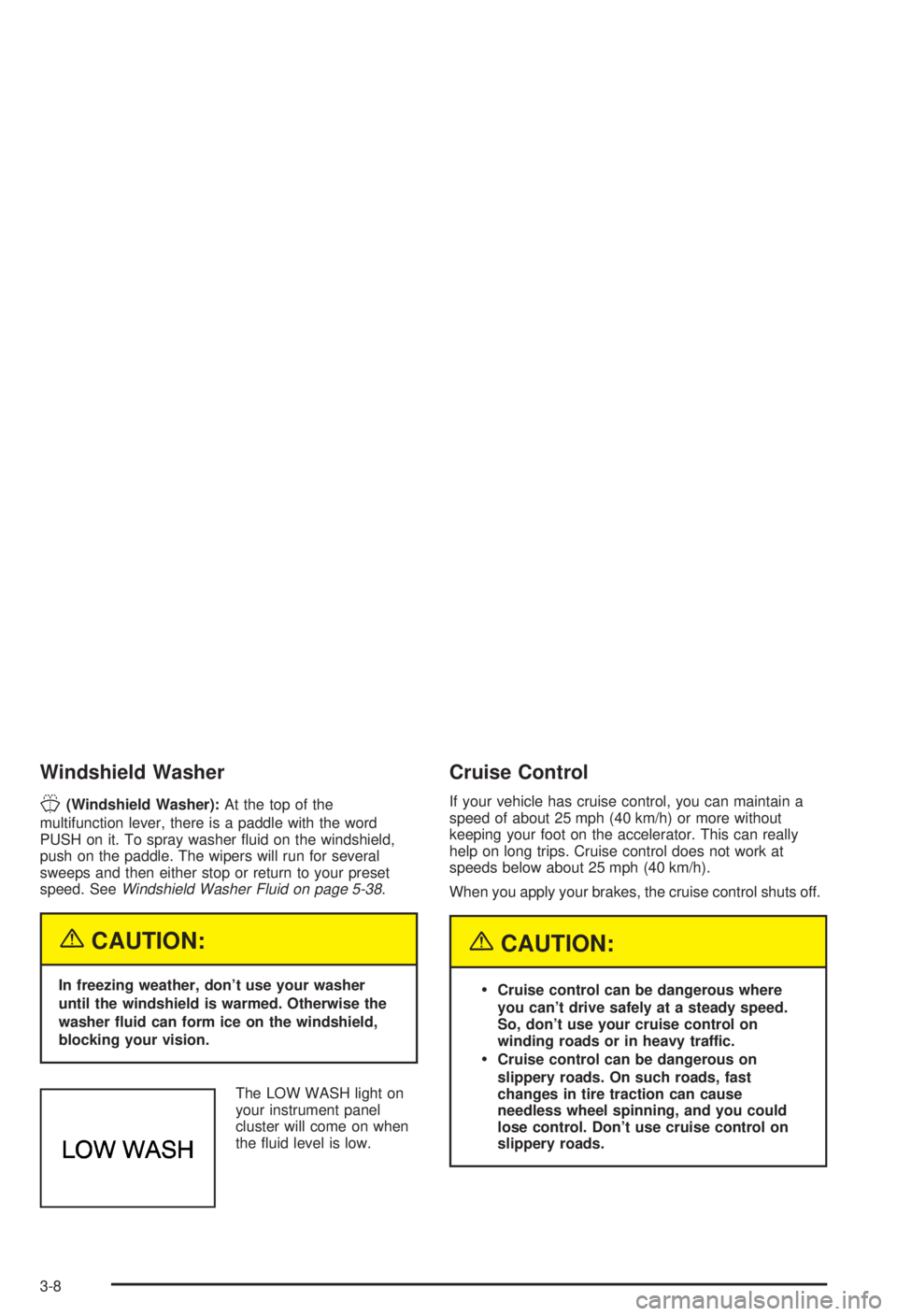
The LOW WASH light on
your instrument panel
cluster will come on when
the ¯uid level is low.
Cruise Control
If your vehicle has cruise control, you can maintain a
speed of about 25 mph (40 km/h) or more without
keeping your foot on the accelerator. This can really
help on long trips. Cruise control does not work at
speeds below about 25 mph (40 km/h).
When you apply your brakes, the cruise control shuts off.
{CAUTION:
·Cruise control can be dangerous where
you can't drive safely at a steady speed.
So, don't use your cruise control on
winding roads or in heavy traffic.
·Cruise control can be dangerous on
slippery roads. On such roads, fast
changes in tire traction can cause
needless wheel spinning, and you could
lose control. Don't use cruise control on
slippery roads.
3-8
Page 115 of 344
If your vehicle is in cruise control when the enhanced
traction system begins to limit wheel spin, the cruise
control will automatically disengage. See
Enhanced
Traction System (ETS) on page 4-10. When road
conditions allow you to safely use it again, you may turn
the cruise control back on.
Setting Cruise Control
{CAUTION:
If you leave your cruise control on when you're
not using cruise, you might hit a button and go
into cruise when you don't want to. You could
be startled and even lose control. Keep the
cruise control switch off until you want to use
cruise control.1. Move the cruise control switch to ON.
2. Get up to the speed you want.
3. Push in the SET button at the end of the lever and
release it. The CRUISE light on the instrument
panel cluster will come on.
4. Take your foot off the accelerator pedal.
3-9
Page 116 of 344
Resuming a Set Speed
Suppose you set your cruise control at a desired speed
and then you apply the brake. This, of course, shuts
off the cruise control. But you don't need to reset it.
Once you're going about 25 mph (40 km/h) or more, you
can move the cruise control switch from ON to R/A
(Resume/Accelerate) brie¯y. You'll go right back up to
your chosen speed and stay there.
Increasing Speed While Using Cruise
Control
There are two ways to go to a higher speed:
·Use the accelerator pedal to get to the higher
speed. Push in the SET button, then release
the button and the accelerator pedal. You'll now
cruise at the higher speed.
·Move the cruise switch from ON to R/A. Hold it there
until you get up to the speed you want, and then
release the switch. (To increase your speed in very
small amounts, move the switch to R/A brie¯y and
then release it. Each time you do this, your vehicle
will go about 1 mph (1.6 km/h) faster.
The accelerate feature will only work after you set the
cruise control speed by pushing the SET button.
Reducing Speed While Using Cruise
Control
There are two ways to reduce your speed while using
cruise control:
·Push in the SET button until you reach the lower
speed you want, then release it.
·To slow down in very small amounts, push the SET
button brie¯y. Each time you do this, you'll go about
1 mph (1.6 km/h) slower.
Passing Another Vehicle While Using
Cruise Control
Use the accelerator pedal to increase your speed.
When you take your foot off the pedal, your vehicle will
slow down to the cruise control speed you set earlier.
Using Cruise Control on Hills
How well your cruise control will work on hills depends
upon your speed, load and the steepness of the
hills. When going up steep hills, you may have to step
on the accelerator pedal to maintain your speed.
When going downhill, you may have to brake or shift to
a lower gear to keep your speed down. Of course,
applying the brake takes you out of cruise control. Many
drivers ®nd this to be too much trouble and don't use
cruise control on steep hills.
3-10
Page 117 of 344

Ending Cruise Control
There are two ways to turn off the cruise control:
·Step lightly on the brake pedal, or
·move the cruise switch to OFF.
Ending Speed Memory
When you turn off the cruise control or the ignition, or
shift into PARK (P) or NEUTRAL (N), your cruise control
set speed memory is erased.
Exterior Lamps
This control, located to the
left of the instrument
panel, operates the
exterior lamps.The exterior lamps control has three positions:
Off:Push the control all the way in to turn off all lamps
and lights.
Parking Lamps:Pull the control out, to the ®rst
position, to turn on the parking lamps together with the
following:
·Taillamps
·License Plate Lamps
·Sidemarker Lamps
·Instrument Panel Lights
Headlamps:Pull the control out all the way, to the
second position, to turn on the headlamps together with
the previously listed lamps and lights.
A warning chime will sound if you open the driver's door
when you turn the ignition switch to OFF, LOCK or
ACCESSORY with the lamps on.
3-11
Page 118 of 344

Daytime Running Lamps/Automatic
Headlamp System
Daytime Running Lamps (DRL) can make it easier for
others to see the front of your vehicle during the
day. DRL can be helpful in many different driving
conditions, but they can be especially helpful in the short
periods after dawn and before sunset. Fully functional
daytime running lamps are required on all vehicles
®rst sold in Canada.
A light sensor on top of the instrument panel makes the
DRL work, so be sure it isn't covered.
The DRL system will make your front turn signal lamps
come on when the following conditions are met:
·The ignition is on,
·the exterior lamps control is off and
·the parking brake is released.
While the DRL are on, only your front turn signal lamps
will be on. The headlamps, taillamps, sidemarker
and other lamps won't be on. Your instrument panel
won't be lit up either.When it's dark enough outside, your front turn signal
lamps will turn off and your vehicle's headlamps
and parking lamps will turn on. The other lamps that
come on with your headlamps will also come on.
When it's bright enough outside, your headlamps will
go off and your front turn signal lamps will come on.
To idle your vehicle with the DRL and automatic
headlamp control off, set the parking brake while the
ignition is in OFF or LOCK. Then start your vehicle. The
DRL, headlamps and parking lamps will stay off until
you release the parking brake.
To turn off the automatic headlamp feature when it's
dark outside, move the exterior lamps control to
the parking lamp position. Your parking lamps will
remain illuminated and your headlamps will turn off.
As with any vehicle, you should turn on the regular
headlamp system when you need it.
3-12