2003 BMW M3 COUPE engine
[x] Cancel search: enginePage 59 of 158

59
Vehicle Memory, Key MemoryHow the system functionsYou have probably frequently wished
that you could configure individual
functions of your vehicles to reflect your
own personal requirements. In engi-
neering your vehicle, BMW has pro-
vided for a number of options for per-
sonal adjustment that can be
programmed into your vehicle at your
BMW center.
The available configuration data fall into
two categories, according to whether
their primary orientation is the vehicle –
Vehicle Memory – or the individual –
Key Memory. You can have up to four
different basic settings adjusted for four
different persons. The only require-
ment is that each person uses his or her
own remote control key.
When your vehicle is unlocked with the
remote control, the vehicle recognizes
the individual user by means of a data
exchange with the key, and makes
adjustments accordingly.
In order for you to distinguish between
different keys, colored decals are sup-
plied together with the keys.What the system can doYour BMW center can provide you with
details on the possibilities that the Vehi-
cle and Key Memory systems offer:
Examples for Vehicle Memory:
>Various signals that can serve as
acknowledgment for locking and
unlocking the vehicle, refer to
page 31
>Activates/deactivates the Follow me
home lamps function, refer to
page 86
>Activates/deactivates daytime driv-
ing lamps, refer to page 86
>Sets the units of measure for display-
ing time, outside temperature, dis-
tance traveled and fuel consumption
in the instrument cluster
>Indicates via an acoustic tone that
PDC has been activated, refer to
page 80>Switches on rear window defroster
automatically, refer to page 93
>After giving an ice warning, the dis-
play returns to the previous setting,
refer to page 78.
Examples for Key Memory:
>Locks the vehicle automatically after
you start off, refer to page 34
>Automatically moves the seat and
outside mirror into position for the
programmed driver when unlocking
the vehicle, refer to page 49
>Automatic tilting of the passenger-
side mirror, refer to page 50
>After the engine is started, calls up
the last selected driving program for
each shifting mode, refer to page 68.
You will see this symbol through-
out the Owner's Manual. It is to
remind you at appropriate places of the
settings that are available to you.<
OverviewControlsMaintenanceRepairsDataIndex
handbook.book Page 59 Saturday, July 27, 2002 1:12 PM
Page 60 of 158
60Driving
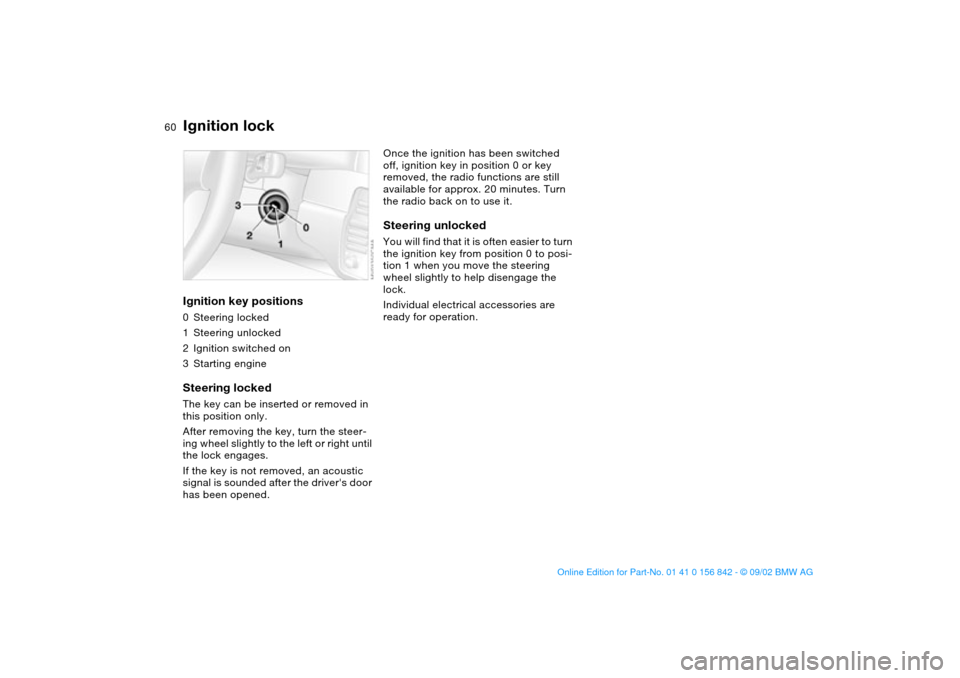
Ignition lockIgnition key positions0Steering locked
1Steering unlocked
2Ignition switched on
3Starting engineSteering lockedThe key can be inserted or removed in
this position only.
After removing the key, turn the steer-
ing wheel slightly to the left or right until
the lock engages.
If the key is not removed, an acoustic
signal is sounded after the driver's door
has been opened.
Once the ignition has been switched
off, ignition key in position 0 or key
removed, the radio functions are still
available for approx. 20 minutes. Turn
the radio back on to use it.Steering unlockedYou will find that it is often easier to turn
the ignition key from position 0 to posi-
tion 1 when you move the steering
wheel slightly to help disengage the
lock.
Individual electrical accessories are
ready for operation.
handbook.book Page 60 Saturday, July 27, 2002 1:12 PM
Page 61 of 158

61
Starting the engine and driving off
Do not allow the engine to warm
up by leaving it running while the
vehicle remains stationary. Instead,
drive off immediately at a moderate
engine speed.<
Do not allow the engine to run in
enclosed spaces. Otherwise,
breathing the exhaust fumes can lead
to unconsciousness and death. The
exhaust gases contain carbon monox-
ide, an odorless and colorless, but
highly toxic gas. Do not leave the vehi-
cle unattended with the engine running.
An unattended vehicle with a running
engine represents a safety hazard.<
If the engine does not start on the first
attempt, such as when it is very hot or
cold:
>Press the accelerator pedal halfway
down while engaging the starter.
Cold starts at very low temperatures
below about +57/ –156 and at high
altitudes above 3,300 ft/1,000 m:
>On the first start attempt, it may be
necessary to engage the starter for a
longer period, but no longer than
20 seconds.
Extended starting attempts, char-
acterized by excessively frequent
or long periods with the starter
engaged, can damage the catalytic
converter.<
When driving, standing at idle,
and parking the vehicle, take care
to avoid contact between the hot
exhaust system and flammable materi-
als – grass, hay, leaves, etc. Such con-
tact could lead to a fire, resulting in
serious personal injury and property
damage.<
Manual transmission1. Engage the parking brake
2. Gearshift lever in idling position
3. Press the clutch pedal at low tem-
peratures
4. Start the engine. Do not press the
accelerator pedal. Do not actuate the
starter for too short a time. Do not
turn it for more than approx.
20 seconds. Release the ignition key
immediately when the engine starts.Sequential M gearbox SMG II1. Depress footbrake
2. Move selector lever into position 0
3. Start the engine. Do not actuate the
starter for too short a time. Do not
turn it for more than approx.
20 seconds. Release the ignition key
immediately when the engine starts.
4. Engage a driving position
5. Release footbrake and slowly
depress accelerator pedal.
With the engine running, the gear
indicator in the SMG display
flashes to indicate that a driving posi-
tion is engaged with the driver's door
open or that the hood is not closed
properly, refer to page 66.
If none of the pedals is actuated, then
the gearbox is automatically taken out
of gear after approx. four seconds.
Then the desired direction of travel
must be selected again with the selec-
tor lever in position 0. Driving off is not
possible with the hood open.<
Before exiting the vehicle with the
engine running, move the selector
lever into position 0 and apply the park-
ing brake.
Never leave the vehicle unattended
with the engine running. An unat-
tended vehicle with a running engine
represents a safety hazard.<
OverviewControlsMaintenanceRepairsDataIndex
handbook.book Page 61 Saturday, July 27, 2002 1:12 PM
Page 62 of 158
62
Engine idle speed is controlled by the
engine computer system. Increased
speeds at start-up are normal and
should decrease as the engine warms
up. If engine speed does not decrease,
service is required.
To prevent the battery from discharg-
ing, always deactivate electrical
devices that are not in use. Switch the
ignition off when the vehicle is not
being driven.Starting the engine and driving off
handbook.book Page 62 Saturday, July 27, 2002 1:12 PM
Page 63 of 158

63
Switching off the engine
You should never remove the igni-
tion key when the vehicle is in
motion, as the steering lock could
engage.
When you leave the vehicle, always
remove the ignition key and engage the
steering lock.<
Always engage the parking brake
when parking on downhill roads.
Engaging a gear may not sufficiently
secure the vehicle against rolling.<
Manual transmissionTurn the ignition key to position 1 or 0.Sequential M gearbox SMG IIIf you turn the ignition key to position 1
or 0 with the selector lever in the for-
ward or reverse position, a gear auto-
matically remains engaged.
If you turn the ignition key to position 1
or 0 with the selector lever in position 0,
a warning tone and the flashing gear
indicator in the SMG display remind you
that the vehicle is not secured against
rolling.
The warning stops after approx.
10 seconds. If you move the selector
lever into a forward or reverse position
during this time, a gear is automatically
engaged.
Parking brakeThe parking brake is designed primarily
to prevent the vehicle from rolling when
it is parked. It operates against the rear
wheels.To engageThe detent engages automatically, and
the indicator lamp in the instrument
cluster comes on when the ignition key
is in position 2, refer to page 18.To releasePull up slightly on the lever, press the
button – see arrow – and lower the
lever.
OverviewControlsMaintenanceRepairsDataIndex
handbook.book Page 63 Saturday, July 27, 2002 1:12 PM
Page 66 of 158

66
SMG display in instrument clusterThe selector lever position, currently
engaged gear and selected driving pro-
gram are displayed in the instrument
cluster.
1Engaged gear
2Selected driving program, corre-
sponds to the number of illuminated
fields, refer to page 68
3Tapping the selector lever to the right
switches over into the displayed shift
mode
4"A" indicates an activated automated
shift mode
R – Reverse position Only engage with the vehicle stopped
or at low speed, e.g. for rocking free in
deep snow.
An intermittent signal tone indi-
cates that the reverse position has
been engaged.<0 – Position 0 (Neutral)Always engage before starting the
engine.
If the driving situation requires, e.g.
when downshifting on slippery roads,
the SMG II automatically disengages
and reengages the clutch, i.e. it is not
necessary to manually engage
position 0.S – Sequential modeIn the sequential mode all forward
gears are to be shifted by the driver.
Changeover from automated to
sequential mode:
>Tap the selector lever to the right
toward "S" or
>change gears with the selector lever
or the shift paddles on the steering
wheel.
You do not need to reduce the throttle
for shifting.
Sequential M gearbox SMG II*
handbook.book Page 66 Saturday, July 27, 2002 1:12 PM
Page 67 of 158

67
Shifting gears with shift paddles on
steering wheel:
>To upshift, briefly pull the right pad-
dle +
>To downshift, briefly pull the left pad-
dle –.
Shift paddles with various widths
matched to the shape of your
hand are available from your BMW cen-
ter.<
Shifting gears with selector lever:
>To upshift, pull the selector lever
backward in the "+" direction
>To downshift, push the selector lever
in the "–" direction.
No automatic upshifting is carried out in
the sequential mode.
You accelerate from higher gears, e.g.
during passing, by manually downshift-
ing.
In the following situations the SMG II
helps you think in the sequential mode:
>Upshifts and downshifts are only exe-
cuted when the new gear will provide
a suitable combination of vehicle and
engine speed, i.e., downshifts that
would cause the engine to overrev
will not be executed
>During a stop the gearbox is auto-
matically downshifted into the first
gear so that, e.g. before a traffic light,
it is only necessary to accelerate to
continue driving
>When the speed is reduced, the
gearbox is automatically down-
shifted shortly before a gear-depen-
dent minimum speed is reached with-
out you taking any action.A – Automated modeEach time the engine is started, the
automated mode is activated as soon
as you move the selector lever into the
forward driving position.
In the automated mode all forward
gears are automatically shifted.Changeover from sequential to auto-
mated mode: tap the selector lever to
the right toward "A". Watch the display
in the instrument cluster, refer to
page 66.
For rapid acceleration, e.g. during
passing, depress the accelerator pedal
completely – kick-down. The gearbox
now downshifts in dependence on the
selected driving program.
Even in the automated mode, you can
help specify the shifting point: if a gear-
dependent minimum speed is
exceeded, you can upshift by slowly
reducing pressure on the accelerator
pedal. In the process, the respective
driving situation is detected by sensors
and taken into account.
Sequential M gearbox SMG II*
OverviewControlsMaintenanceRepairsDataIndex
handbook.book Page 67 Saturday, July 27, 2002 1:12 PM
Page 68 of 158
68
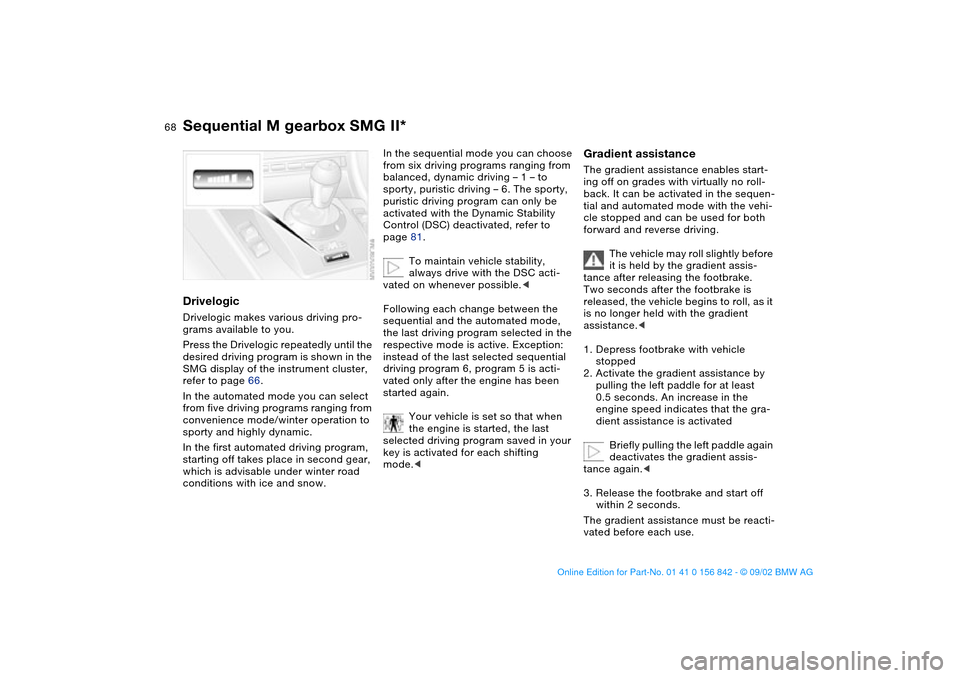
DrivelogicDrivelogic makes various driving pro-
grams available to you.
Press the Drivelogic repeatedly until the
desired driving program is shown in the
SMG display of the instrument cluster,
refer to page 66.
In the automated mode you can select
from five driving programs ranging from
convenience mode/winter operation to
sporty and highly dynamic.
In the first automated driving program,
starting off takes place in second gear,
which is advisable under winter road
conditions with ice and snow.
In the sequential mode you can choose
from six driving programs ranging from
balanced, dynamic driving – 1 – to
sporty, puristic driving – 6. The sporty,
puristic driving program can only be
activated with the Dynamic Stability
Control (DSC) deactivated, refer to
page 81.
To maintain vehicle stability,
always drive with the DSC acti-
vated on whenever possible.<
Following each change between the
sequential and the automated mode,
the last driving program selected in the
respective mode is active. Exception:
instead of the last selected sequential
driving program 6, program 5 is acti-
vated only after the engine has been
started again.
Your vehicle is set so that when
the engine is started, the last
selected driving program saved in your
key is activated for each shifting
mode.<
Gradient assistanceThe gradient assistance enables start-
ing off on grades with virtually no roll-
back. It can be activated in the sequen-
tial and automated mode with the vehi-
cle stopped and can be used for both
forward and reverse driving.
The vehicle may roll slightly before
it is held by the gradient assis-
tance after releasing the footbrake.
Two seconds after the footbrake is
released, the vehicle begins to roll, as it
is no longer held with the gradient
assistance.<
1. Depress footbrake with vehicle
stopped
2. Activate the gradient assistance by
pulling the left paddle for at least
0.5 seconds. An increase in the
engine speed indicates that the gra-
dient assistance is activated
Briefly pulling the left paddle again
deactivates the gradient assis-
tance again.<
3. Release the footbrake and start off
within 2 seconds.
The gradient assistance must be reacti-
vated before each use.
Sequential M gearbox SMG II*
handbook.book Page 68 Saturday, July 27, 2002 1:12 PM