2003 BMW 760LI SEDAN fuel
[x] Cancel search: fuelPage 89 of 229
At a glance
Controls
Driving tips
Communications
Navigation
Entertainment
Mobility
Reference
87
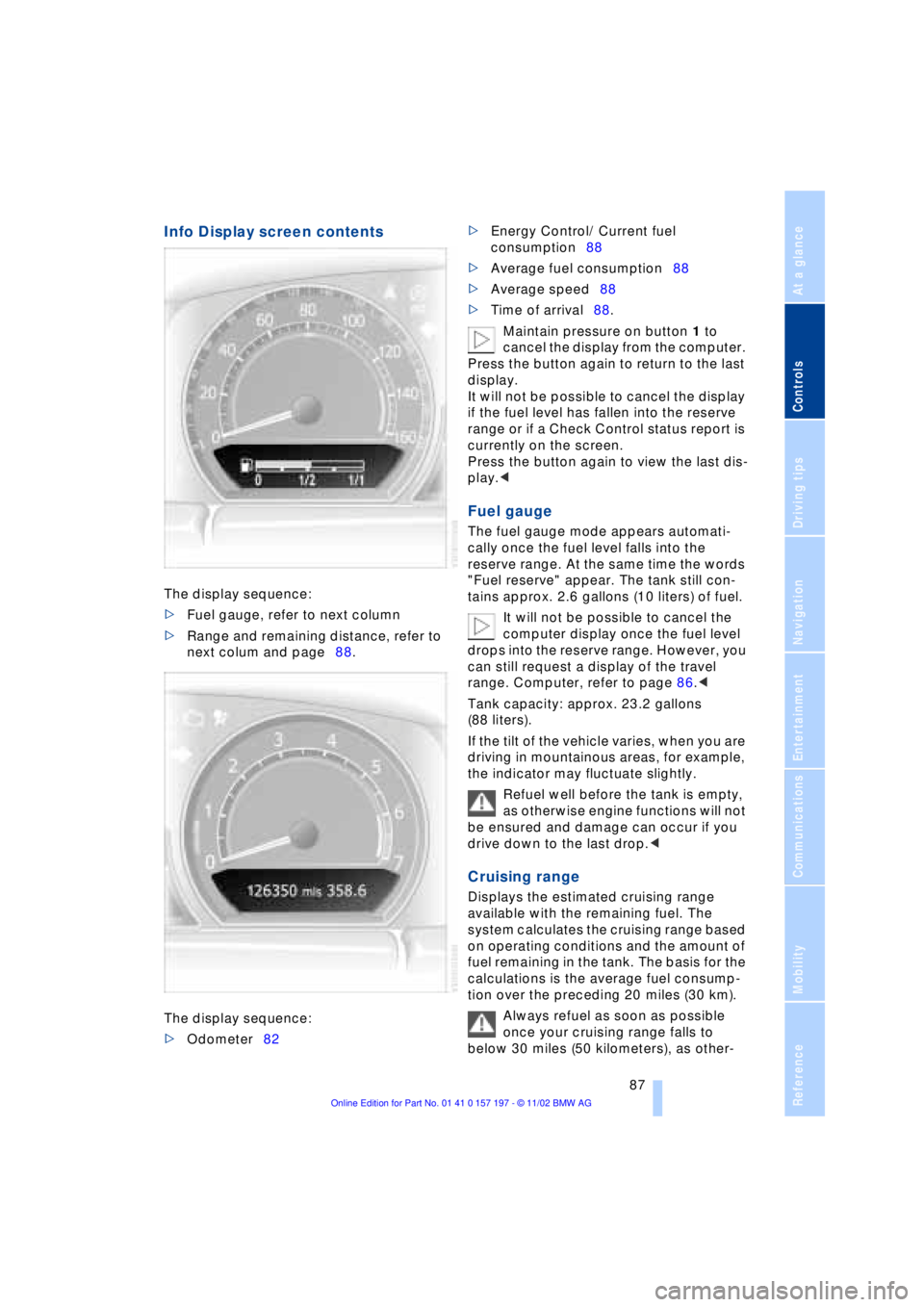
Info Display screen contents
The display sequence:
>Fuel gauge, refer to next column
>Range and remaining distance, refer to
next colum and page88.
The display sequence:
>Odometer82 >Energy Control/ Current fuel
consumption88
>Average fuel consumption88
>Average speed88
>Time of arrival88.
Maintain pressure on button 1 to
cancel the display from the computer.
Press the button again to return to the last
display.
It will not be possible to cancel the display
if the fuel level has fallen into the reserve
range or if a Check Control status report is
currently on the screen.
Press the button again to view the last dis-
play.<
Fuel gauge
The fuel gauge mode appears automati-
cally once the fuel level falls into the
reserve range. At the same time the words
"Fuel reserve" appear. The tank still con-
tains approx. 2.6 gallons (10 liters) of fuel.
It will not be possible to cancel the
computer display once the fuel level
drops into the reserve range. However, you
can still request a display of the travel
range. Computer, refer to page 86.<
Tank capacity: approx. 23.2 gallons
(88 liters).
If the tilt of the vehicle varies, when you are
driving in mountainous areas, for example,
the indicator may fluctuate slightly.
Refuel well before the tank is empty,
as otherwise engine functions will not
be ensured and damage can occur if you
drive down to the last drop.<
Cruising range
Displays the estimated cruising range
available with the remaining fuel. The
system calculates the cruising range based
on operating conditions and the amount of
fuel remaining in the tank. The basis for the
calculations is the average fuel consump-
tion over the preceding 20 miles (30 km).
Always refuel as soon as possible
once your cruising range falls to
below 30 miles (50 kilometers), as other-
Page 90 of 229
Everything under control
88 wise engine functions are not ensured and
damage can occur.<
Refueling is only registered by the com-
puter for fuel amounts above approx.
1.3 gallons (5 liters).
Distance to destination
When you enter a destination in the naviga-
tion system or manually enter a distance in
the computer prior to departure, the
system can also display the distance
remaining to your destination, refer to
page 132 or 89.
The system automatically adopts the dis-
tance to your destination using the route
recommended by the navigation system.
When you enter a destination in the
navigation system, any manual
entries will be overwritten no later than
once 1,640 ft (500 meters) of the calcu-
lated distance have elapsed.<
Energy Control/
Current fuel consumption
Shows your current fuel consumption rate
in mpg Ð in liters/100 km on Canadian vehi-
cles. This allows you to see whether your
current driving style is conducive to fuel
economy with minimum exhaust emis-
sions.
When the vehicle is stationary the display
goes to the maximum reading, zero on
Canadian models.
Average fuel consumption
The average fuel consumption is calculated
for the time during which the engine is run-
ning.
You can use the Control Display to view
your fuel consumption rate over two dif-
ferent distances, refer to Computer or Trip
computer.
Average speed
Periods with the vehicle parked and the
engine off are not included in the calcula-
tions of average speed.
Time of arrival
A display of your estimated time of arrival is
available whenever you enter a destination
in the navigation system, refer to page 132,
or enter the distance manually in the com-
puter, refer to page 89, prior to departure.
This function is only available if the
time in the Control Display has been
correctly set, refer to page 91.<
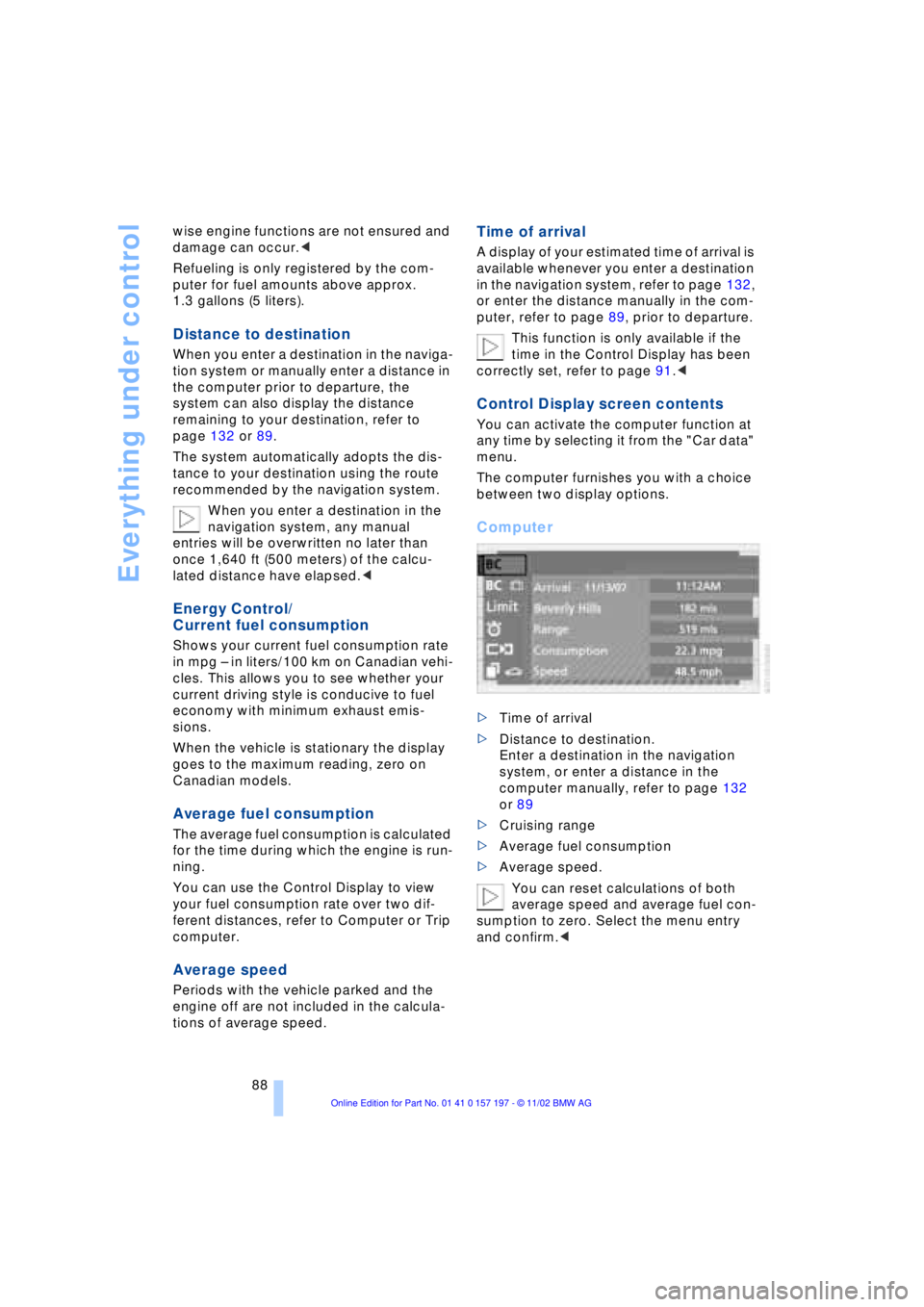
Control Display screen contents
You can activate the computer function at
any time by selecting it from the "Car data"
menu.
The computer furnishes you with a choice
between two display options.
Computer
>Time of arrival
>Distance to destination.
Enter a destination in the navigation
system, or enter a distance in the
computer manually, refer to page 132
or 89
>Cruising range
>Average fuel consumption
>Average speed.
You can reset calculations of both
average speed and average fuel con-
sumption to zero. Select the menu entry
and confirm.<
Page 91 of 229
At a glance
Controls
Driving tips
Communications
Navigation
Entertainment
Mobility
Reference
89
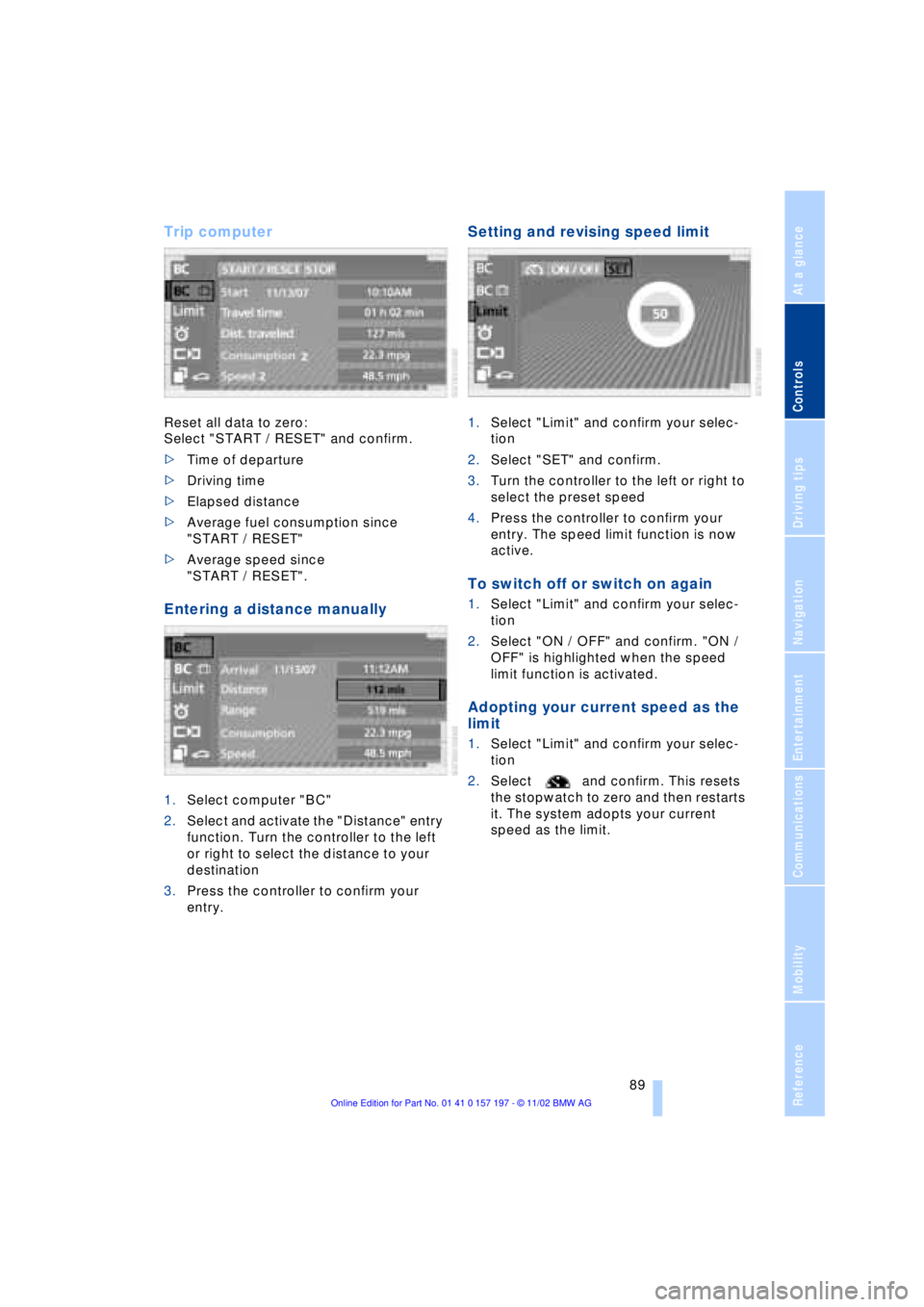
Trip computer
Reset all data to zero:
Select "START / RESET" and confirm.
>Time of departure
>Driving time
>Elapsed distance
>Average fuel consumption since
"START / RESET"
>Average speed since
"START / RESET".
Entering a distance manually
1.Select computer "BC"
2.Select and activate the "Distance" entry
function. Turn the controller to the left
or right to select the distance to your
destination
3.Press the controller to confirm your
entry.
Setting and revising speed limit
1.Select "Limit" and confirm your selec-
tion
2.Select "SET" and confirm.
3.Turn the controller to the left or right to
select the preset speed
4.Press the controller to confirm your
entry. The speed limit function is now
active.
To switch off or switch on again
1.Select "Limit" and confirm your selec-
tion
2.Select "ON / OFF" and confirm. "ON /
OFF" is highlighted when the speed
limit function is activated.
Adopting your current speed as the
limit
1.Select "Limit" and confirm your selec-
tion
2.Select and confirm. This resets
the stopwatch to zero and then restarts
it. The system adopts your current
speed as the limit.
Page 93 of 229
At a glance
Controls
Driving tips
Communications
Navigation
Entertainment
Mobility
Reference
91
Importing display
1.Select the desired function and confirm
Ð here, computer "BC"
2.Select and confirm. This resets
the stopwatch to zero and then restarts
it. The function appears in the assis-
tance window.
The symbol is highlighted if
the function displayed in the asssis-
tance window is selected in the Control
Display. You can also choose to view brief
help texts explaining selected menu
entries, refer to page 23, or the travel route
on vehicles equipped with a GPS naviga-
tion system, refer to page 131.<
Changing settings
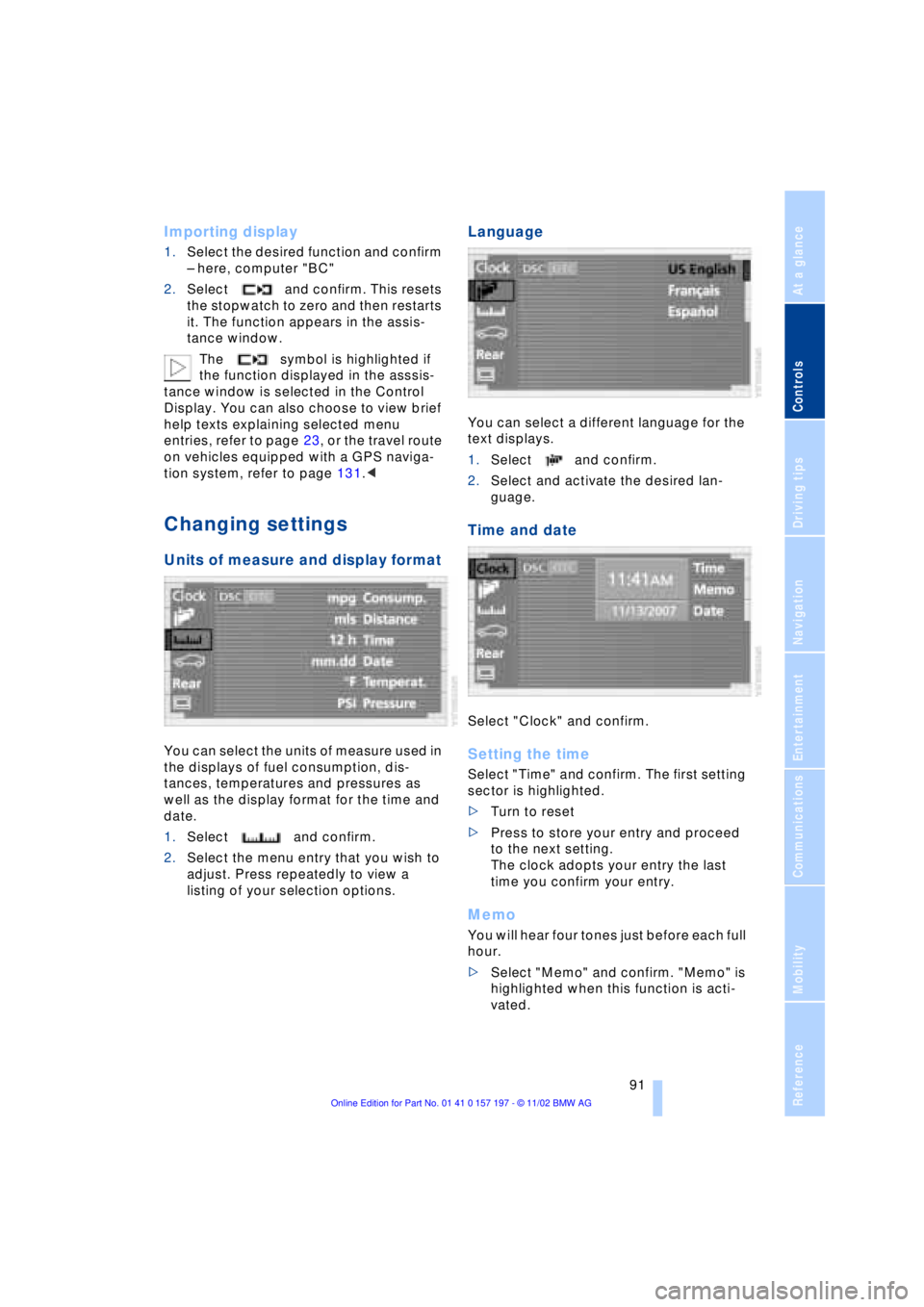
Units of measure and display format
You can select the units of measure used in
the displays of fuel consumption, dis-
tances, temperatures and pressures as
well as the display format for the time and
date.
1.Select and confirm.
2.Select the menu entry that you wish to
adjust. Press repeatedly to view a
listing of your selection options.
Language
You can select a different language for the
text displays.
1.Select and confirm.
2.Select and activate the desired lan-
guage.
Time and date
Select "Clock" and confirm.
Setting the time
Select "Time" and confirm. The first setting
sector is highlighted.
>Turn to reset
>Press to store your entry and proceed
to the next setting.
The clock adopts your entry the last
time you confirm your entry.
Memo
You will hear four tones just before each full
hour.
>Select "Memo" and confirm. "Memo" is
highlighted when this function is acti-
vated.
Page 172 of 229
Using the phone in your vehicle
170
Using the phone in your vehicle
Safety notice
For your own safety
Your in-car phone makes life more conve-
nient in many ways, and can even save
lives in an emergency. While you should
consult your portable phone's separate
manual for a detailed description of safety
precautions and information, we request
that you direct your particular attention to
the following:
Adjustments
To avoid posing a danger to yourself
and other road users, never adjust the
system settings unless your vehicle is com-
pletely stationary.<
Using the phone in your vehicle
Using a hand-held portable phone to
make and receive calls while driving is
now illegal in virtually every country in the
world. Always use your hands-free system,
or stop your vehicle in an area where you
will not pose a safety hazard to other road
users.<
Vehicles and portable phones
Do not use your phone from within a
garage, or near an open hood. The air
in these areas could contain fuel vapors,
and the portable phone might generate
sparks that could result in burns.
This same precaution applies to open
luggage compartment lids on vehicles
equipped for operation using natural gas or
hydrogen, and to all vehicles with luggage
compartment-mounted batteries.<
Antenna
When using the phone, ensure that all
persons in the area are at least 20 in
(50 cm) from the antenna. Never use your
BMW portable phone if the antenna is dam-
aged. Contact between your skin and a damaged antenna can result in minor
burns.
If the antenna is damaged, have it replaced
immediately.<
Special environmental conditions
Always switch off your BMW portable
phone in areas where blasting work is
being conducted with explosives. The
phone signals could potentially act as a
high-frequency transmitter and set off
explosions.
Always switch off your BMW portable
phone in areas where an increased explo-
sion danger is present. This category
includes filling stations along with fuel and
chemical storage depots, etc., and all
areas in which the air can contain fuel,
chemicals or metal particles. Under these
conditions, your BMW portable phone
could conceivably generate sparks that
could lead to a fire or explosion. Always
observe all legal regulations governing the
use of portable phones in the vicinity of
filling stations, chemical factories and other
areas where an explosion potential exists.
Never use the BMW portable phone in air-
craft; do not use this portable phone in hos-
pitals, care centers or at other locations
where medical equipment may be in oper-
ation, such as accident sites, etc.
Your service provider can furnish you with
more detailed information on legal regula-
tions governing the use of your phone.<
Medical equipment
Portable phones can generate inter-
ference capable of preventing hearing
aids and cardiac pacemakers from oper-
ating correctly. If you or any occupant of
the vehicle will be using such equipment,
consult a physician or the manufacturer
of the equipment to determine whether
it is adequately shielded against high-
frequency energy.<
Page 183 of 229
Mobility
This section helps you maintain your
mobility by supplying important information
on vital topics including fuels and
lubricants, wheels and tires, maintenance
and emergency roadside service.
Page 184 of 229
Refueling
182
Refueling
Fuel filler door
Always switch off the engine before
refueling. If you do not, fuel cannot be
filled into the tank and a message in the
Check Control will appear.<
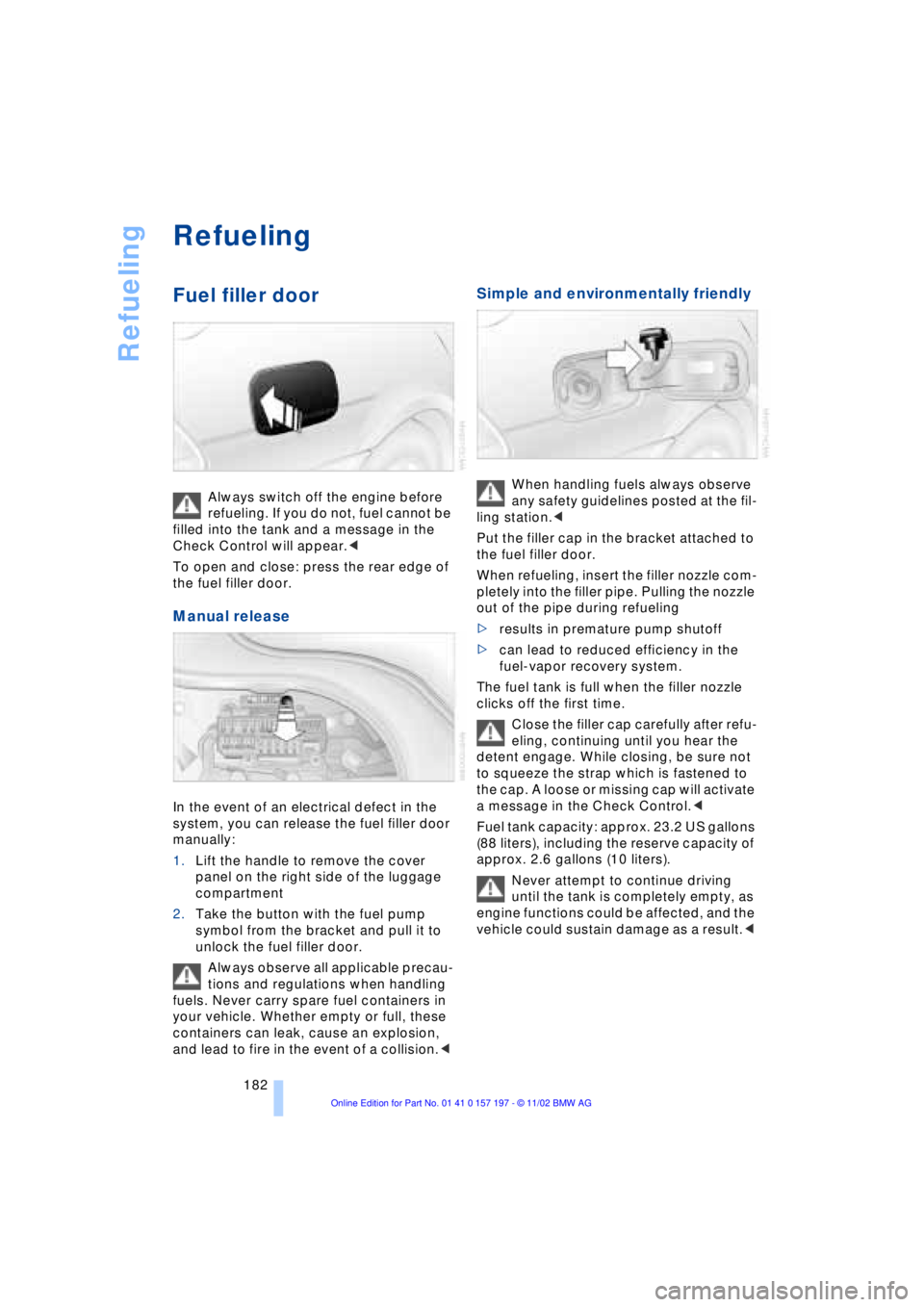
To open and close: press the rear edge of
the fuel filler door.
Manual release
In the event of an electrical defect in the
system, you can release the fuel filler door
manually:
1.Lift the handle to remove the cover
panel on the right side of the luggage
compartment
2.Take the button with the fuel pump
symbol from the bracket and pull it to
unlock the fuel filler door.
Always observe all applicable precau-
tions and regulations when handling
fuels. Never carry spare fuel containers in
your vehicle. Whether empty or full, these
containers can leak, cause an explosion,
and lead to fire in the event of a collision.<
Simple and environmentally friendly
When handling fuels always observe
any safety guidelines posted at the fil-
ling station.<
Put the filler cap in the bracket attached to
the fuel filler door.
When refueling, insert the filler nozzle com-
pletely into the filler pipe. Pulling the nozzle
out of the pipe during refueling
>results in premature pump shutoff
>can lead to reduced efficiency in the
fuel-vapor recovery system.
The fuel tank is full when the filler nozzle
clicks off the first time.
Close the filler cap carefully after refu-
eling, continuing until you hear the
detent engage. While closing, be sure not
to squeeze the strap which is fastened to
the cap. A loose or missing cap will activate
a message in the Check Control.<
Fuel tank capacity: approx. 23.2 US gallons
(88 liters), including the reserve capacity of
approx. 2.6 gallons (10 liters).
Never attempt to continue driving
until the tank is completely empty, as
engine functions could be affected, and the
vehicle could sustain damage as a result.<
Page 185 of 229
At a glance
Controls
Driving tips
Communications
Navigation
Entertainment
Mobility
Reference
183
Fuel specifications
The engine uses lead-free gasoline only.
Required fuel:
>Premium Unleaded Gasoline,
min. 91 AKI.
AKI = Anti-Knock Index.
Do not use leaded fuels. The use of
leaded fuels will cause permanent
damage to the system's oxygen sensor and
the catalytic converter.<