Page 91 of 420
The rear window wiper switch is
located next to the windshield wiper
switch.
To clean the windshield, pull back on
the wiper control lever. The washers
spray until you release the lever. The
wipers run at low speed while you’re
pulling the lever, then complete one
more sweep of the windshield af ter
you release it. Push the red button to the right of
the display to turn on the hazard
warning lights (f our-way f lashers).
This causes all f our outside turn
signals and both indicators in the
instrument panel to f lash. Use the
hazard warning lights if you need to
park in a dangerous area near heavy
traf f ic, or if your vehicle is disabled.
To activate the rear windshield wiper,
turn the switch ‘‘ON’’. The wiper
operates intermittently. If you wish
to use the wiper and washer, turn
and hold the switch one position up
f rom ‘‘ON’’. Hazard Warning
Rear Window Wiper and Washer
Windshield Washers
Controls Near the Steering Wheel
Inst rument s and Cont rols87
Page 92 of 420
The rear window def ogger will clear
fog,frost,andthinicefromthe
window. Push the def ogger button to
turn it on and of f . The light above
the button lights to show the
def ogger is on. If you do not turn it
of f , the def ogger will shut itself of f
af ter about 15 minutes. It also shuts
of f when you turn of f the ignition.
You have to turn it on again when
you restart the vehicle.Make sure the rear window is clear
and you have good visibility bef ore
starting to drive.
Thedefoggerwiresontheinsideof
the rear window can be accidentally
damaged. When cleaning the glass,
always wipe side to side.
Turn the f og lights on and of f by
pressing the button. The indicator in
the button lights to show the f og
lights are on.
You can use the f og lights only when
the headlights are on low beam.
They will go of f when you turn the
headlights of f or onto high beam.
Rear Window Def ogger
Fog Lights
Controls Near the Steering Wheel
Inst rument s and Cont rols88
Page 93 of 420
Push the lever up to lock the
steering wheel in that position.
Make sure you have securely
locked the steering wheel in place
by trying to move it up and down.
To adjust the steering wheel upward
or downward: Push the lever under the steering
column all the way down.
Move the steering wheel to the
desired position, making sure the
wheel points toward your chest,
not toward your f ace. Make sure
you can see the instrument panel
gauges and the indicator lights.
Make any steering wheel adjustment
bef ore you start driving.
3.
4.
1.
2.
See page f or important saf ety inf ormation about how to properlyposition the steering wheel. 18
Steering Wheel A djustment
Controls Near the Steering Wheel
Inst rument s and Cont rols89
Adjusting the steering wheel
position while driving may
cause you to lose control of the
vehicle and be seriously injured
inacrash.
Adjust the steering wheel only
when the vehicle is stopped.
Page 96 of 420

�µ
If the f ront wheels are turned, the
anti-thef t lock may sometimes make
it difficult to turn the key from
LOCK to ACCESSORY. Firmly turn
the steering wheel to the lef t or to
the right as you turn the key. You can insert or
remove the key only in this position.
To switch f rom ACCESSORY to
LOCK, you must push the key in
slightly as you turn it. The shif t lever
must also be in Park. The anti-thef t
lock will lock the steering column
when you remove the key.
The ignition switch is on the right
side of the steering column. It has
f our positions:
LOCK(0)
ACCESSORY (I)
ON (II)
START (III)As required by the FCC: This device complies with Part 15 of theFCC rules. Operation is subject to thef ollowing two conditions: (1) This devicemay not cause harmf ul interf erence, and(2) this device must accept anyinterf erence received, includinginterf erence that may cause undesiredoperation.
Changes or modif ications not expresslyapproved by the party responsible f orcompliance could void the user’sauthority to operate the equipment.
This device complies with IndustryCanada Standard RSS-210.Operation is subject to the f ollowing twoconditions: (1) this device may not causeinterf erence, and (2) this device mustaccept any interf erence that may causeundesired operation of the device.LOCK (0)
Ignition Switch
Keys and Locks
Inst rument s and Cont rols92
Page 145 of 420
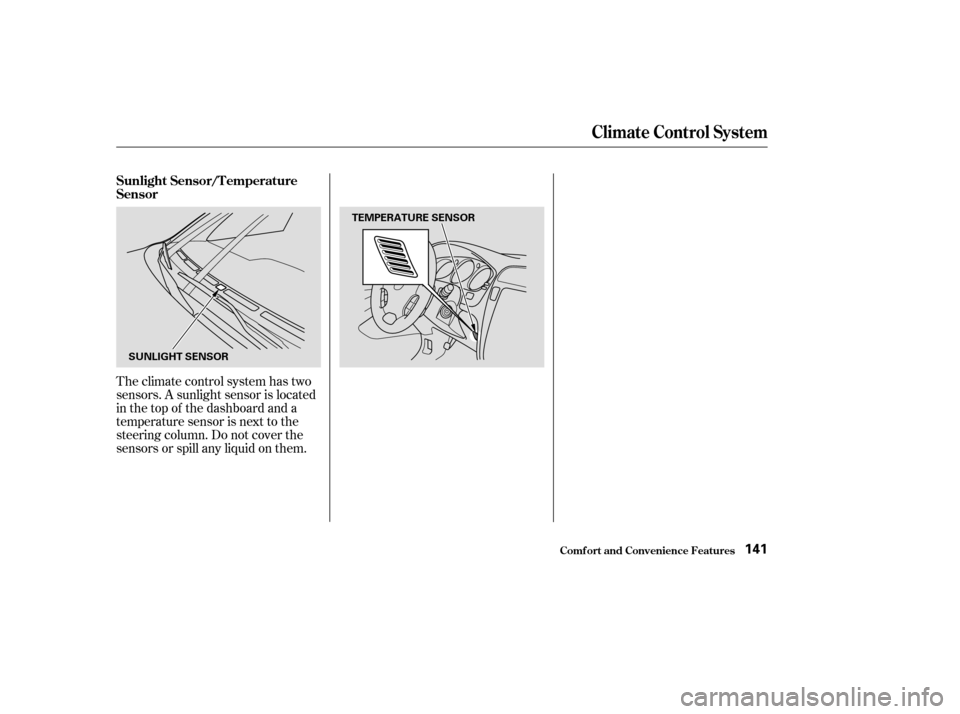
Theclimatecontrolsystemhastwo
sensors. A sunlight sensor is located
in the top of the dashboard and a
temperature sensor is next to the
steering column. Do not cover the
sensors or spill any liquid on them. Sunlight Sensor/T emperature
Sensor
Climat e Cont rol Syst em
Comf ort and Convenience Feat ures141
SUNLIGHT SENSORTEMPERATURE SENSOR
Page 185 of 420

�Û�Ý
The middle button adjusts the
volume up ( ) or down ( ). Press
the top or bottom of the button and
hold it until the desired volume is
reached, then release it.
The CH button has three functions,
depending on whether you are
listening to the radio, or playing a
cassette or CD.
If you are listening to the radio, use
the CH button to change stations.
Each time you press this button, the
system advances to the next preset
station on the band you are listening
to. You will see the number of the
selected Preset button in the display.
To change bands, or to change f rom
FM1 to FM2, press the AM/FM
button. If you are playing a cassette, use the
CH button to advance to the next
selection. You will see ‘‘FF’’ blinking
in the display when you press the CH
button. The system fast forwards
until it senses a silent period, then
goes back to PLAY.
If youareplayingaCD,thesystem
skips to the beginning of the next
track each time you push the CH
button. You will see the disc and
track number in the display.
Three controls f or the audio system
are mounted in the steering wheel
hub. These let you control basic
f unctions without removing your
hand f rom the wheel. Remote Audio Controls
Audio System
Comf ort and Convenience Feat ures181
CH BUTTON
VOLUME
BUTTON AM/FM
BUTTON
Page 220 of 420

Push in the Cruise Control Master
Switch to the lef t of the steering
column. The indicator in the
switch will light.
Cruise control allows you to maintain
asetspeedabove25mph(40km/h)
without keeping your f oot on the
accelerator pedal. It should be used
f or cruising on straight, open
highways. It is not recommended f or
conditions such as city driving,
winding roads, slippery roads, heavy
rain, or bad weather. You should
have f ull control of the vehicle under
those conditions.
Accelerate to the desired cruising
speedabove25mph(40km/h).Press and release the SET/
DECELbuttononthesteering
wheel. The CRUISE CONTROL
light on the instrument panel
comes on to show the system is
now activated.
1.
2. 3.
Cruise Control
Using t he Cruise Cont rol
Cruise Control
Comf ort and Convenience Feat ures216
CRUISE CONTROL MASTER SWITCH
CANCEL
RESUME/ACCEL
SET/DECEL
Improper use of the cruise
control can lead to a crash.
Use the cruise control only
when traveling on open
highways in good weather.
Page 222 of 420

Youcancancelthecruisecontrolin
any of these ways:Push the CANCEL button on the
steering wheel.
Press the Cruise Control Master
Switch.
Even with the cruise control turned
on, you can still use the accelerator
pedal to speed up f or passing. Af ter
completing the pass, take your foot
of f the accelerator pedal. The vehicle
will return to the set cruising speed.
Resting your f oot on the brake pedal
will cause the cruise control to
cancel.
Tap the brake pedal.Pressing the Cruise Control Master
Switch turns the system completely
of f and erases the previous cruising
speed f rom memory. To use the
system again, ref er to
.
When you push the CANCEL button,
or tap the brake pedal, the CRUISE
CONTROL light on the instrument
panel will go out and the vehicle will
begin to slow down. You can use the
accelerator pedal in the normal way.
The system remembers the
previously-set cruising speed. To
return to that speed, accelerate to
above25mph(40km/h)andthen
press and release the RESUME/
ACCEL button. The CRUISE
CONTROL light comes on. The
vehicle will accelerate to the same
cruising speed as bef ore.
Cancelling t he Cruise Cont rol
Using t he
Cruise Cont rol
Cruise Control
Comf ort and Convenience Feat ures218
CANCEL
BUTTON