Page 204 of 420

When the rear system is turned on, it
selects the entertainment source it
waslastsetto.Ifthatsourcehas
been removed (the DVD has been
ejected f rom the player, f or example),
youwillsee‘‘____’’inthedisplay.
You must select another source.
When you turn on the rear system,
the rear speakers are automatically
turned off. You will see the Rear
SpeakersOff iconintherightdisplay.
The sound f or the rear system is
sent to the wireless headphones. If
youwanttoturntherearspeakers
on again, press and hold the REAR
PWR button until they come on.
NOTE: The rear speakers are
connected to the f ront system, so
they will always play the source that
the f ront system is set to. For
example, if you are listening to the
radio, and your rear passengers are
listening to a CD through the
headphones, the rear speakers willplay the radio when you turn them
on. To have the vehicle speakers
play the CD, change the f ront source
f rom AM/FM to CD.
Pressing the RR CTRL selector knob
turns off the rear controls. Yourpassengers are not able to operate
the rear system with the control
panel in the ceiling or with the
remote control. You will see the Rear
ControlsOff iconintherightdisplay.
Press the selector knob again to turn
the rear controls back on.
Comf ort and Convenience Feat ures
Rear Entertainment System
200
REAR PWR
BUTTON
REAR CONTROLS
OFF ICONREAR SPEAKERS
OFF ICON
RR CTRL
SELECTOR KNOB
Page 205 of 420

�Î
�Î
The DVD player in your Rear
Entertainment System can play DVD
video discs and CDs. It features
Dolby noise reduction. The video
screen is designed f or use by the
rear seat passengers only.
The driver and f ront seat passenger
should not try to view the screen
while driving.Open the overhead screen by
pushingonthebutton.Thescreen
will swing down part-way. Pivot the
screen the rest of the way. If you
pivot the screen too far forward, past
the detent, the display will turn off.
Pivot the screen back to the detent
to turn the display back on. To close
the screen, pivot it up until it latches.The DVD player is located under the
f ront control panel. Insert the disc
into the DVD slot. Push the disc in
half way, the drive will pull it in the
rest of the way.
Press the eject button to remove the
disc f rom the drive.
Follow the instructions on the
f ollowing pages to operate the DVD
player f rom the f ront control panel,
the rear control panel, or with the
remote control.
Dolby noise reduction manuf actured under
license from Dolby Laboratories Licensing Corpo-
ration. ‘‘DOLBY’’ and the double-D symbol are trademarks of Dolby Laboratories
Licensing Corporation.
Rear Entertainment System
Comf ort and Convenience Feat ures
Rear Video Operation
201
REAR CONTROL
PANEL
BUTTON
OVERHEAD
SCREEN DVD SLOT
EJECT
BUTTON
Page 206 of 420
To operate the rear entertainment
system f rom the f ront panel, you
must f irst push on the rear power
button, then turn the RR CTRL knob
clockwise to enable the panel. The
amber RR LED will come on to show
that the control panel is now enabled.
To return f ront panel control to the
front audio system, turn the knob
counterclockwise. The system will
automatically change back to the
f ront system several seconds af ter
you stop pressing the buttons.
Comf ort and Convenience Feat ures
Rear Entertainment System
Operating the DVD Player f rom
the Front Control Panel
202
RR CTRL SELECTOR
KNOBRR LED
RPT
BUTTON
REAR PWR
BUTTON
PLAY
BUTTON
RDM
BUTTON
PAUSE
BUTTONSEEK/SKIP
BAR
Page 208 of 420

�Û�Ý
You can control some DVD f unctions
f rom the rear control panel in the
ceiling Make sure the rear control
operation has not been disabled with
theRRCTRLknobonthefront
panel.
Use these buttons to select the
entertainment source (radio,
cassette player, CD player/CD
changer, or DVD player/Auxiliary
device). The selected source will be
showninthedisplay.
Press this button when you want to
pause a DVD. Press this button
again to go back to Play.
To select the menu on the DVD,
press the MENU button. Use the , , , and buttons to
move to the desired menu selection,
then press the ENT button to enter
your selection.
Pressthe buttontoskiptothe
beginning of the next chapter. Press
the buttontoskipbacktothe beginning of the current chapter.
If you press the button while the
beginning of a chapter is playing, the
system skips to the beginning of the
previous chapter.
Comf ort and Convenience Feat ures
Rear Entertainment System
Operating the DVD Player f rom
the Rear Control Panel
Source Select ion But t ons
PL A Y/PA USE/PROG But t on MENU/ENT But t ons
SEEK /SK IP But t ons
204
SOURCE SELECTION
BUTTONS MENU
BUTTON
REAR CONTROLS
OFF BUTTON CH/DISK
BUTTON SEEK/SKIP
BUTTON
SEEK/SKIP
BUTTON
CH/DISK
BUTTON
ENT BUTTON
PLAY/PAUSE/PROG
BUTTON
Page 209 of 420
CONT INUED
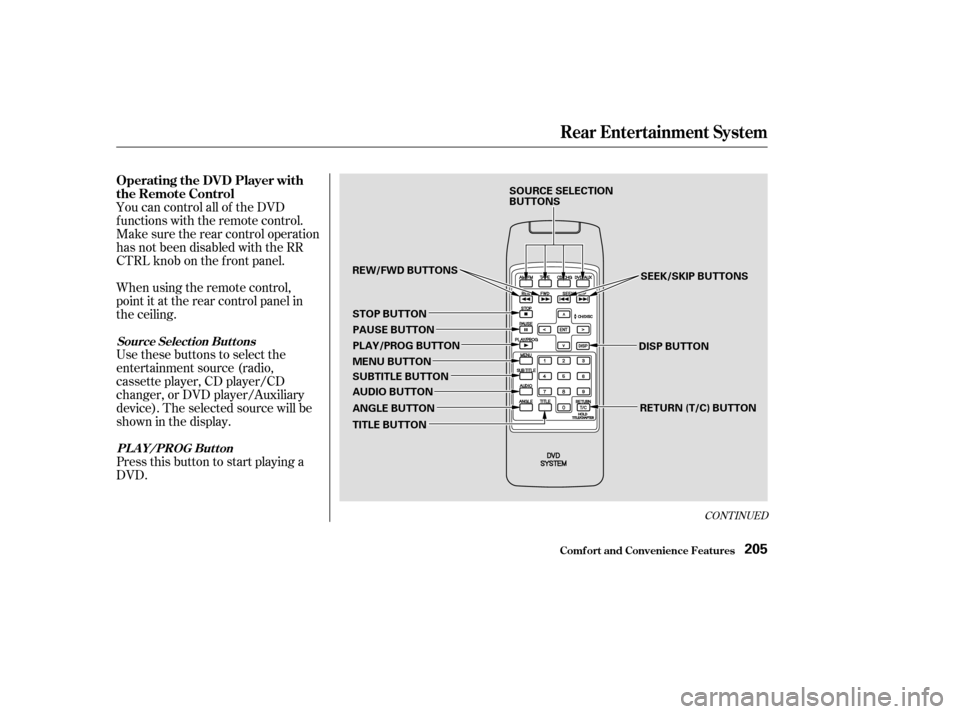
You can control all of the DVD
functions with the remote control.
Make sure the rear control operation
has not been disabled with the RR
CTRL knob on the f ront panel.
When using the remote control,
point it at the rear control panel in
the ceiling.
Press this button to start playing a
DVD. Use these buttons to select the
entertainment source (radio,
cassette player, CD player/CD
changer, or DVD player/Auxiliary
device). The selected source will be
showninthedisplay.
Comf ort and Convenience Feat ures
Rear Entertainment System
Operating the DVD Player with
the Remote Control
Source Select ion But t onsPL A Y/PROG Button
205
SOURCE SELECTION
BUTTONS
REW/FWD BUTTONS STOP BUTTON PAUSE BUTTON
PLAY/PROG BUTTON
MENU BUTTON
SUBTITLE BUTTON
AUDIO BUTTON
ANGLE BUTTON
TITLE BUTTON SEEK/SKIP BUTTONS
DISP BUTTON RETURN (T/C) BUTTON
Page 211 of 420

Many DVDs are recorded, or
dubbed, in more than one language.
To select a dif f erent language than
the one being heard, press the
AUDIO button. Continue to press
and release the AUDIO button to
hear all the available languages.
To change the color, contrast, aspect
ratio, and brightness of the video
screen, press the DISP button. The
current setting of one will be
displayed on the screen each time
you press the button. Use theand buttons to change the
setting as desired. The display will
disappear f rom the screen several
seconds af ter you stop adjusting the
setting. On some DVDs, the scenes are
recorded by more than one camera,
giving dif f erent viewpoints of the
same scene. By pressing the Angle
button, you can select a dif f erent
viewpoint.
In the MENU selection mode,
pressing the RETURN button for
less than two seconds changes the
MENU display to the previous page.
Pressing the RETURN button for
more than two seconds while a DVD
is playing brings the system into the
TITLE enter mode. When you enter
your selection, the DVD player will
start playing f rom the selected title.
Rear Entertainment System
Comf ort and Convenience Feat ures
A UDIO Button
DISP But t on A NGL E Button
RETURN (T/C) Button
207
Page 212 of 420
The tips on how to handle and
protect DVDs are basically the same
as those f or compact discs. Ref er to
‘‘Protecting Compact Discs’’ on page.
There are various types of DVDs
available. Some of them are not
compatible with your system.
The DVD player in your Rear
Entertainment System can play DVD
video discs and CDs bearing the
above marks on their packages or
jackets. Those packages or jackets should
also bear the area designation of ‘‘1’’
or ‘‘ALL’’.
DVD-ROMs cannot be played in this
system. 174
Rear Entertainment System
Comf ort and Convenience Feat ures
Protecting DVDs
Playable DVDs
208
Page 213 of 420
Indication CauseSolution
If you see an error indication in the
display while operating the DVD
player,findthecauseinthechartto
the right. If you cannot clear the
error indication, take the vehicle to
your Acura dealer.
FOCUS Error
Mechanical Error
High Temperature
Low Vehicle Battery
Voltage Press the EJECT button and pull out the disc.
Check if the disc is inserted correctly in the
DVD Player.
Make sure the disc is not scratched or damaged.
Press the EJECT button and pull out the disc.
Check the disc for damage or deformation.
If the DVD cannot be pulled out or the error
indication does not disappear after the disc is
ejected, see your Acura dealer.
Do not try to force the disc out of the player.
Will disappear when the temperature returns to
normal.
Run the engine to recharge the battery.
Rear Entertainment System
Comf ort and Convenience Feat ures
DVDPlayerErrorIndications
209