Page 143 of 420
CONT INUED
Use the MODE Button or MODE
icon to select the vents the air flows
f rom. Some air will f low f rom the
dashboard corner vents in all modes.
Each time you press the MODE
button or touch the icon, the display
shows the mode selected. Press
(touch) f our times to see all the
modes.The main air flow comes
f rom the dashboard vents. The main air f low is divided
between the dashboard vents and
the f loor vents. The main air flow comes
f rom the f loor vents. The main air f low is divided
between the f loor vents and de-
froster vents at the base of the wind-
shield.
Climat e Cont rol Syst em
Comf ort and Convenience Feat ures
Mode Button/Mode Icon
139
Page 144 of 420
The button directs the main
air f low to the windshield f or f aster
def rosting. It also overrides any
MODE selection you may have made.
When you turn of f by
pressing the button again, the
system returns to its former settings. When you select , the A/C
turns on automatically and the
system selects Fresh Air mode. For
f aster def rosting, manually set the
fanspeedtohigh.Youcanalso
increase air f low to the windshield by
closing the side vents in the
dashboard.
This button turns the rear window
def ogger on and of f (see page ).88
Rear Window Def ogger Button
Climat e Cont rol Syst em
Comf ort and Convenience Feat ures140
DEFROST BUTTON
REAR WINDOW DEFOGGER BUTTON
Page 145 of 420
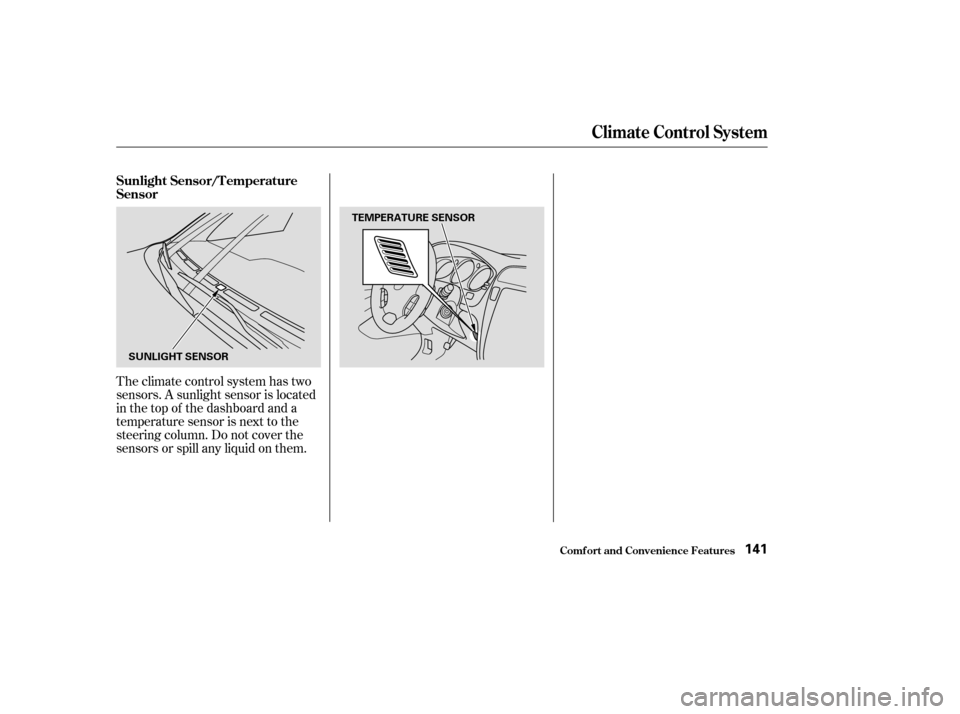
Theclimatecontrolsystemhastwo
sensors. A sunlight sensor is located
in the top of the dashboard and a
temperature sensor is next to the
steering column. Do not cover the
sensors or spill any liquid on them. Sunlight Sensor/T emperature
Sensor
Climat e Cont rol Syst em
Comf ort and Convenience Feat ures141
SUNLIGHT SENSORTEMPERATURE SENSOR
Page 219 of 420

The security system helps to protect
your vehicle and valuables f rom thef t.
The horn sounds and a combination
of headlights, parking lights, side
marker lights and taillights f lashes if
someone attempts to break into your
vehicleorremovetheradio.This
alarm continues f or two minutes,
then the system resets. To reset an
alarming system before the two
minutes have elapsed, unlock the
driver’s f ront door with the key or
the remote transmitter.Do not attempt to alter this system
or add other devices to it. The security system will not set if
the hood, tailgate, or any door is not
f ully closed. If the system will not set,
check the Door and Tailgate Open
Monitor on the instrument panel
(see page ) to see if the doors and
tailgate are f ully closed. Since it is
notpartofthemonitordisplay,
manually check the hood.
The security system sets auto-
matically fifteen seconds after you
lock the doors, hood, and tailgate.
For the system to activate, you must
lock the doors f rom the outside with
the key, lock tab, door lock switch,
or remote transmitter. The security
system light next to the driver’s door
lock starts blinking immediately to
show you the system is setting itself . Once the security system is set,
opening any door or the tailgate
(without using the key or the remote
transmitter), or the hood, will cause
it to alarm. It also alarms if the radio
and DVD components are removed
f rom the dashboard or the wiring is
cut. 70
Security System
Comf ort and Convenience Feat ures215
SECURITY SYSTEM LIGHT
Page 242 of 420

Remove the f uel f ill cap slowly.
You may hear a hissing sound as
pressure inside the tank escapes.
Place the cap in the holder on the
fuel fill door.
Stop f illing the tank af ter the f uel
nozzle automatically clicks of f . Do
not try to ‘‘top off’’ the tank, leave
some room f or the f uel to expand
with temperature changes.Shift to Park or Neutral and set
the parking brake. Pull the hood
release handle located under the
lower lef t corner of the dashboard.
The hood will pop up slightly.
Screw the f uel f ill cap back on,
tighten it until it clicks several
times. If you do not properly
tighten the cap, the Malfunction
Indicator Lamp may come on (see
page ).
Push the f uel f ill door closed until
it latches.
Your vehicle has an on-board
ref ueling vapor recovery system to
help keep f uel vapors f rom going
into the atmosphere. If the fuel
nozzle keeps clicking of f even
though the tank is not full, there
maybeaproblemwiththissystem.
Consult your dealer. 1.
3.
4.
5.
6.
375
Service Station Procedures
Bef ore Driving
Opening the Hood
238
HOOD RELEASE HANDLE
Page 248 of 420

Any object
attached to or placed on the covers
marked ‘‘SRS AIRBAG,’’ in the
center of the steering wheel and
on top of the dashboard, could
interf ere with the proper operation
of the airbags. Or, if the airbags
inf late, the objects could be
propelled inside the vehicle and
hurt someone.
If a side airbag
inflates,acupholderorotherhard
object attached on or near the
door could be propelled inside the
vehicle and hurt someone.
Covering the outside edge of a
f ront seat-back, with a non-Acura
seat cover for example, could
prevent the airbag from inflating
properly.
Removing parts f rom your vehicle,
or replacing components with non-
Acura (aftermarket) components
could seriously af f ect your vehicle’s
handling, stability, and reliability.
Some examples are:
Lowering the vehicle with an
aftermarket suspension kit that
signif icantly reduces ground
clearance can allow the
undercarriage to impact speed
bumps or other raised objects,
which could cause the airbags to
deploy.
Raising the vehicle with an
af termarket suspension kit can
af f ect the handling and stability.
Af termarket wheels, because they
are a universal design, can cause
excessive stress on suspension
components. Do not modif y your steering wheel
or any other part of your
Supplemental Restraint System.
Modif ications could make the
system inef f ective.
Larger or smaller wheels and tires
can interf ere with the operation of
your vehicle’s anti-lock brakes and
other systems.
If you plan to modif y your vehicle,
consult with your Acura dealer.
Modif ications
Additional Saf ety Precaution
A ccessories and Modif ications
Bef ore Driving
Do not at t ach or place object s on
the airbag covers.
Do not at t ach hard object s on ornear a f ront door.
Do not place any object s over t heoutsideedgeof afront seat-back.
244
Page 383 of 420
All the electrical circuits in your
vehicle have fuses to protect them
f rom a short circuit or overload.
These f uses are located in three f use
boxes.Theinteriorfuseboxesarelocated
underneath the dashboard on each
side.Toopenthefuseboxonthe
passenger’s side, pull the right edge
of the cover.
Fuses
T aking Care of t he Unexpect ed379
DRIVER’S SIDE INTERIOR
PASSENGER’S SIDE INTERIOR
Page 392 of 420
Your vehicle has several identif ying
numbers located in various places.
The Vehicle Identif ication Number
(VIN) is the 17-digit number your
Acura dealer uses to register your
vehicle f or warranty purposes. It is
also necessary f or licensing and
insuring your vehicle. The easiest
placetofindtheVINisonaplate
fastened to the top of the dashboard.
Youcanseeitbylookingthrough
the windshield on the driver’s side. It
is also on the Certification label at-
tached to the driver’s doorjamb, and
is stamped on the engine com-
partment bulkhead. The VIN is also
provided in bar code on the
Certif ication label.
Identif ication Numbers
T echnical Inf ormation388
VEHICLE IDENTIFICATION NUMBERCERTIFICATION LABEL