Page 122 of 420

Turn the ignition switch ON (II).
You cannot add a new driving
position in the memory unless the
ignition switch is ON (II). You can
recall a memorized position with
the ignition switch in any position.
Seat and outside mirror positions, f or
two dif f erent drivers or driving
conditions,canbestoredinseparate
memories. You select a memorized
position by pushing the appropriate
button or using the appropriate
remote transmitter (Memory 1 or
Memory 2). Store a driving position as explained
in this section only when the vehicle
is parked.
Adjust the seat to a comfortable
position (see page ). Press and release the MEMO
buttononthecontrolpanel.You
will hear a beep. Immediately
press and hold one of the memory
buttons (1 or 2) until you hear two
beeps. The indicator light in the
memory button will come on. The
current positions of the driver’s
seat and outside mirrors are now
stored.
Your Acura has a memory f eature
f or the driver’s seat and outside
mirror positions.
Adjust the outside mirrors f or best
visibility (see page ).3.
1.
2.
116
101
Touring Model
St oring a Driving Posit ion in Memory
Driving Posit ion Memory Syst em
Inst rument s and Cont rols118
MEMO BUTTON
Page 147 of 420
CONT INUED
When the system is in FULL AUTO,
the rear A/C passenger control
panel cannot be used. The system
will cycle on and of f automatically to
bring the interior to the set
temperature.To enable the rear A/C passenger
control panel, press the RR A/C
Manual button on the control panel.
The light in the button will come on.
When the rear A/C passenger
control panel is enabled, the
passenger in the second row can use
the rear A/C passenger control
panel to adjust the f an speed and air
flow.
The f an speed control dial changes
the speed of the rear f an; turn it
clockwise to increase fan speed and
air flow.
Climat e Cont rol Syst em
Comf ort and Convenience Feat ures
Rear A/C Passenger Control Panel
Rear A/C Control Button
Fan Speed Cont rol Dial
143
AUTO BUTTON
REAR A/C CONTROL BUTTONTEMPERATURE CONTROL DIAL
MODE BUTTON
FAN SPEED
CONTROL DIAL
Page 152 of 420

�µIf you are
traveling far from home and can no
longer receive the stations you
preset, you can use the Auto Select
feature to find stations in the local
area.
If you are in a remote area, Auto
Select may not f ind six strong AM
stations or twelve strong FM stations.
If this happens, you will see a ‘‘0’’
displayed when you press any preset
button that does not have a station
stored. If you do not like the stations Auto
Select has stored, you can store
other f requencies in the preset
buttons. Use the TUNE, SEEK, or
SCAN f unction to f ind the desired
f requencies, then store them in the
selected preset buttons as described
previously.
Auto Select does not erase the
f requencies that you preset pre-
viously. When you return home, turn
of f Auto Select by pressing the
A. SEL button. The preset buttons
will then select the f requencies you
originally set.
To activate Auto Select, press the
A. SEL button. A. SEL will f lash in
the display, and the system will go
into scan mode f or several seconds.
It automatically scans both bands,
looking f or stations with strong
signals. It stores the f requencies of
six AM stations and twelve FM
stations in the preset buttons. You
can then use the preset buttons to
select those stations. AUTO SELECT
Comf ort and Convenience Feat ures
Audio System
148
A.SEL INDICATOR
TUNE KNOB
SCAN BUTTON PRESET
BUTTONS
A.SEL
BUTTON SEEK BUTTONS
Page 153 of 420

�µ�µ
Bass, Treble, Balance, and Fader are
each adjustable. You select which of
these you want to adjust by pressing
the TUNE knob. The mode changes
fromBAStoTREtoFADtoBAL,
and then back to the selected audio
mode, each time you press the
TUNE knob.
Use these modes to
adjust the tone to your liking. Select
TRE or BAS by pressing the TUNE
knob. Adjust the desired mode by
turning the TUNE knob. The level
indicators on the display show you
the range.
These two
modes adjust the strength of the
sound coming f rom each speaker.
BAL adjusts the side-to-side strength,
while FAD adjusts the f ront-to-back
strength. Select BAL or FAD by pressing the
TUNE knob. Adjust the Balance or
Fader to your liking by turning the
TUNE knob. The level indicators on
the display show you the range.
The system will automatically return
the display to the selected audio
mode about f ive seconds af ter you
stop adjusting a mode with the
TUNE knob.
You can use the instrument panel
brightness control dial to adjust the il-
lumination of the audio system (see
page ). The audio system
illuminates when the parking lights
are on, even if the radio is turned of f .
For inf ormation, see page .
82
169
Audio System
Comf ort and Convenience Feat ures
Adjusting the Sound
Treble/Bass
Balance/Fader A udio System L ighting
Radio Frequencies and Reception
149
Page 154 of 420

The audio system display usually
shows the time when the ignition
switch is in ACCESSORY (I) or ON
(II). It shows the operation mode of
the radio, cassette player, or CD
changer when you operate them,
then goes back to the time display
af ter f ive seconds.
To set the clock, press and hold the
CLOCK button until the number
f lash. Change the hours by pressing
the H button until the numbers
advance to the desired time. Change
the minutes by pressing the M
button until the numbers advance to
the desired time.You can use R to quickly set the time
to the nearest hour. If the displayed
time is before the half hour, pressing
Rsetstheclockbacktotheprevious
hour. If the displayed time is af ter
the half hour, pressing R sets the
clock f orward to the beginning of the
next hour.For example:
1:06 would RESET to 1:00
1:52 would RESET to 2:00
When you are f inished, press the
CLOCK button again.
On vehicles with Navigation System
Audio System
Comf ort and Convenience Feat ures
Digital Clock
150
CLOCK BUTTON
H BUTTON M BUTTONR BUTTON
Page 164 of 420
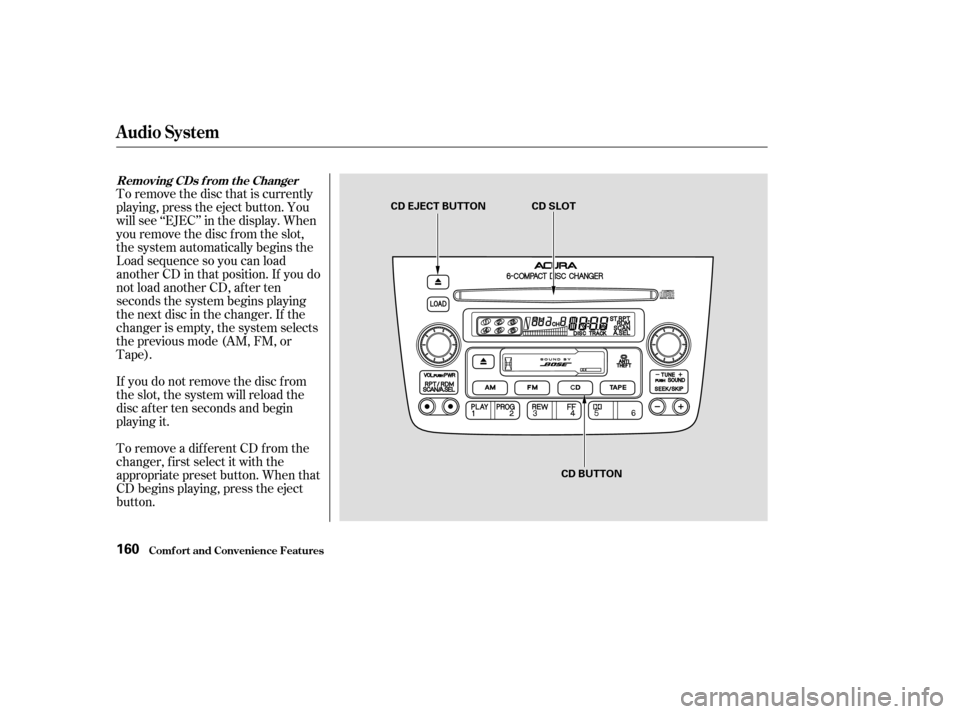
To remove the disc that is currently
playing, press the eject button. You
will see ‘‘EJEC’’ in the display. When
you remove the disc f rom the slot,
the system automatically begins the
Load sequence so you can load
another CD in that position. If you do
not load another CD, af ter ten
seconds the system begins playing
the next disc in the changer. If the
changer is empty, the system selects
the previous mode (AM, FM, or
Tape).
If you do not remove the disc f rom
the slot, the system will reload the
disc af ter ten seconds and begin
playing it.
To remove a different CD from the
changer,firstselectitwiththe
appropriate preset button. When that
CD begins playing, press the eject
button.
Removing CDs f rom t he Changer
Comf ort and Convenience Feat ures
Audio System
160
CD EJECT BUTTON CD SLOTCD BUTTON
Page 170 of 420
�µIf you are
traveling far from home and can no
longer receive the stations you
preset, you can use the Auto Select
feature to find stations in the local
area.
If you are in a remote area, Auto
Select may not f ind six strong AM
stations or twelve strong FM stations.
If this happens, you will see a ‘‘0’’
displayed when you press any preset
button that does not have a station
stored. To activate Auto Select, press the
A. SEL button. A. SEL will f lash in
the display, and the system will go
into scan mode f or several seconds.
It automatically scans both bands,
looking f or stations with strong
signals. It stores the f requencies of
six AM stations and twelve FM
stations in the preset buttons. You
can then use the preset buttons to
select those stations. AUTO SELECT
Audio System
Comf ort and Convenience Feat ures166
A.SEL INDICATOR
A.SEL BUTTON
Page 176 of 420

�µ
�Ó
�Ó �µ
�Ó �Ó
�´
�µ
�´�µ
You can use the SKIP buttons while
a disc is playing to select passages
and change tracks.
This feature,
when activated, plays the tracks on
the CD in random order, rather than
in the order they are recorded on the
CD. To activate Random Play, press
the RDM button. You will see RDM
in the display. The system will then
select and play tracks randomly.
This continues until you deactivate
RandomPlaybypressingtheRDM
button again.
To move rapidly within a track, press
and hold an appropriate SKIP button.
Press the button to move f orward,
or the button to move backward.
Release the button when the system
reaches the point you want.
To activate the Repeat
feature, press and release the Repeat
button. You will see REPEAT in the
display. The system continuously
replays the current track. Press the
Repeat button again to turn it off.
Each time you press the button
and release it, the system skips
f orward to the beginning of the next
track. Press and release the
buttontoskipbackwardtothe
beginning of the current track. Press
and release it again to skip to the
beginning of the previous track.
When the system reaches the end of
the disc, it will return to the begin-
ning and play the disc again.
You can switch to the radio while a
CD is playing by pressing the AM or
FM button. Press the CD button to
return to playing the CD. The CD
will begin playing where it lef t of f .
If you eject the disc, but do not
remove it from the slot, the system
will automatically reload the disc
af ter 15 seconds and put the CD
player in pause mode. To begin
playing the disc, press the CD button. Press the eject button to remove the
disc f rom the drive. If you turn the system of f while a CD
is playing, either with the PWR/VOL
knob or by turning off the ignition,
the disc will stay in the drive. When
youturnthesystembackon,theCD
will begin playing where it lef t of f .
RANDOM PLAY REPEAT
Audio System
Comf ort and Convenience Feat ures172