Page 13 of 102
DESCRIPTION
2-2
2
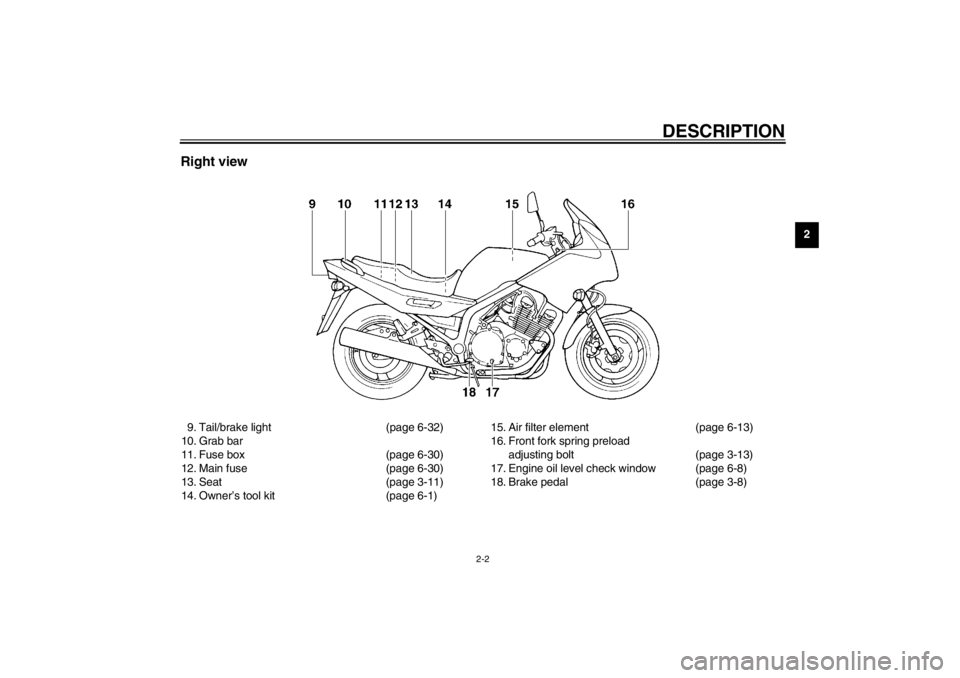
Right view9. Tail/brake light (page 6-32)
10. Grab bar
11. Fuse box (page 6-30)
12. Main fuse (page 6-30)
13. Seat (page 3-11)
14. Owner’s tool kit (page 6-1)15. Air filter element (page 6-13)
16. Front fork spring preload
adjusting bolt (page 3-13)
17. Engine oil level check window (page 6-8)
18. Brake pedal (page 3-8)
E_4km.book Page 2 Tuesday, August 28, 2001 9:51 AM
Page 16 of 102
3-1
3
EAU00027
3-INSTRUMENT AND CONTROL FUNCTIONS
EAU00029
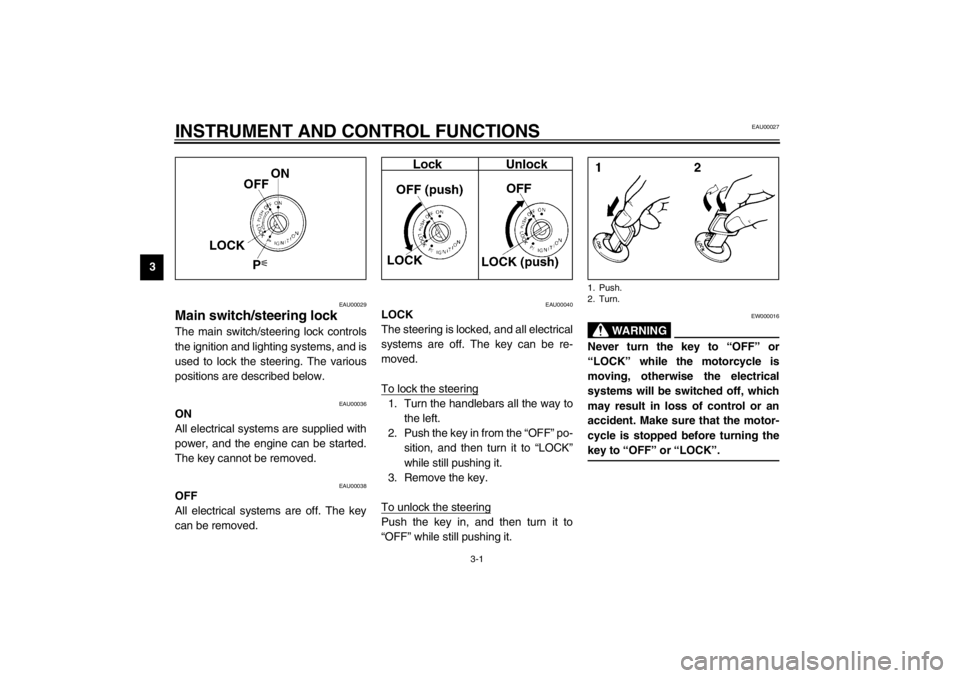
Main switch/steering lock The main switch/steering lock controls
the ignition and lighting systems, and is
used to lock the steering. The various
positions are described below.
EAU00036
ON
All electrical systems are supplied with
power, and the engine can be started.
The key cannot be removed.
EAU00038
OFF
All electrical systems are off. The key
can be removed.
EAU00040
LOCK
The steering is locked, and all electrical
systems are off. The key can be re-
moved.
To lock the steering1. Turn the handlebars all the way to
the left.
2. Push the key in from the “OFF” po-
sition, and then turn it to “LOCK”
while still pushing it.
3. Remove the key.
To unlock the steeringPush the key in, and then turn it to
“OFF” while still pushing it.
EW000016
WARNING
@ Never turn the key to “OFF” or
“LOCK” while the motorcycle is
moving, otherwise the electrical
systems will be switched off, which
may result in loss of control or an
accident. Make sure that the motor-
cycle is stopped before turning the
key to “OFF” or “LOCK”. @1. Push.
2. Turn.
E_4km.book Page 1 Tuesday, August 28, 2001 9:51 AM
Page 17 of 102
INSTRUMENT AND CONTROL FUNCTIONS
3-2
3
EAU04356
(Parking)
The steering is locked, the taillight and
auxiliary light are on, and the hazard
light can be turned on, but all other
electrical systems are off. The key can
be removed.
The steering must be locked before the
key can be turned to “”.
ECA00043
CAUTION:_ Do not use the parking position for
an extended length of time, other-
wise the battery may discharge. _
EAU03034
Indicator and warning lights
EAU04121
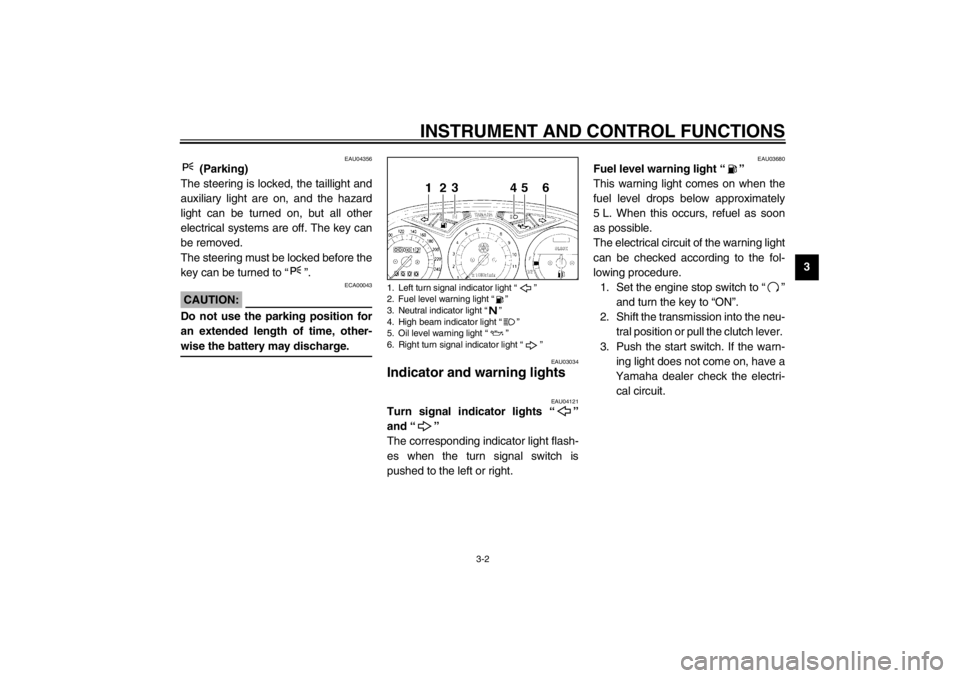
Turn signal indicator lights “”
and “”
The corresponding indicator light flash-
es when the turn signal switch is
pushed to the left or right.
EAU03680
Fuel level warning light “”
This warning light comes on when the
fuel level drops below approximately
5 L. When this occurs, refuel as soon
as possible.
The electrical circuit of the warning light
can be checked according to the fol-
lowing procedure.
1. Set the engine stop switch to “”
and turn the key to “ON”.
2. Shift the transmission into the neu-
tral position or pull the clutch lever.
3. Push the start switch. If the warn-
ing light does not come on, have a
Yamaha dealer check the electri-
cal circuit.
1. Left turn signal indicator light “”
2. Fuel level warning light “”
3. Neutral indicator light “”
4. High beam indicator light “”
5. Oil level warning light “”
6. Right turn signal indicator light “”
E_4km.book Page 2 Tuesday, August 28, 2001 9:51 AM
Page 18 of 102
INSTRUMENT AND CONTROL FUNCTIONS
3-3
3
EAU00061
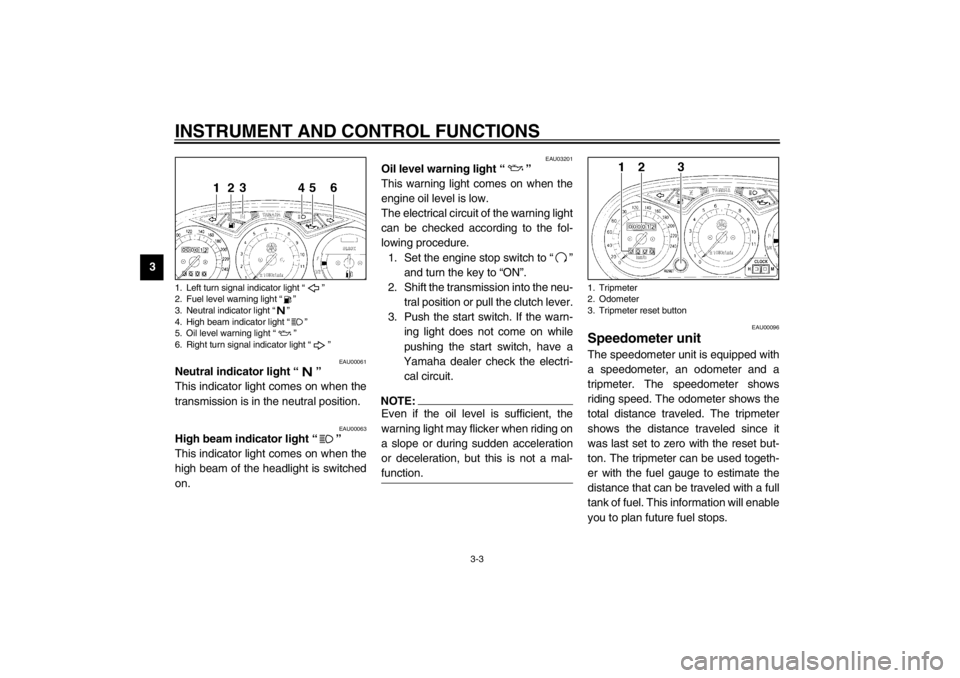
Neutral indicator light “”
This indicator light comes on when the
transmission is in the neutral position.
EAU00063
High beam indicator light “”
This indicator light comes on when the
high beam of the headlight is switched
on.
EAU03201
Oil level warning light “”
This warning light comes on when the
engine oil level is low.
The electrical circuit of the warning light
can be checked according to the fol-
lowing procedure.
1. Set the engine stop switch to “”
and turn the key to “ON”.
2. Shift the transmission into the neu-
tral position or pull the clutch lever.
3. Push the start switch. If the warn-
ing light does not come on while
pushing the start switch, have a
Yamaha dealer check the electri-
cal circuit.NOTE:@ Even if the oil level is sufficient, the
warning light may flicker when riding on
a slope or during sudden acceleration
or deceleration, but this is not a mal-
function. @
EAU00096
Speedometer unit The speedometer unit is equipped with
a speedometer, an odometer and a
tripmeter. The speedometer shows
riding speed. The odometer shows the
total distance traveled. The tripmeter
shows the distance traveled since it
was last set to zero with the reset but-
ton. The tripmeter can be used togeth-
er with the fuel gauge to estimate the
distance that can be traveled with a full
tank of fuel. This information will enable
you to plan future fuel stops.
1. Left turn signal indicator light “”
2. Fuel level warning light “”
3. Neutral indicator light “”
4. High beam indicator light “”
5. Oil level warning light “”
6. Right turn signal indicator light “”
1. Tripmeter
2. Odometer
3. Tripmeter reset button
E_4km.book Page 3 Tuesday, August 28, 2001 9:51 AM
Page 19 of 102

INSTRUMENT AND CONTROL FUNCTIONS
3-4
3
EAU00101
Tachometer The electric tachometer allows the rider
to monitor the engine speed and keep it
within the ideal power range.
EC000003
CAUTION:@ Do not operate the engine in the ta-
chometer red zone.
Red zone: 9,500 r/min and above @
EAU01559
Self-diagnosis device This model is equipped with a self-di-
agnosis device for the following electri-
cal circuits:�
throttle position sensor
�
ignition system
If any of those circuits are defective,
the tachometer will repeatedly display
the following error code:
CB-17EUse the table below to identify the
faulty electrical circuit.CB-18E
If the tachometer displays such an er-
ror code, note the circuit-specific num-
ber of r/min, and then have a Yamaha
dealer check the motorcycle.
EC000004
CAUTION:@ When the tachometer displays an
error code, the motorcycle should
be checked as soon as possible in
order to avoid engine damage. @
1. Tachometer
2. Tachometer red zone
Specific r/min
Faulty electrical circuit
10,000 r/min
Throttle position sensor
9,000 r/min
Ignition system
0 r/min for
3 seconds
Circuit-specific
number of r/min
for 3 seconds
(See the table
below.)
Current
engine
speed for
3 seconds
E_4km.book Page 4 Tuesday, August 28, 2001 9:51 AM
Page 22 of 102
INSTRUMENT AND CONTROL FUNCTIONS
3-7
3
EAU03890
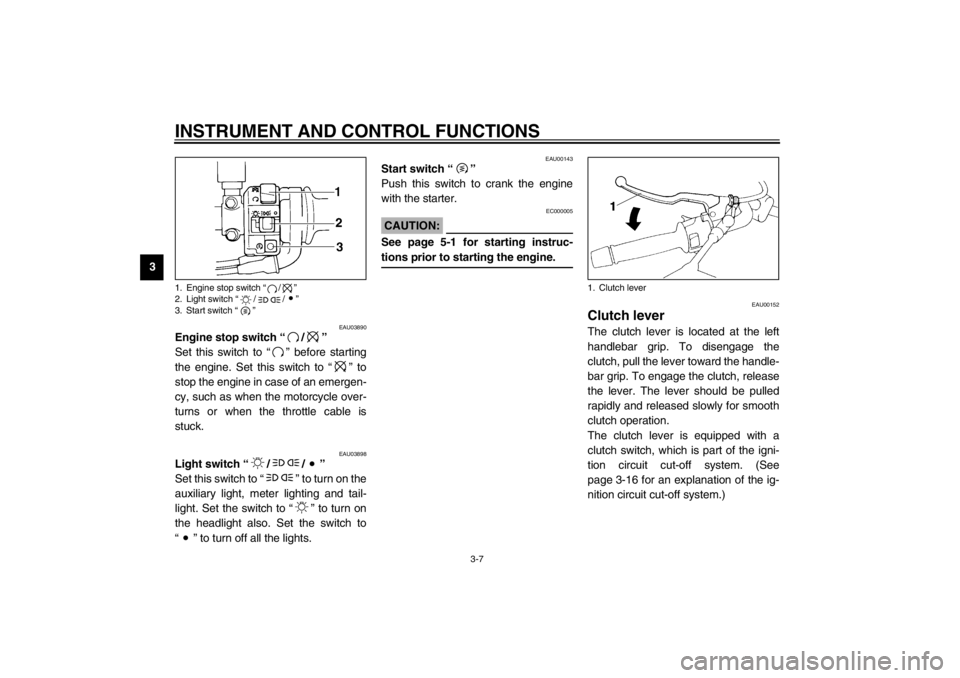
Engine stop switch “/”
Set this switch to “” before starting
the engine. Set this switch to “” to
stop the engine in case of an emergen-
cy, such as when the motorcycle over-
turns or when the throttle cable is
stuck.
EAU03898
Light switch “//”
Set this switch to “” to turn on the
auxiliary light, meter lighting and tail-
light. Set the switch to “” to turn on
the headlight also. Set the switch to
“” to turn off all the lights.
EAU00143
Start switch “”
Push this switch to crank the engine
with the starter.
EC000005
CAUTION:@ See page 5-1 for starting instruc-
tions prior to starting the engine. @
EAU00152
Clutch lever The clutch lever is located at the left
handlebar grip. To disengage the
clutch, pull the lever toward the handle-
bar grip. To engage the clutch, release
the lever. The lever should be pulled
rapidly and released slowly for smooth
clutch operation.
The clutch lever is equipped with a
clutch switch, which is part of the igni-
tion circuit cut-off system. (See
page 3-16 for an explanation of the ig-
nition circuit cut-off system.)
1. Engine stop switch “/”
2. Light switch “//”
3. Start switch “”
1. Clutch lever
E_4km.book Page 7 Tuesday, August 28, 2001 9:51 AM
Page 23 of 102
INSTRUMENT AND CONTROL FUNCTIONS
3-8
3
EAU00157
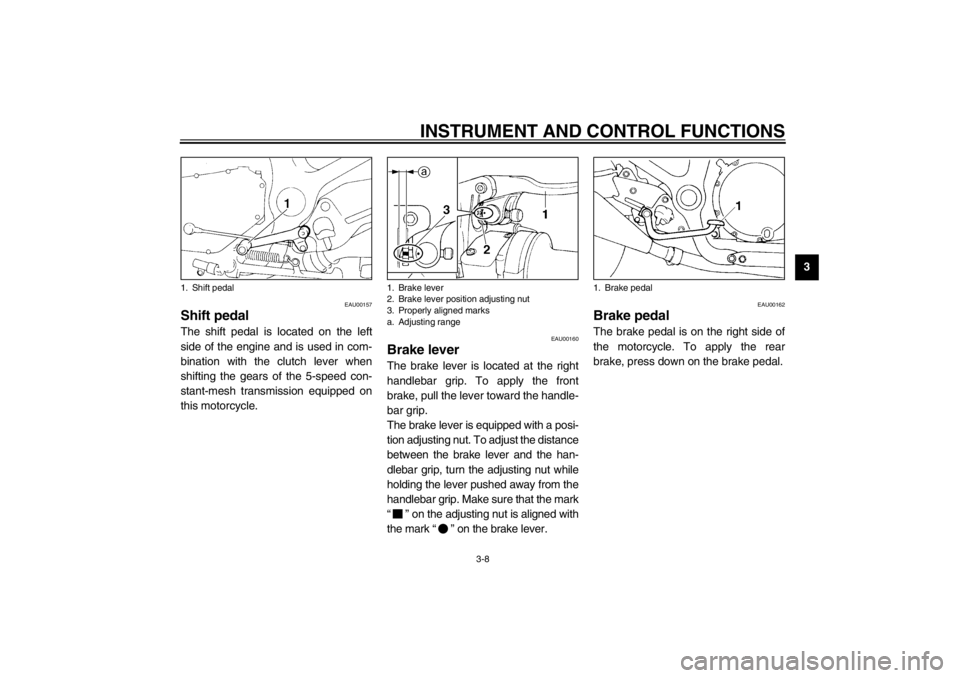
Shift pedal The shift pedal is located on the left
side of the engine and is used in com-
bination with the clutch lever when
shifting the gears of the 5-speed con-
stant-mesh transmission equipped on
this motorcycle.
EAU00160
Brake lever The brake lever is located at the right
handlebar grip. To apply the front
brake, pull the lever toward the handle-
bar grip.
The brake lever is equipped with a posi-
tion adjusting nut. To adjust the distance
between the brake lever and the han-
dlebar grip, turn the adjusting nut while
holding the lever pushed away from the
handlebar grip. Make sure that the mark
“” on the adjusting nut is aligned with
the mark “” on the brake lever.
EAU00162
Brake pedal The brake pedal is on the right side of
the motorcycle. To apply the rear
brake, press down on the brake pedal.
1. Shift pedal
1. Brake lever
2. Brake lever position adjusting nut
3. Properly aligned marks
a. Adjusting range
1. Brake pedal
E_4km.book Page 8 Tuesday, August 28, 2001 9:51 AM
Page 24 of 102
INSTRUMENT AND CONTROL FUNCTIONS
3-9
3
EAU02935
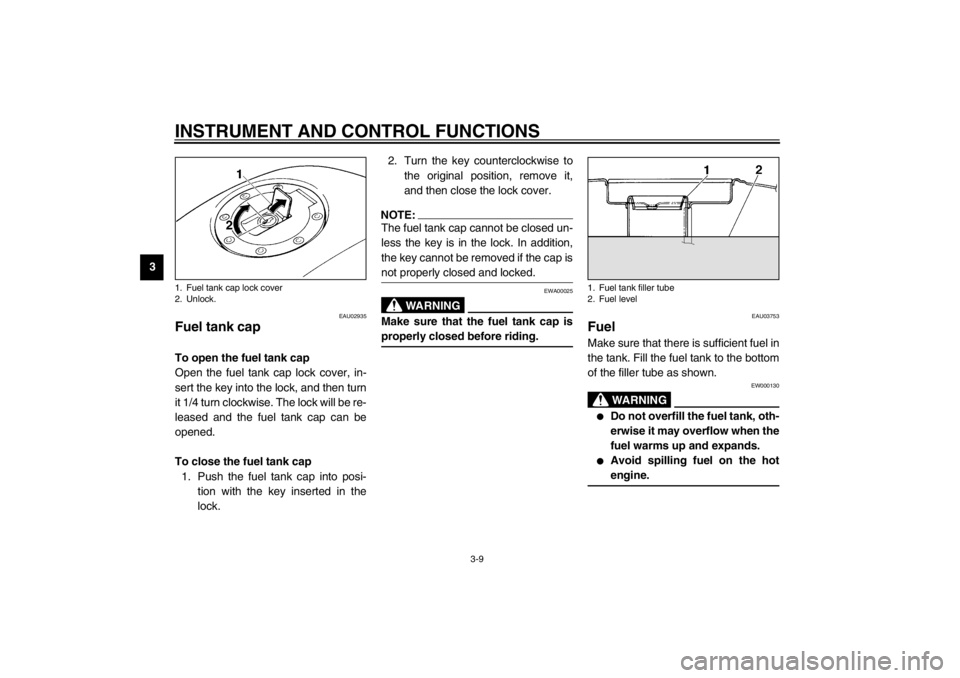
Fuel tank cap To open the fuel tank cap
Open the fuel tank cap lock cover, in-
sert the key into the lock, and then turn
it 1/4 turn clockwise. The lock will be re-
leased and the fuel tank cap can be
opened.
To close the fuel tank cap
1. Push the fuel tank cap into posi-
tion with the key inserted in the
lock. 2. Turn the key counterclockwise to
the original position, remove it,
and then close the lock cover.
NOTE:@ The fuel tank cap cannot be closed un-
less the key is in the lock. In addition,
the key cannot be removed if the cap is
not properly closed and locked. @
EWA00025
WARNING
@ Make sure that the fuel tank cap is
properly closed before riding. @
EAU03753
Fuel Make sure that there is sufficient fuel in
the tank. Fill the fuel tank to the bottom
of the filler tube as shown.
EW000130
WARNING
_ �
Do not overfill the fuel tank, oth-
erwise it may overflow when the
fuel warms up and expands.
�
Avoid spilling fuel on the hot
engine.
_
1. Fuel tank cap lock cover
2. Unlock.
1. Fuel tank filler tube
2. Fuel level
E_4km.book Page 9 Tuesday, August 28, 2001 9:51 AM